

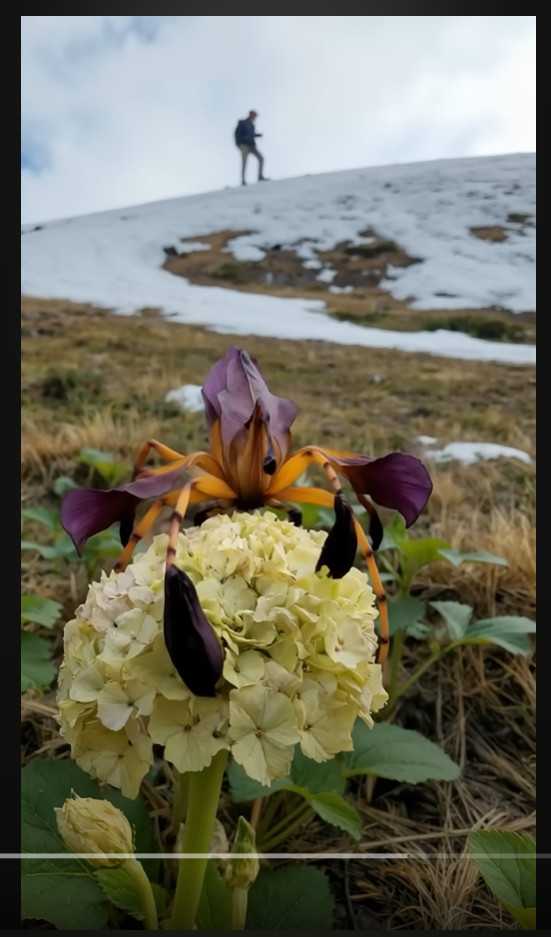
A strange video recently swept across TikTok, YouTube and Instagram, leaving millions of viewers stunned. It shows what appears to be a walking flower — a vivid hybrid of petals and insect-like limbs — crawling slowly over a snowy mountainside. The strange bloom was dubbed Irispoda fugax, and many claimed it was a newly discovered species. But is it real?
Let’s clear the air: Irispoda fugax is not a real organism. It’s a striking example of what artificial intelligence and CGI can create — a digital illusion so convincing it fooled millions.
The Viral Sensation: Where It Began
The now-viral video first appeared on platforms like TikTok and YouTube Shorts, where it gained millions of views within days. Some viewers were quick to call it fake, while others speculated it might be a deep-sea creature adapted to land or a previously unknown insect mimicking floral camouflage. The video shows a close-up of a cream-colored flower perched on alpine terrain — until the flower begins to move, revealing spidery legs and pulsing movements.
The video spread rapidly, shared with captions like “Nature is unbelievable” and “Scientists just discovered this in the Himalayas.” But these sensational claims didn’t come with any credible sources.
Decoding the Name: A Hint at Fabrication
The name Irispoda fugax sounds scientific — but it’s entirely fictional. Breaking it down:
- “Iris” is a type of flowering plant, known for its ornate petals.
- “Poda” derives from Greek, meaning “foot.”
- “Fugax” is Latin for “fleeting” or “transient.”
Together, it loosely translates to “fleeting flower-foot” — poetic, but not consistent with how real species are named in scientific taxonomy. No peer-reviewed literature mentions Irispoda fugax. No botanical databases contain such a name. That alone is a major red flag.
No Botanical Basis: What Experts Say
Leading botanists and entomologists have confirmed that no known plant exhibits movement resembling walking. While some plant species display limited motion — like sunflowers tracking the sun, or Venus flytraps snapping shut — these are reactive movements, not self-propelled locomotion.
Flowers do not possess muscle tissue, jointed appendages, or neurological systems that would allow such movement. What’s seen in the video breaks every known rule of plant biology.
Visual Effects: A Masterclass in CGI
Several VFX artists have weighed in to identify clear signs of digital manipulation in the Irispoda fugax video:
- Smooth, symmetrical leg motion consistent with animation rigs
- Lighting inconsistencies, where shadows don’t align naturally
- Depth of field blur that mimics camera focus, often added artificially
- Perfect loop timing, commonly seen in AI-generated video clips
These are classic hallmarks of AI-assisted CGI — not live footage of a biological organism. Some creators even admitted using tools like Runway ML, MidJourney, or Unreal Engine to generate the walking flower concept.
Why People Believed It
The illusion worked because it was just believable enough. It showed a realistic background — patches of melting snow, a human figure on a hillside — and was filmed in vertical smartphone format, which mimics real-life content. The “flower” even blended common features of real plants like irises and hydrangeas, enhancing the effect.
In an era of deepfakes and viral hoaxes, the line between digital fantasy and reality is increasingly blurred. When something looks hyper-realistic and is presented with no context, it’s easy to mistake fiction for fact.
The Power — and Risk — of AI Art
AI-generated art is becoming more powerful by the day. Tools now exist that can:
- Create photorealistic animals, hybrids, or landscapes
- Animate non-existent creatures with lifelike motion
- Mimic camera effects like bokeh, motion blur, and lens distortion
While these tools are amazing for storytelling, education, and creativity, they can also mislead. Without proper labeling or explanation, AI content can fuel misinformation — especially when it goes viral.
The walking flower video is a perfect case study in how quickly fantasy can be mistaken for scientific fact.
Lessons from Irispoda Fugax
Here’s what this viral hoax teaches us:
- Digital Literacy Is Vital
We need sharper instincts to question what we see online. If something looks incredible, ask for the source before hitting share. - Creators Have a Responsibility
When artists post AI-generated content, a simple disclaimer helps prevent confusion. Clarity fosters appreciation for the art rather than disbelief. - Nature Doesn’t Need Fiction to Be Fascinating
Real plants and animals are astonishing in their own right. From bioluminescent fungi to shape-shifting octopuses, Earth is full of genuine wonders.
Conclusion: Beautiful, But Not Real
Irispoda fugax is a mesmerizing creation — but it belongs in the digital art gallery, not the pages of scientific journals. It’s a stunning example of what’s possible with modern CGI and AI tools, designed to captivate and entertain.
As we move deeper into an era where synthetic media becomes indistinguishable from reality, it’s more important than ever to think critically, share thoughtfully, and appreciate the creativity behind the illusion.
In the end, the walking flower walks only in code — not in nature.

Join the discussion
0 commentsShare your experience or ask a question about this article.
Discussion
Start the conversation
Have a question or something useful to share? Add the first comment.