

If you received a text claiming you are “ordered to appear” for mandatory mediation over an unpaid traffic violation, and it names Judge Robert Harlan, it is designed to make you panic and comply.
These messages are not legitimate court notices. They are part of a text scam that pressures people to reply, click, or “resolve immediately,” then routes them into a payment or data-harvesting trap.
Scam Overview
The Judge Robert Harlan unpaid traffic violation text scam is a variation of a wider “unpaid ticket” smishing campaign. Smishing is phishing delivered through text message.
Instead of pretending to be a bank or delivery carrier, this scam impersonates a legal authority and uses court-style language to create fear.
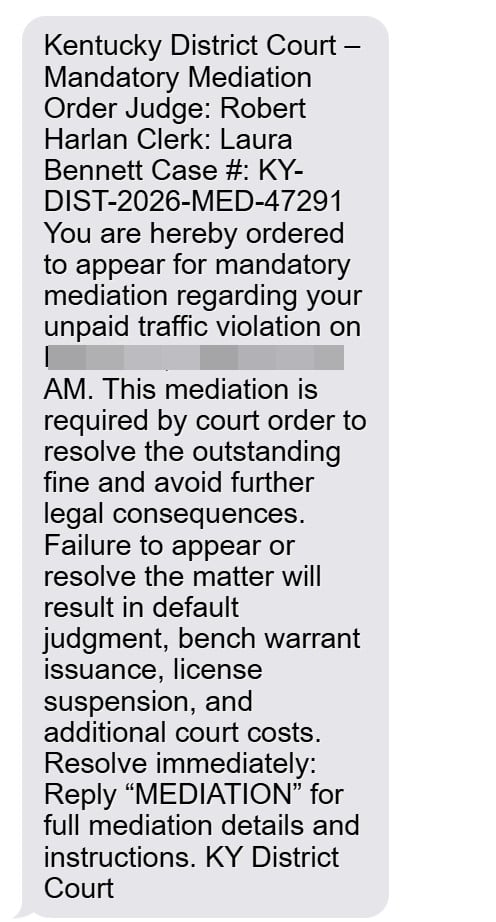
In the version circulating right now, the message frames itself as a Kentucky District Court mandatory mediation order for an “unpaid traffic violation.” It assigns a judge name, a clerk name, a case number, and a specific appearance time. Then it pushes you to reply with a keyword (often “MEDIATION”) to receive “details and instructions.”
That reply is the hook.
Once you respond, scammers can escalate the pressure, feed you a link to a fake portal, or direct you to a scam site where you are asked to pay a small amount by credit card. The fee is bait. The real goal is to steal your card details and personal information.
What the scam text usually says
The wording varies, but the structure is consistent:
- A court-like header (Kentucky District Court, mediation order, legal compliance language)
- A named judge and clerk
- A case number that looks official
- A required appearance time, often in the morning
- Threats like default judgment, bench warrant, license suspension, or added costs
- A demand to reply with a keyword or follow instructions immediately
This is meant to short-circuit your common sense. When you see “bench warrant” in writing, your brain wants to fix the problem fast.
That emotional spike is what scammers are exploiting.
Here is the full message:
Kentucky District Court – Mandatory Mediation Order
Judge: Robert Harlan
Clerk: Laura Bennett
Case #: KY-DIST-2026-MED-47291You are hereby ordered to appear for mandatory mediation regarding your unpaid traffic violation on March 31, 2026 at 9:00 AM. This mediation is required by court order to resolve the outstanding fine and avoid further legal consequences.
Failure to appear or resolve the matter will result in default judgment, bench warrant issuance, license suspension, and additional court costs.
Resolve immediately:
Reply “MEDIATION” for full mediation details and instructions.
KY District Court
Why the “mandatory mediation” angle is so effective
Most people have heard of:
- traffic tickets
- court dates
- warrants
- license suspension
Far fewer people know what “mandatory mediation” would look like in real life for a traffic issue.
That unfamiliarity is useful to scammers because it creates uncertainty. People think, “Maybe this is a new process,” or “Maybe this is how the court handles unpaid tickets now.”
Then the message supplies a simple solution: reply “MEDIATION” or follow the link.
That is the trap.
Why they use names like Judge Robert Harlan and Clerk Laura Bennett
Scammers often include names to make the notice feel personal and real.
Sometimes the name is entirely fabricated. Sometimes it is borrowed from unrelated sources. Either way, the name is not proof of legitimacy.
The scam’s credibility does not come from accurate details. It comes from presentation.
A formal layout, a case number, and a judge name are enough to get many recipients to comply, especially if the message lands when they are busy or distracted.
The hidden goal: your card and identity data
These scams usually monetize in two ways.
1) Credit card theft
Victims are routed to a payment step where they enter:
- card number
- expiration date
- CVV
- billing address and ZIP
Once scammers have that information, they can run unauthorized charges, test the card with small transactions, or sell the details to other criminals.
2) Personal information harvesting
Even before payment, fake portals often ask for:
- full name
- address
- phone number
- sometimes license plate or other “verification” info
That information can be used for follow-up scams, identity fraud attempts, or account takeovers.
KYTC’s alert specifically warns that these scam texts impersonate state agencies and include suspicious links that mimic government addresses, and it instructs residents not to click or respond.
Why the amount requested is often small
When scammers do ask for payment, it is often a small “administrative fee” or “processing fee.”
Small amounts convert better because they feel safe.
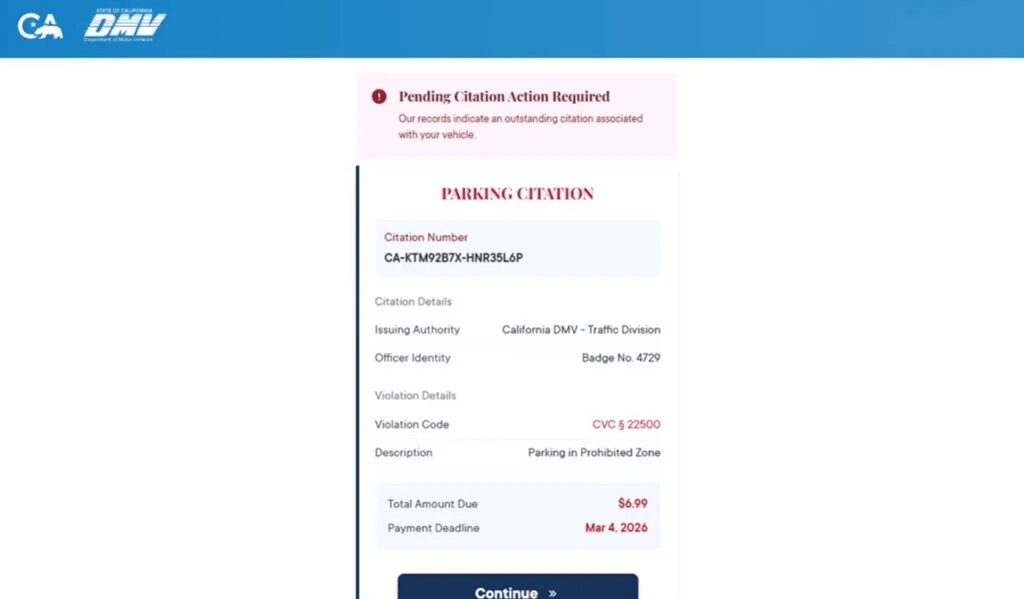
A request for $6.99 feels like a nuisance. A request for $300 feels like a crime.
Scammers want the nuisance payment because it gets you to type your card details.
Once your card details are captured, the size of the original fee stops mattering.
Why this scam is spreading
This scam is easy to scale.
Criminals can reuse the same message and swap only a few lines:
- city and county names
- appearance date and time
- case number format
- the judge and clerk names
That is why victims see nearly identical messages in different places, sometimes even on the same day.
Common red flags that expose it
If you want to help readers spot it quickly, these red flags show up again and again:
- The text arrives without any prior mailed notice or official case paperwork.
- It demands immediate action and uses fear-based consequences.
- It asks you to reply with a keyword to receive instructions.
- It includes a link or later supplies one after you respond.
- It claims payment is due through an unfamiliar site.
- It pressures you not to verify independently.
A real court process does not rely on surprise texts and keyword replies to initiate serious legal actions.
How The Scam Works
This scam follows a predictable funnel. Once you understand the steps, the intimidation loses a lot of its power.
Step 1: Mass texts go out to thousands of phone numbers
These campaigns are not sent because scammers verified you owe money.
They are sent because your number exists in a list.
Scammers obtain lists through many channels, including data brokers, leaked databases, and bulk marketing ecosystems. They only need a small percentage of people to engage.
That is why you can get the message even if you have:
- no unpaid tickets
- no recent driving issues
- no connection to the court named in the text
Step 2: The message uses legal framing to spike anxiety
The most effective scams do not start with “pay us.”
They start with “you are in trouble.”
The Judge Robert Harlan script often includes:
- “ordered to appear”
- “mandatory mediation”
- “court ordered”
- “failure to appear will result in…”
This language is chosen because it triggers quick, compliance-oriented behavior.
You do not want to ignore a court order. That fear is what scammers are renting from the legal system.
Step 3: The “reply MEDIATION” instruction is the engagement trap
Many victims assume replying is harmless.
It is not.
Replying confirms:
- your phone number is active
- you read messages
- you respond to authority framing
Once a number is confirmed, it becomes more valuable. It can be targeted again, sold to other scam groups, or pushed into more aggressive follow-up sequences.
The reply also opens the door for the scammer to move you into a guided conversation, where social engineering becomes much stronger than a single text blast.
Step 4: The scammers escalate with “details,” links, or a payment demand
After you reply, scammers typically respond with one of these paths:
Path A: The link push
They provide a “registry” or “case portal” link to resolve the matter.
Path B: The payment shortcut
They claim you can pay a small fee immediately to avoid further action.
Path C: The phone call
They push you to call a number where a scammer pretends to be a clerk or mediator.
The end result is the same: get you to a place where you will hand over money or data.
Step 5: The fake portal makes the situation feel official
If you click the link, you are routed to a scam page designed to look like an official system.
Common features include:
- a case or citation number field
- a “violation details” block
- a deadline highlighted in red
- warnings about consequences
- a large “Continue” or “Pay Now” button
It often looks tidy and professional. That is intentional.
Scammers invest in design because it increases trust.
Step 6: The portal asks for identity details “to confirm your record”
Before payment, you may be asked for:
- name
- address
- phone number
This makes the flow feel legitimate and helps scammers build a more complete victim profile.
Even if you stop before paying, you may have already handed over enough personal information to increase your risk of future targeting.
Step 7: The payment screen captures your card details
This is the primary monetization step.
Victims are asked to enter their credit card details to pay a small fee.
Once those details are entered, scammers can use them immediately or sell them.
At that point, it does not matter what the site shows next.
Step 8: The scam ends with a fake confirmation or a fake error
Scammers typically choose an ending that benefits them:
- A confirmation message that calms you down so you do not call your bank quickly
- An error message that pushes you to try again, sometimes with a second card
Both outcomes increase the chance of theft.
Step 9: Follow-up targeting begins
Once scammers know you engaged, they may send:
- more “court” messages
- fake bank fraud alerts
- “refund” offers
- additional “compliance” notices
This is why it is important not just to block one sender, but to treat the entire pattern as hostile.
Step 10: Victims notice the damage later
Many people only realize what happened when:
- their bank flags fraud
- they see charges they did not make
- they receive more scam messages using their name or address
The earlier you act after exposure, the easier it is to contain.
What To Do If You Have Fallen Victim to This Scam
If you interacted with the scam, focus on damage control. These steps are practical and time-tested.
- If you entered card details, call your bank or card issuer immediately
Use the number on the back of your card. Tell them you entered your card details on a fraudulent site linked from a text message. Ask them to cancel the card and issue a new number. - Review recent transactions and look for “test” charges
Scammers often run small test transactions first. If you see anything unfamiliar, dispute it right away. - Turn on real-time transaction alerts
Enable alerts for all purchases, online transactions, and any charge over $1. This helps you catch fraud quickly. - If you provided personal information, tighten identity protections
If you entered your address, phone number, or other identifying details, consider placing a fraud alert or credit freeze depending on your situation. At minimum, monitor your credit activity. - Do not reply again and do not keep the conversation going
If you already replied “MEDIATION,” stop there. Further engagement increases your risk. Block the number. - Save evidence before the site or message disappears
Take screenshots of the text, the sender details, any links, and any pages you visited. This helps with disputes and reports. - Report the scam through official channels
KYTC’s alert recommends reporting to IC3 and the FTC and forwarding suspicious messages to 7726 (SPAM), and it notes the state is taking steps to request takedowns of fraudulent sites. - Verify any real ticket or court matter independently
Do not use any link or phone number in the text. If you want to confirm whether you have a legitimate issue, look up the official court or state agency contact information on your own and ask through verified channels. - Watch for recovery scams
After scams like this, victims are often targeted by “recovery agents” who claim they can get the money back for a fee. That is usually another scam. Never pay someone who reaches out unsolicited offering to recover funds. - Tell family members, especially those who respond quickly to official-sounding texts
These scams thrive on speed and stress. A short warning to family can prevent the next victim.
The Bottom Line
The Judge Robert Harlan unpaid traffic violation text scam is built to feel like a real court-driven emergency, but its purpose is simple: pressure you into replying, clicking, and paying through a fraudulent flow that steals your card and personal data.
If you get a message like this, do not reply, do not click, and do not pay. Verify only through official sources you locate independently. If you already entered payment details, contact your card issuer immediately and treat the card as compromised.








