

An unexpected text claims you are under a Mandatory Mediation Order for an unpaid traffic violation, complete with a judge’s name, a case number, and a warning about serious legal consequences.
It looks formal and urgent by design. The goal is to make you react before you verify.
These messages are not legitimate court notices. They are part of a phishing scam that uses legal language and pressure tactics to push victims toward scam websites where small “resolution” fees lead to stolen credit card and personal information.
Scam Overview
The Mandatory Mediation Order text scam is a fast-growing smishing campaign where scammers impersonate courts, legal authorities, or traffic enforcement systems to pressure people into taking immediate action.
The message usually claims you must attend a mediation hearing or resolve a violation tied to your vehicle. It often includes:
- a court-style header
- a judge name and clerk name
- a case number that looks legitimate
- a hearing date and time
- threats of consequences if you do not comply
These elements are not random. They are carefully designed to mimic how real legal notices look, while still being simple enough to mass-produce and send to thousands of people at once.
Why “mandatory mediation” is the perfect hook
Most people understand what a traffic ticket is. They understand fines, court dates, and license suspension.
But “mandatory mediation” introduces something unfamiliar.
That uncertainty creates a gap in knowledge. Scammers fill that gap with urgency and fear.
Victims often think:
- “Is this something new?”
- “Did I miss a notice in the mail?”
- “Could this turn into a warrant?”
That internal questioning is exactly what pushes people to act quickly instead of verifying.
The scam is not about the violation
It is important to understand this clearly.
This scam is not about collecting unpaid fines. It is not connected to any real traffic violation.
It is about getting you to:
- reply to the message
- click a link
- scan a QR code
- or follow instructions that lead to a payment page
Once you take that step, you are moved into a controlled environment where scammers can guide you toward entering sensitive information.
The small payment trap
In many versions of this scam, victims are eventually told they can “resolve” the issue by paying a small fee.
This is one of the most effective parts of the scheme.
The amount is usually low, such as:
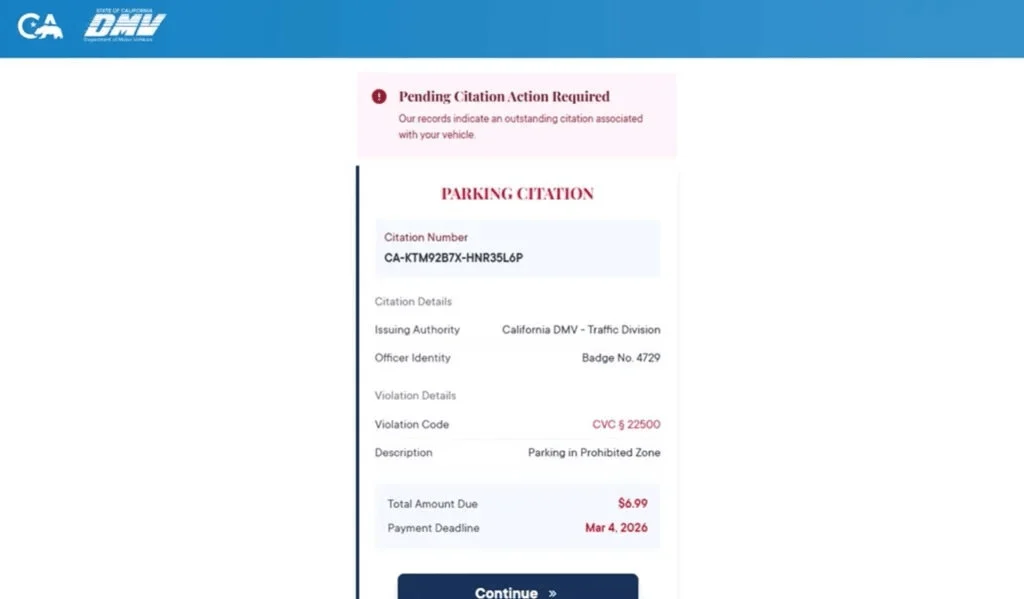
- $6.99
- $9.99
- $12.49
That price point is not accidental. A small amount lowers resistance. Many people think:
“It is not worth the risk of ignoring it. I will just pay it and move on.”
But the payment is not the goal. The goal is your credit card details.
What scammers are really collecting
When victims follow the instructions, they are typically routed to a fake website that looks like a court portal, DMV system, or citation payment page.
There, they are asked to enter:
- full name
- address
- phone number
- credit card number
- expiration date
- CVV
- billing ZIP code
This combination of data is extremely valuable.
With it, scammers can:
- make unauthorized purchases
- test and validate cards
- sell the data to other criminals
- launch follow-up scams using your real details
Why the message feels believable
This scam works because it combines three powerful elements:
Authority
A judge name, case number, and court language create instant credibility.
Urgency
Deadlines and threats trigger quick decisions.
Clarity of action
The message tells you exactly what to do next: reply, click, or resolve immediately.
When those three are combined, even cautious people can be caught off guard.
Why these scams are spreading across multiple regions
The same script is reused across different states and cities.
Scammers simply change:
- the court name
- the location
- the judge and clerk names
- the case number format
Everything else stays the same.
That is why identical messages appear in different areas at the same time.
This is a scalable operation, not a local issue.
Key red flags to watch for
These warning signs appear in most versions of the scam:
- You receive a legal notice by text without any prior mail notice
- The message demands immediate action
- It asks you to reply with a keyword like “MEDIATION”
- It includes threats like warrants or license suspension
- It directs you to a link or asks you to follow instructions
- The language feels formal but slightly generic
A real court process does not start with a surprise text message.
How The Scam Works
Understanding the flow makes it much easier to spot and avoid.
Step 1: Mass texting campaign
Scammers send thousands of messages at once.
They do not know whether you have a violation.
They rely on probability. If even a small percentage respond, the campaign is profitable.
Here is how it looks:
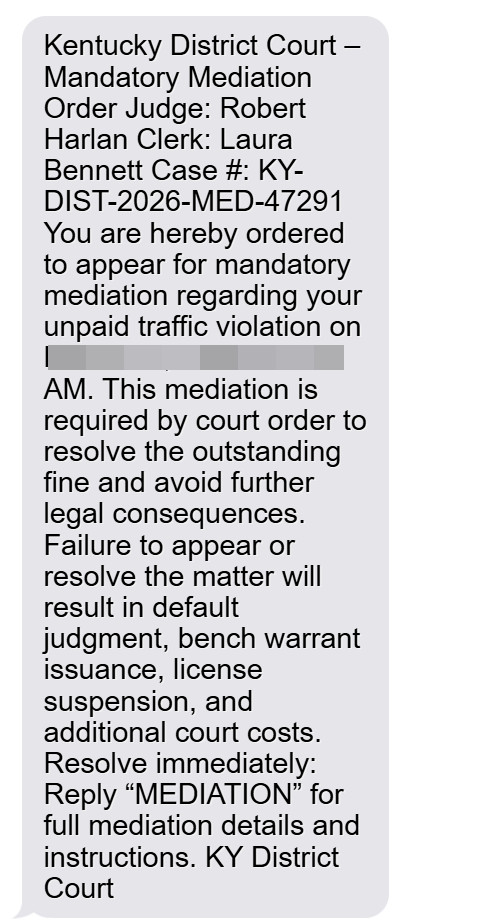
Kentucky District Court – Mandatory Mediation Order
Judge: Robert Harlan
Clerk: Laura Bennett
Case #: KY-DIST-2026-MED-47291You are hereby ordered to appear for mandatory mediation regarding your unpaid traffic violation on March 31, 2026 at 9:00 AM. This mediation is required by court order to resolve the outstanding fine and avoid further legal consequences.
Failure to appear or resolve the matter will result in default judgment, bench warrant issuance, license suspension, and additional court costs.
Resolve immediately:
Reply “MEDIATION” for full mediation details and instructions.
KY District Court
Step 2: The message creates fear and urgency
The wording is designed to trigger a strong reaction.
Phrases like:
- “ordered to appear”
- “mandatory mediation”
- “failure to comply will result in…”
push you into a stress response.
When people feel pressure, they are more likely to act quickly and skip verification.
Step 3: The reply instruction confirms you as a target
Many messages instruct you to reply with a keyword.
This step is critical for scammers.
It confirms:
- your number is active
- you read the message
- you are willing to engage
Once confirmed, your number becomes more valuable for future targeting.
Step 4: The scam escalates
After you reply, scammers may:
- send a link to a “case portal”
- provide payment instructions
- direct you to call a number
- continue the conversation to build trust
This is where social engineering becomes more personalized.
Step 5: The fake website takes over
If you click the link, you are taken to a site designed to look official.
These sites often include:
- a case lookup feature
- a violation description
- a deadline
- a payment button
The design is clean and convincing, which increases trust.
Step 6: Personal data is collected
Before payment, the site may ask for identifying details.
This makes the process feel legitimate and helps scammers build a profile.
Even if you stop here, your data may already be used later.
Step 7: Credit card theft
When you reach the payment step, your card details are captured.
This is the core objective of the scam.
The site may show a confirmation, but the transaction is not legitimate.
Step 8: Fake confirmation or retry loop
Scammers often:
- show a “payment successful” message
- or claim the payment failed and ask you to try again
Both outcomes benefit them.
Step 9: Follow-up targeting
After engagement, victims often receive:
- more scam messages
- fake bank alerts
- “refund” offers
- additional legal threats
This is why it is important to stop all interaction immediately.
Step 10: Fraud appears later
Victims usually notice:
- unknown charges
- declined transactions
- increased scam activity
The delay between entering data and seeing fraud can make the connection less obvious.
What To Do If You Have Fallen Victim to This Scam
If you interacted with the scam, act quickly.
1) Contact your card issuer immediately
Explain that you entered your card details on a fraudulent site. Request a card replacement and review recent transactions.
2) Monitor your transactions closely
Look for small test charges first. Dispute anything unfamiliar right away.
3) Enable real-time alerts
Set alerts for all purchases or transactions over $1.
4) Stop all communication
Do not reply again. Block the sender.
5) Save evidence
Take screenshots of:
- the message
- the sender
- the link
- the website
This helps with disputes and reporting.
6) Report the scam
Mark the message as spam and report it through official channels. You can also forward it to 7726 (SPAM) if supported.
7) Watch for follow-up scams
Be cautious of anyone claiming they can “fix” the issue or recover money.
8) Verify independently
If you are concerned about a real issue, check through official court or DMV websites that you access manually.
The Bottom Line
The Mandatory Mediation Order text scam is designed to feel like a serious legal notice, but it is a carefully crafted trap.
It uses authority, urgency, and a simple action path to push victims into revealing sensitive information or making a small payment.
If you receive a message like this:
- do not reply
- do not click
- do not pay
Verify everything through official sources you find yourself.
If you already entered payment details, treat your card as compromised and act immediately.
FAQ
What is the Mandatory Mediation Order text scam?
It is a phishing scam sent by text message. Scammers pretend to be a court or legal authority and claim you must appear for “mandatory mediation” over an unpaid traffic violation or similar issue. The message is designed to pressure you into replying, clicking a link, or paying a small fee.
Is a court likely to send a mandatory mediation order by text message?
In this scam context, no. A surprise text message demanding immediate legal action, especially one asking you to reply with a keyword or follow a payment link, is a major red flag.
Why does the message include a judge name, clerk name, and case number?
Because those details make the message feel official. Scammers use names, case numbers, and formal wording to create credibility and fear, even when the notice is fake.
Why do scammers ask me to reply with a word like “MEDIATION”?
Replying confirms that your number is active and that you are willing to engage. That makes your number more valuable for follow-up scams and allows scammers to move you into the next stage of the fraud.
What happens after I reply or click?
Scammers may send you a link to a fake court or citation website, ask for personal details, or demand a small payment to “resolve” the issue. The real goal is usually to steal your credit card information and personal data.
Why is the payment amount often so small?
Small amounts like $6.99 or $9.99 lower suspicion. Many people will pay a small fee just to avoid hassle. The fee is bait. The real target is your card number, CVV, billing address, and identity information.
What personal information are scammers trying to collect?
Often:
- Full name
- Address and ZIP code
- Phone number and email
- Sometimes vehicle-related information
- Credit card details during the payment step
I clicked the link but did not enter anything. Am I still at risk?
Your risk is much lower if you did not submit information. Close the page, do not return, and be alert for follow-up scam texts or calls.
I entered my card details. What should I do right away?
- Call your card issuer immediately
- Report that your card details were entered on a fraudulent site
- Freeze or replace the card
- Review recent transactions and dispute anything unfamiliar
- Turn on real-time transaction alerts
Should I replace my card even if I do not see fraud yet?
Yes. Stolen card details are often used later or sold. Replacing the card proactively is the safest option.
Can this scam lead to identity theft too?
Yes. If you entered personal information, scammers may use it for future phishing attempts, account takeovers, or identity-related fraud.
How do I report the scam?
- Mark the message as spam or junk in your messaging app
- Block the sender
- Forward it to 7726 (SPAM) if your carrier supports it
- Report it through official consumer fraud reporting channels and keep screenshots
How can I avoid scams like this in the future?
- Do not trust legal notices sent unexpectedly by text
- Do not reply to keyword prompts like “MEDIATION”
- Do not click links in unsolicited texts
- Verify any real issue through official court or DMV websites you type in yourself








