


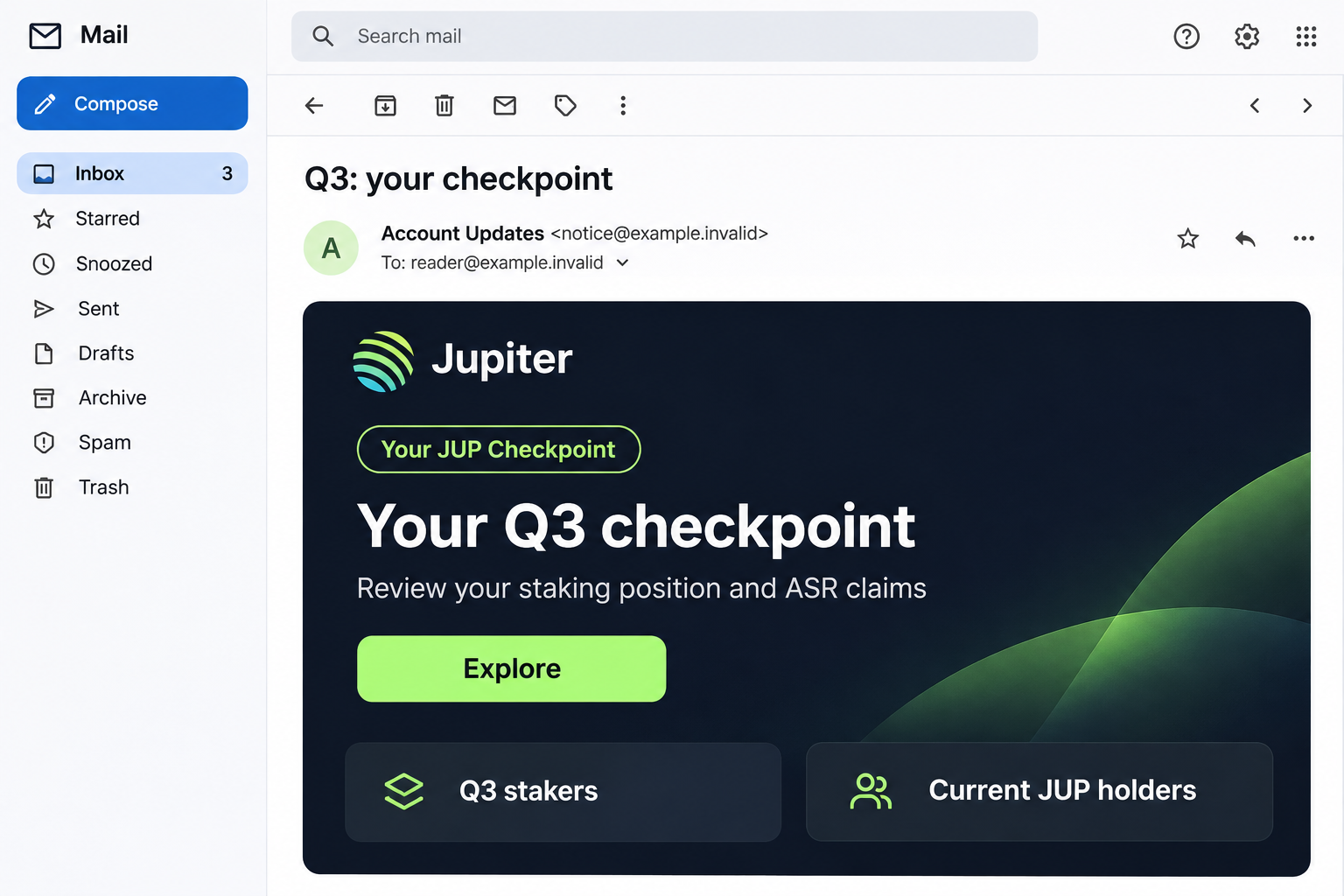
A Jupiter email says your Q3 checkpoint is open. It mentions staking rewards, market access, and a position worth reviewing, even if you have not staked recently.
For someone who uses several crypto platforms, it looks like another account update to catch up on. The important question is which route it asks you to take.
Overview
A real rewards program supplies the vocabulary
The Jupiter Staking Checkpoint email scam impersonates the Solana-based platform using the subject Q3: your checkpoint. The message discusses JUP and Active Staking Rewards, commonly called ASR.
ASR is a genuine Jupiter program. That is precisely why the wording can be persuasive: the email borrows something holders may already expect to hear about.
It divides readers into groups, including Q3 stakers, current JUP holders, and people interested in Jupiter markets. This makes the invitation feel relevant to several audiences.
The message also claims a particular claim-opening date and expanded beta markets. Those statements belong to the bait and should not be treated as independently verified eligibility advice.
The Explore route leads to a different operator
The campaign directs readers toward pioneersportal-jupag2026[.]com, a lookalike domain rather than an official Jupiter account route. A captured version imitated a trading interface.
Its staged process asked for a public wallet address and then presented wallet-connection choices. Familiar wallet names can make an unfamiliar website seem like part of normal trading.
Jupiter is the impersonated service, not the operator of this email scam. The warning concerns the message and its destination, not the existence of legitimate staking rewards.
A fresh visit reached a security-verification gate, not the previously documented trading screen. Do not assume the visible page or availability will remain the same.
The risk depends on what you authorize
A public address, a wallet connection, an approval, and a recovery phrase are not equivalent. Understanding the difference helps you act without either complacency or unnecessary panic.
- A public address can reveal public blockchain activity, but is not a private key.
- A connection lets an application recognize the wallet and request further actions.
- A harmful signed transaction or permission can expose assets to transfer.
- A leaked recovery phrase or private key can compromise the wallet itself.
Do not explore this offer through the email. Open Jupiter independently, and assess any previous interaction according to the actual permissions or secrets involved.
Why This Email Does Not Look Like a Random Giveaway
The pitch does not simply promise free Bitcoin. It uses staking language, distinguishes holding from previous participation, and presents reviewing a position as sensible account maintenance.
That restraint can lower suspicion. A message that sounds knowledgeable about eligibility may feel more credible than one claiming every visitor wins a large allocation.
However, accurate terminology is easy to borrow. Knowing the name ASR does not establish access to Jupiter’s systems or authority to manage your wallet.
The range of audiences also creates a reason to click even when the recipient doubts they qualify. You might investigate markets rather than a reward.
The email therefore does not need to convince everyone they are entitled to money. It only needs to make the Explore button seem worth opening.
Jupiter’s official staking information provides the legitimate context. Use independently reached official navigation for rewards, rather than treating an emailed checkpoint as an account requirement.
How the Jupiter Staking Checkpoint Email Scam Works
Step 1: A checkpoint notice reaches the inbox
The subject suggests a scheduled review rather than a speculative investment. It fits the rhythm of quarterly rewards, giving the reader a plausible reason to pay attention.
The sender’s display name can say Jupiter regardless of who controls the sending address. Expand the details instead of relying on the name shown in the inbox.
A genuine relationship with a platform does not authenticate every message mentioning it. Public wallet activity and widely used services give fraudsters plenty of plausible subjects.
Step 2: Familiar account categories broaden the invitation
The message explains why former stakers, present holders, and market users might each have something to review. There is a path for almost any interested reader.
This is useful social engineering. If one explanation does not apply to you, another category offers a reason not to dismiss the whole notice.
Do not use the email to determine eligibility. Open the genuine service and check the rules associated with your actual staking history or position.
Step 3: Explore opens a branded lookalike domain
The campaign address includes Jupiter-related lettering and a year, but its actual registered domain is not jup.ag. Brand fragments inside a longer name are not ownership evidence.
A copied interface can supply charts, navigation, and recognizable terminology. None of those visual elements changes who controls the website.
Similarly, a security gate or encrypted connection does not certify the claimed business identity. Protective-looking infrastructure can appear before both legitimate and deceptive pages.
Step 4: A public address makes the process feel individualized
The documented flow begins by asking for a wallet address. This can look like an eligibility check because blockchain addresses are routinely used to display public positions.
Providing that address alone does not give someone the secret needed to sign transactions. Do not mistake public information for complete wallet control.
It can still help a hostile site tailor its next request. The page can make a generic offer appear connected to a wallet you recognize.
Pause before moving from a public lookup to a request that actually involves your wallet application. Those are separate decisions.
Step 5: Familiar wallet choices encourage a connection
The captured interface displayed wallet names such as Phantom, Ledger, Solflare, OKX Wallet, and MetaMask. Listing those brands does not prove a partnership.
Be especially cautious if a website replaces the expected wallet interaction with a form asking for recovery words. A phrase is not needed merely to check staking eligibility.
A real wallet application can also receive a malicious request from a counterfeit website. The wallet software’s legitimacy does not make the requesting site trustworthy.
Step 6: A signature or permission can cross the financial boundary
The critical question is what the wallet asks you to approve. A transaction may transfer assets, change an authority, or grant a permission with consequences beyond opening a page.
Some signatures authorize other actions or establish access. Do not assume a request is harmless because the button says verify or claim.
Phantom’s connection documentation distinguishes connecting from approving actions. A connection alone should not be described as automatic, unrestricted permission to empty every wallet.
A loss cannot be diagnosed from the email alone. Your wallet’s actual requests and transaction history explain whether an authorization occurred.
Four Different Exposures, Four Different Priorities
You only read the email or viewed the site
Close the destination and ignore further requests. Reading the message is not evidence that funds moved or that someone obtained your recovery phrase.
If your wallet remained disconnected and you approved nothing, do not send a transfer to a supposed recovery address just because a warning claims you are compromised.
You supplied a public address or connected an application
Review the connection in your wallet’s settings. Remove an unfamiliar application and inspect whether any signing permissions or token approvals were also granted.
Remember which account and network were involved. Connecting one wallet address does not establish what happened to another address managed in the same application.
You approved an unfamiliar request
Look at the wallet’s transaction history and relevant blockchain explorer. Record signatures, transaction hashes, affected assets, and any authority or approval changes.
Do not approve a second transaction simply because the website says the first failed. A confusing error can encourage another harmful authorization.
You entered recovery words or a private key
Treat that wallet as compromised. Changing its local unlock password does not replace a secret that can recreate the wallet elsewhere.
Use trusted equipment and the wallet provider’s official recovery guidance to protect remaining assets. A new wallet requires genuinely new recovery credentials.
What to Do if You Have Fallen Victim to This Scam
-
Stop using the email’s route. Leave the checkpoint page and do not respond to its support prompts, chat invitations, or requests to complete an interrupted claim.
Open your wallet directly. If the concern is genuine rewards eligibility, return to Jupiter through a bookmark or official navigation you already trust.
-
Remove unfamiliar application access. In Phantom, inspect Settings and Connected Apps. Disconnect the suspicious application and review available signing-permission controls.
Other wallets use different menus. Follow the help instructions for the software actually involved rather than importing settings from another provider.
-
Review approvals on the correct network. Disconnecting a site does not necessarily cancel permissions previously granted to move tokens.
Use Phantom’s scam-response guidance to identify the appropriate Solana or EVM permission-review route. Avoid recovery tools suggested by the suspicious page.
-
Replace an exposed wallet secret. If recovery words, a private key, or the device itself may be compromised, create a new wallet securely.
Move trusted remaining assets with appropriate care, including legitimate staking or other positions. Do not interact with unknown tokens just to tidy the old wallet.
-
Preserve the useful financial evidence. Save transaction hashes, recipient addresses, the email, destination domain, approximate times, and the assets affected.
Keep recovery phrases out of screenshots and reports. An investigator needs transaction evidence, not the secret that controls your remaining funds.
-
Report losses promptly. Contact relevant exchanges or platforms through their genuine support channels and report the case to appropriate law enforcement.
A wallet provider generally cannot reverse confirmed blockchain transfers. Reports can still matter when investigators or exchanges can identify and restrain assets; recovery is never guaranteed.
-
Investigate software exposure only if it occurred. A fake extension, downloaded installer, or requested remote-access tool creates a separate device-security problem.
Stop managing valuable wallets on a suspect device and seek suitable cleanup assistance. Scanning alone cannot undo a blockchain approval or replace a leaked phrase.
-
Reject guaranteed recovery offers. Do not send a release deposit, validation payment, or private key to someone claiming they can return the stolen balance.
A person who knows your public transactions may simply be reading the same blockchain. That knowledge is not proof of special recovery access.
How to Check Jupiter Rewards More Safely
Separate the service you intend to use from the message announcing it. Begin with Jupiter’s genuine website rather than searching the unusual email subject for another claim link.
Read the campaign’s own participation rules there. Holding a token today and qualifying from activity in a previous period are different questions.
Inspect the requesting site’s address again when a wallet prompt appears. A familiar wallet window does not erase a mismatch in the website that opened it.
If a request is difficult to understand, reject it first. You can investigate a legitimate action before authorizing it; you cannot assume an unwanted confirmed transfer can be undone.
Keep investment decisions separate from the warning too. A fraudulent Jupiter email does not establish whether JUP itself is a suitable investment for a particular reader.
The useful lesson is about authorization, not predicting a token price. A reward claim is not worth handing an unknown operator control you do not understand.
Frequently Asked Questions
Is Jupiter itself a scam?
This article concerns an email impersonating Jupiter. The legitimate platform and its staking program are different from the lookalike checkpoint destination.
Do not use a fraudulent message as an account portal or as evidence that the real service sent it.
Are Active Staking Rewards real?
Yes. Jupiter has an ASR program. That genuine terminology makes the imitation more convincing, but does not authenticate this email’s claims or destination.
Check current participation and claiming information on Jupiter’s own pages, not through an unsolicited Explore button.
Can someone empty my wallet just from its public address?
A public address alone is not the private signing key. It can expose public activity, but does not by itself authorize spending.
The risk changes if you approve a harmful request, grant permissions, expose a secret, or use a compromised device.
Is disconnecting the website enough?
It is a useful action, but it may leave earlier token approvals or other permissions in place. Review those separately using network-appropriate guidance.
If a recovery phrase escaped, disconnecting cannot fix that. The compromised wallet secret needs to be replaced with a new wallet.
Will a hardware wallet prevent every loss?
No. Hardware protection does not make every transaction safe to authorize, and it cannot protect a recovery phrase that you disclose to a website.
Read requests carefully and protect recovery words offline. Brand names listed on a claim page are not safety endorsements.
Can Phantom or Jupiter reverse a fraudulent transfer?
Do not expect either to undo a confirmed blockchain transaction on demand. Report the details promptly because exchanges or law enforcement may have options in some cases.
Ignore anyone guaranteeing recovery in return for another transfer. A displayed recovery balance is not returned money.
The Bottom Line
Ignore the Jupiter Q3 staking-checkpoint email and its lookalike destination. Genuine staking terminology does not make the Explore route an official account channel.
If you interacted, separate a public-address disclosure from a connection, authorization, or leaked secret. Review the affected wallet’s real activity and take the matching protective steps.

Join the discussion
0 commentsShare your experience or ask a question about this article.
Discussion
Start the conversation
Have a question or something useful to share? Add the first comment.