


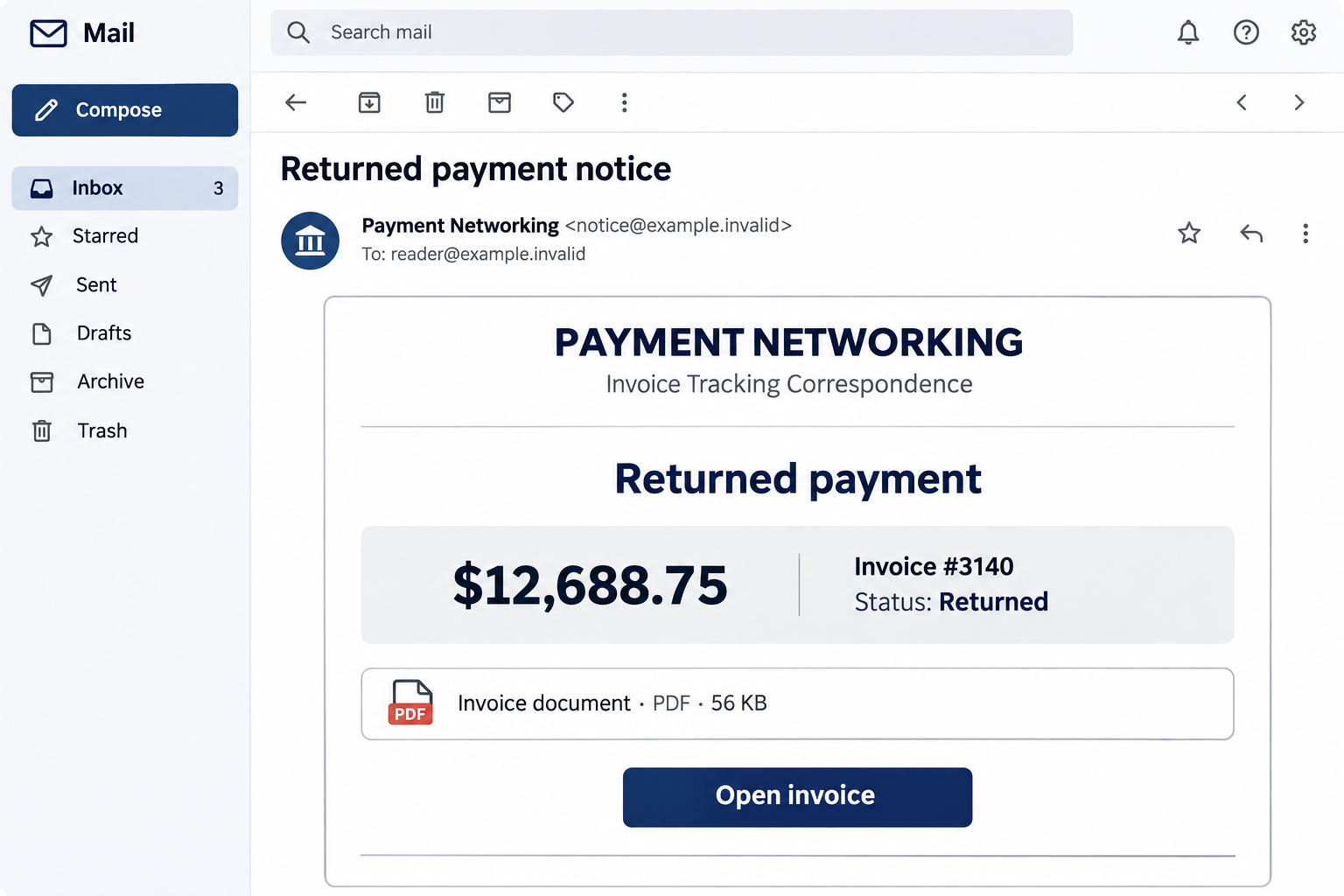
A returned-payment notice lands between ordinary work emails. It names an invoice, shows $12,688.75, and offers a document that seems to explain the problem.
For anyone handling orders or accounts, that is enough to interrupt the morning. Before opening the invoice, there are a few details worth slowing down for.
Overview
The message looks like an accounting update
The Returned Payment email scam uses the display identity Payment Networking and describes its purpose as invoice-tracking correspondence. Its subject announces a returned-payment notice.
Inside, a compact payment card identifies invoice #3140, an amount of $12,688.75, and a transaction date of October 29, 2026.
The invoice status is marked returned. Below that, an attachment-style panel presents an invoice document as a 56 KB PDF and invites the reader to open it.
These are claims inside the message. They are not confirmation that a bank returned money, that the recipient owes anything, or that invoice #3140 belongs to their business.
The document is the reason to leave the inbox
The campaign is a phishing lure. Its apparent invoice button sends readers to an outside destination instead of establishing a genuine payment problem through their bank or supplier.
The link was inactive when the campaign was documented. Its exact login design remains uncertain, but that does not make the invoice notice safe to trust.
A counterfeit mailbox login is the reported likely purpose. Readers should distinguish that assessment from a captured functioning form or a confirmed malware download.
The safe response is still clear: do not follow this notice to sign in, resend money, or provide account information. Check the alleged transaction independently.
The identifying details to look for
A message using this particular combination deserves attention even if the layout or button wording changes. Compare it with records you already trust.
- Sender branding: Payment Networking.
- Service description: Invoice Tracking Correspondence.
- Subject: Returned payment notice.
- Invoice reference: #3140.
- Amount listed: $12,688.75.
- A PDF-looking document card with an Open invoice link.
Do not use these details as a complete blocking rule. Criminals can change an invoice number or amount much faster than a workplace can circulate a warning.
Why a Returned Payment Gets Attention
A payment failure suggests unfinished work. Perhaps an order will be delayed, a customer is waiting, or a supplier needs a correction before dispatching goods.
That uncertainty makes opening a document feel like the sensible first step. The email does not have to demand immediate payment to move the reader toward risk.
The large amount adds weight. Someone who would ignore a vague accounts message may investigate five figures because leaving it unresolved seems irresponsible.
The cents help too. A number such as $12,688.75 resembles a total calculated from actual goods, taxes, or services rather than a rounded promotional claim.
Precision is not authentication. An invented payment can have exact cents, an invoice reference, a date, and a polished status panel.
The document card also offers apparent relief. Instead of asking the recipient to solve an unexplained problem, it promises the missing information behind one familiar-looking button.
For a busy accounts team, this is a workflow trap. The attacker borrows an ordinary reason to review paperwork and attaches that reason to an untrusted route.
How the Returned Payment Email Scam Works
Step 1: An unfamiliar sender adopts financial-service language
Payment Networking sounds like a service connected to business transactions. Invoice-tracking wording reinforces that impression without identifying the recipient’s actual bank, merchant processor, or supplier relationship.
Ask what service the business genuinely uses. If staff cannot place the sender in their payment process, the notice needs verification before anyone opens its document.
A professional display name does not answer that question. Expand the sender details and compare the real address with contact information in your established records.
A mismatch is useful evidence, but a familiar address is not absolute clearance. A compromised supplier mailbox can also send convincing invoice correspondence.
Step 2: The payment card creates a specific unresolved problem
The invoice reference and exact amount encourage the recipient to search mentally for a transaction. Even without a match, someone may wonder whether another department initiated it.
That is where uncertainty can become compliance. The message gives enough detail to sound important, but not enough trusted context to resolve the alleged return inside the email.
Look for the original invoice, purchase order, supplier account, and payment record in systems you already use. An isolated status card cannot replace them.
If the amount matches an actual transaction, verification becomes more important, not less. Real invoice information can sometimes appear in malicious correspondence.
Step 3: A PDF-looking panel makes the next click seem harmless
The message presents a document tile with a file type and size. Those visual details encourage readers to think they are opening familiar paperwork.
But an attachment-shaped card can be an ordinary web link. Its label does not establish that a PDF is attached, that it is safe, or that it contains an invoice.
On a desktop, the link destination can often be inspected without opening it. Let workplace security examine uncertain addresses rather than experimenting on an accounts workstation.
Do not bypass browser warnings just because the email described the item as a document. The description and the actual destination are different pieces of information.
Step 4: The outside page can turn an invoice question into an account request
In invoice phishing, a page often claims that signing in is necessary to view protected paperwork. That request can arrive after a convincing document preview.
A secure-document explanation should identify the supplier and sharing service. A generic sign-in box is not enough to establish either connection.
The boundary to preserve is straightforward: an unexplained returned-payment email should not introduce a new place to enter the password for your existing mailbox.
If an organization genuinely shares protected documents, confirm the sharing request through that organization’s known contact and your established document system.
Step 5: A stolen mailbox can expose real business correspondence
If the recipient discloses usable credentials, the risk can extend beyond the fictional invoice. Real orders and conversations inside the mailbox may be much more valuable.
An intruder could watch payment discussions, impersonate staff, or use the account to approach contacts who recognize the address. These are potential consequences, not documented outcomes for every recipient.
This is why an invoice phish deserves prompt reporting even when nobody paid the displayed amount. Account access can become preparation for a later payment fraud.
Conversely, a suspicious email does not prove the business has suffered a breach. Keep the response tied to what someone clicked, entered, approved, downloaded, or paid.
A Returned-Payment Email Is Not a Bank Record
There are several explanations for a genuine failed payment, and each belongs with the institution handling that transaction. A notice alone does not identify which explanation applies.
A card issuer may show a reversal or declined transaction. A banking portal may show a transfer returned. A merchant processor may record a payment dispute or settlement issue.
Those records are not interchangeable. Do not infer that a supplier needs another transfer simply because an email uses the word returned.
Open the relevant account independently and check the actual amount, counterparty, reference, and status. If necessary, call the institution using a number from existing records.
For supplier payments, confirm with the person your business normally deals with. Use the contact stored before the notice arrived, not a new number in the message.
Never send a replacement payment while the first transaction is unresolved. You could create a real duplicate charge while trying to fix a problem that was only alleged.
Useful Checks for Accounts and Purchasing Teams
Separate document review from payment authorization. A staff member opening correspondence should not automatically be permitted to change a supplier’s bank details or release a replacement transfer.
A second approval is particularly helpful when the request involves urgency, new banking information, or a different recipient. Confirm the underlying change through another channel.
Search internal records by the invoice number and amount. If neither exists, ask the relevant department rather than clicking to discover whether the sender recognizes the business.
If there is a match, compare the original issue date and the supplier’s genuine correspondence. A copied invoice can still be attached to a fraudulent payment instruction.
Share a concise warning with colleagues who handle the same mailbox. Include the recognizable branding, but avoid forwarding an active malicious link as an ordinary task.
For suspected phishing in Gmail, the reporting menu lets users flag the message instead of replying to its sender.
Do not send a scan of company identity documents to establish that the notice is mistaken. A fraudster does not need more information about your business.
What to Do if You Have Fallen Victim to This Scam
-
Freeze the email-driven task. Tell anyone handling invoice #3140 not to act on the notice until the transaction has been checked independently.
If you only received the email, reporting and deleting it is normally sufficient. There is no reason to assume the displayed sum has left your account.
-
Check the real payment record. Use the banking app, payment processor, or accounting system already associated with the transaction.
Note whether any payment actually exists and whether it was returned. Ask your normal finance contact to resolve a genuine discrepancy outside the suspicious email thread.
-
Protect any login you entered. Replace the exposed password through the correct provider and review recent account activity.
For business email, involve the administrator so suspicious sessions, forwarding rules, and application permissions can be checked. Do not send the old password with the incident report.
-
Tell the payment provider if money really moved. Contact its fraud team immediately and ask what recall, dispute, or protective action is available.
Provide the actual transfer details rather than only the amount in the fake notice. Avoid paying anyone who promises that another fee will recover the funds.
-
Save evidence that explains the route. Keep the original message, its headers, the destination address, and a timeline of what you did.
If another person authorized a payment, preserve that instruction too. Accurate records help separate the false returned-payment claim from any real transaction that followed.
-
Address additional device exposure separately. If you ran a downloaded program, enabled content, or installed an extension, stop handling financial accounts on that device.
Get case-appropriate technical assistance. Merely clicking a link is not proof of infection, and a malware scan cannot reverse a bank transfer.
-
Watch for a second approach. Be wary of calls claiming to trace the missing invoice, restore a mailbox, or refund the displayed amount.
A caller who repeats details from the notice has not established legitimacy. Return to the business or provider through your own contact route.
If a Customer or Supplier Asks About This Notice
Confirm the genuine account status before discussing payment. Do not assume the other party received the same document or understands that the displayed amount may be invented.
Explain which invoice records actually exist. Send any necessary correction through the normal business channel, without including the suspicious document link.
If a mailbox was accessed, ask security staff whether previous conversations need review. A false payment notice can coexist with unrelated, legitimate invoices.
Continue normal accounting controls while investigating. A security incident is not a reason to approve a rushed transfer or skip verification of a changed beneficiary.
Frequently Asked Questions
Is the $12,688.75 payment definitely real?
No. That figure appears in the notice and does not establish a completed transfer, an unpaid invoice, or money owed by the recipient.
Only the records of the bank, processor, and parties actually involved can resolve a real transaction question.
Why does the email show invoice #3140?
A reference number makes the notice look specific and gives the reader something to investigate. It is not evidence that the sender belongs in your accounting workflow.
Compare the number with your own records. An unexpected match should still be confirmed with the genuine supplier.
Does the PDF label mean the document is safe?
No. The label and 56 KB size are part of the email’s presentation. A document-looking tile may open a website rather than a genuine attached PDF.
Do not infer that a particular file executed merely because the message displayed an attachment panel.
What if the invoice link no longer works?
Do not search for a replacement or ask the sender to reactivate it. An unavailable page does not make the original message authentic.
If you entered account information while a page was working, protect that account even though the destination is now inaccessible.
Should I reply to say the payment is not mine?
No. A reply gives the sender a conversation and can expose your role in the business. Use internal support or the genuine institution to resolve uncertainty.
If the message concerns no known transaction, report it as suspicious rather than supplying extra company information.
Can account recovery and payment recovery be handled together?
They may need to happen at the same time, but they are different jobs. The email provider handles access; the financial provider handles actual payments.
Give each party the facts relevant to its service. Do not wait for an invoice explanation before reporting a genuine unauthorized transaction.
The Bottom Line
Do not open the Payment Networking notice’s invoice or send replacement money because it says $12,688.75 was returned. Check any real payment through established records.
If you disclosed credentials or paid someone, contact the appropriate account or financial provider promptly. Treat the actual exposure, not the alarming amount printed in the email.

Join the discussion
0 commentsShare your experience or ask a question about this article.
Discussion
Start the conversation
Have a question or something useful to share? Add the first comment.