


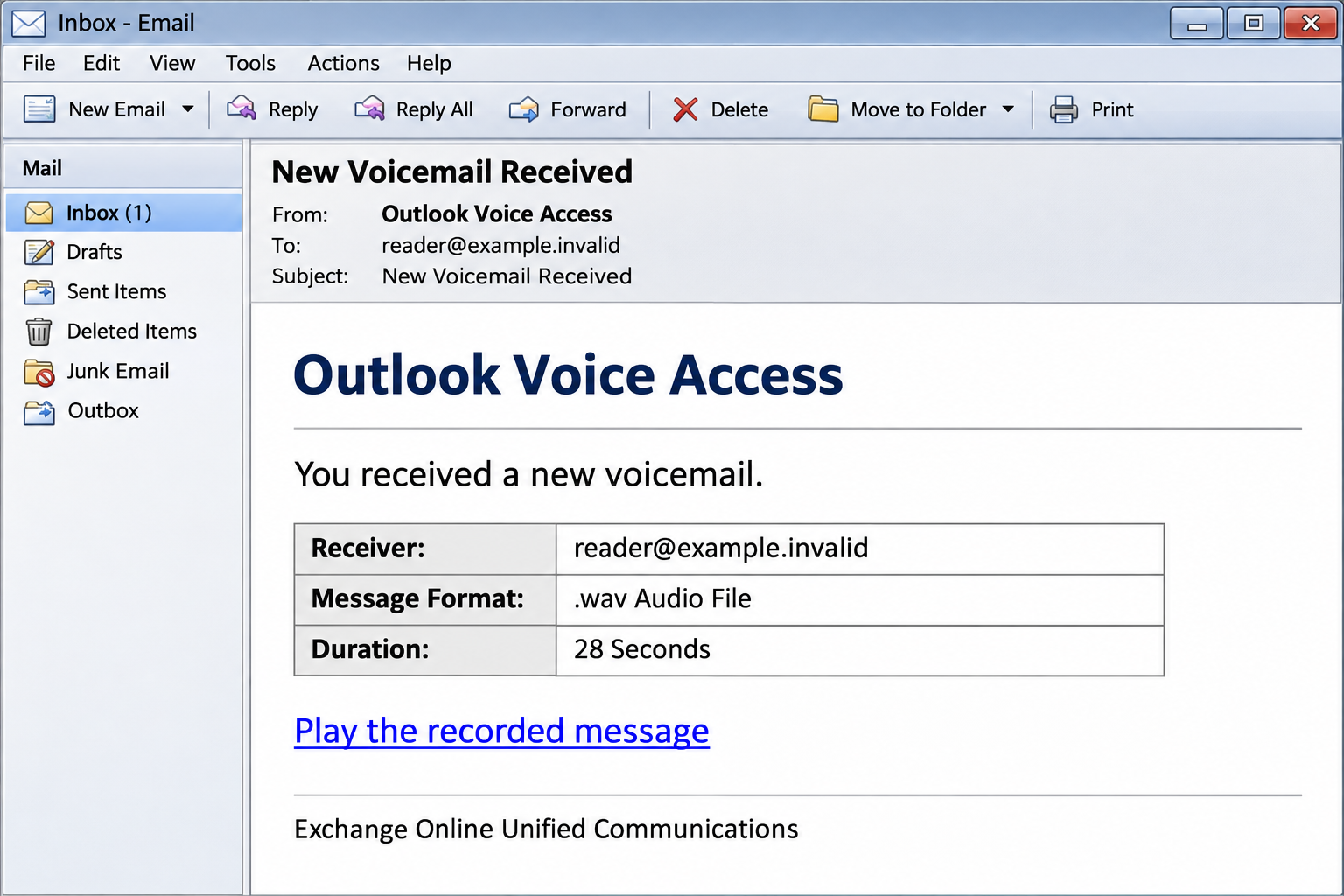
An Outlook Voice Access email says a short voicemail is waiting. It lists a recording format, a timestamp, and a link that promises to play the message.
Perhaps you missed a customer call. Perhaps it is an internal request. Before finding out, take a moment to check how this notification expects you to listen.
Overview
The bait is a routine missed message
The Outlook Voice Access email scam arrives under the subject New Voicemail Received. Its body describes a voicemail and offers a link to retrieve the recording.
One documented message identifies a .wav audio file, a 28-second duration, the recipient’s address, and a received time. Those details resemble a telephone-system notification.
The email also invokes Exchange Online Unified Communications. That phrase makes the message sound like workplace infrastructure rather than an unfamiliar outside service.
However, the listing of a file format is not proof that a recording exists. The immediate action offered is a web link, not independent confirmation from your telephone system.
The playback link becomes a password prompt
The captured destination used the hostname wealthydevkelclean.s3.us-central-1.ionoscloud[.]com. Its page showed a Gmail-looking background beneath an email-password dialog.
This is the critical change in the story. You started with an alleged Microsoft-related voicemail but reached an unrelated hosted page asking for mailbox credentials.
The captured example is credential phishing. Microsoft, Google, and the legitimate cloud-hosting provider should not be mistaken for the people operating the counterfeit login.
The .wav wording describes the supposed message; it does not show that an audio file infected anyone. The captured trap asks for a password.
Recognize the message without distrusting every voicemail
Voicemail services and email notifications are real. The problem is the untrusted route and credential request in this specific message, not the existence of voice messages.
- The notice calls itself Outlook Voice Access.
- A short recording is described as a .wav file.
- Playback requires following a supplied web link.
- The captured site uses IONOS storage rather than an authenticated mailbox route.
- A Gmail-styled password request appears despite the Outlook-related pretext.
Leave this notification alone and check your messages through the communication service your organization actually uses. An unexplained sign-in is not a necessary step toward hearing a missed call.
Outlook Voice Access Was a Real Feature
The name itself was not invented for this scam. Outlook Voice Access has been used for telephone-based access to voicemail and other mailbox information.
That history matters because dismissing every reference to the feature as fictional would be misleading. A reader may have encountered the name in a genuine older workplace system.
Microsoft’s voicemail documentation also notes that Unified Messaging in Exchange Online retired on February 28, 2020, with migration to Cloud Voicemail.
Do not flatten that into a claim that every on-premises Exchange arrangement or voicemail notification vanished. Different organizations have different communications setups.
Instead, ask a practical question: does this notice match the system your employer uses today, and can you retrieve the message inside that system?
If your organization uses Teams, a desk-phone application, or another provider, open that established service directly. Let internal support resolve an unfamiliar legacy product name.
How the Outlook Voice Access Email Scam Works
Step 1: A short voicemail creates curiosity
The message does not need a frightening threat. An unheard recording is enough to prompt action, especially when someone works with customers, suppliers, or several internal teams.
A 28-second duration sounds manageable. Listening appears quicker than contacting support or working out whether the notice belongs to the organization’s current phone service.
The apparent caller information adds context without establishing identity. Numbers printed in an email are claims by the sender, not a verified record of a real call.
Step 2: Technical details make the notice look automated
The receiver address, received time, and audio format imitate the fields a communications platform might insert. A plain layout can make the message feel less promotional.
Automation is easy to imitate. A criminal can write a duration and date into the same template sent to many recipients.
Knowing your email address is also unsurprising when someone is emailing you. Its appearance in a receiver field does not establish access to your mailbox or telephone account.
Step 3: The playback link changes the channel
The supplied link promises the recording through a web portal. Following it moves the task away from your established communications application and into a new website.
The captured path used /pure.html on the IONOS-hosted destination. That address is a campaign identifier, not a recommendation to visit and investigate the page yourself.
Cloud storage can serve ordinary customer-uploaded web content. A storage provider’s valid domain does not certify that the page represents Microsoft or your employer.
Step 4: A sign-in overlay obscures the missing audio
The recorded example placed a password dialog over a Gmail-looking page. The background supplied familiar branding while the foreground asked the user to authenticate.
That arrangement can keep attention on the form. Someone intent on retrieving the message may type the password before questioning why the playback system changed brands.
A page can imitate a dialog box without being a genuine operating-system prompt. Its appearance does not tell you which organization receives the information entered.
The service name mismatch is particularly useful here. A Microsoft-branded voicemail notification does not explain an unrelated page collecting a Gmail password.
Step 5: The recipient supplies access instead of hearing a message
The sensitive act is entering the mailbox password. The form’s promise to continue does not establish that it will authenticate you to the genuine service.
An error message afterward would not make the attempt harmless. A hostile form can collect information and still fail to show the recording it promised.
Likewise, leaving before the final click is not a guarantee. If you typed the password into the page, treat it as disclosed.
Do not enter a second account password to see which provider the page wants. A confusing login flow is a reason to stop, not to keep trying.
Step 6: A work inbox can become a convincing sender
With usable account access, an intruder may read conversations or send messages from an identity colleagues already recognize. The first phish can then help create another.
That does not mean every person who clicked lost their account. Access depends on what information was disclosed and what other protections prevented unauthorized sign-in.
Report the exposure early so your organization can inspect the relevant activity. Waiting for obviously fraudulent sent mail can give an intruder more time.
Check for a Voicemail Without Trusting the Link
Open the communications application you normally use. Look for missed calls and voicemail there, or contact the telephone-system administrator through the internal directory.
If no corresponding recording exists, do not use the suspicious email as a fallback. A missing voicemail is not a reason to authenticate on an unfamiliar website.
Ask whether the sender address, notification style, and retrieval route match genuine messages from the same service. Your support team can compare technical details.
A legitimate recording may concern something important, but its importance does not require using this particular link. An authentic caller can contact you through established channels.
If you recognize the apparent caller, call them using a saved number. Do not rely on the number embedded in the notice to establish who supposedly left it.
There is no need to install a special audio player or browser extension to investigate a surprise notification. Such an additional request would create a separate risk.
What the Sign-In Page Can and Cannot Prove
A copied Gmail background proves only that the page displays that design. It does not show that Google authenticated the sender or that a real message is waiting.
The same distinction applies to HTTPS. An encrypted connection can protect the journey to the wrong destination without making that destination legitimate.
A known cloud hostname identifies infrastructure. The account holder who placed content there can be different from the company whose branding appears in that content.
A working password on the genuine service does not prove a hostile form rejected it safely. A page may report failure regardless of whether the information was collected.
Conversely, an unwanted voicemail email is not a malware diagnosis. Treating every recipient as infected can distract from the actual priority: securing any credentials that escaped.
What to Do if You Have Fallen Victim to This Scam
-
Leave the playback page. Stop interacting with the dialog and decline any later request for a code, permission, or software installation.
If you merely viewed the notification, use your mailbox’s phishing-report option. There is no need to change every password solely because this email arrived.
-
Identify the account information you supplied. The message mentions Outlook, but the captured page imitates Gmail. Protect the actual credentials entered, whichever provider they belong to.
If you tried several passwords or reused one elsewhere, tell support that too. Do not assume the brand in the email identifies the only affected account.
-
Reset the exposed credential outside the email flow. Open the real provider yourself and choose a fresh, unique password.
For a managed account, use the organization’s approved recovery process. If you are locked out, contact internal support rather than a recovery service found through advertisements.
-
Check for continuing account access. Examine recent sign-ins, active devices, recovery settings, and authorized applications. Remove entries you do not recognize.
Ask an administrator to revoke suspicious access where necessary. Password replacement and session invalidation are related protective actions, not interchangeable guarantees.
-
Inspect mailbox settings and correspondence. Review forwarding, filters, automatic rules, sent items, and deleted messages for changes associated with the incident.
Tell colleagues if your account sent unexpected links. Use another channel for that warning if access to the mailbox is still uncertain.
-
Report the original message with a timeline. Include the approximate click time, destination, and whether you typed a password or approved anything.
Keep private message contents out of a public warning. The security team can explain how to provide headers and sensitive evidence securely.
-
Escalate a genuine software installation. If the page persuaded you to run a file or add an extension, have the device assessed before further sensitive use.
That additional event may need malware-removal instructions. It should not be assumed from a .wav label, and a scanner cannot cancel an unauthorized account session.
What to Tell the Help Desk
Start with the subject New Voicemail Received and the Outlook Voice Access wording. Mention that the page requested a mailbox password instead of playing audio.
If Gmail branding appeared after an Outlook-themed message, say so. That detail helps explain why a personal account could be affected by a work-looking email.
Describe the actual action without minimizing it. Typing a password, entering a verification code, and approving a notification are different events that require different follow-up.
You do not need to know whether the page used an advanced phishing technique. Clear facts help your administrator investigate faster than guessing a malware name.
If your own provider flags an unfamiliar login afterward, open its official security controls independently. Do not assume the next security-related email belongs to the same sender.
Frequently Asked Questions
Is every Outlook Voice Access email fraudulent?
No. The name has a legitimate product history. This warning addresses the particular notification and counterfeit authentication route described above.
Check messages through your real telephone or communications system rather than deciding solely from a feature name.
Why does the email mention a .wav recording?
That familiar audio format makes the notification resemble a genuine voicemail listing. It does not establish that an attached recording exists or that the link plays one.
A file label in an email is not a technical analysis of the destination.
Why did Gmail appear after an Outlook notification?
The captured phishing page used a Gmail-styled credential dialog. The mixed branding exposes the gap between the voicemail story and the password request.
Do not resolve that confusion by entering more accounts. Leave the page and verify the alleged recording separately.
Does pressing the playback link mean I was hacked?
Not automatically. The relevant questions are whether you disclosed credentials, approved access, or ran something. A click alone does not prove a successful account takeover.
Review what happened and report the destination, but avoid assuming outcomes that have not occurred.
Which password should I change?
Change the one entered into the counterfeit page, plus any reused copies. The label Outlook in the email does not limit exposure to Microsoft accounts.
If Google credentials were involved, Google’s account-recovery guidance provides the appropriate account-specific route.
Can an antivirus scan secure the stolen login?
No. Scanning checks a device for threats; it does not replace the password, remove mailbox rules, or revoke an attacker’s account access.
Use device cleanup when there is a relevant software exposure, while handling account recovery through the provider.
The Bottom Line
Do not use this Outlook Voice Access notification to retrieve a message. Its playback story leads to a counterfeit email-password prompt on an unrelated hosted page.
Check genuine voicemail in your normal communications service. If a password escaped, secure that actual account and notify workplace support without waiting for another warning.

Join the discussion
0 commentsShare your experience or ask a question about this article.
Discussion
Start the conversation
Have a question or something useful to share? Add the first comment.