


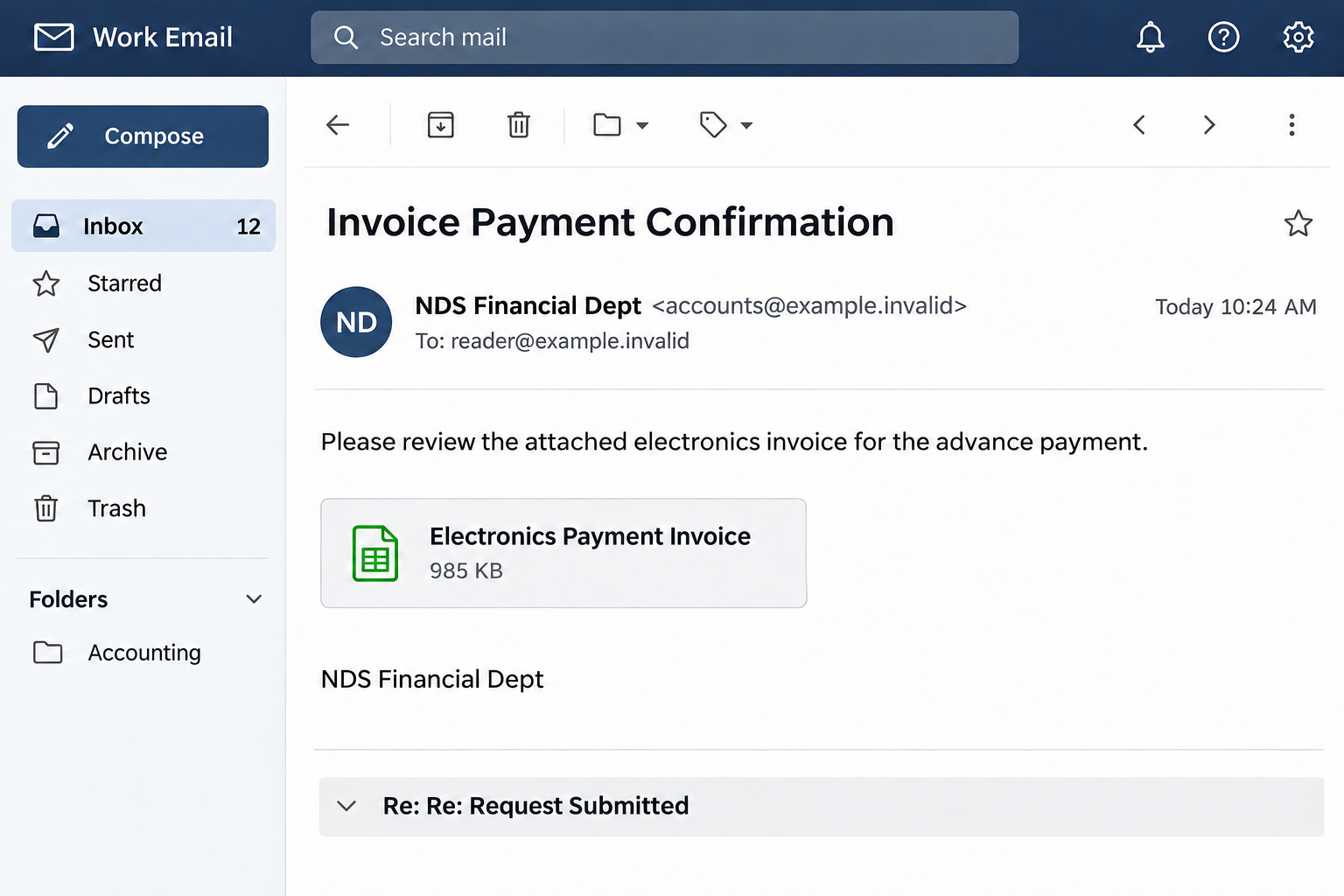
An email from NDS Financial Dept asks you to review an electronics invoice for an advance payment. Its signature looks businesslike, and the attachment appears ready to open.
The message even hints at an earlier conversation. Before treating it as another accounts task, check what happens between the invoice request and the document itself.
Overview
An invoice request borrows the shape of business mail
The Attached Electronics Invoice email scam uses the subject Invoice Payment Confirmation and signs itself NDS Financial Dept. It asks the recipient to review advance-payment paperwork.
The note is short and polite. It offers further information if needed and includes a department signature, an office address, and a landline number.
An attachment-style item is labeled Electronics Payment Invoice_ with a listed size of 985 KB. A reply-thread phrase, Re: Re: Request Submitted, suggests an ongoing exchange.
Those details create context without proving a genuine transaction. Neither the department name nor the apparent correspondence history establishes that your business ordered anything.
The documented viewer asks for a mailbox password
A captured version of the destination used delicate-crepe-a42dc1[.]netlify.app. It showed a blurred invoice beneath a Secure Document Viewer identity-verification dialog.
The overlay called the document encrypted and asked for a username and password. Its action button promised to decrypt and display the invoice.
This is the central deception: a business-document request is used to collect account credentials. A mailbox password is not an ordinary key for opening a supplier’s encrypted invoice.
The accusation belongs to this message and counterfeit viewer. It is not a finding that every organization using the initials NDS is fraudulent.
The details worth checking before you act
Focus on the relationship between the claimed transaction and the authentication request. A polished signature cannot bridge an unexplained gap between them.
- Did your business expect an advance-payment invoice from this sender?
- Does the alleged earlier conversation exist in your actual mailbox?
- Can a known supplier confirm the document through an established contact?
- Why is an unrelated hosted viewer asking for your existing account password?
- Does the address belong to a document service your organization actually uses?
Do not enter credentials into this viewer. If the invoice might concern a real order, verify that order through your purchasing records rather than the email’s route.
The Reply Thread Is Part of the Persuasion
Most people read an email differently when it appears to continue an existing conversation. A reply prefix suggests someone has already established the subject and participants.
That can make a brief request feel less suspicious. You may assume a coworker handled the earlier details or that an invoice relates to something you have forgotten.
But text such as Re: Re: Request Submitted can be placed inside any message. It does not prove that a genuine earlier exchange occurred.
Search your own mailbox or purchasing system for the supposed request. Look for the original contact, order, and agreed payment terms, not just the repeated subject.
Even a real thread is not complete clearance. Compromised accounts can send malicious replies, so new credential requests still need independent scrutiny.
The useful habit is to verify the transaction and the access route separately. A recognizable order does not automatically make an unfamiliar login page safe.
How the NDS Electronics Invoice Email Scam Works
Step 1: A financial department appears to send routine paperwork
The sender presents the message as an invoice review, not a dramatic emergency. This gives busy staff a small, apparently reasonable task to complete.
The captured email’s display identity and underlying sending address did not establish a verified relationship with the recipient. A department label is easy to imitate.
Do not infer the actual sender’s location from the signature. A phone prefix and office address can be copied without showing where the message originated.
Step 2: The attachment tile makes the task tangible
The invoice item has a name and a file size. That presentation encourages the reader to treat it as paperwork already prepared for this transaction.
The recorded message used a spreadsheet-style attachment icon. That appearance alone does not establish the underlying file type or show that a spreadsheet was safely opened.
Different document lures can use a real attachment containing a link or a link styled as an attachment. Inspect the actual route rather than trusting the icon.
If your security team needs the item, preserve it through the approved reporting process. Do not open it repeatedly to work out what kind of file it is.
Step 3: The document opens inside an unfamiliar viewer
The documented destination used a Netlify-hosted page with the title Secure Document Viewer. A blurred business invoice supplied a plausible backdrop.
Blurred content is persuasive because it suggests the answer is already there. The reader can almost see the invoice, so completing the next prompt feels like the final hurdle.
Netlify is a legitimate hosting platform. Its presence does not authenticate a customer-created page as your supplier, your employer, or your mailbox provider.
Likewise, a site can display the words secure and encrypted without implementing an authorized document-sharing relationship.
Step 4: Encryption becomes an excuse for identity verification
The captured dialog says Document Encrypted and asks the visitor to verify their identity. A username field appears alongside a password field.
The button links the two ideas: provide credentials, then decrypt the invoice. This framing hides an account-access request inside a normal desire to finish reviewing paperwork.
A genuine encrypted file may need a separately supplied document password. That is different from asking you to disclose the password protecting an existing email account.
Legitimate document services can also use sign-in. Verify the exact service, origin, and sharing request independently instead of deciding from the existence of a login box.
Step 5: The password can escape without an invoice appearing
Information entered into a hostile form can be sent to its operator. The page does not have to display a real invoice or produce a successful sign-in afterward.
If you typed a password, do not assume it remained private because an error appeared or you closed the tab before pressing the button.
An already populated email address is not proof of a safe session. A sender can carry the recipient’s address into a page without owning that mailbox.
Refuse any additional request for a verification code or approval that you did not initiate through the actual account service.
Step 6: The account can become more useful than the fake invoice
An inbox may contain real supplier conversations, shared files, and payment histories. Usable access can give an intruder a convincing context for later impersonation.
Potential abuse includes watching an invoice discussion or sending a changed-payment request from a familiar account. These are risks, not a claim that every recipient suffered those events.
For workplace exposure, report promptly even if no money was sent. Protecting ongoing correspondence can be just as important as preventing an immediate unauthorized login.
What the Address and Phone Number Do Not Establish
The message’s signature names an office in Healthcare City and lists a landline. Those details may look reassuring because ordinary suppliers provide similar contact information.
However, a signature is not a verified company record. It does not prove who controls the email account, whether the office exists, or who answers the number.
Do not call the supplied line to authenticate the same message. That keeps the entire verification process inside information chosen by the suspicious sender.
If NDS is a genuine supplier in your records, contact your established representative. Compare the legal identity, prior correspondence, and actual purchase order.
If no such relationship exists, there is no need to investigate unrelated businesses sharing those initials. Avoid directing accusations toward a company merely because its name resembles the signature.
The immediate issue is enough to justify stopping: an unexpected invoice route asks for an existing account password without establishing an authorized reason to collect it.
The Document Gate Can Change While the Email Stays the Same
The captured encrypted-viewer example is not necessarily what every later visitor will see. Hosted pages can change, and incomplete links may open an entry screen instead.
A direct visit to the associated host displayed a Document Access Portal requesting a security handshake. It did not authenticate the invoice or establish a verified supplier connection.
Here is the entry page, not the earlier password dialog. Its security-handshake wording still does not identify a genuine supplier or an authorized invoice.
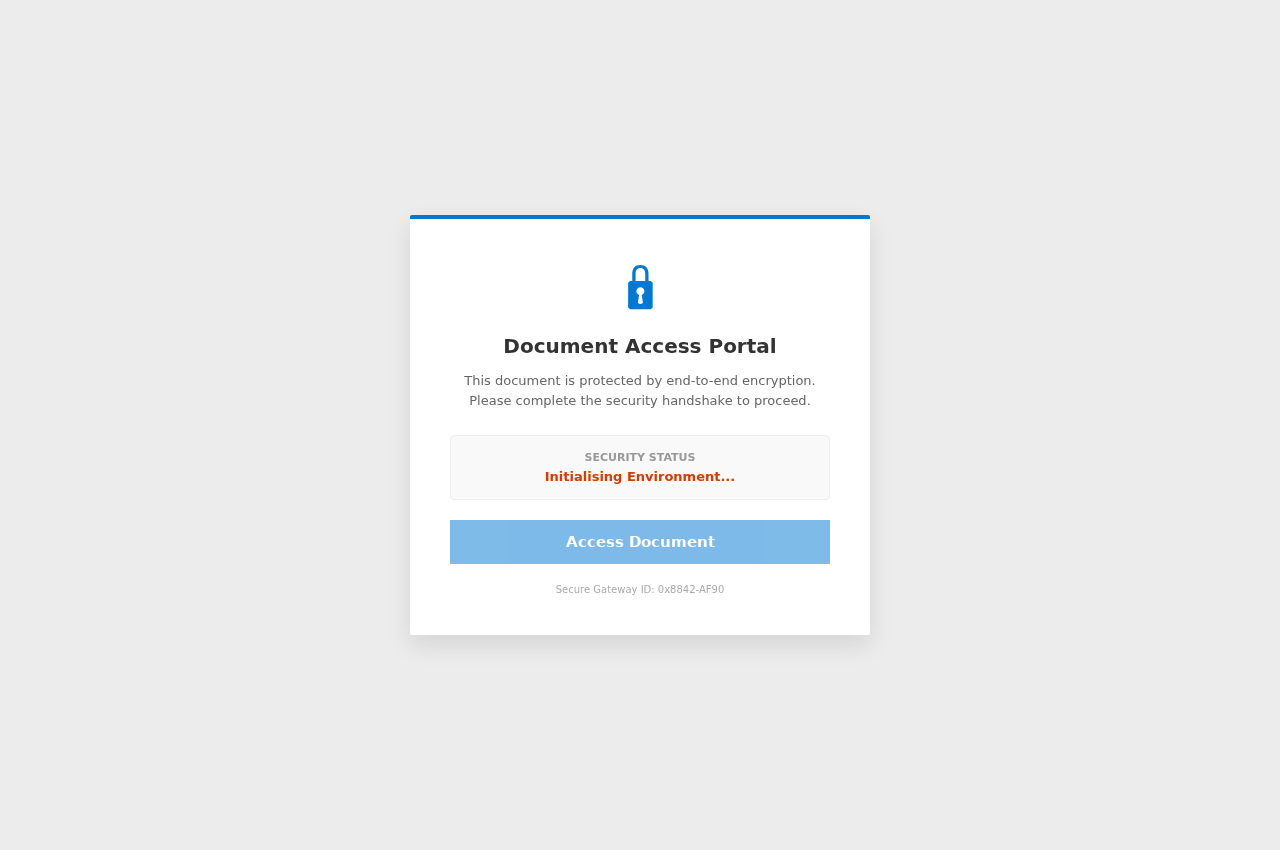
A different-looking gate should not encourage experimentation. Return to the known supplier or internal purchasing system to resolve whether any real document is expected.
What to Do if You Have Fallen Victim to This Scam
-
Pause the invoice review and any payment. Close the viewer and tell the relevant colleague that the email is being checked for impersonation.
Do not authorize an advance payment, update a beneficiary, or resend funds based on the message. Confirm any genuine order through existing records.
-
Report exactly what opened. Give workplace security the original email and describe whether you saw an attachment, a document portal, or a password dialog.
Include any download or instruction you followed. A clear timeline helps distinguish credential disclosure from a separate software or remote-access incident.
-
Replace any password entered into the viewer. Visit the proper account service independently and set a unique replacement.
If you supplied several possible passwords, protect each relevant account. Do not keep trying credentials on the invoice page to determine which one it expected.
-
Remove unauthorized access and settings. Inspect account activity, recognized devices, recovery contacts, connected applications, and mailbox forwarding or rules.
A managed account may need administrator assistance to revoke sessions or investigate suspicious changes. Resetting the password is important but does not substitute for that review.
-
Check business correspondence for consequential changes. Ask finance staff whether unexpected bank details, payment instructions, or messages appeared around the incident.
If money was actually transferred, alert the financial provider quickly and request available protective action. Preserve the transaction record instead of relying on the fake invoice.
-
Separate a downloaded file from a viewed page. If you ran software, enabled active document content, or installed a browser extension, avoid further sensitive work on that device.
Have it assessed using appropriate security instructions. Merely receiving an attachment-looking email does not prove a malware infection.
-
Warn the right people without spreading the link. Let coworkers and a genuine supplier know if the exposure could affect their correspondence.
Use trusted contact details and share a clear description. Keep private account information and active malicious destinations out of a casual group-message warning.
A Better Way to Handle Protected Supplier Documents
Agree on a document channel before a problem arises. Accounts staff should know which supplier portals are normal and who can confirm an unfamiliar invitation.
For a new portal, verify it with the supplier using an existing telephone contact. Check whether your organization permits that service before creating or linking an account.
Keep document access separate from payment approval. Opening a file should not authorize a new bank account or change the person receiving an advance payment.
Use your company’s approved credential manager where possible. A refusal to fill saved credentials on a new host is a useful pause point, not an obstacle to bypass automatically.
For personal Google account exposure, the official compromised-account guide covers access review and recovery. Workplace accounts should also involve their administrator.
If a sender pressures you to ignore a warning because the invoice is urgent, escalate the task. Legitimate business urgency does not require surrendering account credentials to an unexplained host.
Frequently Asked Questions
Is NDS Financial Dept a verified sender?
The signature in this campaign does not establish a verified supplier or legal entity. It is part of the email’s presentation.
If you work with a real NDS-named organization, confirm the request through its existing representative. Do not assume that similarly named businesses operated the phishing page.
Why is the invoice described as encrypted?
The encrypted-document story supplies a reason for the password prompt. It makes authentication seem like the last step before ordinary invoice review.
A supplier’s document password and your mailbox password serve different purposes. Do not disclose the latter to an unfamiliar viewer.
Does the listed office address make the email trustworthy?
No. Contact details can be copied into a signature. The printed address does not authenticate the sender, the transaction, or the destination collecting credentials.
Verify through details already recorded in your supplier system, not solely through the contact information in this message.
Is Netlify responsible for the invoice request?
Netlify provides hosting. A page on a customer-controlled subdomain is not automatically endorsed by the platform or connected to the company it impersonates.
The relevant question is who is requesting your credentials and whether that request belongs to a verified business relationship.
What if the attachment looked like a spreadsheet?
The recorded email used a spreadsheet-style item. That appearance does not establish that the contents were safe or that opening them produced a legitimate invoice.
Report the actual file or link through your security process rather than relying on its icon.
Should I scan after typing my password?
Account recovery comes first when the exposure is credential entry. A device scan cannot change a password or remove an intruder’s mailbox permissions.
Software execution, a new extension, or remote access would justify additional device investigation. Do not assume those events happened just because you saw a viewer.
The Bottom Line
Do not authenticate through the NDS electronics-invoice viewer. The message’s business signature and reply-thread wording do not justify collecting your mailbox password.
Verify genuine invoices through established supplier contacts. If you entered credentials, protect the account and involve workplace security before continuing the payment conversation.

Join the discussion
0 commentsShare your experience or ask a question about this article.
Discussion
Start the conversation
Have a question or something useful to share? Add the first comment.