


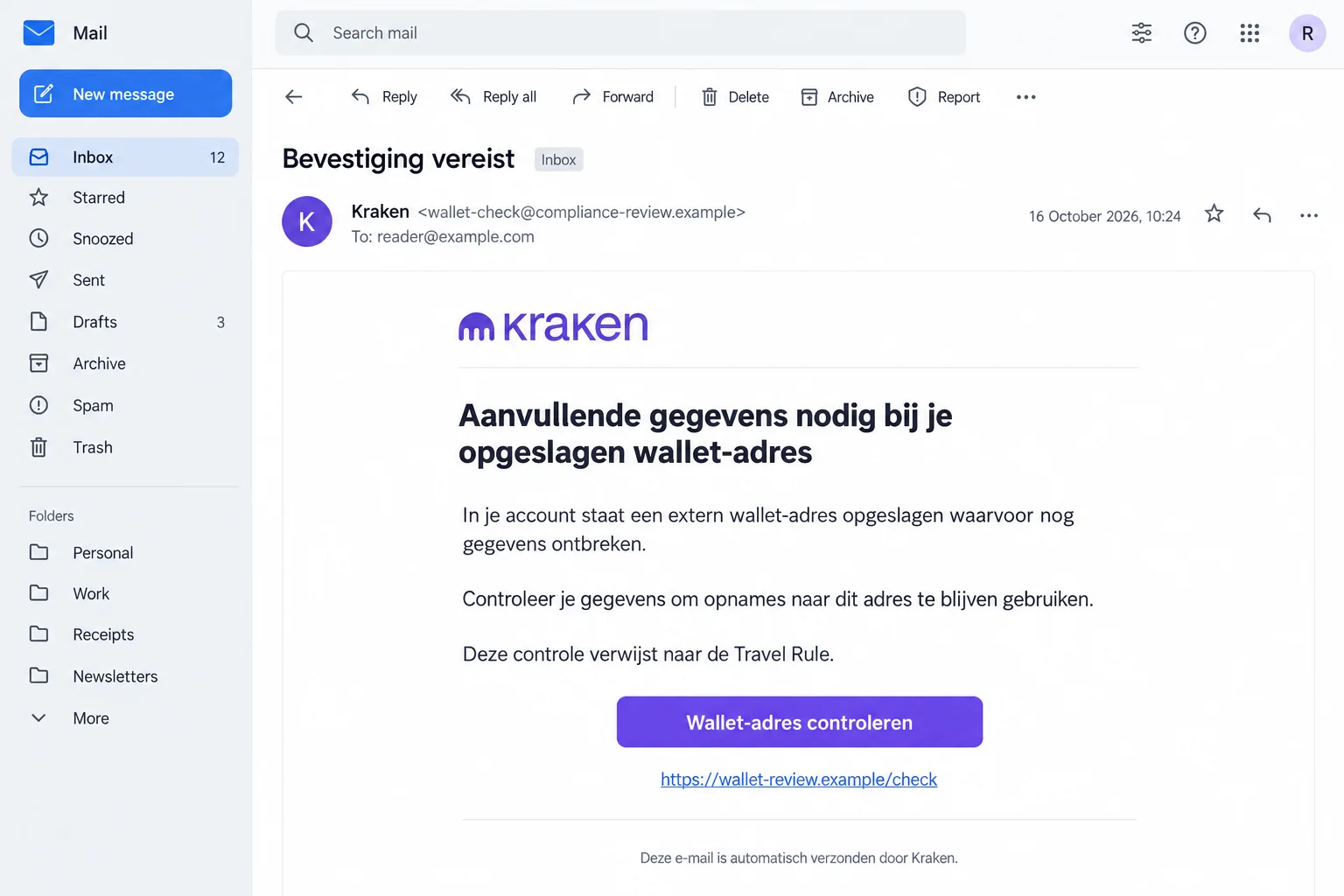
A Kraken email says information is missing for a wallet address saved in your account. Unless you complete a check, future withdrawals could be affected.
It mentions the Travel Rule, making the request sound like routine compliance. Before you open the wallet-check button, there’s an important distinction to understand.
Overview
A Compliance Explanation Is Used to Justify a False Wallet Check
The Kraken Travel Rule email scam impersonates the genuine cryptocurrency platform. It says an external wallet address lacks information needed for future withdrawals.
That warning gives an unexpected login request a plausible purpose. Instead of offering an investment, the sender claims to be preserving access to your existing funds.
The deception concerns the message and its verification route. Kraken itself isn’t the scam, and legitimate account checks shouldn’t be dismissed automatically.
The False Message Is Documented, but Its Final Form Isn’t Shown
Fraudehelpdesk records the October 14 email as false. Its button asks recipients to check a wallet address under a regulatory pretext.
Kraken separately publishes phishing warnings and recovery guidance. Imitation sign-in pages can seek credentials and approval codes.
The image illustrates the lure with fictional addresses and interface details. It isn’t an original email capture or evidence of a live verification page.
Check the Account Without Letting the Email Choose the Entrance
Open Kraken through its genuine website yourself. A compliance term inside an email doesn’t authenticate the sender, the button, or the page behind it.
- The message threatens withdrawal access to make an unrequested check feel necessary.
- Real wallet-verification procedures exist, so the legal terminology alone doesn’t identify the fraud.
- Don’t supply passwords or codes to an imitation sign-in page.
- After suspected exposure, contact Kraken’s genuine security support promptly.
Why the Travel Rule Makes This Email Convincing
Many crypto users have encountered additional questions during deposits or withdrawals. A request about a wallet can therefore sound familiar without being authentic.
Kraken’s transfer guidance describes genuine checks for EU and UK clients, including information about transfer counterparties and, in some cases, private-wallet ownership.
The false email borrows that context. It doesn’t need to persuade you that regulations exist; it needs you to accept its button as the required response.
Recognizing the regulation isn’t enough. You still need to establish that Kraken sent this particular request and controls the page receiving your information.
You may also worry about being unable to move funds when needed. That concern can make an ordinary-looking verification seem safer than waiting.
But rushing doesn’t establish who receives the information. A page that steals access can cause the very account problem the email claims to prevent.
Use the actual account and genuine support to clarify anything outstanding. You don’t need to interpret a regulation before refusing an unverified login route.
How the Kraken Travel Rule Email Scam Works
Step 1: The Email Claims a Saved Wallet Has Incomplete Information
The documented message refers to an external wallet address supposedly stored in the account. That detail makes the problem sound connected to an existing setup.
It doesn’t establish that the sender knows your actual addresses. A general claim about a saved wallet can be sent without identifying one.
If you’ve recently withdrawn crypto, the timing may feel relevant. Don’t let your own recent activity supply evidence the message hasn’t provided.
If you don’t use Kraken, don’t create an account to resolve the warning. Receiving an impersonation email doesn’t prove someone opened an account in your name.
Step 2: Regulatory Language Makes the Request Seem Obligatory
The email invokes the EU Transfer of Funds Regulation and the Travel Rule. It presents the requested information as a condition for future withdrawals.
This creates pressure without needing a dramatic countdown. You may feel you should finish the check before your next transfer becomes difficult.
The wording is still a claim made inside a false message. It doesn’t tell you whether Kraken has placed any restriction on your account.
Don’t reply with wallet details to demonstrate compliance. First establish whether the genuine platform has asked you for anything.
Step 3: A Wallet-Check Button Tries to Become Your Sign-In Route
The proposed solution is a link to review and complete information. That moves the decision from reading an email to trusting a website with account access.
The published example doesn’t reveal the final page. It doesn’t show a particular password form, approval screen, payment, or downloaded program.
Kraken’s broader warning explains why fake login destinations matter. Entering a password or approval code on the wrong page can expose genuine access.
A rejected sign-in isn’t proof that your information remained private. Don’t keep trying different credentials on the same questionable page.
Leave it and open the real platform independently. If you already entered anything, start security recovery rather than trying to finish the false check.
Real Account Reviews Don’t Depend on Finding the Email
Kraken’s account-review instructions explain how to check a genuine request through the website. Start by typing kraken.com into your browser.
For that review process, an outstanding request appears inside the signed-in account. You don’t need the email’s button to begin.
Kraken says these particular additional-information requests currently require a browser rather than its app. Follow its current instructions, not an assumption about where every notice appears.
That matters if you checked only the app and saw nothing. Use the genuine web account or ask support before deciding what the absence means.
Keep different procedures separate. A general account review and a wallet-transfer check aren’t necessarily the same task or governed by identical steps.
If you have a real outstanding request, address it through the confirmed process. An impersonation warning isn’t advice to neglect legitimate account requirements.
If you can’t find the request or understand its purpose, ask Kraken through its own support site. Don’t ask the questionable sender to authenticate itself.
A Real Wallet Test Is Not Permission to Trust a Stranger
Kraken’s transfer documentation describes legitimate ownership checks, including self-attestation and a Satoshi test. The latter can involve a small crypto transfer within a verified procedure.
That exception matters. A blanket claim that every wallet-verification transfer is fraudulent would mislead people trying to follow authentic platform instructions.
But an unsolicited email doesn’t establish that such a procedure applies to you. Don’t send crypto to an address supplied by an unverified person.
Confirm the actual requirement, account context, and instructions with Kraken first. Never reveal a wallet recovery phrase or private key to prove ownership.
Don’t improvise a test transaction because you recognize the terminology. A transfer to the wrong recipient isn’t made safe by calling it compliance.
Passwords, Approval Codes, and Wallet Secrets Have Different Roles
A Kraken password opens a platform account. An email password may help someone interfere with recovery or account-change messages.
An approval code can complete an action even when it is short-lived. Don’t treat it as harmless because it isn’t your permanent password.
A private wallet’s recovery phrase is different again. It can control funds held outside the exchange, so platform password changes alone won’t resolve that exposure.
The reported email doesn’t establish that every recipient is asked for all these secrets. Identify what you actually supplied before choosing recovery steps.
Kraken’s phishing guidance also warns about requests to synchronize email. Don’t enter your mailbox password into a page merely because it sits inside a supposed wallet check.
If a helper asks you to paste secrets into a chat, stop. Genuine assistance should not require surrendering the information that controls the account or wallet.
Account Alerts That Deserve Immediate Attention
Kraken describes notifications for important changes, including device approvals, password resets, authentication changes, withdrawal-address changes, and withdrawal requests.
An event you didn’t initiate deserves prompt investigation through the real account. Don’t wait for the false email’s sender to explain it.
At the same time, a notification isn’t a complete account history. Check actual activity with support rather than relying on a single message.
If the associated email account may also be exposed, tell Kraken. Missing messages don’t prove that no account changes occurred.
Preserve the event times and any legitimate notices already available. Don’t repeatedly return to the imitation page to see whether it has changed.
When describing the incident, distinguish an alert you saw from an action you approved. That detail can help security staff understand the sequence.
Don’t approve an unfamiliar withdrawal address just to clear a notification. An account-security event needs checking, not automatic completion because it appeared during verification.
What to Do if You Have Fallen Victim to This Scam
Move from the false verification to genuine account protection. The right response depends on whether you submitted information, approved access, or transferred anything.
-
Stop the wallet check. Close the questionable page and reject further instructions from the same sender. Keep the original email for reporting.
Record the time and the categories of information supplied. Don’t include actual passwords, recovery phrases, or private keys in an ordinary incident note.
-
Contact Kraken’s security support. Open its compromised-account guide independently and use the linked account-security process.
Describe suspected exposure honestly. Ask support what needs securing or restricting, and keep the genuine support reference separate from anything in the false email.
-
Secure the associated email account. Replace an exposed or reused password and review its available recovery, authentication, and session controls.
Tell Kraken if you no longer control that inbox. Don’t route sensitive recovery exchanges through email you believe someone else can read.
-
Change exposed Kraken credentials through the real platform. Ask support about unfamiliar devices, settings, withdrawal addresses, or authentication changes.
Don’t assume a password reset reverses a withdrawal or clears every existing permission. Continue the security process until the relevant access has been assessed.
-
Report any transfer or wallet-secret disclosure specifically. Keep transaction identifiers, the asset, network, amount, destination, and time from records you already have.
If a private wallet’s recovery phrase was exposed, obtain trusted wallet-security guidance promptly. Don’t give that phrase to another person offering to rescue the funds.
-
Involve your bank when appropriate. If a connected card or bank account shows unauthorized activity, contact that financial provider through its established route.
A bank cannot necessarily reverse an on-chain transfer. Give each provider the facts relevant to its service rather than expecting one report to resolve everything.
-
Assess software if the interaction included a download. The email alone doesn’t prove infection. Tell a trusted technician about anything installed or remotely accessed.
Malwarebytes can help investigate suspected malware. For unwanted ads or browser redirects, AdGuard may add a useful blocking layer.
Neither restores a disclosed recovery phrase or cancels a transaction. Keep device cleanup separate from securing the exchange, mailbox, and any private wallet.
-
Preserve evidence and report fraud. Use Kraken’s genuine support process and Fraudehelpdesk’s reporting route. Contact appropriate police authorities if funds were stolen.
Don’t publish unredacted account records or working verification links. A useful warning can describe the false request without giving strangers more personal information.
Don’t Let Recovery Become a Second Withdrawal
After a frightening account incident, someone promising fast recovery can sound welcome. Be especially cautious if help arrives unsolicited.
Don’t pay an activation charge, security deposit, or release fee to a stranger claiming to repair this verification problem. Check any supposed requirement with genuine support.
A person knowing your transaction identifier doesn’t establish that they represent Kraken. Information about an incident can circulate without granting anyone recovery authority.
Never install a remote-control tool so an unverified helper can operate your exchange account. Don’t let them supervise password entry or wallet recovery.
If someone promises a guaranteed reversal, ask the relevant provider independently what is actually possible. Keep expectations grounded in the transaction and available evidence.
You’re allowed to pause, even after making a mistake. Continuing an unverified process to recover the first loss can expose accounts that were previously safe.
Frequently Asked Questions
Is the Kraken Wallet-Check Email Genuine?
The October 14 message documented by Fraudehelpdesk is false. Check any actual wallet requirement through Kraken itself rather than that email’s button.
Does the Travel Rule Make Every Verification Email Legitimate?
No. Real compliance processes exist, but naming a regulation doesn’t authenticate a message or its destination. Confirm the specific request independently.
Can Kraken Legitimately Ask for More Account Information?
Yes. It documents genuine reviews and transfer checks. Use the official account and support instructions to distinguish those processes from impersonation.
Should I Trust a Page Because It Accepted My Login Code?
No. A code entered on an imitation page can be exposed. Contact genuine security support promptly if you submitted credentials or approved unfamiliar access.
Does Receiving This Email Mean My Wallet Was Hacked?
No. Receiving the warning doesn’t establish access to your account or private wallet. Investigate information you actually disclosed and activity you don’t recognize.
Will Changing My Kraken Password Fix a Leaked Recovery Phrase?
No. A private wallet’s recovery phrase controls a different form of access. Obtain trusted wallet-security help and tell Kraken about any related account exposure.
The Bottom Line
Don’t complete the Kraken Travel Rule email scam’s wallet check. Verify genuine requirements through the platform, not through the sender claiming withdrawals are at risk.
If you supplied credentials, approved access, or moved funds, contact Kraken’s real security support now. Secure the mailbox and any wallet secrets involved as separate priorities.

Join the discussion
0 commentsShare your experience or ask a question about this article.
Discussion
Start the conversation
Have a question or something useful to share? Add the first comment.