


An email says your WoningNet registration needs renewing. The requested payment looks modest, but the thought of losing your housing registration makes it difficult to ignore.
Before you pay, check whether the message belongs to the regional service where you actually registered.
Overview
The housing registration is the pressure point
The WoningNet renewal email scam uses a genuine concern: keeping your registration in order while looking for a home.
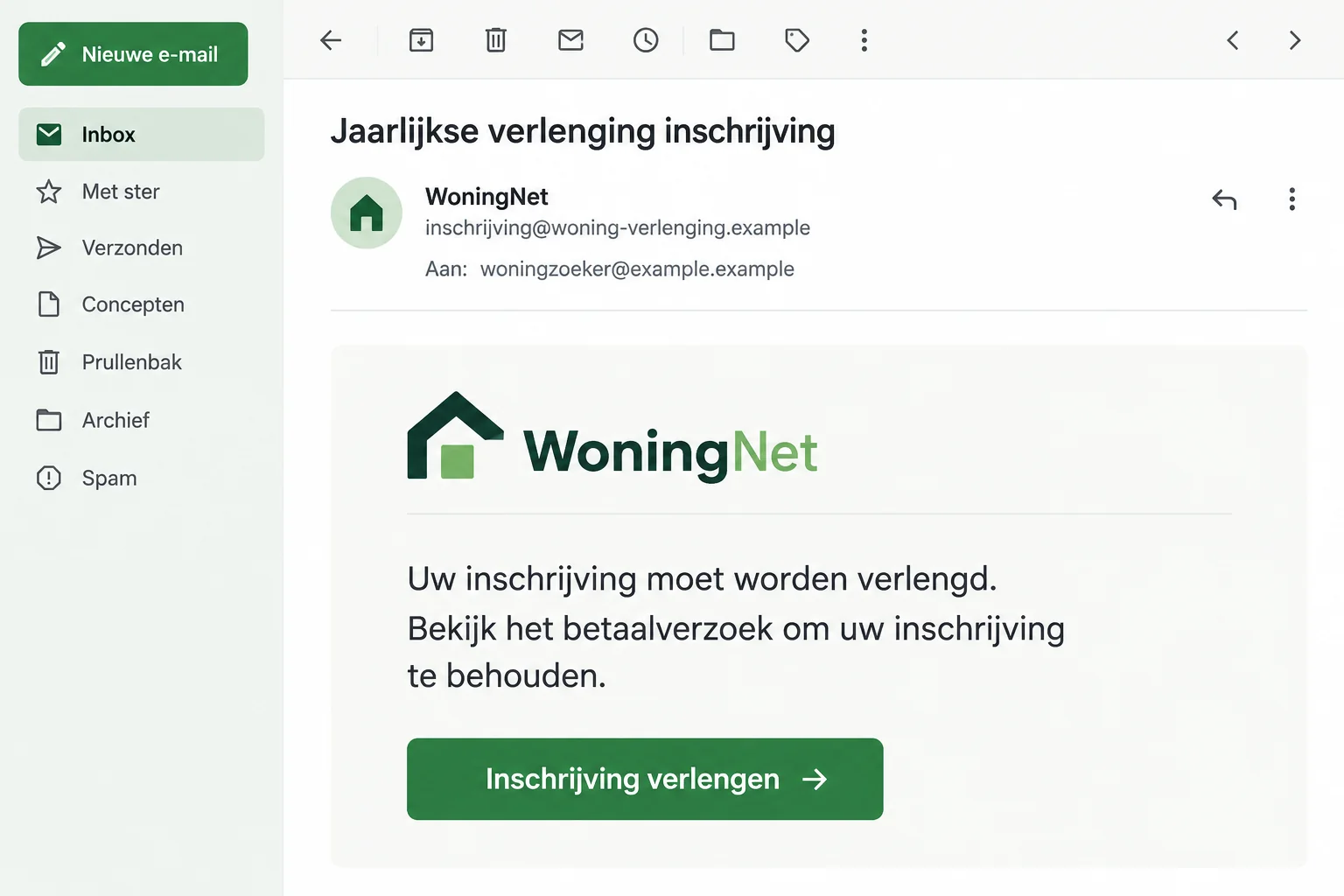
False messages ask for renewal fees through a supplied route. Some claim that failing to act will end your registration.
This is confirmed phishing, not a complaint about housing allocation. WoningNet’s official DĀK platform warns about impostor messages, while housing partners have issued their own alerts.
A real service name doesn’t validate a payment link
WoningNet and DĀK refer to a legitimate housing platform. Their names are being used to make an unrelated demand feel connected to your account.
The platform disowns payment requests containing links in the message text and payment demands by SMS. It directs exposed recipients toward their bank.
Check these details before treating a renewal request as yours:
- The actual region and service where you hold a registration.
- Your independently accessed account status and genuine notices.
- Any real renewal terms that apply to that registration.
- The payment method confirmed by the regional service, not the email’s button.
Don’t let a fake deadline erase the real account check
Leave the unexpected payment link alone and check the genuine regional account. A phishing warning is not a reason to ignore legitimate registration requirements.
The illustration uses fictional sender information and sample text. It does not reproduce an original message or establish a universal renewal fee.
Why a Small Fee Can Carry a Large Threat
Someone waiting for housing may care much more about preserving their registration than about the amount requested. A modest charge can therefore feel easy to justify.
The sender benefits from that imbalance. Paying appears to protect something important, while checking first feels like risking a missed deadline.
Don’t accept that choice as the only one. You can verify your genuine account without paying the person who sent the warning.
A false email does not decide your actual registration status. The real service’s records and rules are what need checking.
Equally, a scammer can imitate a task that sometimes exists legitimately. A real renewal charge elsewhere doesn’t authenticate this particular message.
Don’t rely on someone saying housing registration is always free. Open your own regional account and check the rules that actually apply to you.
Keep the question practical: where are you registered, what does that account show, and how does the genuine service tell you to handle payment?
How the WoningNet Renewal Email Scam Works
Step 1: The message presents a renewal as unfinished business
The sender uses the housing platform’s identity and asks for a fee. That creates the impression that an existing registration needs administrative attention.
You may recognize the brand without recognizing the invoice. Don’t let the familiar name fill in the missing connection to your actual regional account.
Housing association Vecht en Omstreken has confirmed false WoningNet/DĀK renewal emails and cautioned recipients against paying through them.
Step 2: A threatened registration deadline discourages checking
Fraudehelpdesk’s archived false renewal email says registration will stop unless the recipient renews. Its invoice and deadline are part of the deception.
A reference number can make that threat look specific. It still needs to match a genuine account record outside the email.
Don’t assume the sender knows your place in a housing process. A broadly distributed notice may reach someone who already worries about missing an important update.
If you recently changed address or region, find your original records. The email’s confidence is not evidence that it understands your circumstances.
Step 3: The supplied route becomes a supposed account check
The payment instruction draws you away from the regional service you would normally use. A familiar-looking page can make that detour seem legitimate.
Read the address rather than relying on the page’s heading. A housing logo and login fields don’t establish who controls the website.
Do not enter credentials just to find out whether the invoice exists. Use your established account route for that check.
If you cannot remember the correct region, start at the official platform’s directory. Don’t let the suspicious message choose a replacement service for you.
Step 4: The fee or submitted information creates the exposure
The false renewal request can lead to a payment, a disclosure, or both. What you actually did determines which protections matter afterward.
A familiar payment method doesn’t establish that the money reaches the housing service. Confirm the recipient and purpose before any authorization.
If a login was involved, tell the genuine platform about it. Even without a transfer, exposed access can require attention.
No single final banking screen is established for every version. Avoid assuming the outcome from the email alone or treating every recipient as already financially compromised.
Check the Right Region Before Making Any Decision
Find the account you originally registered
Locate your own registration confirmation, trusted bookmark, or app. Match the regional service rather than signing into the first page that displays a familiar name.
The official DĀK directory lists regional routes. Use it to reach the appropriate service if your saved information is unclear.
Once inside the genuine account, review the registration status and any real renewal notice. Check the period and reference, not only the amount.
Keep the registration date and any available renewal confirmation with your own records. Those documents can help explain your situation without relying on the false email.
If the message names no region, don’t supply one merely to continue its process. Establish which real service holds the account first.
If it names the wrong region, preserve that mismatch for support. Don’t assume the platform transferred your registration just because the sender presents a different route.
When your contact details changed recently, check the genuine account’s communication settings. Correcting an old email address there is different from confirming details to an impostor.
If you discover a real missed notice, ask support how to address it. A coincidental account problem doesn’t make the phishing payment request acceptable.
Keep any genuine payment confirmation after resolving the issue. It should match the regional account and service, not just a receipt carrying the familiar brand name.
If you hold more than one registration, assess them separately. A genuine requirement in one region doesn’t confirm an unexplained request about another.
Ask about a real deadline without using the false one
If the account shows something requiring attention, follow the regional service’s verified instructions. Don’t switch back to the email because its button appears easier.
If you cannot find a notice, contact genuine support and ask about your specific account. Keep the suspicious message available to describe the mismatch.
Tell support whether you’re checking a possible renewal or reporting exposed access. Those are different tasks and may require different help.
Don’t assume the absence of a matching notice guarantees there is never a fee. Resolve the individual question with the service that holds your registration.
Preserve the registration, not the scammer’s instructions
Keep genuine account documents and any confirmation of payment or renewal. They give you an independent record when a later message makes another claim.
If a real account detail is wrong, correct it through the proper service. Avoid sending documents to an unknown address claiming it can fix your registration.
A helper should assist you in finding the official route, not request your password or security code. Keep control of the account yourself.
For a support conversation, prepare your actual region and registration reference. Don’t substitute the invoice number invented by the unexpected sender.
What a False Renewal Email Doesn’t Prove
Receiving the message doesn’t establish that the housing platform leaked your information. The confirmed fact is misuse of its identity.
Nor does it mean your registration has already been deleted. Check the genuine record rather than treating the sender’s threat as an account-status report.
If you paid the impostor, don’t assume the real service received the fee. A bank receipt and a genuine housing-account receipt answer different questions.
Likewise, don’t accuse a business named in a suspicious footer without further evidence. Copied correspondence can contain unrelated details that don’t identify the person controlling it.
Those distinctions don’t weaken the warning. They keep the focus on the documented false request and the actions that can protect your money and registration.
What to Do if You Have Fallen Victim to This Scam
-
Stop following the renewal link. Close the page and don’t submit another payment, document, or code to complete or cancel the request.
If the sender claims your registration will disappear while you check, verify that directly with the real service rather than paying under pressure.
-
Tell your bank about a payment or banking disclosure. Use a trusted bank contact and explain that a fake housing-renewal message led to the interaction.
Give the recipient, amount, transaction reference, and time from your actual banking record. Describe any codes or approvals separately.
Ask what protective or recovery steps remain available. Don’t assume a small renewal-sized transfer will automatically be refunded.
-
Protect the housing login if you entered it. Use the authentic regional service to secure access and ask support about any unfamiliar account changes.
Check contact information and registration details rather than stopping after the sign-in works again. Report anything you don’t recognize.
If the same password was used elsewhere, replace those copies. Protect the email account too if its access was exposed.
-
Confirm the real registration position. Ask the regional service whether any legitimate action remains due and follow its own payment instructions if applicable.
Keep the fraud report separate from resolving a genuine requirement. Paying an impostor does not necessarily preserve or renew the real registration.
-
Save the false request and your response. Retain the original email or SMS, destination information, relevant screenshots, payment evidence, and follow-up messages.
Record which fields you completed. Don’t include live passwords, codes, income documents, or unredacted identity information in a public warning.
-
Report the impersonation through official channels. The platform lists valse-email@woningnet.nl for information about phishing using its name.
Use genuine regional support for your individual registration question. A general phishing specimen report may not receive a personal account response.
Fraudehelpdesk can advise about fraud exposure, and an actual financial crime may also need a police report. Keep references from each organization.
-
Review device exposure where relevant. If the page introduced an unfamiliar program or remote-control request, pause banking on that device while you investigate the change.
Malwarebytes can help examine unwanted applications. AdGuard may reduce malicious advertising and redirects, but neither restores transferred money or fixes a compromised housing account.
Reading a renewal email alone is not proof of infection. Avoid paying someone who turns that fear into an unsolicited cleanup offer.
Keep Housing Paperwork Out of an Unverified Conversation
Housing searches can involve sensitive documents. Don’t upload identification, income records, or other paperwork merely because a supposed renewal page adds another requirement.
If genuine support needs documents, establish the appropriate secure route first. An email reply to the suspicious sender is not that route.
If you already shared documents, list exactly what was provided and seek specific advice. An identity-document disclosure is different from an email address alone.
For a relative or friend, help find their real regional account without taking over their credentials. Let them understand and approve the legitimate action themselves.
Don’t make a second registration on an unfamiliar site to replace one you fear was lost. Check the existing record before creating more exposure or confusion.
After resolving the issue, keep the verified account address and support reference accessible. A future renewal question should start with those records.
Frequently Asked Questions
Are WoningNet renewal scam messages confirmed?
Yes. The official platform, housing partners, and Fraudehelpdesk warn about false renewal requests. The genuine housing service is the organization being impersonated.
Does this mean every regional renewal fee is fake?
No. Check your own registration and applicable regional rules. The scam warning concerns false messages and payment routes, not a universal statement about all fees.
Will the email’s deadline cancel my registration?
The impostor’s claim doesn’t establish your account status. Review the genuine regional record and ask official support about any real action required.
What if I paid but the real account still needs renewal?
Report the false transaction to your bank and resolve the actual registration with the genuine service. Don’t assume the fraudulent payment reached the intended organization.
Should I send housing documents to prove who I am?
Not to an unexpected sender or its page. Establish the genuine service and appropriate document route before disclosing sensitive registration paperwork.
Does receiving the message mean my account was hacked?
No. Receipt alone doesn’t prove account access or a platform breach. If you entered credentials, report that specific exposure and secure the affected account.
The Bottom Line
Do not pay a WoningNet or DĀK renewal demand through an unexpected message link. Check the authentic regional account and follow only its verified instructions.
If you already paid or exposed access, contact your bank and the genuine housing service. Protect the actual registration instead of continuing the impostor’s renewal process.

Join the discussion
0 commentsShare your experience or ask a question about this article.
Discussion
Start the conversation
Have a question or something useful to share? Add the first comment.