


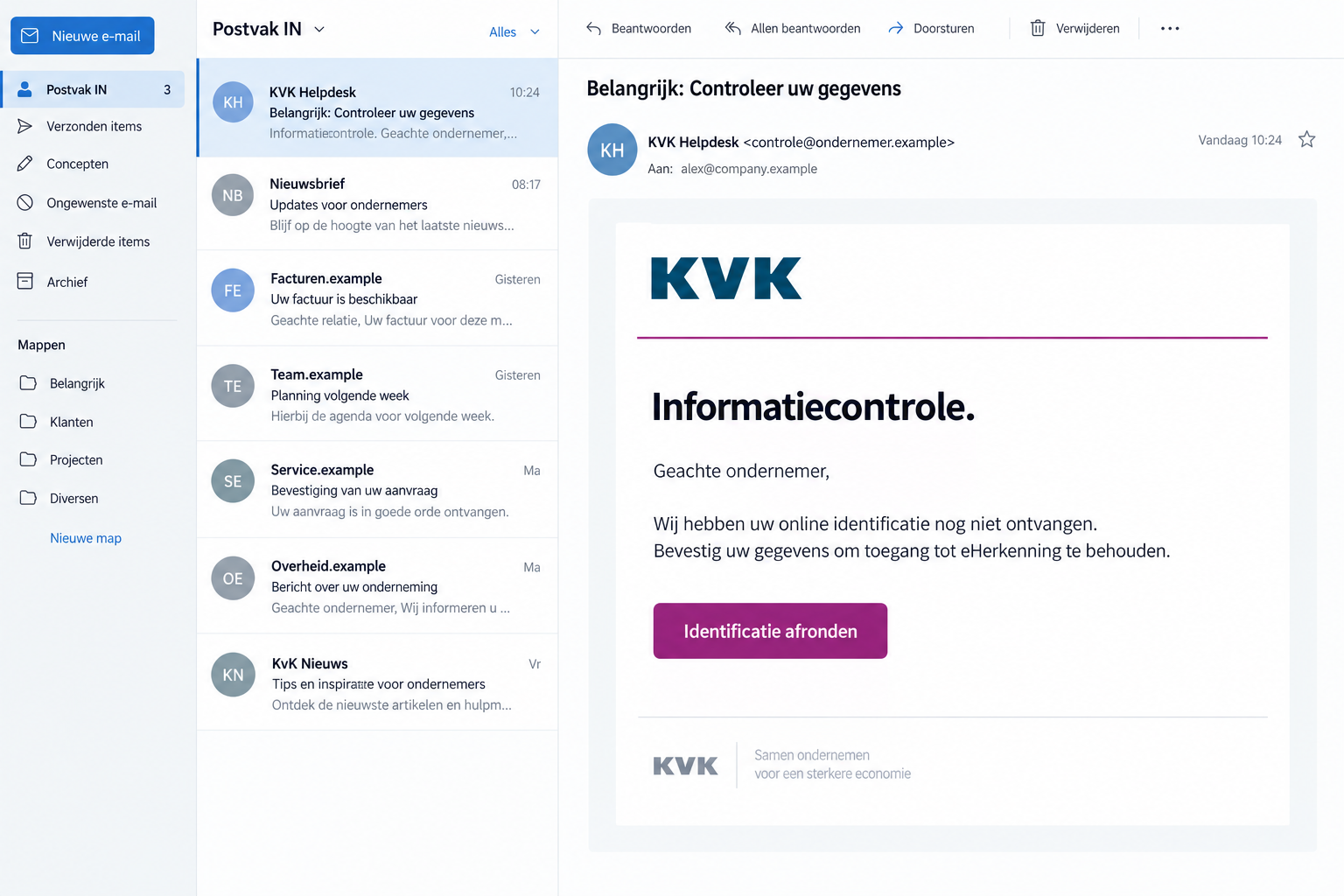
A KVK email says your business identification is incomplete. There’s a deadline, a verification button, and a warning about losing access to essential services.
For someone running a company, that sounds like a task to finish before lunch. But who is actually waiting on the other side?
Overview
A Routine Business Check Becomes an Urgent Demand
The KVK verification email scam impersonates the Dutch Chamber of Commerce. It turns familiar administrative language into a reason to submit information through an unsolicited link.
One false message says online identification is missing and connects the deadline to eHerkenning access. That combination can make a small business owner stop everything.
The email presents the task as a quick fix, not a purchase. You aren’t being invited to consider an offer, only to complete supposedly overdue paperwork.
That matters because people scrutinize unexpected spending more closely than routine administration. A verification request can bypass the caution they would apply to a sales pitch.
KVK Warns About Fake Forms and Follow-Up Bank Calls
Fraudehelpdesk records the eHerkenning-themed message as a false email. Another example invokes business-register verification and warns that an unverified registration could be misused.
The changing wording doesn’t make these legitimate instructions. It shows that the administrative pretext can be repackaged while the request for information remains.
KVK itself warns that fake forms collect details. Its guidance also describes a dangerous follow-up: callers pretending to represent a bank after someone submits information.
KVK and eHerkenning are genuine services. The false email borrows their names; it does not show what either service has decided about your account.
What to Check Before You Respond
- A claim that missing identification will interrupt eHerkenning access.
- A button directing you to a verification page you didn’t independently locate.
- Official-sounding registration references that cannot be matched through your normal business account.
- A later caller who uses submitted details to sound familiar.
- Instructions to install an app, authorize a transfer, or follow another link to resolve the supposed problem.
The illustrated message above recreates the kind of request involved. Its example addresses are fictional; the confirmation comes from the published warnings, not the illustration.
Not every version asks for the same fields or leads to the same second contact. Treat the initial data request and any subsequent banking instructions separately.
You don’t need to solve who owns the fake website before protecting yourself. The practical question is whether KVK authorized the task through a trustworthy route.
Why This Message Fits a Busy Workday
Business owners routinely receive notices about registrations, access permissions, invoices, taxes, and supplier records. A message that resembles another administrative reminder can disappear into that workload.
The lure is especially awkward when several people share responsibility. An assistant may assume the owner requested verification; the owner may assume the accountant missed it.
Neither assumption confirms the sender. Before assigning the task, establish who initiated it and whether a matching request exists outside the email.
Words about identification can also sound more serious than they are. A scammer doesn’t need a long explanation when a short deadline suggests business disruption.
A reference number adds the appearance of a tracked case. Unless it matches an independently checked record, it is simply another piece of text.
The mention of eHerkenning introduces a second trusted name. Recognizing both names can feel reassuring, even though neither has authenticated this particular message.
If your actual login still works, don’t use that fact to negotiate with the sender. Check any alleged access problem through your established provider or official account.
If it doesn’t work, the timing still doesn’t validate the email. A genuine login problem and a fraudulent message can occur around the same time.
Ask a colleague to verify the administrative issue without forwarding an active button as an instruction. A brief pause is less costly than exposing business credentials.
How the KVK Verification Email Scam Works
Step 1: The Email Creates a Registration Problem
The opening tells you something is incomplete, outdated, or unverified. Rather than proving that problem, it presents the sender’s claim as an established fact.
In the eHerkenning example, the supposed missing item is online identification. The promised reward is continued access once you complete the requested action.
Another false email uses the authority of registration law. The language gives the request weight without making its link an official government service.
These are different versions of the opening, not evidence that every recipient faces one universal deadline or obligation.
Step 2: A Verification Button Moves You Away From Trusted Access
The message offers a convenient path to finish the task. That path is precisely what needs checking, not a shortcut you should trust automatically.
A button can display ordinary words while pointing elsewhere. The destination, rather than the button label, determines which website receives information you enter.
Copied branding can make the next page feel continuous with the email. It doesn’t prove that the chamber or your login provider controls the form.
Don’t complete a test submission using made-up business information. Visiting or interacting further serves no useful purpose once you recognize the impersonation.
Someone checking for you should likewise use their own trusted account route. Having two people follow the same false link doesn’t produce independent verification.
Step 3: The Form Collects Information Under a Legitimate-Sounding Pretext
Once you submit the form, the stranger behind it has information you meant to give KVK. Its warning identifies data collection through counterfeit forms.
A name and phone number are useful even without a bank password. They can help a later caller refer to your business and recent verification attempt.
That caller may seem unusually informed because you supplied the missing context. Familiar details establish knowledge, not authority to act on your accounts.
The exact fields depend on the version. Don’t assume a form is harmless because it stops short of asking for card numbers.
If you already submitted it, write down what you entered. That inventory helps you prioritize the accounts and people that need attention.
Step 4: A Follow-Up Caller May Turn the Data Into a Banking Emergency
KVK describes follow-up bank impersonation, including requests to download applications, click links, or transfer money.
This stage is not guaranteed after every email. It is a documented risk worth understanding before a convincing caller reaches you.
The story may change from registration to account security. That shift tries to make a new demand feel like the natural continuation of an earlier task.
You can stop the conversation even after answering questions. There is no obligation to finish a process simply because you started it.
Call your bank through an established number instead. Do not let the person who created the alarm choose the channel through which it gets resolved.
Checks That Separate KVK From the Impersonator
A Sender Name Is Not a Verified Identity
Expand the sender details rather than reading only the display name. A label such as KVK Helpdesk can be typed into an ordinary email account.
Even a plausible address is not enough. KVK warns about spoofing, so your decision should not rest solely on whether the visible email appears familiar.
Likewise, avoid a simplistic rule that every contracted service address is fake. KVK lists legitimate external research senders alongside its own domains.
Compare the request itself with the institution’s guidance. A threatening instruction can be false even when the message has polished formatting.
Check Your Business Record Without the Email
Go to kvk.nl yourself and navigate to Mijn KVK. Use that route to inspect your registration, rather than treating an emailed form as the register.
KVK says it doesn’t threaten by email or SMS to withdraw your number or stop registration. It also doesn’t send linked SMS or WhatsApp messages.
Don’t confuse that warning with permission to ignore genuine business responsibilities. If your details need changing, handle the change through the authentic service.
For an eHerkenning issue, consult the provider relationship you already use. A stranger’s claim about access is not a replacement for provider support.
Read the Banking Request as a Separate Event
A person who knows your company name still needs independent authentication. The earlier email gives them no special standing with your bank.
Compare each requested action with what it actually authorizes. A transfer moves money; installing software gives a program access; a login code completes a sign-in.
Those actions do not become safe because the caller calls them verification. Use the meaning shown by your real app, not the person’s explanation.
If a caller prevents you from checking independently, end the call. You can investigate a real account issue without staying connected to an unverified person.
Keep the Incident From Becoming an Office-Wide Problem
When a shared mailbox receives the request, tell colleagues which message is false. Otherwise another person may process it after you have stopped.
Remove it from active task queues after preserving evidence. A phishing email saved as an unfinished compliance task can be reopened days later.
If credentials were entered, identify their actual scope. A personal mailbox password and an administrative business login expose different systems and require different owners.
Ask your account administrator to check recent access and permissions where applicable. Don’t assume changing one password automatically closes every existing session.
If only a telephone number was shared, the immediate task is different: prepare staff for follow-up impersonation and reject instructions delivered through unsolicited calls.
Keep the explanation practical. Colleagues need the subject line, approximate arrival time, and prohibited action, not a frightening claim that every company system is compromised.
Use a second channel for sensitive approvals. An instruction to move money should be checked with a known person using previously established contact details.
Small firms can do this without elaborate software. Agree who approves payments and who verifies unfamiliar government requests before anyone fills out a form.
That procedure also protects someone covering for an absent colleague. They can follow an agreed check instead of guessing how urgent the email really is.
What to Do if You Have Fallen Victim to This Scam
-
Stop the verification and any follow-up conversation. Close the false form. Refuse new instructions even if the sender says your unfinished submission caused another problem.
Do not send additional details to correct earlier entries. That gives the same unverified recipient a more complete record.
-
List what you actually disclosed. Separate contact information, passwords, identification documents, bank details, and approvals. Note which account each password belongs to.
Record the approximate times of submission and any later calls. An accurate sequence is more useful than assuming everything on your computer was exposed.
-
Secure affected accounts through their real services. Change exposed passwords, replace reused versions, review recovery details, and revoke unfamiliar sessions where the provider offers that option.
Enable multifactor authentication when available. If business access is administered centrally, contact the administrator rather than changing unrelated permissions yourself.
-
Contact your bank if banking information or approvals were involved. Explain the fake KVK form and any caller instructions, including transfers you personally confirmed.
Ask what can be blocked, investigated, or recalled. Provide transaction references; recovery depends on the payment and timing, not the scammer’s refund promise.
-
Report the message to KVK. Its published address is valse-email@kvk.nl. Send the suspicious email as an attachment when practical, preserving sender and link information.
Use reporting tools inside your email service too. Keep a private copy if money was lost or account access was affected.
-
Review the device only if your interaction warrants it. If you downloaded an application or opened an unexpected file, scan with Malwarebytes.
If browsing produced redirects or deceptive pop-ups, AdGuard can provide an additional blocking layer. Neither tool retracts submitted information or reverses a transfer.
-
Warn the people who could receive the next approach. Include your accountant, payment approver, or shared-mailbox colleagues when the exposed details relate to their work.
Tell them to independently check callers claiming a banking emergency. Avoid circulating unredacted identification or passwords while explaining the incident.
-
Decline paid recovery offers from strangers. Someone promising to restore stolen funds or fix KVK access may be exploiting the same anxiety again.
Work through your bank, the relevant account provider, and official reporting channels. Never send another payment to prove you qualify for help.
Frequently Asked Questions
Is KVK Itself Running This Scam?
No. The scammer is impersonating KVK. The real chamber publishes warnings and checking guidance; its name appearing in a message does not authenticate the sender.
Does the Email Mean My eHerkenning Access Is About to End?
Not on its own. Check your actual access with your established provider. The false email’s deadline is not evidence of an account restriction.
What if I Only Entered My Name and Phone Number?
Be alert for informed follow-up calls. You may not need a bank-password reset unless credentials were exposed, but personal details can support another impersonation attempt.
Can a Bank Caller Know About the KVK Form?
Yes. KVK warns that scammers may call after data submission. Knowledge of the form is a reason to verify independently, not proof of a genuine bank employee.
Is a Plausible Email Address Enough to Trust It?
No. Display names and addresses can be misleading. Confirm the task through your existing account or official support instead of relying on the email’s appearance.
Should I Keep Clicking Until I Understand the Whole Website?
No. Further interaction adds risk without helping your registration. Preserve what you already have, leave the site, and use KVK’s reporting route.
The Bottom Line
Do not complete verification through the fake KVK email. Check registration or access independently; the message’s administrative language does not make its form official.
If you submitted information, secure the affected accounts and prepare for follow-up bank impersonation. Contact your bank immediately if money or banking access was involved.

Join the discussion
0 commentsShare your experience or ask a question about this article.
Discussion
Start the conversation
Have a question or something useful to share? Add the first comment.