

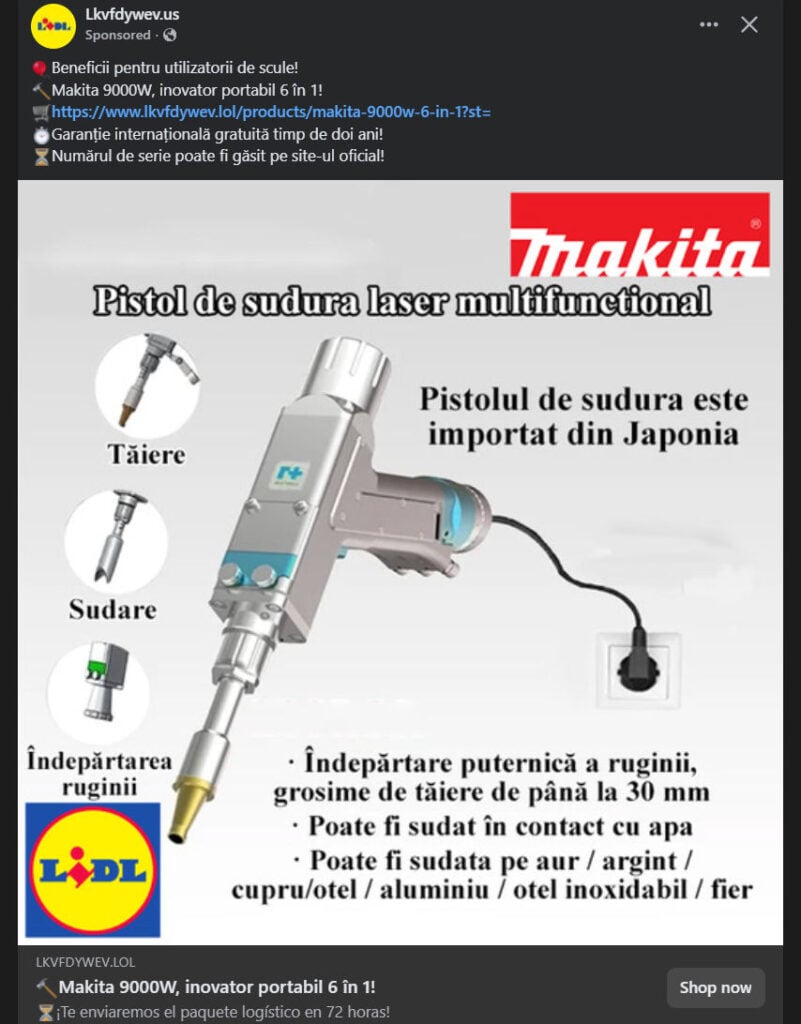
If you’ve seen a social media ad offering an “Innovative Makita 9000W 6 in 1 Portable Welding Gun” through what appears to be a LIDL promotion, stop right there. This is not a groundbreaking tool innovation from a trusted brand. It’s a sophisticated scam that is already tricking thousands of unsuspecting buyers across Facebook, Instagram, and other platforms. Here’s everything you need to know about the LIDL Makita welding gun scam, how it works, and how to protect yourself from becoming a victim.
Scam Overview
The LIDL Makita 9000W 6 in 1 Portable Welding Gun Scam is a deceptive online scheme that falsely advertises a powerful, multifunctional laser welding tool. It often appears in ads under domains like .lol, .shop, .xyz, or .store, and falsely uses brand names like Makita and LIDL to appear credible. The ads claim this product can weld, cut, clean, and remove rust with laser precision, all for a price as low as $49.90. It sounds like an amazing deal. But there’s a catch — the product is either never delivered or is a worthless toy-like item that does not remotely resemble the advertised tool.
The fake listings often include fabricated specifications such as “9000W power,” “Made in Japan,” and “Multifunctional 6 in 1 Technology,” none of which are supported by Makita or any real tool manufacturers. To further mislead consumers, the scammers include fake safety certifications, use fake LIDL logos, and show images of the product supposedly in use.
These fraudulent stores go a step further by promising free safety glasses, fast delivery (within 72 hours), and international warranties. However, none of this is real. Once you place an order, you either receive nothing or a substandard item that cannot perform any of the described functions. The lack of a real company address, absence of phone support, and a fake or non-responsive email are all indicators of fraud.
The websites typically disappear after a few weeks, only to reappear under a different domain name. The cycle continues, targeting new victims with cloned content and slightly reworded ads.
In many cases, these scams use automated translation tools to localize content into Romanian, Spanish, or other languages, leading to poorly written or awkward product descriptions — another red flag for shoppers.
Many users believe the scam is legitimate due to the recognizable Makita and LIDL branding, high-quality graphics, and paid placement on trusted platforms like Facebook. However, both Makita and LIDL have no association with these ads or products.
How the Scam Works
1. Scammers Create a Fake Website
They begin by registering a domain like “makita-9000w.lol” or something similar. These domains are cheap, fast to create, and often anonymized through privacy protection services.
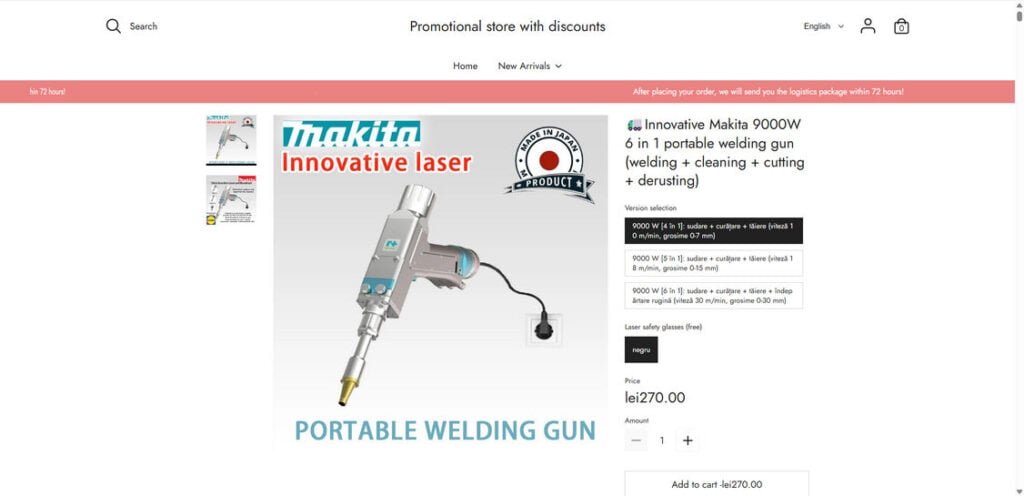
2. They Design a Fake Product Page
Using stock images, 3D renderings, and plagiarized text, the scammers build a landing page that looks somewhat convincing. They replicate legitimate store formats and sprinkle in logos like “Makita,” “Made in Japan,” or “LIDL” to build trust.
3. They Launch Paid Social Media Ads
Ads are pushed through Facebook and Instagram to reach tool enthusiasts, welders, mechanics, or hobbyists. The ads highlight impossible specs (9000W power, multifunctional capabilities) and limited-time discounts to pressure buyers into acting fast.
4. Shoppers Are Redirected to the Scam Store
Clicking the ad takes users to the fake site. A fake inventory counter or ticking clock may be shown to create urgency. Payment is typically collected via credit or debit card. Secure platforms like PayPal are rarely accepted.
5. Confirmation Email Sent
Once the payment goes through, the victim receives a basic confirmation email with vague details. No real tracking or order number is provided.
6. Victim Waits for Delivery
Weeks pass. In most cases, the buyer receives nothing. If something does arrive, it’s usually a cheap plastic item or toy that is worthless.
7. No Support or Refund
When customers try to contact support, their emails are ignored or bounce back. The website eventually goes offline, leaving the victim with no recourse.
8. Scammers Start Over
After complaints increase or the payment processor cuts them off, scammers close the site and start a new one with a different domain, targeting a new group of potential buyers.
What to Do If You’ve Fallen Victim to the Scam
- Contact Your Bank or Credit Card Provider Immediately
Request a chargeback or dispute the transaction. Credit card companies usually have buyer protection policies. - Report the Scam Website
Report the site to Google Safe Browsing, your browser (Chrome, Firefox, etc.), and social media platforms where the ad appeared. - Monitor Your Bank Account
Watch for any suspicious activity. Some scammers store your payment details for future unauthorized use. - Change Your Passwords
If you created an account on the fake site using your common email/password combination, change your passwords across all accounts. - File a Report With Cybercrime Authorities
Use national platforms such as the FBI’s IC3 (if in the US), the UK’s Action Fraud, or your local consumer protection agency. - Warn Others
Leave reviews, post on forums, or use social media to alert others. Visibility is key to reducing future victims. - Enable Two-Factor Authentication
Add extra protection to your email and bank accounts in case your data was compromised. - Check Scam Reporting Websites
Sites like Scamwatch, Trustpilot, and Reddit often have threads that track active scams. Share your experience.
Frequently Asked Questions About the LIDL Makita 9000W Scam
1. Is the Makita 9000W 6 in 1 Welding Gun real?
No, the product being advertised in these scam ads does not exist. Makita has never manufactured or sold a 9000W laser welding gun. The product is completely fake.
2. Does LIDL sell Makita tools?
While LIDL occasionally sells tools, they do not officially partner with Makita for products like the 9000W welding gun. Any use of LIDL’s branding in these ads is unauthorized and deceptive.
3. Why do the scam websites look professional?
Scammers use stolen content, brand logos, and website templates that mimic legitimate e-commerce stores. The appearance of professionalism is part of the deception.
4. How can I recognize this scam?
Watch for unrealistic pricing, overly broad claims (like 6-in-1 capabilities), fake urgency, poor grammar, and untraceable contact information. Domain names often include unusual endings like .lol or .shop.
5. What should I do if I already bought the product?
Contact your credit card provider to dispute the charge, report the site, monitor your accounts, and change passwords if necessary. Also, file an official complaint with cybercrime agencies.
6. Can I get a refund?
If you paid via credit card, you might be able to initiate a chargeback. Debit cards have fewer protections, and wire transfers are nearly impossible to reverse.
7. Why do scammers use social media platforms?
Social platforms like Facebook and Instagram allow cheap, targeted ads. Scammers use these to reach large audiences quickly, often using AI to localize their content across different countries.
8. Are there any real versions of this tool?
No professional-grade welding tool with these features exists at this price. Any high-powered multifunctional laser welder would cost thousands of dollars and be sold through official industrial suppliers.
9. What happens if I try to contact the store?
Scam websites typically list a fake or unmonitored email address. Most buyers report no response at all. Phone numbers and physical addresses are usually missing or fake.
10. Can I report the scam to LIDL or Makita?
Yes. Both companies encourage reporting misuse of their brand names. You can contact their official customer service teams to share details about the scam.
The Bottom Line
The LIDL Makita 9000W 6 in 1 Portable Welding Gun is not real. It’s a well-crafted scam targeting bargain hunters, tool enthusiasts, and unsuspecting buyers. Always research unfamiliar websites, be skeptical of deals that sound too good to be true, and never trust ads based solely on brand names or logos. Real tools from trusted brands are never sold this way. Stay informed, stay cautious, and always verify before you buy.

Join the discussion
0 commentsShare your experience or ask a question about this article.
Discussion
Start the conversation
Have a question or something useful to share? Add the first comment.