


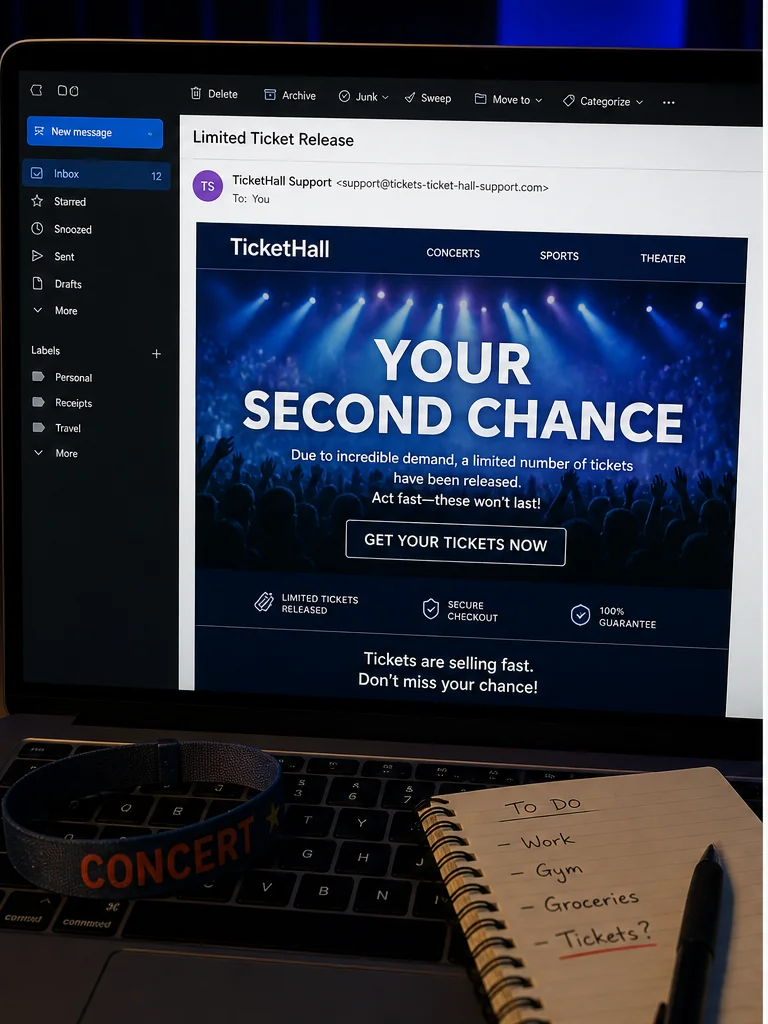
The sold-out concert suddenly has two seats available. An email says they are being held for only a few minutes, and the sender looks close enough to Ticketmaster that a fan may click before reading the full address.
That second chance can be manufactured from beginning to end. The Ticketmaster limited ticket release email scam combines copied branding, false scarcity, fake transfer screens, and unusual payment demands to sell tickets the sender does not control.
Overview
The message arrives when demand is already emotional
Campaigns have targeted people searching for Taylor Swift, Coldplay, and other sold-out events. Fans who missed an official sale are primed to believe that production holds, cancelled orders, or last-minute releases could create a rare second opportunity.
Scammers do not need to know every recipient's plans. A broad message sent during a major tour can reach enough interested people, while social posts and resale conversations provide more targeted leads.
A convincing email is not proof that tickets exist
The message may copy Ticketmaster colors, order language, seat maps, barcode graphics, and transfer instructions. Sender names are easy to fake, and a lookalike domain can differ from the real one by only a hyphen or extra word.
Screenshots and PDFs are equally weak evidence. A scammer can copy a genuine ticket image, alter seat details, or show a transfer screen that never connects to the official ticketing system.
Payment friction reveals the real objective
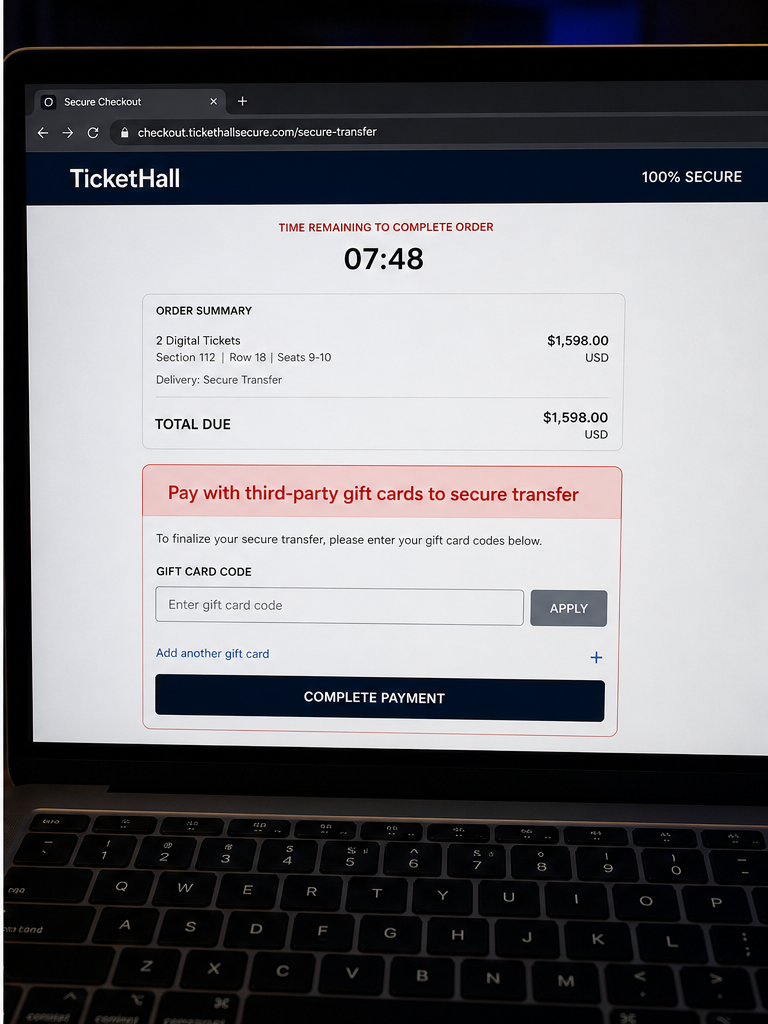
A fake seller may demand gift cards, wire funds, cryptocurrency, an off-platform payment app, or a supposed transfer fee. The urgency shifts attention from ticket ownership to completing payment before the timer expires.
Ticketmaster states that it will not ask buyers to use third-party gift cards or wire funds for tickets and does not charge a name-change or ticket-transfer fee. Those requests are not alternative checkout methods. They are decisive scam indicators.
- A fan receives a surprise second-chance or limited-release email.
- The sender name looks official while the full domain does not.
- A timer and sold-out event create intense pressure.
- Fake tickets, seats, or transfer screens supply visual proof.
- Payment is pushed outside the official ticket platform.
- The seller demands gift cards, a wire, crypto, or a transfer fee.
Why Ticket Scams Defeat Ordinary Skepticism
Concert tickets are scarce, emotional, and time-sensitive. A fan is not simply buying a barcode. They are trying to preserve travel plans, a family gift, or an experience that may not return soon.
Real ticketing systems also send emails about presales, transfers, waitlists, and schedule changes. That normal communication gives scammers a realistic template and makes an unexpected message less obviously out of place.
The seller may appear helpful rather than aggressive. They answer questions, send screen recordings, show identification, or offer to transfer the tickets before full payment. Every one of those items can be stolen, edited, or reversed.
A genuine Ticket Transfer should end inside the recipient's official account. Ticketmaster explains that accepted transferred tickets appear under My Tickets and receive a new barcode, while the sender's ticket becomes invalid.
The address bar and account are stronger evidence than the email body. Open the ticket platform from a saved bookmark or official app, not from the message. If the seats do not exist there, the beautiful email has no value.
The Checks That Separate a Transfer from a Trap
Ticketmaster's published scam guidance provides several bright lines. It says the company will never request an Amazon, iTunes, or other third-party gift card for tickets, never ask for a wire payment, and never charge for a name change or transfer.
Ticketmaster also provides spoof@ticketmaster.com for suspicious messages and advises customers to use official support. Search-engine results can contain fake support numbers, so the correct contact route should be opened from Ticketmaster's own website.
A real transfer does not require the recipient to pay Ticketmaster to accept it. The recipient signs in with the same email used for the transfer and checks My Tickets. A scam page that adds a release, insurance, name-change, or activation fee is inventing friction.
High-quality screenshots cannot answer whether a barcode is unique, active, transferable, and owned by the seller. Only the platform controlling entry can establish those facts. Even a genuine ticket image can be sold to several victims.
For resale, use the platform's approved marketplace or a payment method with meaningful buyer protection. A stranger who insists that protection is unnecessary because the tickets are already visible is asking the image to replace the transaction safeguards.
How the Ticketmaster Limited Ticket Release Email Scam Works
Step 1: The scam targets a sold-out event
The sender chooses an artist, match, or festival with intense demand. Public tour dates, fan groups, resale posts, and leaked contact lists make it easier to reach people who are actively searching.
The subject line says limited release, second chance, production hold, verified-fan access, or transfer pending. Each phrase borrows a real ticketing concept.
Step 2: A lookalike sender copies Ticketmaster
The display name may say Ticketmaster Support even though the address ends in an unrelated domain. Logos, legal footers, and a professional layout make the center of the message look more important than the sender line.
Hover over links on a computer or inspect them without opening. A real-looking path written in the email can point somewhere entirely different.
Step 3: Scarcity leaves no time for verification
The email claims the seats will return to the queue in 5 or 10 minutes. A countdown can restart when the page reloads, revealing that it is a pressure device rather than a live inventory hold.
The recipient is encouraged to act alone and quickly. That prevents a call to the venue, a check inside the app, or a conversation with another fan who might notice the domain.
Step 4: Fake visual evidence proves a ticket that does not exist
The page shows a seat section, row, order number, moving barcode, or transfer status. A seller in a direct conversation may send video of an account or a government ID.
Those elements can be copied from a real customer, assembled in a browser mockup, or displayed from a compromised account. The proof is whether the transfer completes inside the recipient's official account.
Step 5: Payment moves outside the protected platform
The seller says official checkout is unavailable, too slow, or subject to extra tax. They request a payment app transfer, cryptocurrency, wire, or a method marked for friends and family.
Off-platform payment separates the money from the promised ticket. If the seller vanishes, there may be no marketplace record and little buyer protection.
Step 6: A gift card or transfer fee appears
Some pages instruct the buyer to purchase gift cards and enter the codes. Others ask for a name-change, release, activation, or insurance fee after the first payment.
Ticketmaster's own guidance rejects these requests. Gift card codes can be redeemed immediately and are difficult to recover, while another fee simply tests whether the victim will keep paying.
Step 7: The scam expands into account theft or recovery fraud
A fake acceptance page can collect the Ticketmaster and email password. With email access, criminals may steal genuine tickets, reset accounts, and use the victim's contacts for more fraud.
After the loss, another person may promise replacement tickets or recovery for an advance fee. That follow-up uses the same urgency and insider language as the original scam.
Company, Address, and Fulfillment Red Flags
Ticketmaster is the impersonated platform
The sender, social seller, fake checkout, and payment recipient may have no connection with Ticketmaster. Verify the transaction by opening Ticketmaster.com or the official app independently and checking the account.
A display name is not a legal identity. Preserve the full sender domain, reply-to address, link destination, payment account, and name on any receipt.
The address may belong to a money mule or mailbox
A payment profile, wire recipient, or seller ID can belong to a recruited intermediary, a stolen account, or a person who is forwarding funds. It does not prove that the recipient owns tickets or works for a venue.
Likewise, an address printed in an email footer can be copied from Ticketmaster or another real business. The only useful address is one confirmed through the platform's official legal and support pages.
Official support does not use the number inside the lure
Ticketmaster lists official contact options through its help center and a U.S. support number of 1-800-653-8000. A phone number printed in the suspicious email may lead directly back to the scammers.
Ticketmaster asks users to forward suspicious material to spoof@ticketmaster.com. Keep the email headers and do not rely on the sender to confirm whether its own message is legitimate.
Digital fulfillment must finish inside the real account
For mobile tickets, fulfillment is the successful issuance of a valid ticket in the recipient's account. A PDF, screenshot, email animation, or promise of a later barcode does not complete that chain.
The official platform should show the event, seat, transfer status, and usable ticket. If those records are absent, no outside courier, payment agent, or gift card can make the transaction safer.
Warning Signs to Check Before You Act
- A sold-out event suddenly has seats only through an unsolicited email.
- The display name says Ticketmaster but the sender domain is different.
- A countdown expires before the ticket can be checked in the app.
- Screenshots are treated as stronger proof than an official transfer.
- The seller moves payment outside the ticket platform.
- Gift cards, wire funds, crypto, or friends-and-family payment are demanded.
- A transfer, name-change, release, or activation fee appears.
- Support must be reached through the contact details in the email.
The ticket either arrives in the official account or it does not. Every screenshot, timer, and reassurance is secondary. A request for third-party gift cards or a transfer fee ends the investigation immediately because Ticketmaster says it does not operate that way.
What to Do if You Have Fallen Victim to This Scam
- Stop communicating with the sender. Do not reply, open another attachment, or use a phone number in the message. If a supposed seller is waiting for gift card codes, do not send them. Open the official ticket platform separately to verify whether any order or transfer exists.
- Contact the payment provider immediately. If you used a card, payment app, wire, or gift card, tell the provider it funded a ticket scam and ask whether the transaction can be stopped. Ticketmaster states that it does not demand third-party gift cards, wire payments, or transfer fees for tickets.
- Protect the ticket and email accounts. Change passwords if the fake page collected them, use unique credentials, and enable multi-factor authentication. Review forwarding rules, recovery details, recent sessions, and the ticket account's transfer history for changes you did not make.
- Keep the fake sale record intact. Save the full email headers, sender domain, message, checkout page, seat details, timer, payment request, gift card receipts, conversation, and account activity. Do not delete the message until the bank and investigators have what they need.
- Verify tickets inside the official account. A screenshot, PDF, or convincing email is not proof of ownership. Sign in by typing the official address or using the app, then look under My Tickets. A legitimate transfer should become visible there after acceptance.
- Check the device for malicious content. Delete unknown downloads and remove browser permissions granted to the fake site. Run Malwarebytes if you opened an attachment, installed a viewer, or entered credentials on a suspicious page, because ticket lures can deliver malware as well as steal payments.
- Block future phishing infrastructure. AdGuard can reduce exposure to malicious domains and advertising redirects used in follow-up scams. It is not a ticket authenticator, so keep verifying sales and support through the platform's official app and help center.
- Report the impersonation quickly. Forward suspicious Ticketmaster material to spoof@ticketmaster.com, report the sender to the email provider, and submit the loss to ReportFraud.ftc.gov. If gift cards were used, contact the card issuer with the receipt and card numbers.
- Reject ticket-recovery and refund agents. Someone who contacts you after the loss may claim to have replacement tickets or a guaranteed refund. Do not pay a second fee or share account codes. Use the original payment provider and verified official support.
Frequently Asked Questions
Can Ticketmaster email a real second-chance offer?
Yes, legitimate ticketing programs can send presale, waitlist, or transfer messages. Verify them by opening the official app or site independently and checking the corresponding account activity.
Will Ticketmaster ask for Amazon or iTunes gift cards?
No. Ticketmaster says it will never demand third-party gift cards, a wire payment, or a gift card to issue a refund.
Is there a fee to accept a Ticket Transfer?
Ticketmaster says Ticket Transfer is free and it does not charge a name-change or transfer fee. A separate fee request is a scam warning.
Does a ticket screenshot prove ownership?
No. Screenshots can be copied, edited, or sold repeatedly. The accepted ticket must appear in the buyer's official account with a valid current barcode.
Where should I send a suspicious Ticketmaster email?
Ticketmaster directs users to forward suspicious emails to spoof@ticketmaster.com. Keep the full headers and contact Fan Support through the official website.
What if I entered my email password on the fake page?
Change it immediately, enable multi-factor authentication, review forwarding rules and sessions, then secure the Ticketmaster account and any other account using the same password.
The Bottom Line
The Ticketmaster limited ticket release email scam succeeds because the opportunity feels rare and the deadline feels real. Neither feeling establishes that the sender owns a ticket.
Open the official account and verify the transfer there. Refuse gift cards, wires, cryptocurrency, transfer fees, and payment methods that remove buyer protection, regardless of how polished the email looks.
A real ticket can survive a pause for verification. A scam needs the timer, the secret payment route, and the fear that asking one more question will cost you the seat.

Join the discussion
0 commentsShare your experience or ask a question about this article.
Discussion
Start the conversation
Have a question or something useful to share? Add the first comment.