

Imagine checking your phone and finding a message claiming to be from the Maryland DMV, warning of unpaid traffic tickets and threatening license suspension. It looks official. It even references real laws and deadlines. But one wrong click, and you’re on a fake website that siphons your personal and financial information. Welcome to the Maryland DMV Text Scam—a growing menace that has already deceived thousands.
This article breaks down everything you need to know about this scam: how it works, what the scammers want, and most importantly, how you can protect yourself.
Scam Overview
Known as “smishing” (SMS + phishing), this technique uses text messages to lure victims into providing sensitive information. The Maryland DMV Text Scam exemplifies how convincing and damaging smishing can be. The message appears to come from an official government source, referencing administrative codes and setting a tight deadline to provoke immediate action.
Here’s what the typical message says:
“Maryland State Department of Motor Vehicles (DMV) Final Notice: Enforcement Penalties Begin on June 5. Our records show that as of today, you still have an outstanding traffic ticket…”
It continues with a list of potential consequences, including license suspension, driving privilege revocation, toll charges, and even prosecution. A payment link is provided, directing victims to a phishing website.
Why This Scam Is Effective
- Use of Urgency and Fear: Scammers set a deadline, usually within a few days, to pressure the recipient into quick action.
- Official Language: Legal jargon and references to Maryland State Codes (like 15C-16.003) give the message a sense of legitimacy.
- Realistic Threats: Threatening driver’s license suspension, fines, and even credit score damage resonates with anyone who drives.
- Impersonation of Trusted Authorities: The DMV is a credible and often-feared institution, making people less likely to question the message’s authenticity.
Domain Manipulation
The fake link used—something like https://mva.maryland-govxr.icu/us —mimics a legitimate DMV website. The domain is designed to look familiar while using uncommon extensions like “.icu” to avoid detection by security systems.
Personal Information Stolen
Once victims click the link, they land on a page that looks remarkably similar to the real Maryland DMV website. They’re prompted to enter:
- Full Name
- Date of Birth
- Home Address
- Phone Number
- Email Address
- Credit Card Information (under the guise of paying a small $5-$10 fee)
The moment this data is submitted, it’s sent directly to cybercriminals, who can then commit identity theft, make fraudulent purchases, or even sell the information on the dark web.
Real-Life Impact
Victims have reported thousands of dollars in unauthorized credit card charges. Others have had their identities stolen, leading to months of financial and legal chaos. Despite numerous warnings from authorities, the scam continues to evolve and spread.
How the Scam Works
Step 1: Initial Contact via SMS
The scam starts with a seemingly official SMS message, often sent from spoofed or international numbers. The message states that you have an outstanding traffic violation and must pay immediately to avoid serious penalties.
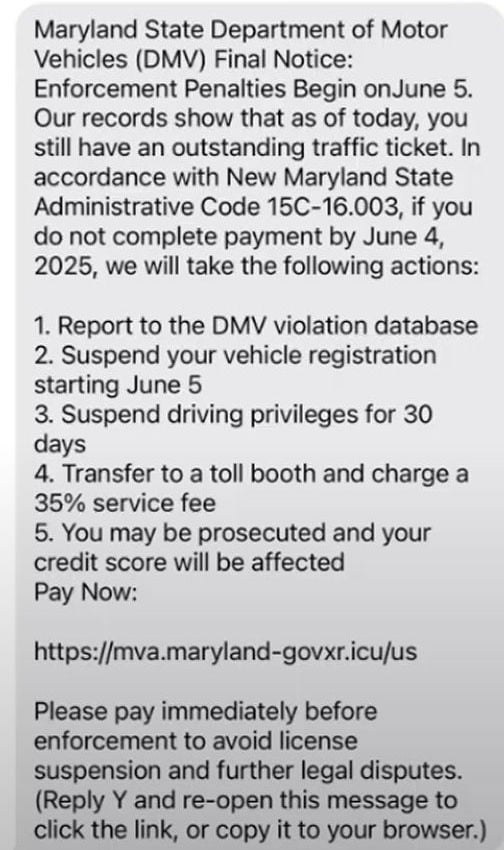
Here is the fake text message:
Maryland State Department of Motor Vehicles (DMV) Final Notice:
Enforcement Penalties Begin on June 5.
Our records show that as of today, you still have an outstanding traffic ticket. In accordance with New Maryland State Administrative Code 15C-16.003, if you do not complete payment by June 4, 2025, we will take the following actions:
- Report to the DMV violation database
- Suspend your vehicle registration starting June 5
- Suspend driving privileges for 30 days
- Transfer to a toll booth and charge a 35% service fee
- You may be prosecuted and your credit score will be affected
Pay Now:
https://mva.maryland-govxr.icu/usPlease pay immediately before enforcement to avoid license suspension and further legal disputes.
(Reply Y and re-open this message to click the link, or copy it to your browser.)
Step 2: Creating Urgency and Pressure
The message lists dramatic consequences of inaction:
- License suspension
- Driving ban for 30 days
- 35% toll booth surcharge
- Legal prosecution
- Credit score damage
These are strategically designed to create a psychological sense of panic.
Step 3: Directing to a Fake Website
The message includes a link that looks like it belongs to the Maryland DMV. However, it contains subtle misspellings or uses an unfamiliar domain like .icu or .govxr. Clicking it leads you to a nearly identical copy of the DMV site.
Step 4: Data Harvesting
Victims are asked to enter personal details under the guise of clearing a traffic ticket. These include:
- Driver’s license number
- Social Security Number
- Billing address
- Email and phone number
- Credit card number, expiration date, and CVV
The form may even include captchas or other trust signals to appear more legitimate.
Step 5: Financial Theft and Identity Fraud
After submission, victims may:
- See immediate unauthorized charges on their cards
- Have their identities used to open new accounts
- Get targeted with more scams using the stolen information
In some cases, the attackers install tracking cookies or malware through the website to continue monitoring the victim’s device.
Step 6: Disappearing Act
Once the scammers collect what they need, the website goes offline or redirects to the real DMV site. This creates confusion, making it harder for victims to trace the fraud.
What To Do If You Have Fallen Victim to This Scam
If you suspect you’ve been targeted or have submitted your data, act quickly. Follow these steps immediately:
1. Contact Your Bank or Credit Card Issuer
- Request to freeze or cancel the compromised card
- Dispute any fraudulent charges
- Request a new card with a new number
2. Report the Incident to the Authorities
- File a complaint with the Federal Trade Commission (FTC) at https://reportfraud.ftc.gov
- Report the scam to the Maryland Attorney General’s Office
- Contact your local police department to file a report (this helps with any identity theft claims later)
3. Monitor Your Credit
- Use services like AnnualCreditReport.com to check for unauthorized activity
- Place a fraud alert or credit freeze with the three credit bureaus (Equifax, Experian, TransUnion)
4. Protect Your Devices
- Run a full antivirus/malware scan on your phone and computer
- Clear your browser cache and cookies
- Change all passwords associated with your financial accounts and email
5. Spread the Word
- Warn family and friends, especially those who may be less tech-savvy
- Share legitimate resources and educate others about spotting scams
6. Use Identity Theft Protection Services
- Consider enrolling in a reliable identity theft protection service like LifeLock or Aura
Frequently Asked Questions (FAQ)
What is the Maryland DMV Text Scam?
The Maryland DMV Text Scam is a phishing attempt where scammers send fake text messages claiming to be from the Maryland Department of Motor Vehicles. These messages warn of unpaid traffic tickets and threaten penalties to pressure victims into visiting a fraudulent website and submitting personal and financial information.
How can I tell if the message is a scam?
Look for these red flags:
- The message contains grammatical errors or awkward phrasing.
- The link uses a suspicious domain, like “.icu” or “govxr,” not the official “.gov” domain.
- It creates a sense of urgency, demanding payment within 24–48 hours.
- It asks for sensitive information like your credit card number or Social Security Number.
Is the link in the message safe to click?
No. The link directs you to a fake website designed to steal your personal and financial information. Do not click on it. Instead, go directly to the official Maryland DMV website by typing the URL manually.
What kind of information are scammers trying to steal?
Scammers typically aim to collect:
- Full name
- Address
- Phone number
- Email address
- Driver’s license number
- Credit card details (number, expiration date, CVV)
- Social Security Number
What happens if I enter my information?
If you submit your details, scammers can:
- Make unauthorized purchases using your credit card
- Commit identity theft
- Open fraudulent accounts in your name
- Target you for future scams
What should I do if I fell for the scam?
Immediately:
- Contact your bank or credit card company to cancel the card and report fraud.
- Report the scam to the FTC and local law enforcement.
- Monitor your credit reports for unusual activity.
- Change your passwords and run a malware scan on your device.
- Consider placing a fraud alert or credit freeze with major credit bureaus.
Will the real Maryland DMV ever text me?
The Maryland DMV does not typically initiate contact through unsolicited text messages, especially those asking for personal or financial information. Official communication is usually conducted through mail or secure online portals.
Can this scam affect my credit score?
Yes, indirectly. If your personal information is used to open fraudulent accounts or run up debt, your credit score can be negatively impacted. That’s why it’s crucial to act quickly if you believe you’ve been targeted.
How do I report the scam?
You can report the scam through:
- Federal Trade Commission: reportfraud.ftc.gov
- Maryland Attorney General’s Office
- Your local police department
How can I protect myself from future scams?
- Never click on suspicious links in unsolicited messages.
- Verify the sender before taking any action.
- Use strong, unique passwords and enable two-factor authentication.
- Regularly check your financial and credit reports.
- Educate yourself and others about common scam tactics.
The Bottom Line
The Maryland DMV Text Scam is not just a nuisance—it’s a well-crafted scheme that preys on fear, trust, and urgency to steal your most sensitive data. With professional-looking messages and realistic websites, it’s easy to fall into the trap.
Stay alert, verify all unsolicited messages before clicking any links, and report suspicious activity immediately. As scammers become more sophisticated, your awareness is the best line of defense.
Stay cautious, stay informed, and help others do the same.

Join the discussion
0 commentsShare your experience or ask a question about this article.
Discussion
Start the conversation
Have a question or something useful to share? Add the first comment.