


You searched for a useful Windows program, found a convincing download page, and saved an installer. Nothing about that routine necessarily felt risky.
If a security alert now mentions NWHStealer, the important questions are what actually ran and what was accessible on that computer.
Overview
A Windows Stealer Hidden Behind Useful Software
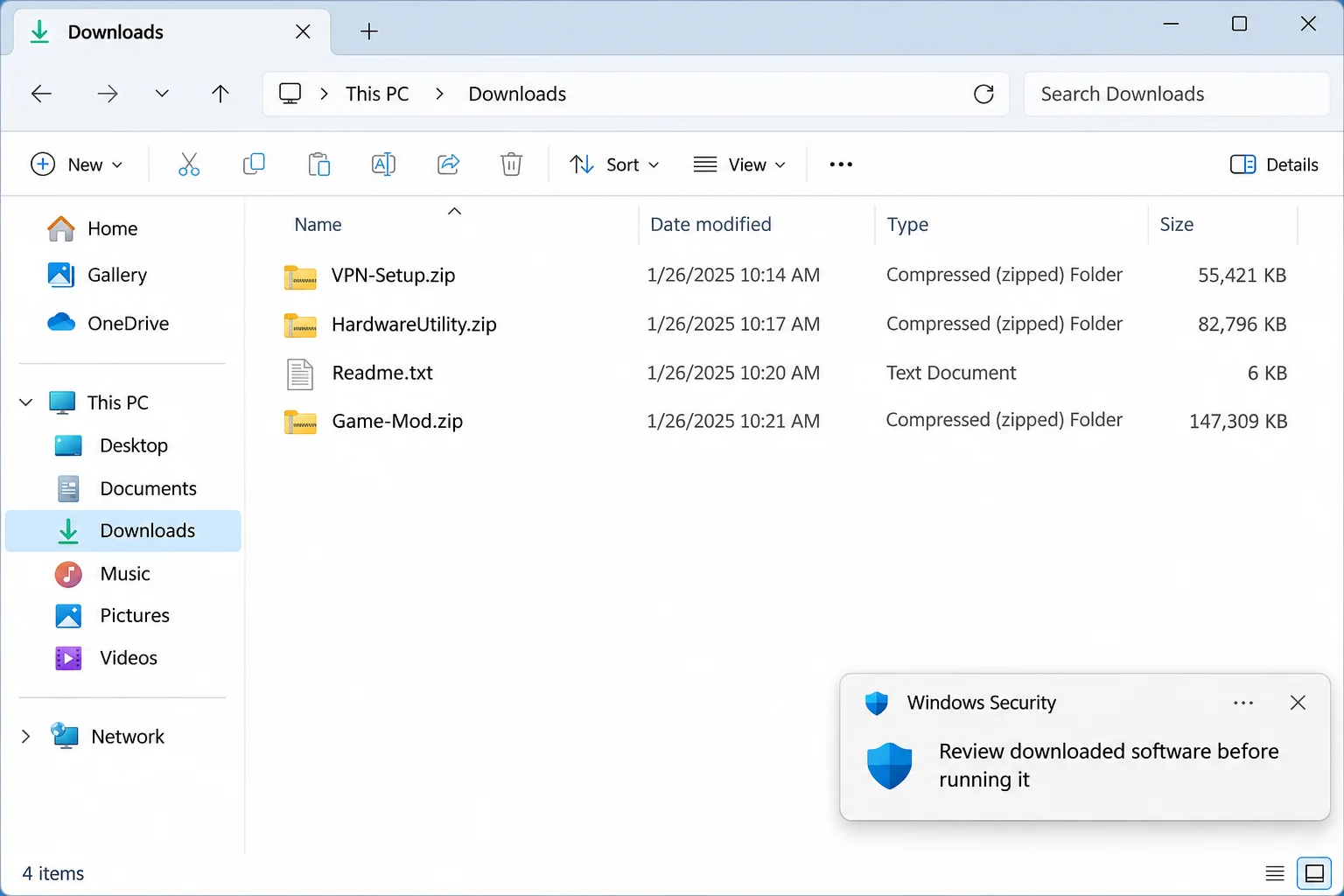
NWHStealer steals information from Windows computers. Its delivery campaigns have impersonated VPN downloads, hardware utilities, and game-related tools rather than offering an obviously malicious program.
The impersonation is the problem, not the legitimate software category. Proton VPN, development runtimes, and code-hosting platforms are not made malicious by an attacker borrowing them.
A Malwarebytes technical investigation documents these download lures and several delivery methods. That does not mean every similarly named archive contains this stealer.
The Browser Is an Attractive Target
The malware can target saved browser information and cryptocurrency-wallet data. What is exposed depends on the variant, available data, and successful execution.
A personal browser profile can hold more than shopping passwords. Work accounts, email sessions, and financial services may all be available from the same desktop.
That makes deleting the original ZIP only a small part of the response. Copied credentials and established access need attention beyond the Downloads folder.
Match Your Next Action to What Happened
- Only saw a download page: leave it and verify the publisher separately.
- Saved a file without launching it: do not run it to investigate.
- Executed the installer: isolate the computer and begin malware assessment.
- Used sensitive accounts afterward: secure those accounts from another trusted device.
A filename, slow computer, or single browser error is not enough to diagnose NWHStealer. Preserve any actual detection name and file location.
How the NWHStealer Infection Chain Works
Step 1: A Familiar Tool Creates a Reason to Download
The bait solves an ordinary problem: installing a VPN, checking hardware, or adding a game feature. The download appears relevant because you were already looking for it.
Reported lures include software presented as hardware monitoring utilities. A recognizable name in a search result does not establish who packaged the file.
Follow the publisher’s independently located website to its own distribution links. A repository or file host is a location, not an endorsement of every upload.
Step 2: The Archive Makes Execution Look Routine
The campaign has used ZIP archives and installers. Some delivery chains hide malicious components beside other files rather than putting everything in one obvious executable.
Do not separate a program from its unknown package and assume that makes it safe. Supporting libraries can be part of what the launcher loads.
Likewise, an application-looking icon is not a signature check. Windows can display a convincing icon for a program created by anybody.
Step 3: A Loader Starts the Information Theft
Documented NWHStealer chains use different loaders. Their common purpose is to get the data-stealing component running, sometimes inside another process.
Do not delete Windows components merely because a report mentions them. Legitimate process names can appear in an attack without every instance being malicious.
The useful evidence is the file path, publisher, parent process, and security findings together. A name-only search cannot supply that context.
Step 4: Other Versions Offer a Second Way to Launch
A later Malwarebytes analysis describes a Bun-based loader and archives containing an alternative launcher named dw.exe.
In those samples, instructions encouraged another launch when the main executable failed. A failed window therefore did not necessarily mean the package was harmless.
Bun itself is a legitimate development runtime. The suspicious act is running an untrusted package, not having a legitimate runtime installed.
Step 5: Cleanup and Account Recovery Become Separate Tasks
Some investigated variants changed protection exclusions and established scheduled execution. A responder should check the system’s configuration, not just remove the visible download.
Once information has been copied, removing the stealer cannot retrieve it. Your response needs both endpoint cleanup and control over exposed accounts.
This is also why a quiet desktop is not an all-clear. Successful information theft does not require a ransom screen or continuous pop-ups.
Check the Download Without Running It Again
Keep the page address, download location, approximate execution time, and security alert. These details help distinguish a misleading download from an actual confirmed infection.
In File Explorer, enable file-name extensions so you can see the file type. Do not launch an unfamiliar executable just to inspect its appearance.
For a known installer, Properties may show publisher and signature information. A signature can help establish origin, but it is not a universal safety certificate.
On a work computer, send those details through the approved incident channel. Do not upload company software or confidential files to public analysis services.
If the file is already quarantined, leave it there. Restoring it to compare icons or screenshots reintroduces a risk without proving its identity.
What to Do If You Ran a Suspected NWHStealer Download
-
Stop using that Windows profile for sensitive work. Disconnect the machine and tell your employer promptly if work credentials were present.
Use a clean device for communication. Avoid repeatedly launching the failed installer or trying the alternative program mentioned in its readme.
-
Keep a short incident record. Note the original page, archive name, execution time, and any detection details. Preserve the downloaded package without reopening it.
You do not need to identify every technical component before asking for help. A clear timeline is more useful than guesses about unfamiliar processes.
-
Recover your main email account first. From a trusted device, replace an exposed password, inspect recovery methods, and review signed-in devices.
Email can reset other services. Remove unknown forwarding rules or connected access if you find them, and save evidence of unauthorized changes.
-
Handle financial and wallet exposure separately. Contact the bank using its established app or card number if financial details or transactions are suspicious.
If wallet secrets may have been exposed, obtain reliable migration guidance and create a new wallet on clean equipment. Never paste a seed into a recovery advertisement.
-
Replace other exposed credentials in priority order. Include browser-saved work access, shopping accounts, and reused passwords. Revoke sessions where the service supports it.
Do not assume switching on multifactor authentication removes an existing unauthorized session. Review each service’s active-access controls as well.
-
Complete system cleanup before resuming normal use. Use the instructions below, retain the scan reports, and get help for persistent detections or unexplained protection changes.
A managed endpoint may need a rebuild rather than consumer troubleshooting. Let the responsible administrator decide when it can safely return to service.
Remove NWHStealer From Windows
Step 1: Prepare a Safe Cleanup Route
These scanning instructions are for a Windows PC you are authorized to manage. They are not permission to change your employer’s security configuration.
Obtain tools from verified routes using another computer if necessary. Keep external backups detached and do not move unknown executables to other machines.
For a business incident, preserve the required evidence before rebooting or quarantining files. Endpoint responders may need information that cleanup changes.
Step 2: Scan, Review and Quarantine the Infection
Download the Correct Windows Installer
Use the download below for Malwarebytes for Windows. Obtain the installer on a trusted computer if the affected machine cannot browse safely.
Download MalwarebytesOpens the official free-scanner page. Choose the Windows download.Optional real-time protection: Malwarebytes Premium
On the official page, choose the free scanner download for Windows. Save the installer; manual scanning and quarantine do not require a Premium purchase.
MalwareTips may earn a commission through its product links. Buying ongoing protection is optional and is not a condition for following this cleanup procedure.
Do not run an installer supplied by the suspicious message, a remote caller, or a search advertisement pretending to offer urgent technical help.
Install and Open Malwarebytes
Open Downloads and double-click the MBSetup installer. Approve the Windows permission prompt only after confirming that it belongs to the installer you obtained.
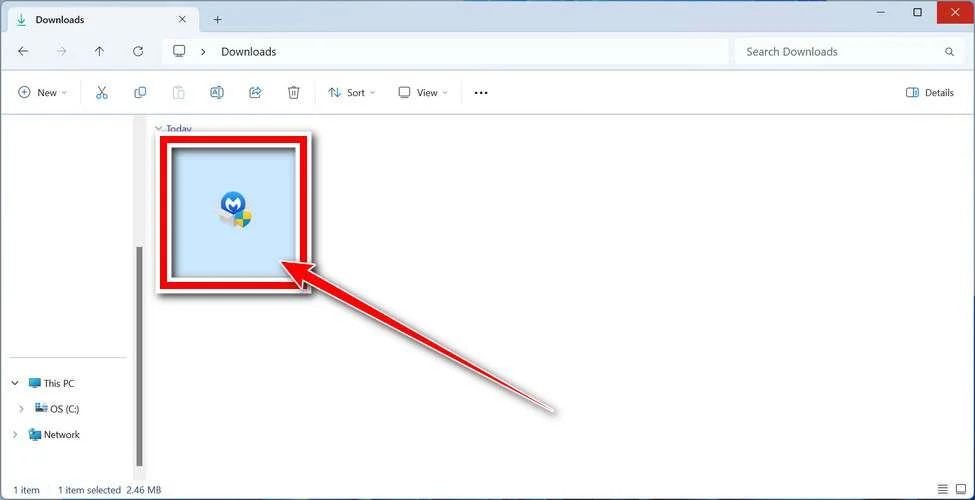
Follow the setup screens and choose the appropriate personal or work option. On a managed computer, obtain your security team’s approval before installing another tool.
Read optional offers carefully. You can skip an unwanted trial, browser add-on, or paid plan without abandoning a normal manual Windows scan.
Open the application when installation finishes. Let its detection information update if safe connectivity is available; do not reconnect an isolated business endpoint without authorization.
Run a Threat Scan, Then Check Other Affected Locations
From the dashboard, select Scan to start a Threat Scan. This checks common infection locations, memory, startup items, and the registry.
A Threat Scan is not a complete inspection of every drive. Use the Scanner tile’s three-dot menu and Advanced Scan for additional scanning choices.
Choose Custom Scan to inspect specific drives or folders. Select the Windows system drive and any other affected location your responder has approved.
Rootkit scanning is an optional Custom Scan setting on supported systems. Its absence on Windows ARM is not a reason to disable Windows protection.
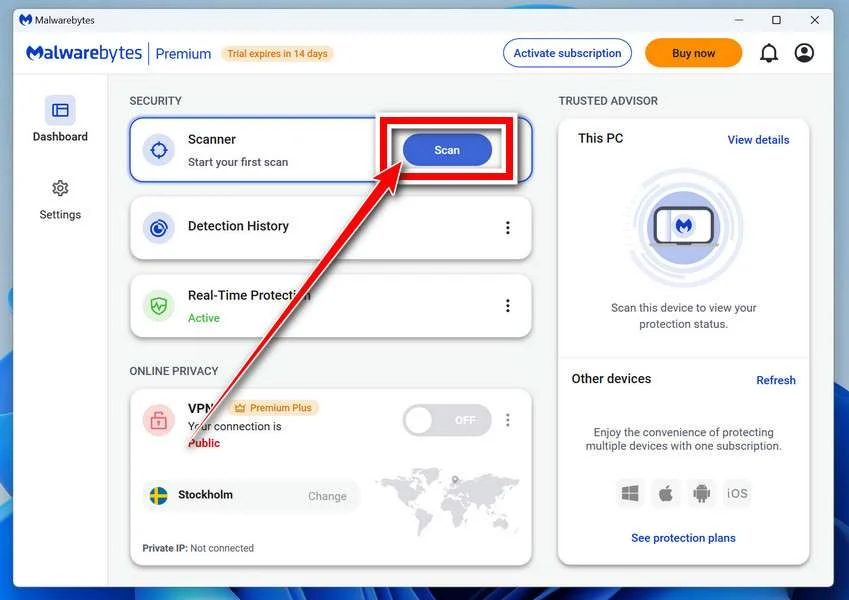
Allow the selected scan to finish. The duration depends on its scope, available storage, and the computer’s condition, so avoid a promised completion time.
If the application cannot update, start, or finish, save its error message. Repeatedly forcing a broken scanner is not a substitute for incident-response help.
When a report becomes available, review the detected names, locations, and actions. Keep a copy for whoever is helping investigate the compromise.
Review Detections and Quarantine Threats
Leave confirmed malicious items selected and choose Quarantine. Do not create an exclusion simply because a familiar program or system-looking filename appears in the report.
If a finding is unclear, record the detection and ask for advice. Do not manually delete random Windows files based only on their names.
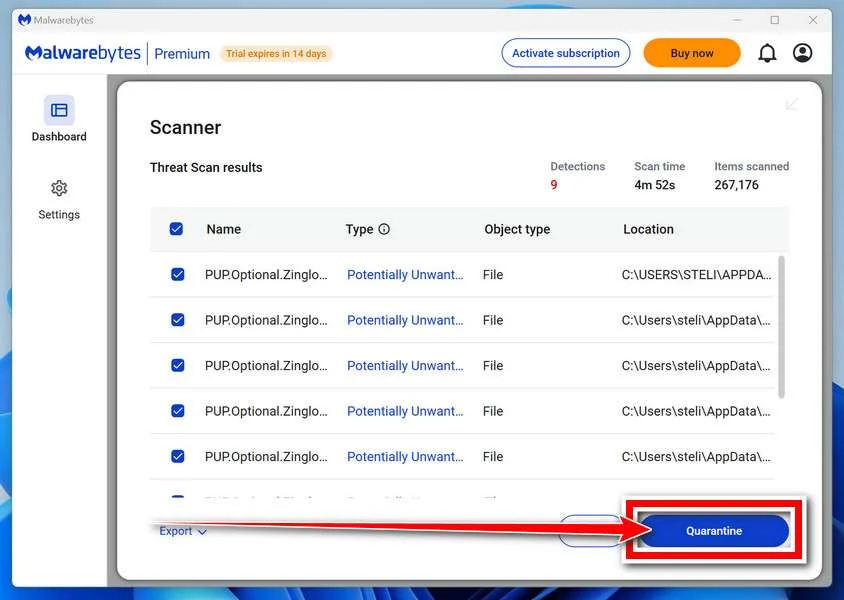
Quarantine isolates the items the tool identifies. Keep them there while the incident is assessed rather than restoring a suspicious file to test it.
Save the scan report after applying the actions. It can show a responder whether the original threat, related components, or potentially unwanted software was found.
A clean result does not undo earlier data theft. Continue the account and recovery actions relevant to this incident even when no active threat remains.
Restart if Requested and Review the Result
Save open work and allow a restart if Malwarebytes requests one. A managed-system responder may need to preserve evidence before approving that restart.
Keep backup storage disconnected during cleanup. Do not interpret a restart as permission to restore files or resume sensitive sign-ins immediately.
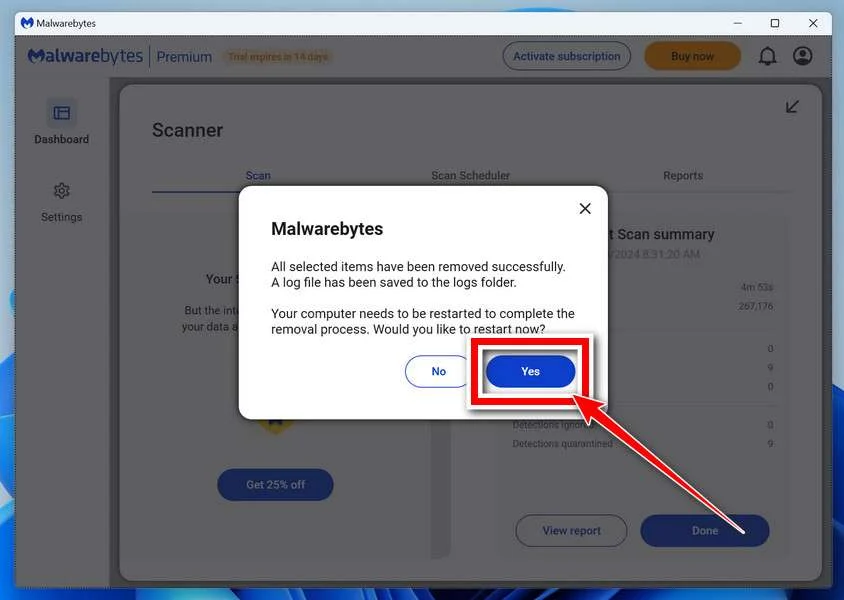
After Windows returns, reopen Malwarebytes and check the report. Run the follow-up scan appropriate to the affected locations and note any recurring detections.
Keep Windows Security and other established protection enabled. If threats return, stop ordinary use and obtain help rather than repeatedly excluding or deleting files.
For unresolved personal-device infections, ask in the MalwareTips malware-removal help forum. Do not post passwords, private logs, or confidential work documents publicly.
Step 3: Review Protection and Startup Changes
Ask your helper to check unexpected antivirus exclusions and startup tasks against the incident timeline. Record findings before altering them.
Do not erase every exclusion or scheduled task indiscriminately. Managed applications and approved security products may rely on settings you do not recognize.
If detections return after a restart, keep the machine isolated. Another launcher, additional payload, or unresolved access may require a more complete response.
Step 4: Decide Whether Windows Needs Rebuilding
Scanning is one tool, not a guarantee of restored trust. Consider a verified rebuild when the scope of malicious changes cannot be established.
Before reinstalling, preserve necessary documents and incident evidence under a safe backup plan. A reset can remove applications and settings you still need.
Restore ordinary work only after updates, security settings, and account access have been reviewed. Do not bring the original suspicious package back with your files.
Prevent the Same Download Trap From Happening Again
Save the legitimate publisher’s download page once verified. That is more dependable than repeating a broad search and trusting the first familiar-looking result.
For game tools and hardware utilities, verify the actual developer and release path. A forum post or video description can point to an unrelated upload.
An ad blocker such as AdGuard can reduce exposure to malicious advertising. It cannot make an unknown installer trustworthy.
Avoid advice that tells you to disable protection because a download is supposedly a false positive. Obtain an explanation from the genuine developer instead.
Keep separate browser profiles for different purposes where practical, but do not treat that as malware isolation. Code running on the computer may access multiple profiles.
Frequently Asked Questions
Is NWHStealer Part of Proton VPN?
No. The documented campaign used impersonation. A fake VPN page does not make the genuine VPN developer responsible for the malicious package.
Did Downloading a ZIP Automatically Infect My Computer?
A saved archive is not the same as a launched payload. Tell your helper whether you extracted it, opened an executable, or followed additional instructions.
Is Bun Malware?
No. Bun is a legitimate runtime. Attackers can bundle malicious code with legitimate development software, just as they can misuse other common tools.
Can I Fix This by Deleting the Installer?
That removes the download, not necessarily what it started. Investigate execution, scan the system, and address any information already exposed.
Do I Need to Buy Malwarebytes Premium to Scan?
Manual Windows scanning and quarantine are available without purchasing ongoing Premium protection. Read installation offers and decline optional purchases you do not want.
What Should I Keep for a Malware-Removal Helper?
Keep the alert, scan report, relevant filenames, source address, and timeline. Redact passwords and private information before sharing logs publicly.
The Bottom Line
Do not run a suspected NWHStealer package again, even if its first launcher appeared to fail. Isolate the computer and investigate the actual execution.
Use verified malware-removal steps, then secure accounts from clean equipment. Deleting the download is not enough when browser data or wallet secrets may already be exposed.

Join the discussion
0 commentsShare your experience or ask a question about this article.
Your progress
Did these steps help?
Let us know how the guide worked for you.
Describe what you see and the step you reached. Keep passwords and other private information out.
Discussion
Start the conversation
Have a question or something useful to share? Add the first comment.