


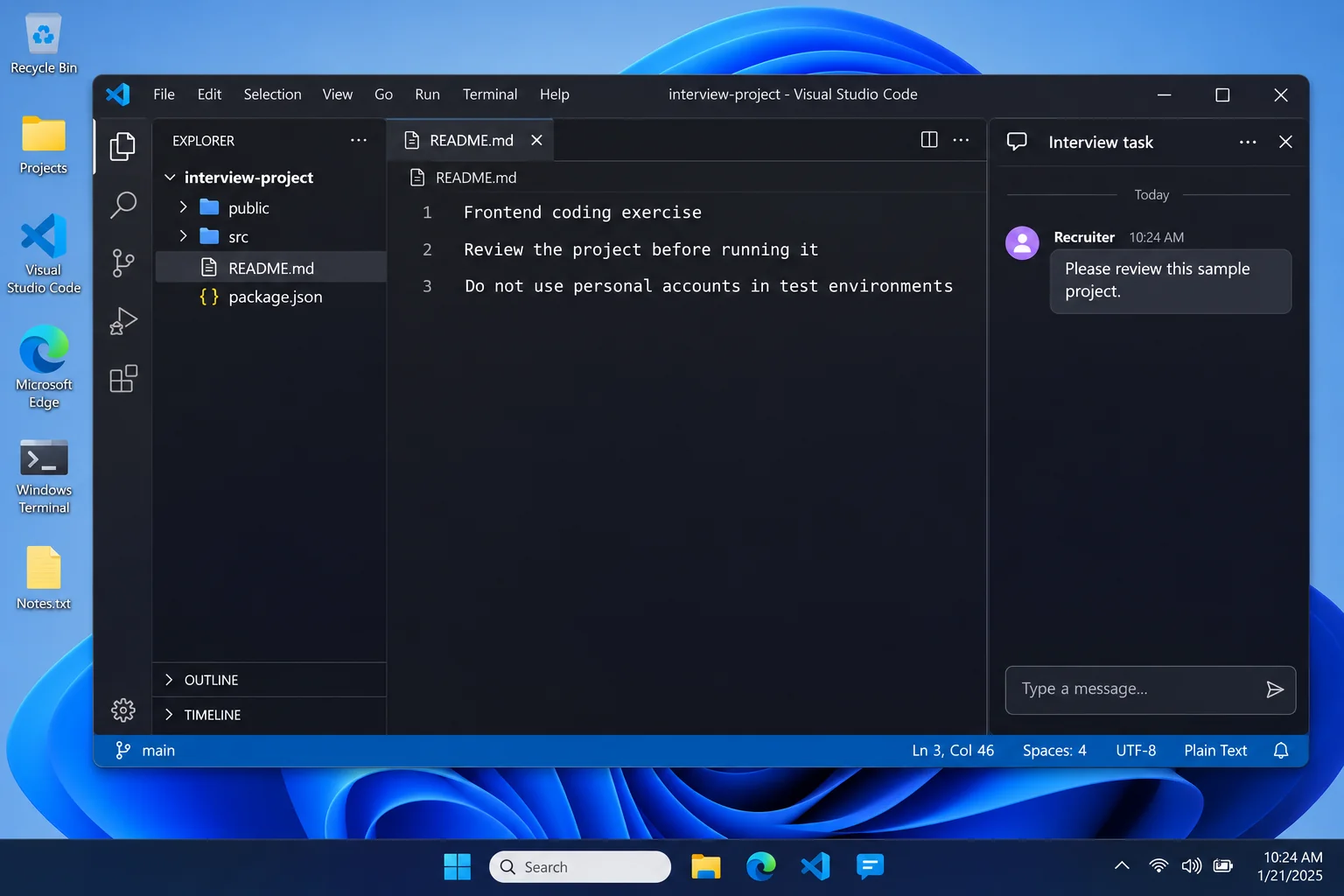
The interview task looks like ordinary development work. A recruiter sends a project, asks you to review it, and waits for your feedback.
For a busy contractor, that can feel familiar enough to begin immediately. An OmniStealer alert turns the same project into a very different problem.
Overview
A Coding Assignment Can Carry an Unrelated Payload
OmniStealer is a credential-harvesting component associated with deceptive development-project campaigns. A plausible repository can be the delivery vehicle rather than the work opportunity it advertises.
Running project code is materially different from reading a job description. The code may have access to files, browser data, and developer credentials on your workstation.
The presence of a project on GitHub does not authenticate the recruiter or its dependencies. GitHub is a legitimate service that attackers can abuse.
Blockchain Infrastructure Helps the Delivery Chain
Ransom-ISAC’s original campaign analysis describes blockchain-linked staging, a DEV#POPPER.js remote-access component, and a separate Python-based OmniStealer payload.
These components have different jobs. Do not treat a stolen credential, a remote-access capability, and every possible payload as the same finding.
Blockchain is infrastructure here, not a requirement that you own cryptocurrency. A developer without a wallet can still have valuable accounts and files exposed.
This Guide Focuses on Windows Cleanup
- Stop executing the suspicious project and preserve its source details.
- Involve workplace security if the workstation holds company access.
- Remove malicious software through a trusted Windows procedure.
- Rotate exposed development secrets and revoke unauthorized sessions.
- Investigate other systems reachable through those credentials.
The broader reported campaign is cross-platform. The Windows scanner below is not a Mac or Linux cleanup tool; use appropriate help for those systems.
How the OmniStealer Job-Project Attack Works
Step 1: A Professional-Looking Opportunity Starts the Conversation
A technical assignment creates a believable reason to send source code. A candidate expects to inspect files and perhaps install project dependencies.
Confirm the organization and recruiter through independently located channels. An account profile, polished brief, or company logo is not a completed identity check.
Be especially cautious when an unfamiliar contact quickly moves the discussion into private chats. That can separate the request from the platform where you found it.
Step 2: The Candidate Executes Untrusted Project Code
The important boundary is execution, not whether the project looks like a normal web application. Setup and dependency routines can run code too.
Do not reproduce a suspicious install on your everyday workstation to see what happens. That environment may hold exactly the information an attacker wants.
A repository with readable source is not automatically safe. What runs can include dependencies, install hooks, downloaded components, and configuration outside the file you inspected.
Step 3: Staging Retrieves Additional Components
The documented chain uses transaction data across public blockchains to help retrieve subsequent stages. Those stages ultimately lead beyond the visible assignment.
That does not mean viewing an ordinary blockchain page infects your computer. The relevant chain begins with malicious code being executed.
Changing the repository’s public visibility or deleting its link would not necessarily remove components already delivered to the workstation.
Step 4: Remote Access and Information Theft Work Together
The reported architecture combines a remote-access tool with a stealer. Credentials, wallet material, development secrets, and other accessible information can become targets.
Do not assume the loss stops at the browser. A developer workstation can also contain SSH credentials, deployment access, and source repositories.
Nor should you assume every secret was successfully obtained. Establish exposure through the available files, logs, detections, and account records.
Step 5: Access Can Extend Beyond the Original Computer
A stolen deployment credential may authorize another system without requiring malware on that second system. Endpoint cleanup and infrastructure containment therefore need coordination.
Replacing a local file containing a key does not invalidate the key. The service that issued it must revoke or rotate the actual credential.
If a related remote-access component established persistence, removing only the stealer is incomplete. Have the whole delivered chain assessed.
Workstation Secrets Need Their Own Exposure Review
Make an inventory with your security team: repository access, cloud accounts, deployment tokens, SSH identities, package registries, and wallet material actually present.
Keep that inventory private. Pasting environment files or credential-bearing logs into a public help thread can create a second disclosure.
Distinguish a secret stored on the machine from a service merely mentioned in source code. The practical response depends on what could authorize access.
Record which credentials were rotated, who authorized the change, and what services depend on them. Unplanned rotation can interrupt production without containing every access route.
Review repository and cloud activity for unauthorized changes. A successful login, new collaborator, or deployment needs investigation in its own context.
What to Do If You Ran a Suspicious Interview Project
-
Stop the project and separate the workstation. Do not run another setup command, dependency repair, or recruiter-supplied cleanup script.
Use a trusted communication channel to report the incident. On a company laptop, let the security team direct isolation and evidence collection.
-
Preserve the assignment and conversation. Keep the repository address, available commit identifier, recruiter details, and the time you executed the project.
Save relevant terminal and security logs without exposing secrets. Do not rerun the program to produce a better demonstration.
-
Revoke exposed development access. Have the authorized owners assess and rotate affected tokens, keys, and service credentials from clean equipment.
Check service-side access logs and remove unauthorized collaborators or applications. Replacing a workstation’s local configuration alone will not do this.
-
Recover personal accounts and wallets separately. Secure email and browser-accessible services, review sessions, and replace reused credentials.
If wallet secrets were accessible, seek trustworthy migration guidance using a new wallet on clean equipment. Do not rely on a connected-site disconnect alone.
-
Assess the wider environment. Identify what the workstation could reach and whether those services show unauthorized activity. Include source-control and deployment systems.
A lack of unusual activity so far is useful evidence, not a promise that no credential was copied. Keep the investigation proportionate to exposure.
-
Clean or rebuild the Windows device. Use the procedure below only when consistent with your response plan. Retain findings for the wider investigation.
Return to development after the workstation and affected access are both cleared. Do not copy the assignment back into the recovered environment.
Remove OmniStealer-Related Malware From Windows
Step 1: Coordinate Cleanup Before Changing the Endpoint
Work devices may require forensic collection before scanning or restarting. Follow that process rather than trying to make the alert disappear privately.
Use trusted equipment for credential changes and downloads. Do not sign into cloud administration through the suspected workstation to begin the investigation.
Preserve evidence of any additional payloads. The reported chain is not limited to a single downloaded Python file.
Step 2: Follow the Illustrated Windows Malware Scan
Download the Correct Windows Installer
Use the download below for Malwarebytes for Windows. Obtain the installer on a trusted computer if the affected machine cannot browse safely.
Download MalwarebytesOpens the official free-scanner page. Choose the Windows download.Optional real-time protection: Malwarebytes Premium
On the official page, choose the free scanner download for Windows. Save the installer; manual scanning and quarantine do not require a Premium purchase.
MalwareTips may earn a commission through its product links. Buying ongoing protection is optional and is not a condition for following this cleanup procedure.
Do not run an installer supplied by the suspicious message, a remote caller, or a search advertisement pretending to offer urgent technical help.
Install and Open Malwarebytes
Open Downloads and double-click the MBSetup installer. Approve the Windows permission prompt only after confirming that it belongs to the installer you obtained.
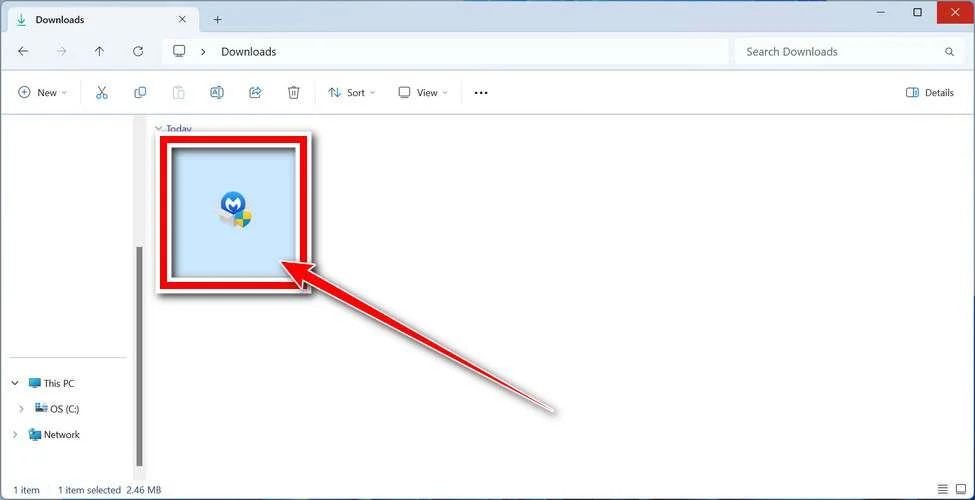
Follow the setup screens and choose the appropriate personal or work option. On a managed computer, obtain your security team’s approval before installing another tool.
Read optional offers carefully. You can skip an unwanted trial, browser add-on, or paid plan without abandoning a normal manual Windows scan.
Open the application when installation finishes. Let its detection information update if safe connectivity is available; do not reconnect an isolated business endpoint without authorization.
Run a Threat Scan, Then Check Other Affected Locations
From the dashboard, select Scan to start a Threat Scan. This checks common infection locations, memory, startup items, and the registry.
A Threat Scan is not a complete inspection of every drive. Use the Scanner tile’s three-dot menu and Advanced Scan for additional scanning choices.
Choose Custom Scan to inspect specific drives or folders. Select the Windows system drive and any other affected location your responder has approved.
Rootkit scanning is an optional Custom Scan setting on supported systems. Its absence on Windows ARM is not a reason to disable Windows protection.
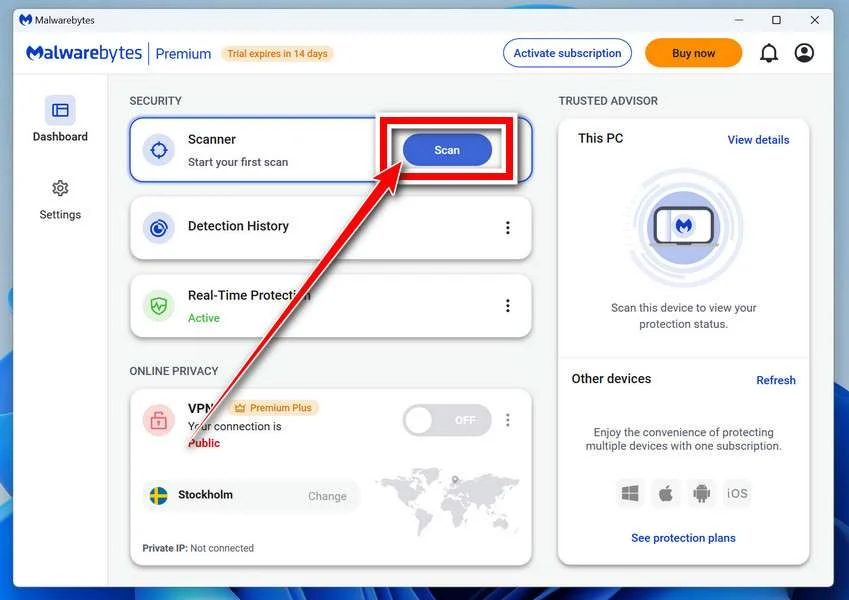
Allow the selected scan to finish. The duration depends on its scope, available storage, and the computer’s condition, so avoid a promised completion time.
If the application cannot update, start, or finish, save its error message. Repeatedly forcing a broken scanner is not a substitute for incident-response help.
When a report becomes available, review the detected names, locations, and actions. Keep a copy for whoever is helping investigate the compromise.
Review Detections and Quarantine Threats
Leave confirmed malicious items selected and choose Quarantine. Do not create an exclusion simply because a familiar program or system-looking filename appears in the report.
If a finding is unclear, record the detection and ask for advice. Do not manually delete random Windows files based only on their names.
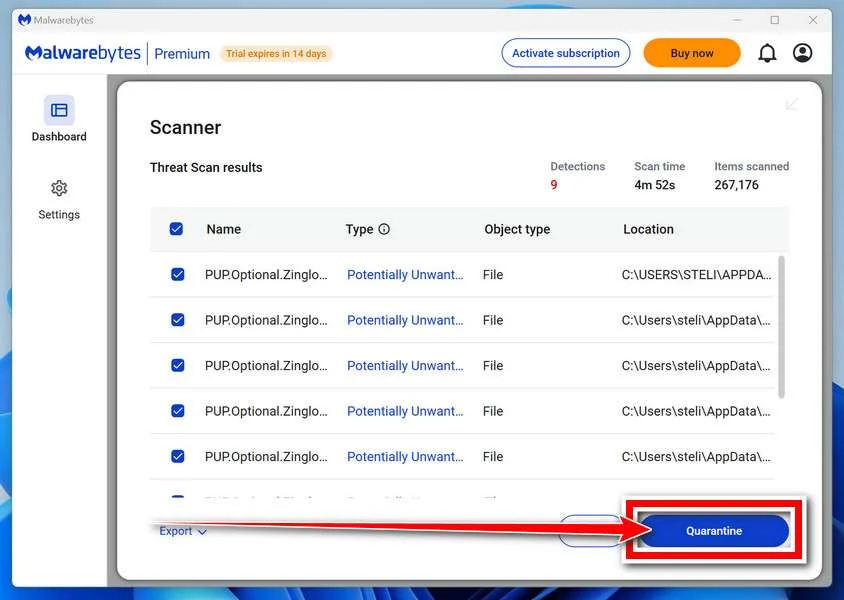
Quarantine isolates the items the tool identifies. Keep them there while the incident is assessed rather than restoring a suspicious file to test it.
Save the scan report after applying the actions. It can show a responder whether the original threat, related components, or potentially unwanted software was found.
A clean result does not undo earlier data theft. Continue the account and recovery actions relevant to this incident even when no active threat remains.
Restart if Requested and Review the Result
Save open work and allow a restart if Malwarebytes requests one. A managed-system responder may need to preserve evidence before approving that restart.
Keep backup storage disconnected during cleanup. Do not interpret a restart as permission to restore files or resume sensitive sign-ins immediately.
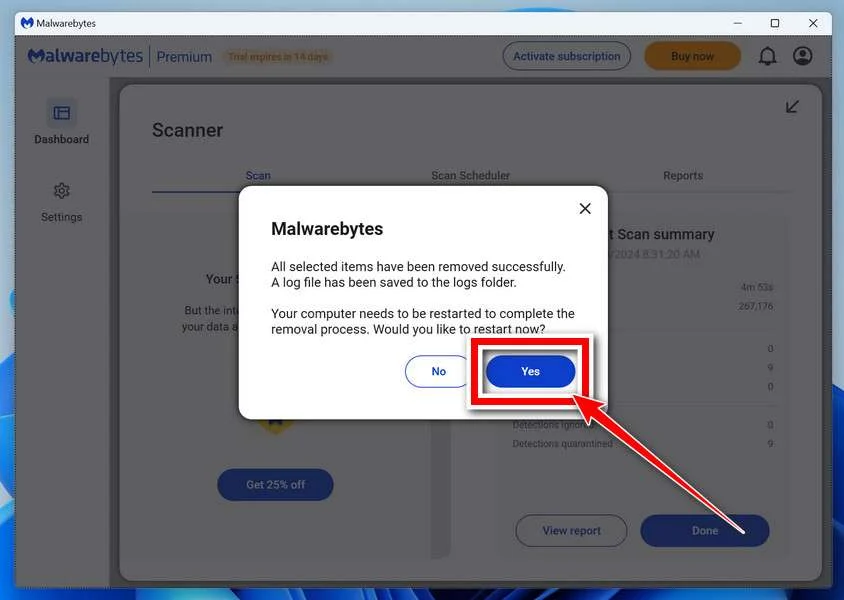
After Windows returns, reopen Malwarebytes and check the report. Run the follow-up scan appropriate to the affected locations and note any recurring detections.
Keep Windows Security and other established protection enabled. If threats return, stop ordinary use and obtain help rather than repeatedly excluding or deleting files.
For unresolved personal-device infections, ask in the MalwareTips malware-removal help forum. Do not post passwords, private logs, or confidential work documents publicly.
Step 3: Investigate Any Remaining Remote Access
A scanner’s findings should be assessed alongside startup entries, suspicious editor changes, and the known execution timeline. Do not assume the stealer was the only component.
Do not delete Python, Node.js, or your editor indiscriminately. These are legitimate development tools, and their presence alone is not evidence of infection.
If malicious access persists or its scope remains uncertain, keep the workstation out of service. A verified rebuild may be more appropriate than repeated narrow cleanup.
Step 4: Restore a Trusted Development Environment
Reinstall required tools from verified publishers and restore reviewed source. Avoid importing old executables, editor extensions, or configuration simply because they were backed up.
Apply updates and reconnect only the access your recovery plan permits. Replace revoked secrets through the approved secret-management process.
Confirm that service-side revocations and monitoring remain in place. Rebuilding Windows cannot remove unauthorized access already established elsewhere.
Make Future Technical Assignments Safer
Agree on the exercise’s purpose and required actions before receiving code. A request to disable protection is not an acceptable assessment prerequisite.
Review source and dependency behavior before execution. Use a properly isolated test environment without personal browser sessions, production credentials, or mounted private folders.
A virtual machine is not automatically isolated if it shares your files, clipboard, credentials, or network access. Configure the environment for untrusted work.
Do not paste secret-bearing logs back to the recruiter as a troubleshooting shortcut. An authentic interview should not need your real deployment keys.
Tools such as AdGuard can reduce deceptive-ad exposure, but cannot certify code requested through a private interview conversation.
Keep a separate verification route to the actual company. When the assignment and the recruiter cannot be authenticated, decline to execute the project.
Frequently Asked Questions
Does OmniStealer Only Affect Cryptocurrency Owners?
No. The reported campaign targets credentials and development information too. A workstation can have valuable access even when no cryptocurrency wallet is installed.
Is a GitHub Repository Proof the Task Is Safe?
No. GitHub hosts content from many contributors. Confirm the sender and review what the project and its dependencies would execute.
Is OmniStealer Windows-Only?
No. The underlying reported campaign has cross-platform components. This article’s illustrated scanning procedure is specifically for Windows, not a universal cleanup routine.
Will Deleting the Project Remove the Entire Infection?
Not necessarily. Executed code can retrieve other components or establish access elsewhere. Assess the endpoint and affected credentials before assuming cleanup is complete.
Should I Rotate Every Company Secret Myself?
No. Report the exposure and coordinate with authorized owners. They need to identify affected access, revoke it safely, and review dependent systems.
Can Malwarebytes Revoke Stolen Development Tokens?
No. Malware scanning addresses the Windows endpoint. The issuing services must revoke tokens, sessions, or keys that were exposed.
The Bottom Line
Do not execute an unverified interview project on your everyday workstation. A professional-looking assignment does not justify exposing personal sessions or production credentials.
If the project already ran, preserve evidence, remediate the device, and coordinate service-side credential recovery. Deleting the repository is not a complete response to OmniStealer.

Join the discussion
0 commentsShare your experience or ask a question about this article.
Discussion
Start the conversation
Have a question or something useful to share? Add the first comment.