

Psnuser.com is a fraudulent PlayStation gift card scam that pretends to offer free PSN codes.
The site uses a fake generator, fake progress messages, and a fake verification process to push users into affiliate offers, downloads, and signups that generate revenue for the scammers. No legitimate PlayStation gift card is delivered.
If you reached Psnuser.com through a social media ad or viral post, this is a standard scam funnel designed to exploit trust in the PlayStation brand and pressure users into completing monetized tasks.
Scam Overview
Psnuser.com is not a legitimate PlayStation gift card source. It is a fake PSN gift card generator scam that uses PlayStation branding and giveaway language to lure people into a monetized scam funnel.
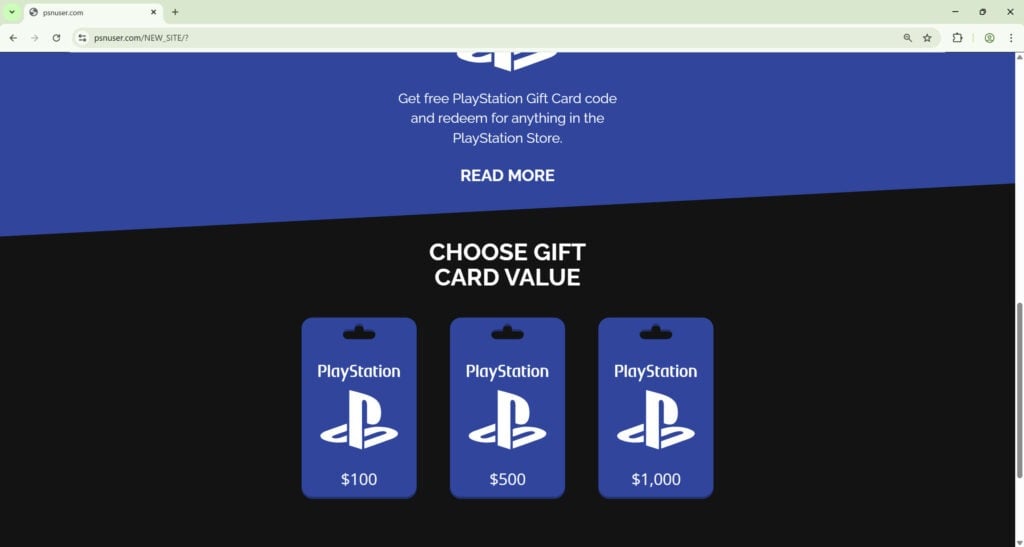
The site is designed to look like a rewards tool. It typically shows PlayStation gift card images, code fragments, progress bars, and buttons that imply a code is being generated in real time.
That presentation is not an accident.
Scam operators know that people trust familiar brands. They also know that “free gift card” is one of the easiest hooks on social media, especially when it is tied to gaming, kids, or popular purchases.
So instead of creating a totally random scam theme, they wrap the scam around something people already want.
What Psnuser.com Pretends To Be
The scam presents itself as a PlayStation gift card generator or unlock page.
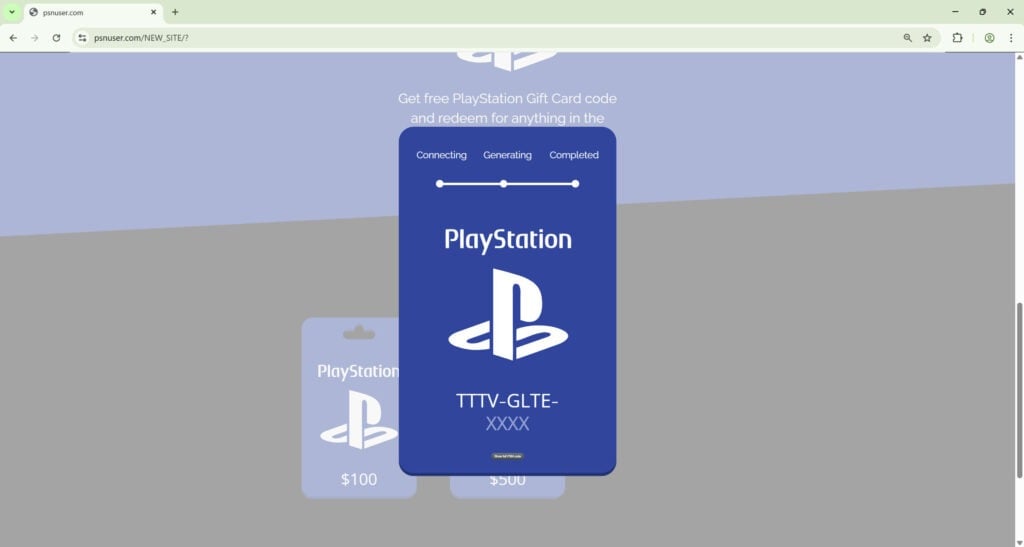
It usually gives the impression that you can select a gift card value like $100, $500, or $1,000, then “generate” a working PSN code. The site often displays fake system messages like:
- Connecting
- Generating
- Completed
- Searching database
- Verifying code inventory
- Preparing your reward
This language is meant to imitate a real backend process.
It is supposed to make you think the site is connected to some hidden inventory of unused PlayStation gift cards. That is fiction. There is no legitimate system that generates valid PSN gift card codes this way.
Real PlayStation gift cards are issued through official retail and digital channels, and real codes are redeemed directly through the PlayStation Store. A random third-party “generator” site does not produce valid codes.
That fake generator screen is only there to keep you emotionally invested.
Why The Scam Looks Convincing To So Many People
A lot of users ask the same question after they realize it is fake.
“If it is a scam, why does it look so polished?”
Because polished pages convert better.
Scammers learned a long time ago that messy, broken pages scare people away too early. A clean page with recognizable visuals and smooth animations keeps people clicking long enough to reach the monetization step.
Psnuser.com uses several trust tricks that are common in scam funnels:
- Familiar brand imagery
- Large reward amounts
- Fake progress animations
- Countdown timers
- “Human verification” messaging
- Partial code reveal screens
- Bright call to action buttons
Each of these features is there for a reason.
A fake code that is almost visible creates anticipation.
A timer creates urgency.
A progress bar creates the illusion of a real technical process.
A “verification” message makes the final step sound normal and harmless.
The scam works because it feels close enough to a real reward flow that many people stop questioning it.
The Real Business Model Behind The Scam
Psnuser.com is not trying to give away gift cards. It is trying to monetize traffic.
The key part of the scam is the verification or task wall. Once you click to reveal the code, the site typically redirects you to one or more offers. These offers may ask you to:
- Enter an email address
- Enter a phone number
- Send an SMS
- Download an app
- Install a browser extension
- Complete a survey
- Start a free trial
- Sign up for a subscription
- Click through multiple pages
The user is told this is required to “verify” they are human or unlock the code.
That is the lie.
These are affiliate offers. The scammers get paid when users complete certain actions. This is usually a cost per action model, also called CPA.
In other words, the fake PSN gift card is just bait. The real objective is to push people into tasks that trigger commissions.
This is why the “reward” never arrives.
The reward is not the product. You are the product.
Why Victims Keep Going Even When It Starts To Feel Suspicious
This scam does not usually hit people with a direct payment request in the first 5 seconds. It builds commitment first.
That matters because small actions change behavior.
Once someone has clicked through a few pages, picked a gift card value, watched the progress bar move, and seen a partial code appear, they are more likely to keep going. They feel like they already invested time and they are close to getting the reward.
This is a classic manipulation tactic.
The scam is built on momentum.
It does not need to look perfect. It only needs to keep you moving from one step to the next without stopping long enough to think.
Many people also assume “verification” is normal because real websites use CAPTCHAs and anti-bot checks. Scammers take advantage of that familiarity.
They use the same language, but change the meaning.
A real human verification check might ask you to click images or solve a simple puzzle. A scam “verification” asks you to complete a monetized offer, send a text, download software, or sign up for something unrelated.
That is not verification. That is exploitation.
Common Red Flags On Psnuser.com And Similar PSN Gift Card Scams
If you are trying to quickly identify this type of scam in the future, watch for these warning signs.
1) “Free PSN code generator” language
There is no legitimate PSN code generator. This phrase is one of the biggest red flags in the gaming scam space.
If a site claims it can generate free PlayStation gift cards on demand, it is almost certainly a scam.
2) Fake progress bars and fake technical messages
Scam pages love fake system text because it sounds official.
Messages about databases, secure servers, or code validation are often just scripted animations. They are there to create trust, not to show a real process.
3) Partial code display
Showing part of a code with the final characters hidden is a psychological trick.
It makes the reward feel real and “almost unlocked.” This increases the chance that users complete the next steps without thinking carefully.
4) Human verification that has nothing to do with identity
If the site asks you to install something, sign up for a trial, send an SMS, or fill out a survey to prove you are human, that is a scam pattern.
Real verification checks do not require third-party offers.
5) Social media ad traffic and repost spam
These scams are often spread through:
- Facebook ads
- Instagram posts
- TikTok videos
- YouTube comments
- Telegram channels
- Spammy gaming pages
The post usually creates urgency and avoids details.
It wants clicks, not questions.
6) No clear company identity
Scam sites often have no credible company information, no support details, no real policies, and no direct connection to the brand they imitate.
If a site is using PlayStation branding but has no legitimate relationship to Sony or official retail channels, assume it is fake.
The Real Risks To Victims
A lot of people think the worst case is “I wasted a few minutes.”
Sometimes that is true. But many victims lose more than time.
The possible outcomes depend on which offers the person completes, but the common risks are serious.
Unwanted subscriptions
Many task walls route users into free trial offers or subscription signups.
The page might look harmless at first, then small print reveals auto-renew billing. Some users do not notice until a charge appears later.
This is one of the most common outcomes because it generates reliable revenue for the scam ecosystem.
SMS charges or mobile billing traps
Some versions of this scam push users to send a text to claim a prize or complete verification.
That can lead to premium SMS charges or recurring text subscriptions. These charges may show up on a mobile bill later, which makes them harder to spot immediately.
Malicious browser extensions
One of the more dangerous outcomes is being told to install a browser extension to continue.
Extensions can request broad permissions. A malicious or shady extension may inject ads, track browsing, redirect searches, or collect data.
Even if it is not outright malware, it can still create serious privacy and security problems.
Potentially unwanted programs or unsafe downloads
Some scam funnels push fake “unlock” apps or utility tools.
These downloads can be adware, bundleware, or worse. Even if the file is not overt malware, it may change browser settings, flood the device with ads, or open the door to future attacks.
Data harvesting for future scams
Even simple actions like entering an email or phone number can cause long-term problems.
Scammers and lead networks value this data. Once your information is in the system, you may start getting:
- Prize scams
- Phishing emails
- Fake support alerts
- Fake delivery messages
- Financial scam calls
A fake gift card scam often becomes the first step in a larger spam and fraud cycle.
Why This Scam Keeps Coming Back
The Psnuser.com PlayStation gift card scam is not unique because of the domain name. It is part of a repeatable scam model.
The domain can change. The design can change. The brand theme can change.
The underlying formula stays the same:
- Promise a free reward
- Build fake trust with branding and animations
- Block the reward behind a fake verification wall
- Push users through affiliate offers
- Never deliver the prize
This model is profitable because it is cheap to run and easy to clone.
A scammer can rotate domains, reuse templates, and relaunch the same funnel under a different name in a matter of hours. That is why these scams keep showing up across social platforms.
The best protection is not memorizing a single site name. It is recognizing the pattern.
And Psnuser.com fits that pattern exactly.
How The Scam Works
Step 1: The Hook Starts With A Social Media Ad Or Viral Post
The scam usually begins off-site.
Most victims do not search for Psnuser.com directly. They find it through a social media ad, a reposted link, a short video, or a comment that promises a free PlayStation gift card.
The messaging is usually short and aggressive:
- Free PSN gift card code
- Claim your PlayStation reward
- Limited time PSN giveaway
- Working code generator
- Last chance bonus
The scam needs fast reactions, so it avoids details.
It is built for people scrolling quickly on their phone. The ad has one job, get the click.
This is also why the posts often feel repetitive. The same scam can appear on different pages with slightly different wording, images, or callouts. The operators test what gets the most clicks and keep the versions that perform well.
Step 2: The Landing Page Uses PlayStation Branding To Lower Your Guard
After the click, the victim lands on a page that looks like a gaming promotion.
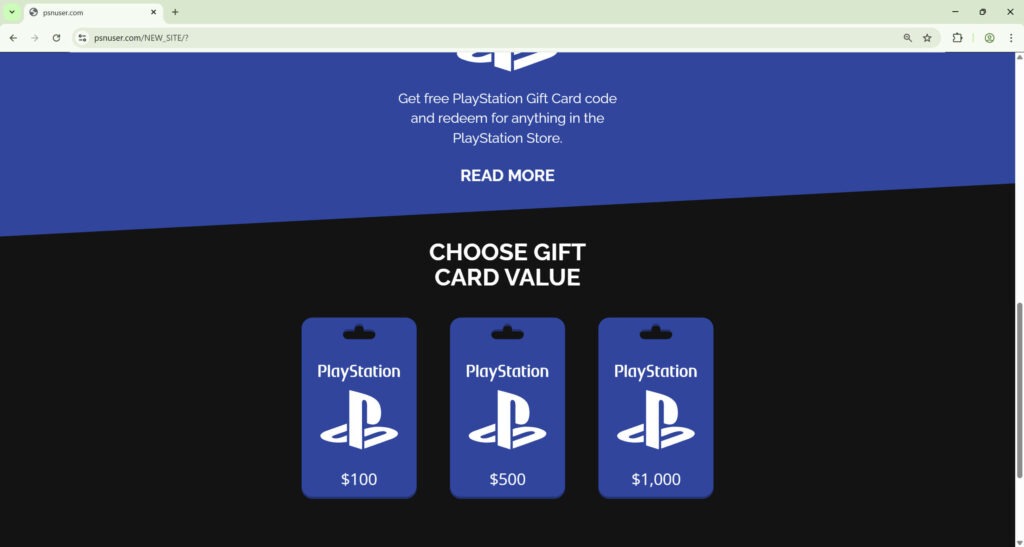
It often uses PlayStation-style colors, gift card graphics, and promotional language. The page may show card values like $100, $500, or $1,000 to make the reward feel substantial.
This design is important because it helps the scam borrow trust from a well-known brand.
The page does not need to perfectly match PlayStation’s official site. It only needs to feel familiar enough that the user stops questioning whether it is real.
This is one of the oldest fraud tactics on the internet.
Scammers know people trust what they recognize.
If the site looks “good enough” and the promise is exciting enough, a large percentage of users will keep going to the next step.
Step 3: The User Is Asked To Choose A Gift Card Amount
The next step is usually a fake selection screen.
The user is asked to choose a PlayStation gift card amount. The values are often high because large rewards improve conversion rates. A $5 reward is less exciting than a $500 reward, so scammers pick numbers that create instant emotional response.
This is where the victim starts participating.
That matters psychologically.
Once a person makes a choice, even a fake one, they feel involved in the process. The site is no longer just a page they are looking at. It becomes something they are doing.
That shift is important because participation increases compliance.
The scam is moving the victim from curiosity into commitment.
Step 4: The Fake Generator Animation Begins
After the amount is selected, the page typically launches a fake “generator” sequence.
This part is often the most visually convincing section of the scam because it is designed to mimic a real system. The page may show:
- A progress bar moving from left to right
- Status labels like “Connecting,” “Generating,” and “Completed”
- Text that sounds technical
- A code field that slowly fills in
This stage is pure performance.
The site is not connecting to PlayStation. It is not searching a real database for valid codes. It is not generating anything legitimate.
It is running a scripted sequence to create the illusion that something valuable is being prepared.
The wording is intentionally technical because technical language creates authority. Even users who do not understand the terms may think, “This looks like a real process.”
That is the point.
The scam wants to replace skepticism with momentum.
Step 5: A Partial Code Appears To Make The Reward Feel Real
Once the animation has run long enough, the page often reveals part of a gift card code.
The final section is hidden or masked, and a button appears with wording like “Show full PSN code” or “Unlock code.”
This is a very effective manipulation technique.
The code does not need to be valid. It just needs to look plausible.
By this point, the victim has:
- Clicked the ad
- Landed on the page
- Chosen a gift card
- Watched the system “work”
- Seen a code appear
The site now creates a strong feeling that the reward already exists and only needs one more step.
That one step is the trap.
Step 6: The “Human Verification” Page Replaces The Reward
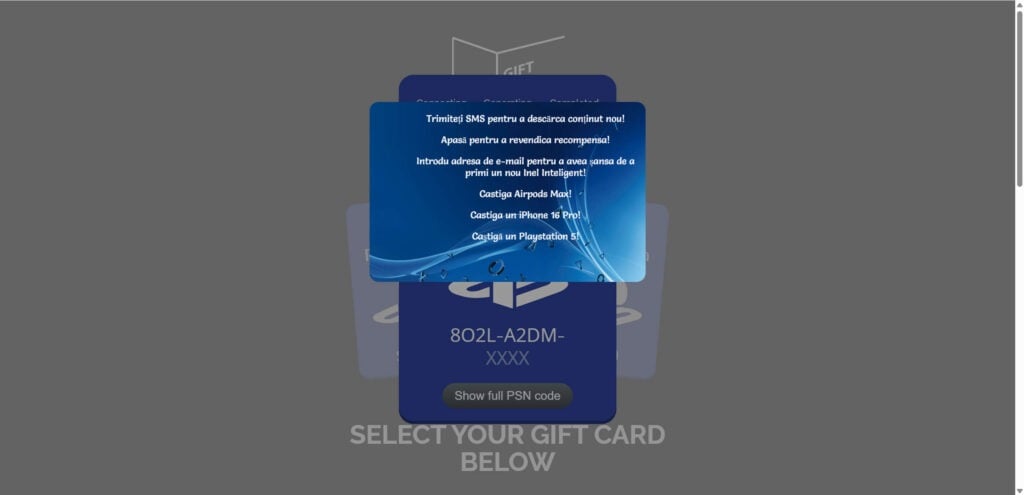
When the user clicks to reveal the full code, the page redirects to a verification screen or popup.
This is the real scam payload.
The site might say something like:
- Verify you are not a robot
- Complete one quick step to unlock your code
- Confirm your reward
- Finish human verification
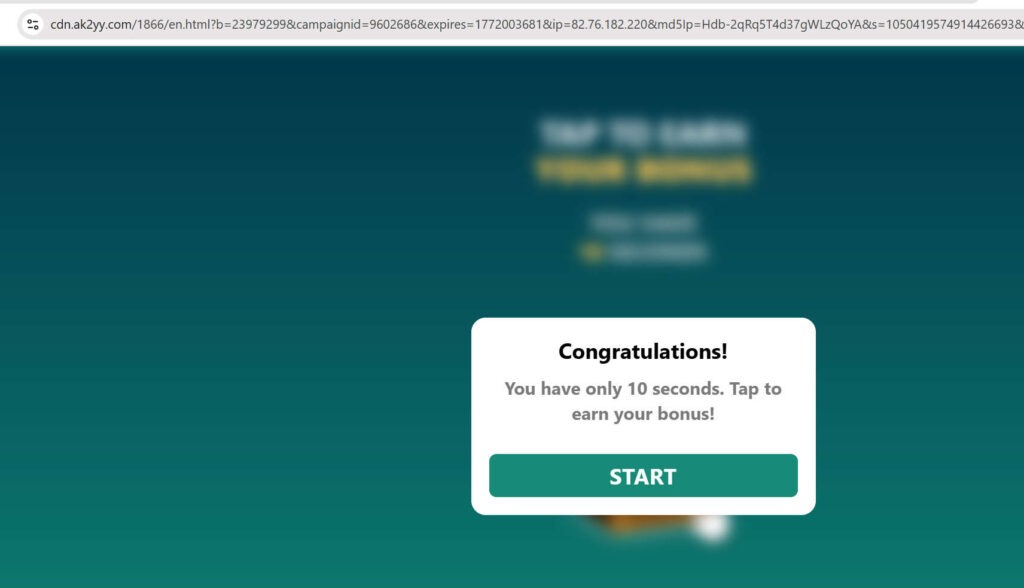
- Claim your bonus in 10 seconds
It often adds countdown timers, urgent language, or extra prize claims to increase pressure. Some versions also stack multiple prizes like phones, headphones, or game consoles to make the offer feel even bigger.
This is where many people get confused.
They assume the verification is part of the gift card process, but it is not. It is the monetization layer.
The reward was never real. The verification step is the actual destination.
Step 7: The User Gets Pushed Into Affiliate Offers
The verification page routes the user into one or more third-party offers.
These offers vary by location, device type, and traffic source. Two users can land on the same scam but see different “verification” tasks depending on where they are.
Common task types include:
Email submit offers
The user is asked to enter an email address to continue.
This looks harmless, but it can trigger affiliate payouts and put the user into marketing and spam pipelines. In many cases, the email gets reused across multiple campaigns.
SMS or mobile PIN offers
The user is told to send a text or enter a mobile number to claim the reward.
This can lead to premium text charges, recurring mobile billing, or aggressive promotional messaging. The user may not realize the real cost until later.
Survey and quiz offers
The page may present “quick surveys” as a required step.
These surveys are often lead-generation funnels. They collect personal details, route users through ad-heavy pages, and can end with trial signups or payment prompts.
App install offers
The user is told to install an app and open it to complete verification.
This triggers affiliate commissions when installs are tracked. Some apps are harmless but unnecessary. Others are aggressive ad apps or suspicious software.
Browser extension installs
This is one of the higher-risk tasks.
A fake verification page may push a browser extension and claim it is required to unlock the code. Extensions can request sensitive permissions and may hijack browsing behavior.
Trial subscriptions and “reward clubs”
Some offers involve free trials, discount clubs, or recurring memberships.
These are especially dangerous because users are focused on the fake PSN code and may ignore billing terms. Later, they get charged and have to untangle a subscription they never really wanted.
Step 8: The Scam Makes Money When You Complete The Task
This is the economic engine of the scam.
The operators behind the page make money through affiliate tracking. If a user completes a required action, the system logs a conversion and pays a commission.
The payout can happen even if the user never receives a gift card.
That is why there is no incentive to deliver the reward.
From the scammer’s point of view, the moment you complete a task is the moment the scam succeeds.
The fake PSN code was only there to get you to that action.
This is also why the page may keep sending you to more offers. Some scam funnels are designed to extract multiple conversions from the same user before they give up.
Step 9: The “Verification Failed” Loop Keeps Victims Stuck
A common tactic is the endless verification loop.
After the user completes one task, the site may claim:
- Verification incomplete
- Offer not detected
- Please complete another offer
- Your region requires one more step
- Retry to unlock
This loop is intentional.
It keeps the victim chasing the original promise while the scam continues to collect commissions from additional actions. The user thinks something glitched. In reality, the system is working exactly as intended.
This is one of the most frustrating parts of the scam because it creates the illusion that the reward is still possible.
People often stay longer than they should because they feel they are already close.
Step 10: The Gift Card Never Arrives
At the end of the process, there is no real PSN code.
There was never going to be one.
The code shown earlier was fake. The progress bar was fake. The database messages were fake. The only real part of the funnel was the offer tracking.
Victims typically walk away with one or more of the following outcomes:
- No gift card
- Spam emails
- Spam calls
- Text charges
- Trial subscriptions
- Unwanted browser changes
- Suspicious apps or extensions on their device
- Lost time
This is why the scam is so effective and so damaging.
It does not need to steal a large amount from every person. It only needs enough users to complete enough tasks to generate steady profit.
Why The Scam Uses “Verification” Language Instead Of A Direct Scam Ask
This is a key point because it explains why people who are usually careful still fall for it.
If the page immediately said “Pay $20 to unlock your free code,” most users would leave.
But “verify you are human” sounds normal.
It sounds like a security step. It sounds routine. It sounds temporary.
Scammers intentionally choose language that feels familiar and low risk.
They also hide the true cost by splitting it across steps. Instead of one obvious scam action, they create a sequence of smaller actions:
- Enter email
- Click continue
- Install app
- Open app
- Complete survey
- Try another offer
Each step looks minor by itself.
Together, they create the scam.
How Affiliate Link Abuse Makes The Scam Look Less Obvious
This type of scam often avoids asking for money directly on the fake PlayStation page. That is part of what makes it harder for some victims to identify.
Because the payment or signup happens on another page, users may think the original site was just a “promo portal” and the problem happened somewhere else.
That separation helps the scammers.
It gives them plausible distance from the damage while still letting them profit from it. They send traffic to offers, the offers capture the conversion, and the scam operator gets paid.
The victim is left trying to figure out which page caused which problem.
That confusion delays charge disputes, slows reporting, and helps the scam continue longer.
Why This Scam Is Especially Dangerous For Parents And Younger Gamers
PlayStation gift cards are a high-demand item for kids, teens, and gamers.
That makes this scam especially risky for households where:
- A child clicks social media gaming content
- A teen is actively looking for PSN codes
- A parent is trying to save money on games
- Someone is less experienced with scam patterns
Scammers know gaming rewards generate strong emotional reactions.
They also know that many people assume gift card promotions are common, so a “free PSN code” pitch feels believable at first glance.
That combination creates a wide pool of potential victims.
This is why it is important to treat fake gaming gift card generators the same way you would treat fake banking alerts or fake delivery scams. The theme is different, but the manipulation is the same.
What To Do If You Have Fallen Victim To This Scam
If you interacted with Psnuser.com, the most important thing is to act quickly and methodically.
Do not panic. Most damage can be reduced if you clean things up early.
Use the steps below in order.
1) Stop the process immediately
Close the site and stop clicking.
Do not try to finish the verification. Do not try “just one more offer.” The code is not real, and the next step is only more risk.
The longer you stay in the funnel, the more chances the scammers have to profit from your actions.
2) Write down what you entered or installed
Before you forget, make a quick list of everything you did.
Include details like:
- Email address entered
- Phone number entered
- SMS sent
- Apps installed
- Browser extension installed
- Payment information entered
- Trial signup completed
This makes recovery much easier because different actions require different fixes.
3) Check your bank and card activity right away
If you entered any payment details during a verification step, check your statements immediately.
Look for:
- Small test charges
- Trial charges
- Subscription charges
- Unfamiliar merchant names
Even a small charge matters. Some scams start with a low amount and increase later.
If you see anything suspicious, contact your bank or card issuer as soon as possible and ask them to:
- Block future recurring charges
- Review the transaction
- Open a dispute if needed
- Replace the card if risk is high
4) Review your email for confirmations and hidden trial terms
Search your inbox for messages related to any offer you completed.
Look for:
- “Welcome” emails
- Trial confirmations
- Billing notices
- Subscription terms
- Account activation emails
Scam funnels often route users into offers with recurring billing hidden in fine print. If you can identify the company, cancel the subscription immediately and save proof of cancellation.
Take screenshots of the cancellation page and any confirmation number.
5) Contact your mobile carrier if you entered a phone number or sent a text
If the scam asked for SMS verification or told you to send a text to claim the reward, contact your mobile provider.
Ask them to check for:
- Premium SMS charges
- Third-party billing subscriptions
- Short code services
- Recurring text programs
Also ask if they can block premium SMS billing on your line to prevent similar scams in the future.
6) Remove any browser extension you installed
If you installed an extension during the verification process, remove it immediately.
Open your browser’s extensions page and uninstall anything added during that session, especially if you do not fully trust it.
After removing it:
- Restart the browser
- Clear cookies and cached data
- Check your default search engine
- Check your homepage settings
- Review notification permissions
Some shady extensions continue causing problems even after the original site is closed, so this step is important.
7) Uninstall any program or app you downloaded
If the scam pushed a “helper app” or “unlock tool,” remove it.
Then run a full malware and adware scan using a trusted security program. This is important even if the app looked harmless.
Also check your system for signs of unwanted changes:
- New startup programs
- Browser redirects
- Pop-up ads
- Slower performance
- Unknown installed software
Do not log into sensitive accounts on the same device until you have cleaned it and scanned it.
8) Change passwords for key accounts
If you entered your email address or used a device that may have been affected by an extension or download, change your passwords.
Start with your email account first. Then change passwords for:
- PlayStation account
- Banking apps
- Shopping sites
- Social media
- Cloud accounts
Use strong, unique passwords for each account. If you reuse passwords, one compromised login can affect multiple accounts.
Turn on 2-factor authentication wherever possible.
9) Watch for scam follow-up messages
After a gift card scam, many users start getting more fraud attempts.
Be alert for:
- Fake prize claims
- “Account issue” emails
- Tech support popups
- Delivery scam texts
- Suspicious calls about purchases
Scammers and affiliate networks often reuse leads. If you interacted with one scam, you may be added to multiple spam lists.
Be extra cautious for the next few weeks.
10) Report suspicious charges and request chargebacks when appropriate
If you were charged by an offer you did not knowingly agree to, contact your bank or card issuer and explain exactly what happened.
Be clear that:
- You were redirected from a fake gift card page
- The “verification” process was deceptive
- The charge came from an offer tied to the scam flow
- You did not intend to enroll in a recurring subscription
The more specific you are, the easier it is for the bank to classify the dispute correctly.
Keep copies of:
- Screenshots
- Confirmation emails
- Billing statements
- Cancellation attempts
- Chat logs, if any
11) Report the scam link and the ad or post where you found it
This step helps other people avoid the same trap.
Report the ad, post, or page on the platform where you found it, such as Facebook, Instagram, TikTok, or YouTube. Include the domain name and explain that it is a fake PlayStation gift card scam with deceptive verification offers.
You can also report the domain to:
- Your browser’s safe browsing reporting system
- Your security software vendor
- Spam and phishing reporting services
- Consumer protection reporting portals in your country
Even if one report does not shut it down immediately, multiple reports increase the chances of action.
12) Keep a record of everything
Create a simple folder with evidence.
Save:
- The domain name
- Screenshots of the scam page
- Screenshots of the offer pages
- Any emails you received
- SMS messages
- Billing statements
- Extension or app names
- Dates and times
This record helps with disputes, reports, and future cleanup.
It also helps if new charges appear later and you need to connect them back to the original scam.
13) Educate anyone else who may have clicked it
If the scam was shared in a family chat, gaming group, or on a page your kids use, let people know it is fake.
This is especially important in homes with children or teens who may click similar “free PSN code” offers later.
A simple rule helps:
No real gaming platform gives away gift card codes through random generator sites and verification walls.
If people remember that one line, they will avoid most scams in this category.
14) Monitor your accounts for at least 30 days
Some charges or spam campaigns do not appear immediately.
For the next month, keep an eye on:
- Bank statements
- Card activity
- Mobile bills
- Email inbox and spam folder
- Browser behavior
- Installed apps and extensions
If anything looks off, act fast. Early response makes recovery much easier.
15) Treat this as a scam lesson, not a personal failure
These pages are built to manipulate normal behavior.
They use urgency, brand familiarity, and fake technical visuals to create trust. Getting caught in one does not mean you are careless. It means the scam was designed well enough to exploit common assumptions.
The right response is not shame.
The right response is cleanup, reporting, and stronger habits going forward.
That is how you turn one bad click into a useful line of defense for the future.
Is Your Device Infected? Run a Free Malware Scan
Slow performance, constant pop-ups, or strange behavior? These are classic signs of a malware infection. The fastest way to find out is to scan your device with Malwarebytes Free — one of the most trusted malware removal tools available.
The free version detects and removes the most common threats, including:
- Adware — the cause of those annoying pop-ups
- Browser hijackers — unwanted redirects and changed homepages
- Trojans and spyware — hidden programs stealing your data
- Potentially unwanted programs (PUPs) — software you never asked for
👉 Select your device below — Windows, Mac, or Android — then follow the simple steps to download Malwarebytes, scan your system, and remove any threats it finds. The scan usually takes 5 to 20 minutes.
Run a Malware Scan with Malwarebytes for Windows
Malwarebytes is one of the most popular and trusted anti-malware tools for Windows — and it’s completely free for removing infections. It catches threats that many antivirus programs miss, including adware, browser hijackers, and trojans. Follow the steps below to scan and clean your PC in just a few minutes.
Download Malwarebytes
Click the button below to download the latest version of Malwarebytes for Windows from the official source. The free version is all you need — it will scan your computer and remove adware, browser hijackers, and other malicious software at no cost.
Download MalwarebytesOfficial installer for Windows 11 and 10. Your download starts right away.Want real-time protection? See Malwarebytes Premium Malwarebytes Free for WindowsScans and removes malware at no cost
-
Install Malwarebytes
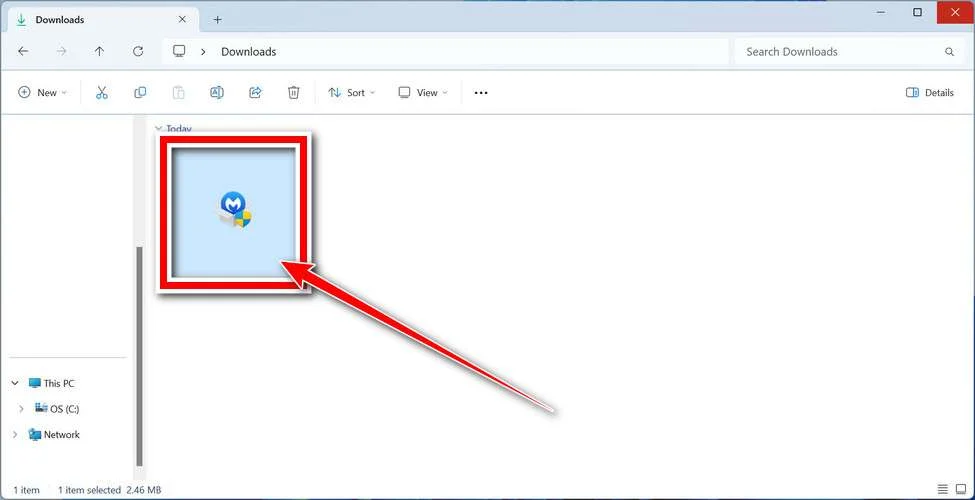
When the download finishes, open your Downloads folder and double-click the MBSetup file. If Windows shows a User Account Control pop-up, click “Yes” to allow the installation.
Follow the On-Screen Prompts to Install Malwarebytes
The setup wizard will walk you through a few quick screens:
-
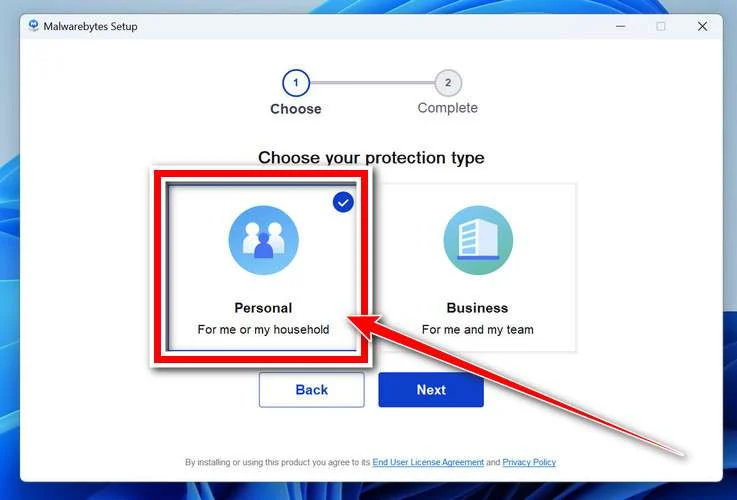
Choose where you’re installing the program — “Personal Computer” or “Work Computer” — then click Next.
-
Malwarebytes will now install on your device. This usually takes under a minute.

-
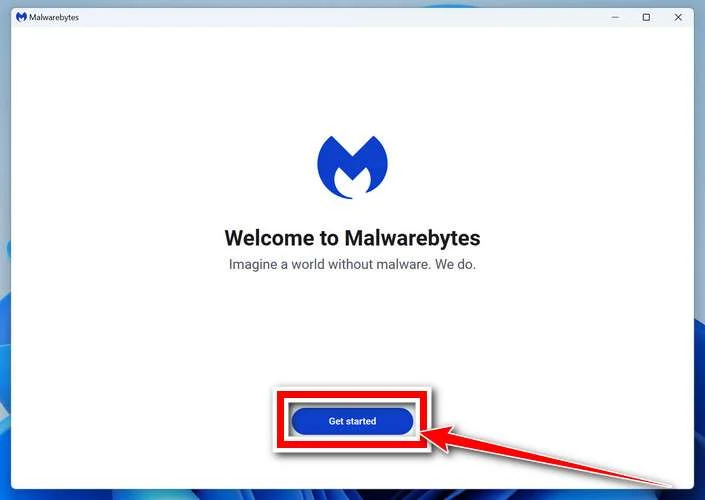
When installation is complete, the “Welcome to Malwarebytes” screen will open automatically.
-
On the final screen, click Open Malwarebytes to launch the program.

-
Enable “Scan for Rootkits”
Before scanning, turn on rootkit detection so Malwarebytes can find even the most hidden threats. Click the Settings gear icon on the left side of the screen.
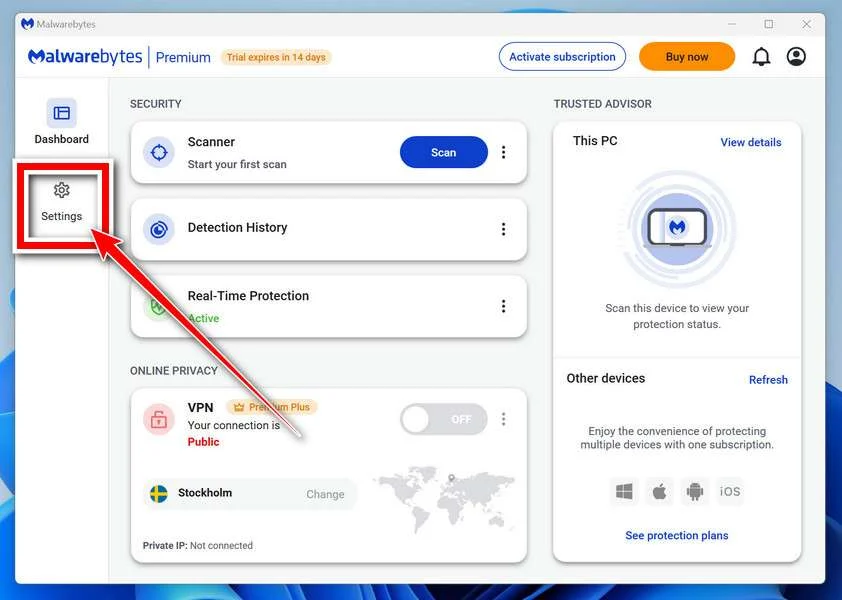
In the settings menu, find “Scan for rootkits” and click the toggle so it turns blue.

Done? Click “Dashboard” in the left pane to return to the main screen.
Start the Scan
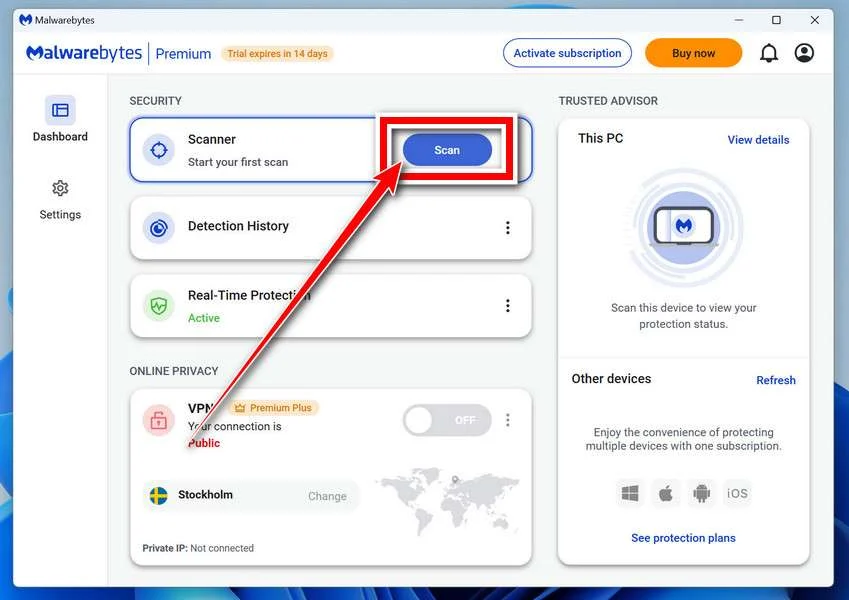
Click the blue Scan button. Malwarebytes will automatically update its virus database and start checking your computer for malware.
-
Wait for the Scan to Finish
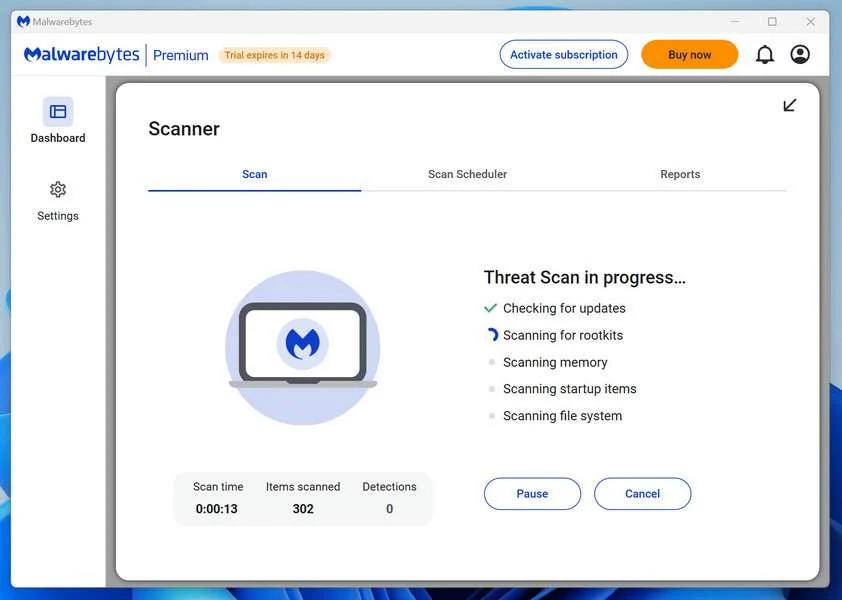
The scan checks your entire system for browser hijackers and other malicious programs, so it can take 5 to 20 minutes depending on your computer. Feel free to do something else — just check back occasionally to see the progress.
-
Quarantine the Detected Threats
When the scan is done, you’ll see a list of everything Malwarebytes found — malware, adware, and potentially unwanted programs. Click the “Quarantine” button to remove all of them at once.
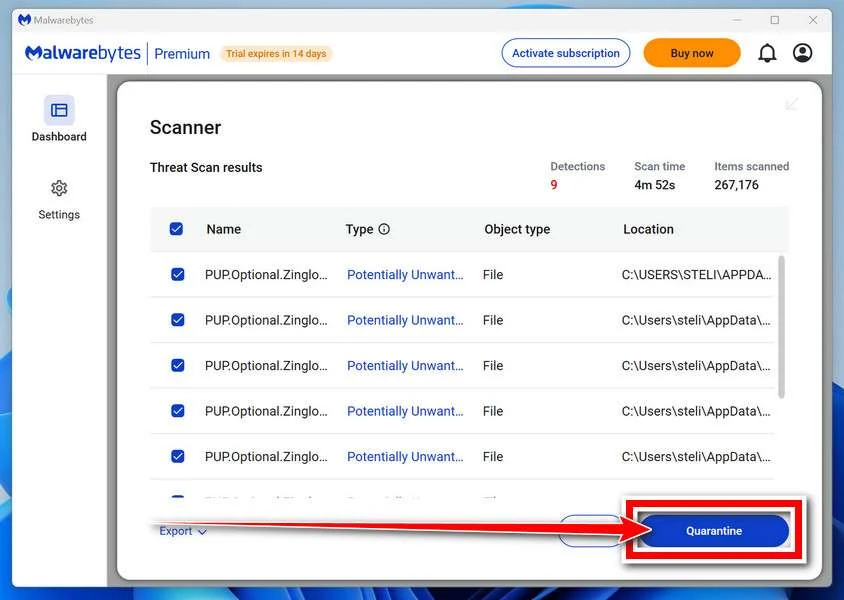
Malwarebytes will now remove the malicious files and registry entries and move them safely into quarantine.
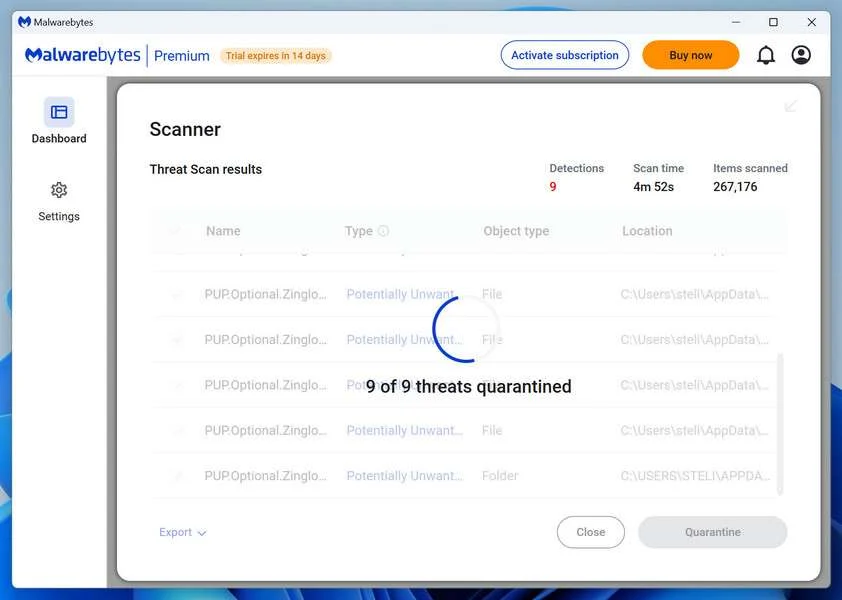
-
Restart Your Computer
Some threats can only be fully removed after a reboot. If Malwarebytes asks you to restart, click Yes. Once you’re logged back in, Malwarebytes has finished removing the threats it found.
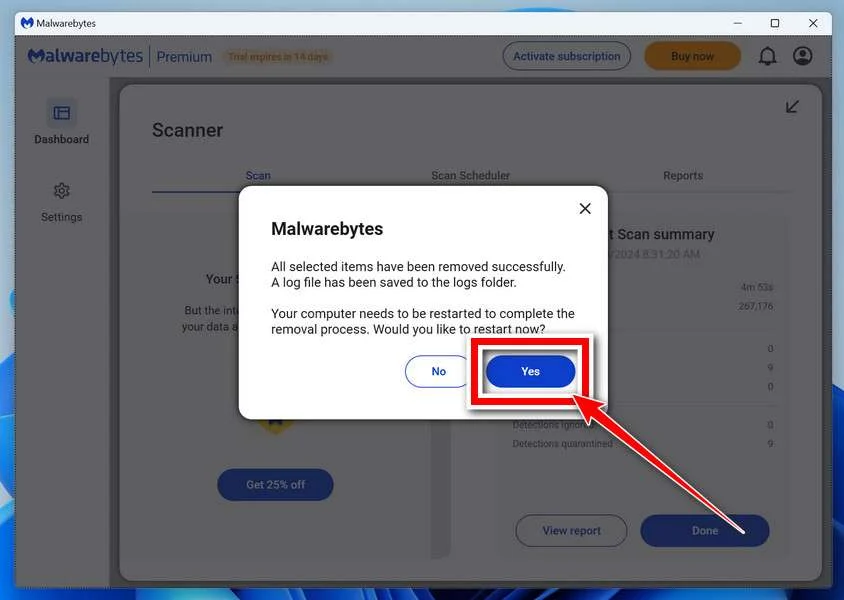
That’s it — your Windows PC is now clean of trojans, adware, and other malware, and should be back to running smoothly.
If you are still having problems with your computer after completing these instructions, then please follow one of the steps:
- Run a computer scan with ESET Online Scanner
- Ask for help in our Windows Malware Removal Help & Support forum.
Run a Malware Scan with Malwarebytes for Mac
Malwarebytes for Mac is a free on-demand scanner that removes the malware other security software tends to miss — adware, browser hijackers, and unwanted programs included. Cleaning an infected Mac with Malwarebytes has always been completely free, and it’s our go-to recommendation. Follow the steps below to scan and clean your Mac in just a few minutes.
-
Download Malwarebytes for Mac
Click the button below to download the latest version of Malwarebytes for Mac.
Download MalwarebytesOfficial installer for macOS. Your download starts right away.Want real-time protection? See Malwarebytes PremiumMalwarebytes Free for MacScans and removes malware at no cost -
Open the Malwarebytes setup file
When the download finishes, open your Downloads folder and double-click the setup file to begin the installation.
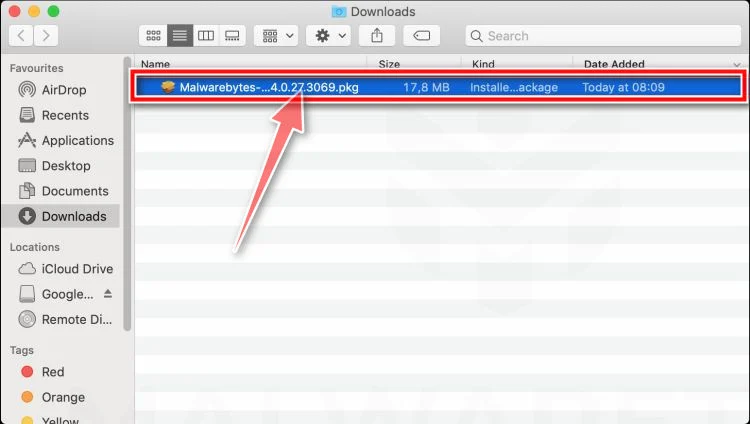
-
Follow the On-Screen Prompts to Install Malwarebytes
The Malwarebytes for Mac Installer will guide you through a few quick screens. Click “Continue” and keep following the prompts until the installation completes.
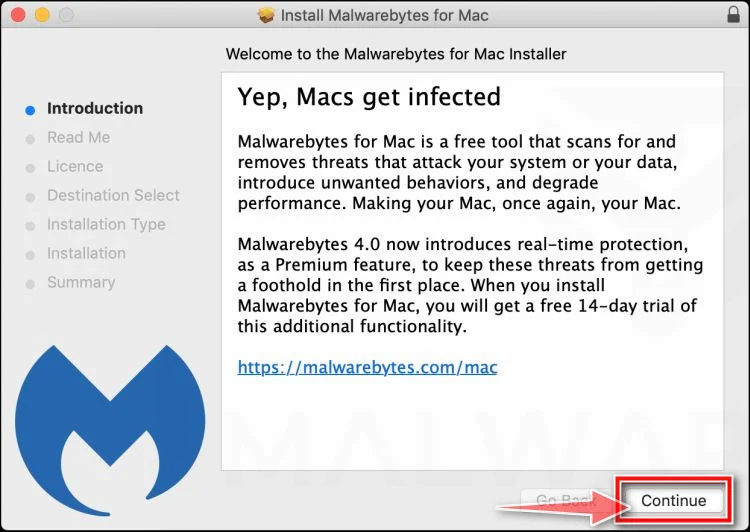
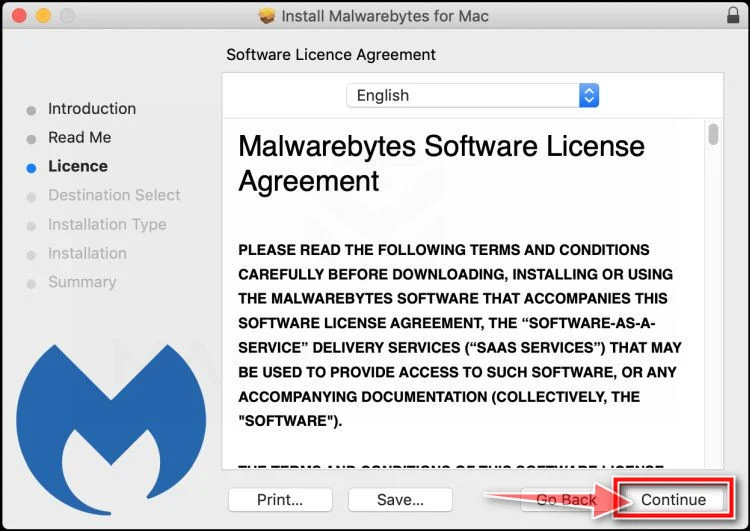
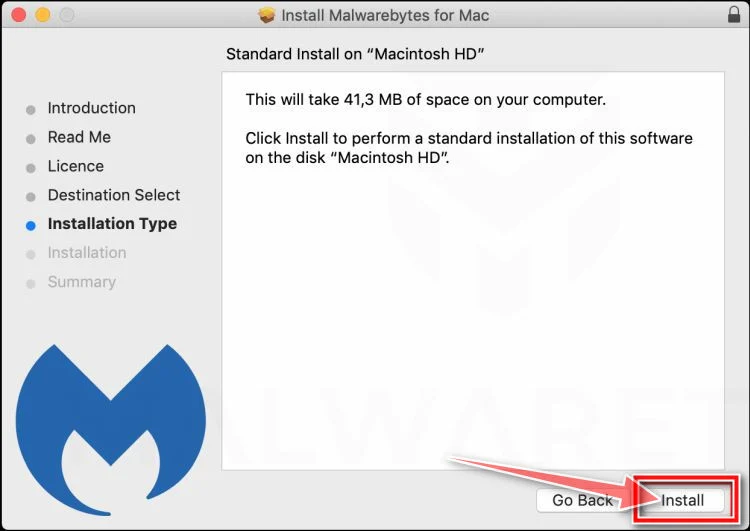
When the installation is complete, Malwarebytes opens to the Welcome to Malwarebytes screen. Click “Get started“.
-
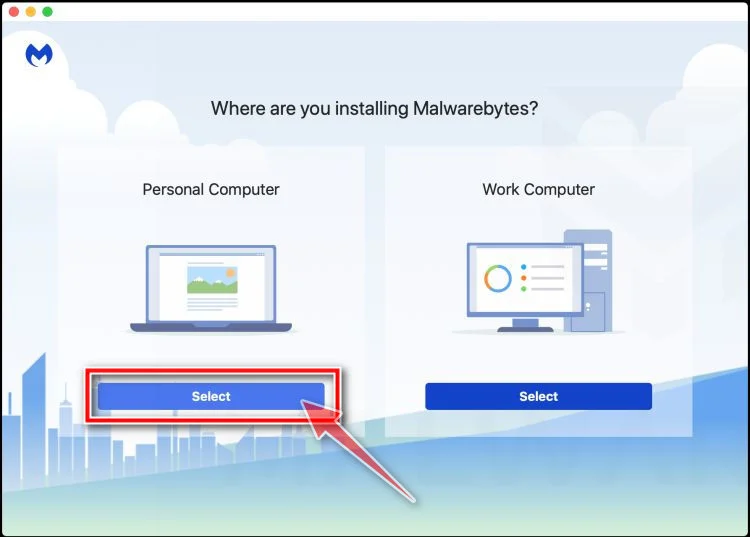
Select “Personal Computer” or “Work Computer”
Malwarebytes will ask what type of computer you’re installing it on. Click either Personal Computer or Work Computer, whichever applies.
-
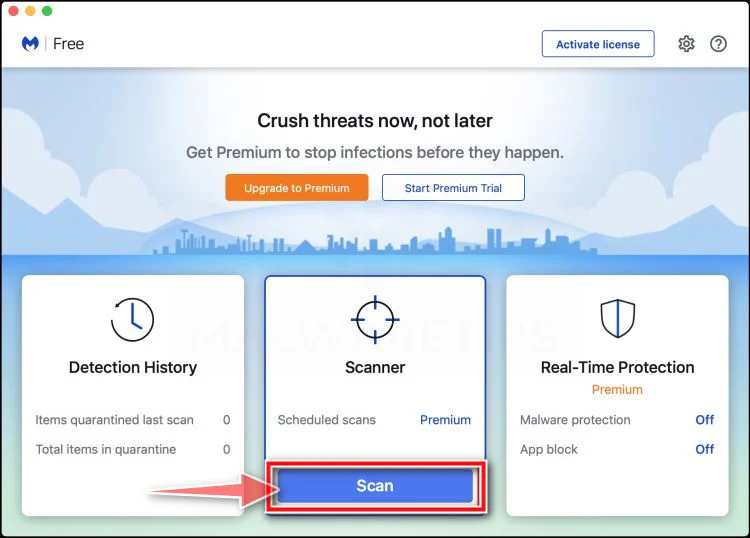
Start the Scan
Click the “Scan” button. Malwarebytes will automatically update its detection database and begin checking your Mac for malware.
-
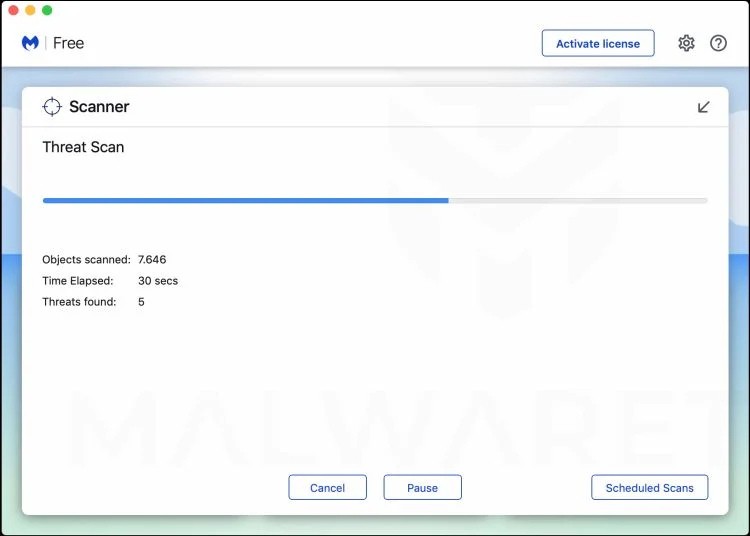
Wait for the Scan to Finish
Malwarebytes will scan your Mac for adware, browser hijackers, and other malicious programs. This can take a few minutes, so feel free to do something else — just check back occasionally to see the progress.
-
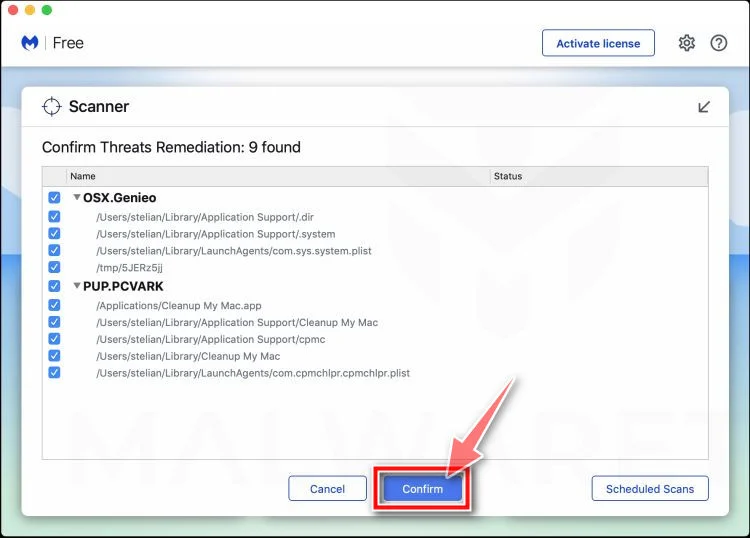
Quarantine the Detected Threats
When the scan is done, you’ll see a list of everything Malwarebytes found. Click the “Quarantine” button to remove all the threats at once.
-
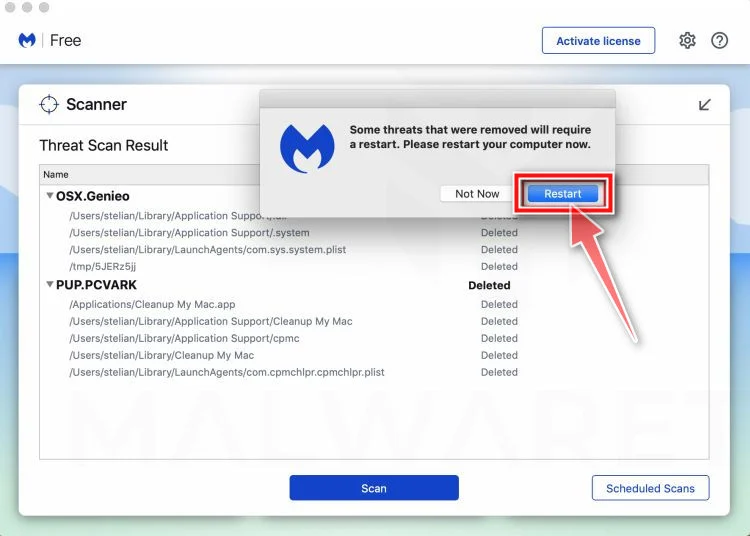
Restart Your Mac
Malwarebytes will now remove all the malicious files it found. Some threats can only be fully removed after a reboot — if Malwarebytes asks you to restart, allow it. Once you’re logged back in, your Mac is clean.
That’s it — your Mac is now free of adware, rogue browser extensions, and other potentially harmful software.
If you are still experiencing problems while trying to remove a malicious program from your computer, please ask for help in our Mac Malware Removal Help & Support forum.
Run a Malware Scan with Malwarebytes for Android
Malwarebytes for Android automatically detects and removes dangerous threats like malware and ransomware so you don’t have to worry about your most-used device being compromised. Aggressive detection of adware and potentially unwanted programs keeps your Android phone or tablet running smooth.
-
Download Malwarebytes for Android.
You can download Malwarebytes for Android by clicking the link below.
Get Malwarebytes for AndroidOpens Google Play in a new tab.Want real-time protection? See Malwarebytes Premium for AndroidMalwarebytes for AndroidScans your phone and removes malware at no cost -
Install Malwarebytes for Android on your phone.
In the Google Play Store, tap “Install” to install Malwarebytes for Android on your device.

When the installation process has finished, tap “Open” to begin using Malwarebytes for Android. You can also open Malwarebytes by tapping on its icon in your phone menu or home screen.

-
Follow the on-screen prompts to complete the setup process
When Malwarebytes will open, you will see the Malwarebytes Setup Wizard which will guide you through a series of permissions and other setup options.
This is the first of two screens that explain the difference between the Premium and Free versions. Swipe this screen to continue.
Tap on “Got it” to proceed to the next step.
Malwarebytes for Android will now ask for a set of permissions that are required to scan your device and protect it from malware. Tap on “Give permission” to continue.
Tap on “Allow” to permit Malwarebytes to access the files on your phone.
-
Update database and run a scan with Malwarebytes for Android
You will now be prompted to update the Malwarebytes database and run a full system scan.

Click on “Update database” to update the Malwarebytes for Android definitions to the latest version, then click on “Run full scan” to perform a system scan.

-
Wait for the Malwarebytes scan to complete.
Malwarebytes will now start scanning your phone for adware and other malicious apps. This process can take a few minutes, so we suggest you do something else and periodically check on the status of the scan to see when it is finished.

-
Click on “Remove Selected”.
When the scan has been completed, you will be presented with a screen showing the malware infections that Malwarebytes for Android has detected. To remove the malicious apps that Malwarebytes has found, tap on the “Remove Selected” button.

-
Restart your phone.
Malwarebytes for Android will now remove all the malicious apps that it has found. To complete the malware removal process, Malwarebytes may ask you to restart your device.
That’s it — your Android phone is now clean — no more malicious apps, adware, or browser redirects.
If you are still having problems with your phone after completing these instructions, then please follow one of the steps:
- Restore your phone to factory settings by going to Settings > General management > Reset > Factory data reset.
- Ask for help in our Mobile Malware Removal Help & Support forum.
Stay Protected: Block Ads and Malicious Sites
Now that your device is clean, keep it that way. Most infections start with a malicious ad or a fake download button — so blocking them at the source is your best defense.
We recommend AdGuard, which blocks malicious ads, phishing pages, and dangerous redirects before they can reach you.
👉 Download AdGuard and browse safely
The Bottom Line
Psnuser.com is a fake PlayStation gift card scam, not a real PSN rewards site.
It uses a polished gift card generator theme to trick people into believing a free code is being prepared. Then it blocks the fake reward behind a “verification” wall filled with affiliate offers, signups, downloads, and other tasks that make money for scammers.
There is no real PlayStation gift card at the end of the process.
The real outcome is usually one or more of the following: wasted time, spam, unwanted subscriptions, mobile charges, risky downloads, or compromised browser security.
If you already interacted with it, stop immediately, check your accounts, remove anything you installed, and document what happened. A quick response can prevent bigger problems.
The most important takeaway is simple. Any site claiming to generate free PSN gift card codes and asking for “verification” tasks is a scam. Once you recognize that pattern, you can avoid this one and the many copycat versions that will appear next.
FAQ
Is Psnuser.com a real PlayStation gift card site?
No. Psnuser.com is not a legitimate PlayStation gift card source. It uses a fake reward flow to make people complete tasks, offers, or signups, but it does not provide a real PSN gift card.
Can a website really generate free PSN gift card codes?
No. Legitimate PSN gift card codes are issued through official retail or authorized digital channels. A random “code generator” website cannot create valid PlayStation gift card codes.
Why does Psnuser.com show a code and progress bar?
That is part of the scam design. The progress bar, fake system messages, and partial code display are used to make the process look real and keep people clicking.
What is the “verification” step on Psnuser.com?
The “verification” step is the scam’s monetization system. It usually sends visitors to affiliate offers such as surveys, app installs, SMS prompts, trial signups, or browser extension downloads. The scammers get paid when people complete those actions.
Will I ever receive a real PlayStation gift card from Psnuser.com?
In almost all cases, no. The promised gift card is bait. Victims are usually pushed through one or more offers and never receive a valid code.
What happens if I entered my email address?
The email address may be added to spam, marketing, or scam lists. This can lead to more phishing emails, fake prize messages, and other scam attempts later.
What if I entered my phone number or sent an SMS?
There may be premium SMS charges, unwanted subscriptions, or aggressive marketing texts. It is a good idea to check the mobile bill and contact the carrier to review and block premium text billing if needed.
What if I installed a browser extension during the scam?
Remove it immediately. Scam-related extensions can track browsing, change search settings, inject ads, or create security risks. After removing it, clear browser data and run a device scan.
What if I signed up for a “free trial” while trying to verify?
Check email confirmations and billing statements right away. Many scam offer pages use trial subscriptions that convert into recurring charges. Cancel the subscription as soon as possible and keep proof of cancellation.
Can Psnuser.com steal money directly?
Sometimes the scam is indirect, not direct. The site often makes money through affiliate offers, but victims can still lose money through trial charges, mobile billing, or subscriptions triggered during the fake verification process.
How can I tell a PSN gift card scam from a real offer?
Watch for these red flags:
- “Free PSN code generator” claims
- Fake progress bars and technical messages
- Partial code reveal screens
- “Human verification” that requires surveys, downloads, or signups
- Social media posts with urgency and no clear company details
A real PlayStation redemption flow does not use a third-party generator or task wall.
What should I do first if I used Psnuser.com?
Start with these steps:
- Stop using the site immediately.
- Write down what was entered or installed.
- Check bank, card, and mobile charges.
- Cancel any trial subscriptions.
- Remove extensions or apps installed during the process.
- Change passwords, especially for the main email account.
- Report the scam and save screenshots or records.
Can this scam lead to malware or other security issues?
Yes. Some versions of these scams push downloads or browser extensions as part of the fake verification process. That can lead to adware, malicious extensions, browser hijacking, or other unwanted software.
Why are scams like this so common on social media?
They are cheap to run, easy to clone, and profitable through affiliate commissions. Scammers use social media because it gives them fast traffic and lets them test many versions of the same scam quickly.
Is there any safe way to get discounted PSN gift cards?
The safest option is to buy from official PlayStation channels or well-known authorized retailers. Avoid any site that claims to generate free codes, unlock gift cards, or requires unrelated verification tasks.

Join the discussion
0 commentsShare your experience or ask a question about this article.
Discussion
Start the conversation
Have a question or something useful to share? Add the first comment.