

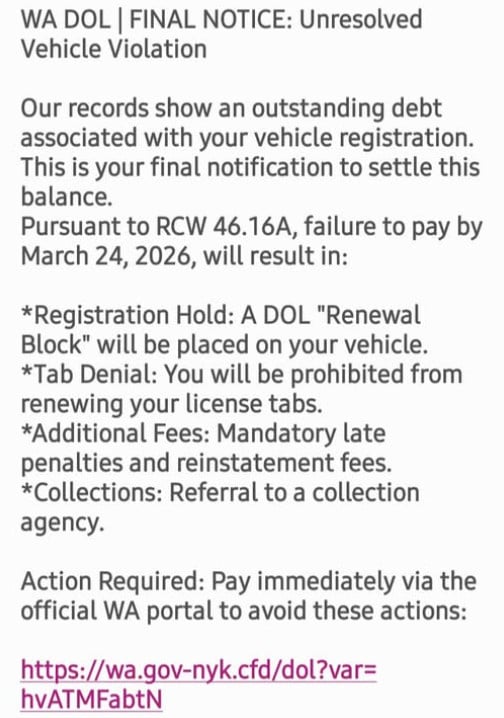
A text message claims your vehicle has an unresolved violation under RCW 46.16A, warning of registration holds, fees, and collections unless you act immediately.
It looks official. It sounds urgent. It pushes you to click fast.
But this is not a real notice from Washington authorities. It is a phishing scam designed to steal your money and personal information.
Scam Overview
The RCW 46.16A scam text is part of a growing wave of DMV and vehicle-related phishing attacks targeting drivers across the United States. In this version, scammers impersonate the Washington State Department of Licensing (WA DOL) and reference real legal statutes like RCW 46.16A to make the message appear legitimate.
The message you shared follows a very specific pattern.
It begins with a strong header such as:
- “WA DOL | FINAL NOTICE: Unresolved Vehicle Violation”
Then it immediately creates urgency by stating:
- “Our records show an outstanding debt associated with your vehicle registration”
- “This is your final notification to settle this balance”
From there, the scam escalates into threats, listing consequences such as:
- Registration hold
- Tab denial
- Additional fees
- Collections referral
It even references a real Washington law, RCW 46.16A, which governs vehicle registration. This is a key detail. By including an actual legal code, the message feels far more credible.
But that credibility is manufactured.
Why referencing RCW 46.16A makes the scam more dangerous
Most people are not familiar with specific legal codes. When they see something like “RCW 46.16A,” they assume it must be real.
Scammers take advantage of this.
They insert real legal references into fake scenarios to make the message feel authentic. It creates a powerful illusion:
- The law is real
- The agency sounds real
- The formatting looks official
So the entire message feels real
But in reality, the connection between the law and the “violation” is fabricated.
The link is the real goal
At the end of the message, the scam provides a link that looks somewhat official, such as:
- wa.gov-like domain structures
- shortened or unfamiliar domains
- strange combinations of letters and subdomains
This is where the real attack begins.
The link typically leads to a fake payment page designed to look like a WA DOL portal. It may include:
- a case number
- a balance due
- a payment deadline
- a “Pay Now” or “Resolve” button
Once you land on that page, you are no longer dealing with a warning message. You are inside the scammer’s system.
Why the amount and penalties feel believable
This scam does not usually demand a large amount upfront.
Instead, it focuses on realistic administrative consequences:
- You cannot renew your tabs
- Your registration gets blocked
- Fees will increase
- The case goes to collections
These are all things that can happen in real situations, which is why they are effective.
But the scam exaggerates and accelerates them.
It creates a fake timeline where everything happens immediately unless you pay right now.
That is not how real agencies operate.
Key red flags in RCW 46.16A scam texts
If you look closely, the warning signs become clear:
- You receive the message unexpectedly
- It demands immediate payment
- It uses threatening language like “final notice”
- It includes a suspicious link
- It pressures you to act quickly
- It does not allow time for verification
Most importantly:
Legitimate agencies like WA DOL do not send unsolicited texts demanding payment through random links.
How The Scam Works
Understanding how the RCW 46.16A scam works step by step makes it much easier to avoid.
Step 1: Mass texting campaign
Scammers send thousands or millions of messages at once.
They do not know if you have a vehicle, a violation, or any connection to Washington.
They are relying on probability.
Even if only a small percentage of people respond, the scam is profitable.
Step 2: Authority and urgency are established
The message uses:
- WA DOL branding
- legal references like RCW 46.16A
- official-sounding language
Then it adds urgency:
- “Final notice”
- “Failure to pay will result in…”
- “Action required immediately”
This combination is powerful.
It makes people feel both afraid and responsible.
Step 3: Threat escalation
The message lists consequences to increase pressure:
- Registration hold
- License tab denial
- Additional penalties
- Collections
These threats are not random.
They are carefully chosen because they are believable.
Most drivers know these are real possibilities in certain situations.
That is why the scam works.
Step 4: The link is presented as the solution
After creating fear, the scam offers relief:
- “Pay immediately via the official portal”
This is the turning point.
The victim is guided from panic to action.
The link feels like the fastest way to fix the problem.
Step 5: Fake payment website
Once clicked, the link leads to a fraudulent site that mimics a government portal.
It may include:
- logos
- structured forms
- violation details
- payment options
The design is meant to lower suspicion.
At this stage, many victims believe they are interacting with a real system.
Step 6: Data collection
The site asks for:
- name
- address
- phone number
- credit card details
This is the real goal.
Even if the payment fails, the data is already captured.
Step 7: Financial and identity exploitation
After submission:
- the card may be used for fraudulent charges
- the data may be sold or reused
- the victim may receive further scam attempts
This is why the damage often continues beyond the initial interaction.
What To Do If You Have Fallen Victim to This Scam
If you interacted with the RCW 46.16A scam, act quickly.
1) Contact your bank or card issuer
- Report the card as compromised
- Request a replacement
- Block unauthorized transactions
2) Monitor your transactions
Check for:
- unknown charges
- small test transactions
- recurring payments
Dispute anything suspicious immediately.
3) Enable transaction alerts
Turn on alerts for all purchases so you can catch fraud early.
4) Do not click the link again
Avoid revisiting the scam site.
Do not attempt to “fix” anything through the same message.
5) Report the message
- Mark it as spam
- Block the sender
- Forward it to 7726 (SPAM) if supported
6) Verify through official channels
If you are concerned about a real issue:
- Go directly to the official WA DOL website
- Do not use the link in the message
- Contact support through verified channels
7) Watch for follow-up scams
Once targeted, you may receive:
- additional DMV scams
- fake refund offers
- fake fraud alerts
Stay cautious.
The Bottom Line
The RCW 46.16A scam text is a well-crafted phishing attack that uses real legal references, official language, and urgent threats to push victims into quick action.
It is not a legitimate notice.
It is a trap designed to:
- steal your payment details
- collect your personal information
- expose you to further fraud
If you receive a message like this, do not click, do not pay, and do not panic.
Verify everything through official channels you access yourself.
That one simple habit is the most effective defense against this entire category of scams.








