

The FBI MoneyPak Ransom is a computer virus, which will display a bogus notification, that pretends to be from the Federal Bureau of Investigation and states that your computer has been blocked due to it being involved with the distribution of pornographic material, SPAM and copyrighted content.
The FBI virus will lock you out of your computer and applications, so whenever you’ll try to log on into your Windows operating system or Safe Mode with Networking, it will display instead a lock screen asking you to pay a non-existing fine of 100 $ in the form of a Green Dot MoneyPak code.
Furthermore, to make its alert seem more authentic, this virus also has the ability to access your installed webcam ,so that the bogus FBI notification shows what is happening in the room.
If your computer is infected with FBI virus,then you are seeing any of the below notifications:

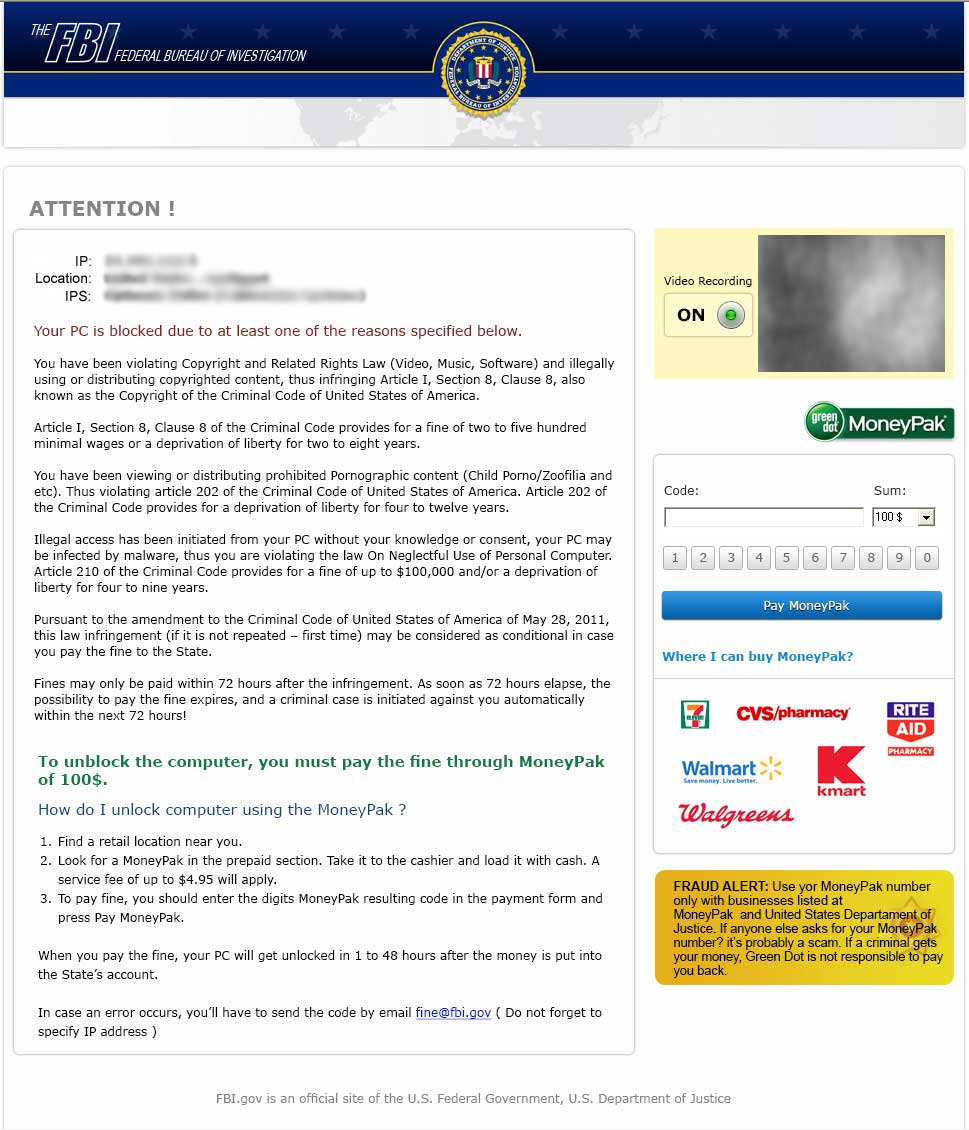
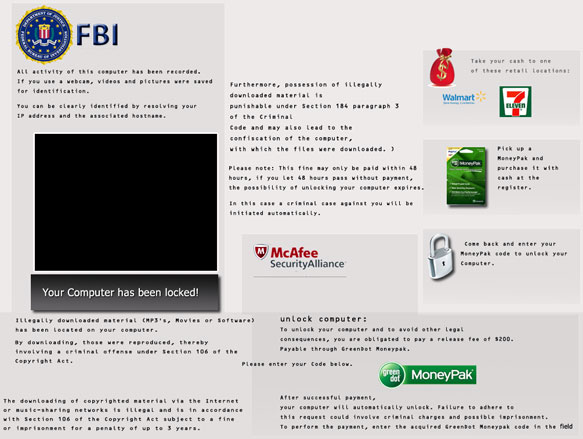
The FBI lock screen is a scam, and you should ignore any alert that this malicious software might generate and remove this trojan from your computer.
Under no circumstance should you send any money to this cyber criminals,as this could lead to identity theft,and if you have, you should contact your credit card company and dispute the charge stating that the program is a scam and a computer virus.
FBI Green Dot MoneyPak – Virus Removal Guide
STEP 1: Remove FBI lock screen from your computer
FBI MoneyPak Ransom has modified your Windows registry and added its malicious files to run at start-up, so whenever you’re trying to boot your computer it will launch instead its bogus notification.To remove these malicious changes,we can use any of the below methods :
Method 1: Start your computer in Safe Mode with Networking and scan for malware
Some variants of FBI virus will allow the users to start the infected computer in Safe Mode with Networking without displaying the bogus lock screen. In this first method, we will try to start the computer in Safe Mode with Networking and then scan for malware to remove the malicious files.
- Remove all floppy disks, CDs, and DVDs from your computer, and then restart your computer.
- Press and hold the F8 key as your computer restarts.Please keep in mind that you need to press the F8 key before the Windows start-up logo appears.
Note: With some computers, if you press and hold a key as the computer is booting you will get a stuck key message. If this occurs, instead of pressing and holding the “F8 key”, tap the “F8 key” continuously until you get the Advanced Boot Options screen. - On the Advanced Boot Options screen, use the arrow keys to highlight Safe Mode with Networking , and then press ENTER.
![[Image: Safe Mode with Networking]](data:image/gif;base64,R0lGODlhAQABAAAAACH5BAEKAAEALAAAAAABAAEAAAICTAEAOw== "Safe Mode with Networking screen")
- If your computer has started in Safe Mode with Networking, you’ll need to perform a system scan (as seen on STEP 2) with Malwarebytes Anti-Malware and HitmanPro to remove the malicious files from your machine.
![[Image: Safe Mode with Networking]](http://malwaretips.com/images/removalguide/safemode.jpg "Safe Mode with Networking screen")
IF the FBI virus didn’t allow you to start the computer in Safe Mode with Networking,you’ll need to follow Method 2 to get rid of its lock screen.
Method 2: Restore Windows to a previous state using System Restore
System Restore can return your computer system files and programs to a time when everything was working fine, so we will try to use this Windows feature to get rid of FBI lock screen.
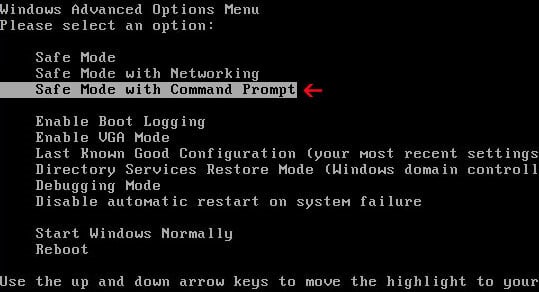
- Restart your computer, and then press and hold F8 during the initial startup to start your computer in safe mode with a Command prompt.
Note: With some computers, if you press and hold a key as the computer is booting you will get a stuck key message. If this occurs, instead of pressing and holding the “F8 key”, tap the “F8 key” continuously until you get the Advanced Boot Options screen. - Use the arrow keys to select the Safe mode with a Command prompt option.
- At the command prompt, type cd restore, and then press ENTER.
Next,we will type rstrui.exe , and then press ENTER
- The System Restore window will start and you’ll need to select a restore point previous to this infection.
- After System Restore has completed its task,you should be able to boot in Windows normal mode,from there you’ll need to perform a system scan (as seen on STEP 2) with Malwarebytes Anti-Malware and HitmanPro to remove the malicious files from your machine.

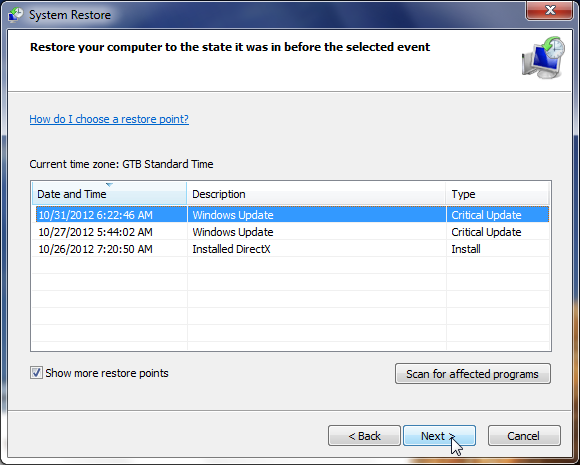
IF the FBI virus didn’t allow you to start the computer in Safe Mode with Command Prompt you’ll need to follow Method 3, to get rid of its screen lock.
Method 3: Remove FBI virus with HitmanPro Kickstart
IF you couldn’t boot into Safe Mode with Command Prompt or didn’t have a System Restore point on your machine, we can use HitmanPro Kickstart to bypass this infection and access your computer to scan it for malware.
- We will need to create a HitmanPro Kickstart USB flash drive,so while you are using a “clean” (non-infected) computer, download HitmanPro from the below link.
HITMANPRO DOWNLOAD LINK (This link will open a download page in a new window from where you can download HitmanPro) - Insert your USB flash drive into your computer and follow the instructions from the below video:
- After you have create the HitmanPro Kickstart USB flash drive, you can insert this USB drive into the infected machine and start your computer.
- Once the computer starts, repeatedly tap the F11 key (on some machines its F10 or F2),which should bring up the Boot Menu, from there you can select to boot from your USB.
Next,you’ll need to perform a system scan with HitmanPro as see in the below video:
- After HitmanPro Kickstart has completed its task,you should be able to boot in Windows normal mode,from there you’ll need to perform a system scan (as seen on STEP 2) with Malwarebytes Anti-Malware and HitmanPro to remove the malicious files from your machine.
STEP 2: Remove FBI malicious files from your computer
No matter what method you used to get rid of FBI lock screen, we will need to remove its malicious files from your computer.
Please download and run a scan with the following scan to completely remove FBI virus from your computer.
Run a computer scan with Malwarebytes Anti-Malware Free
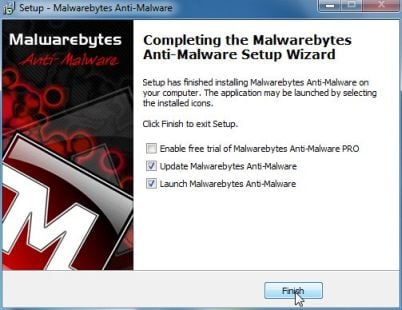
- You can download Malwarebytes Anti-Malware Free from the below link,then double click on it to install this program.
MALWAREBYTES ANTI-MALWARE DOWNLOAD LINK(This link will open a download page in a new window from where you can download Malwarebytes Anti-Malware Free) - When the installation begins, keep following the prompts in order to continue with the setup process.
DO NOT make any changes to default settings and when the program has finished installing, make sure you leave both the Update Malwarebytes’ Anti-Malware and Launch Malwarebytes’ Anti-Malware checked,then click on the Finish button.
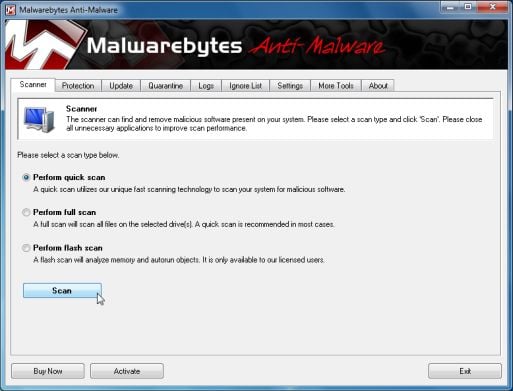
- On the Scanner tab,select Perform quick scan and then click on the Scan button to start scanning your computer.
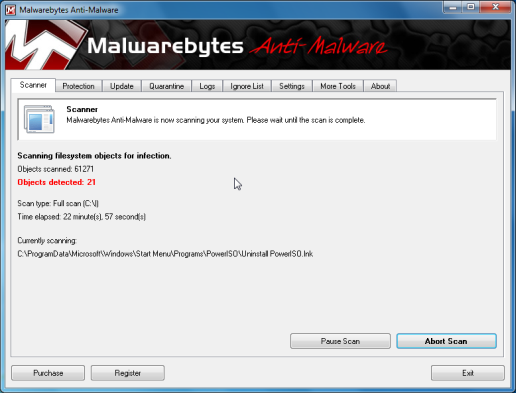
- Malwarebytes’ Anti-Malware will now start scanning your computer for FBI malicious files as shown below.
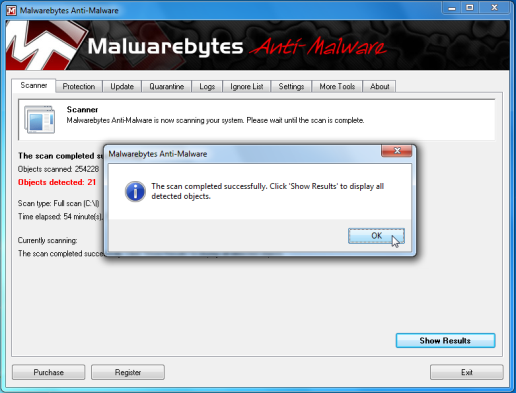
- When the Malwarebytes scan will be completed,click on Show Result.
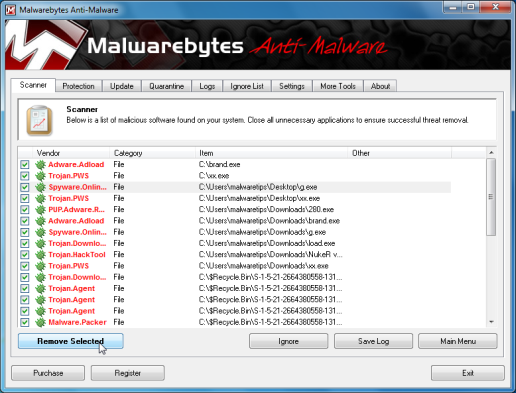
- You will now be presented with a screen showing you the malware infections that Malwarebytes’ Anti-Malware has detected.Please note that the infections found may be different than what is shown in the image.Make sure that everything is Checked (ticked) and click on the Remove Selected button.
- After your computer will restart, open Malwarebytes Anti-Malware and perform a Full System scan to verify that there are no remaining threats
Run a computer scan with HitmanPro
- Download HitmanPro from the below link,then double click on it to start this program.
HITMANPRO DOWNLOAD LINK (This link will open a new web page from where you can download HitmanPro)
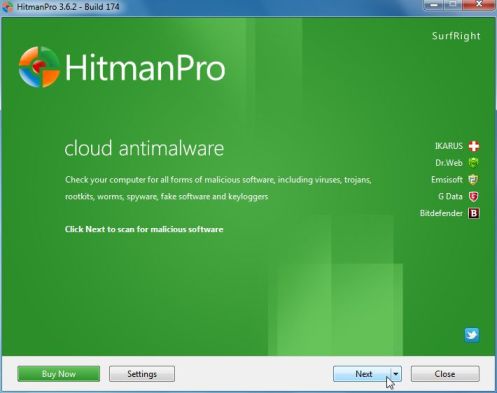
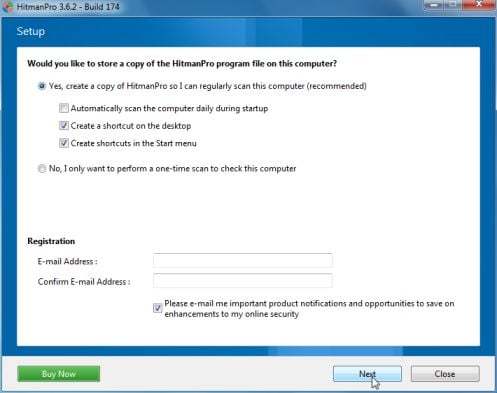
IF you are experiencing problems while trying to start HitmanPro, you can use the Force Breach mode.To start HitmanPro in Force Breach mode, hold down the left CTRL-key when you start HitmanPro and all non-essential processes are terminated, including the malware process. (How to start HitmanPro in Force Breach mode – Video) - HitmanPro will start and you’ll need to follow the prompts (by clicking on the Next button) to start a system scan with this program.
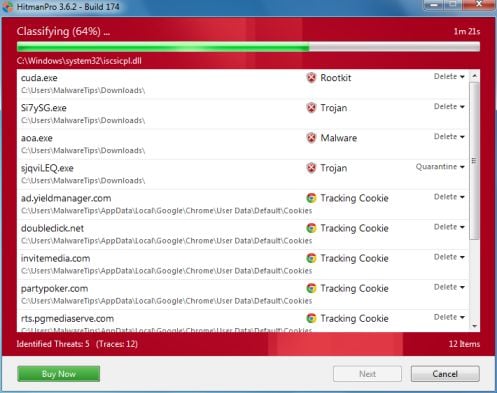
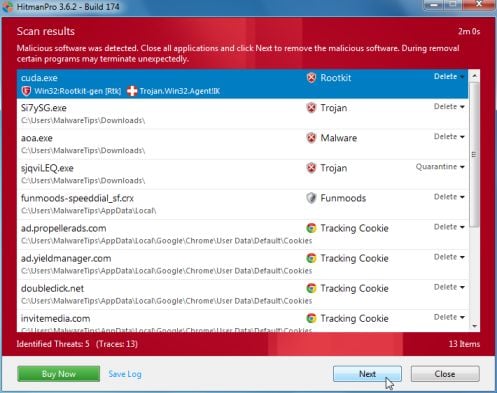
- HitmanPro will start scanning your computer for FBI malicious files as seen in the image below.
- Once the scan is complete,you’ll see a screen which will display all the infected files that this utility has detected, and you’ll need to click on Next to remove these malicious files.
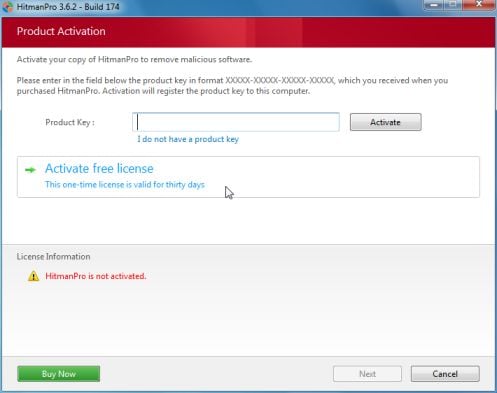
- Click Activate free license to start the free 30 days trial and remove all the malicious files from your computer.









THANK YOU, THANK YOU, THANK YOU! They wanted $200 for the scam, the repair shop wanted $200 to fix it, but you helped me fix it for FREE in less than one hour!
Here is an internet High five, hand shake and hug!!!!! all well deserved! Thanks again!
Hello,
I have the nasty Money Pak virus on my PC, but I can’t log in with my username/password, even in safe mode. It says the password in incorrect, but I haven’t changed it. Any suggestions?
THANKS!
Hello Britta,
This infection should not affect your login passwords, are you sure you’re using the corect passwords?
Did you try HitmanPro Kickstart, as this product should be able to remove the infection without the need of being logged in into your user account.
If it still doesn’t work,you’ll need to create a Kaspersky Rescue CD as seen HERE: http://malwaretips.com/blogs/remove-police-trojan/ , on Method 3.
If everything fails, then you’ll need to create an account on our forums and a member of the staff will help you (with more advanced tools) to remove this nasty virus: http://malwaretips.com/Forum-Malware-Removal-Assistance
Good Luck!
OMG thank you so much for this information! I was in the middle of a project when this crap popped up! I was already stressed and then this mess happens. Luckily my mom recognized it as a scam. still thanks for your simple instructions and easy to follow steps! Now I’m good to go! (:
Stelian,
You Tips are THE BEST!
After multiple hours of attempted fixes and unable to load Kicstart on my USB stick around the “Error #5, lock”, I then copied HitmanPro to the stick on a clean computer. Scans from the stick for Administrator and two users only found tracking cookies and other minor junk. The nefarious FBI scam block remained infected for the problem users. After more web searches, the Universe gratefully sent me to your fine tips with the Forced Breach suggestion. It worked perfectly to search and destroy the nasty.
With Gratitude,
Keith
I am would like to try the Hitmanpro to cleanup my xp computer, unfortunately it is a 32bit computer
while the computer I am downloading to is a 64bit computer, it will not allow me to run the 32bit version in order to create the usb so I can use it on the xp. Any suggestions. I have tried to boot to
safemode but it does not seem to be able to do that and I have the FBI bogus hijacker. Need some help.
Hello Tom,
Here is the direct download link for 32-bit version :
http://dl.surfright.nl/HitmanPro.exeIf you can’t create the USB,you’ll need to create a Kaspersky Rescue CD as seen here: http://malwaretips.com/blogs/remove-police-trojan/ , on Method 3.
If everything fails, then you’ll need to create an account on our forums and a member of the staff will help you (with more advanced tools) to remove this nasty virus: http://malwaretips.com/Forum-Malware-Removal-Assistance
Worked like charm though Malware Byte only detected 1 infection?
I got this virus on my fiance’s computer. She ran several antivirus programs and antimalware programs, however, this wasn’t detected on any of them. I know it’s there because whenever we try to log onto my account on her computer, the FBI scam screen shows up. So how would we remove something that nothing’s detecting?
Hello Patrick,
Please run a scan with the following tools:
STEP 1: Run a scan with RogueKiller
RogueKiller Download Link (This link will automatically download RogueKiller on your computer)
STEP 2: Please perform a scan with HitmanPro as seen on the guide.
If you are having problems starting this program please use the ForceBreach mode as described in the guide.
STEP 3: Run a scan with ESET Online Scanner:
ESET Online Scanner Download Link (This link will automatically download ESET Online Scanner on your computer.)
I have a variant of this on my system. It asks for 200$. I an able to login and window s will boot as usual. I can open everything as long as my internet connection is off. As soon as I turn on my wireless it gives me the lock screen. Will threes same steps work with my issue?
Hello Mike,
Of course Mike, just follow any of the Methods and get rid of this virus.
Why such kind of nonsense is happening in my pc..your steps helped me to remove FBI virus.thanks guys..
Please provide me information on how to avoid this kind of malware in the future!???
Hello Jacob,
Please read this article > http://malwaretips.com/blogs/how-to-easily-avoid-pc-infections/ < to understand how you can easily keep your computer clean!
I was able to unlock the screen by highlighting the text on the web page and then pressing the delete button. I was then able to do a system restore. This was after I tried to run in safe mode and could not.
Run malware bytes and hitman . Detected and removed moneypak virus but then when I restart in regular mode. Virus comes back. Have used malware bytes to clear twice but still comes back if I don’t start in safe mode. Can you help?
Hello John,
Please run the following scan and add the log in your next reply.
STEP 1 : Run a scan with Combofix
Download ComboFix from here: COMBOFIX DOWNLOAD LINK #1 (This link will automatically download Combofix on your computer)
VERY IMPORTANT !!! Save as Combo-Fix.exe during the download.ComboFix must be renamed before you download to your Desktop
Notes:
Please add the combofix log in your next reply!
hey my friend tried this and it seems to work along with all the other instructions given here. I do have a question though. She says that now she can’t get her windows defender firewall back up and she is unable to remove certain programs. How can she fix this?
Hello Shad,
Your friend most likely has a ZeroAccess rootkit infection, if that’s the case then please follow this guide: http://malwaretips.com/blogs/remove-zeroaccess-rootkit/
ok She did all of that and then when she got to the ESET scan this one trojan kept multiplying and she can’t get rid of it. the name of it is: js/agent.nid trojan . How can she get rid of it permenantly?
Hello Shad,
Please follow the instructions from this article: http://malwaretips.com/blogs/remove-medfos-trojan/
It worked!!! Thank you soooooooooo much!
Thanks for posting removal instructions. Unfortunately, I have the newest Kaspersky rescue cd and I ran it, but it found nothing? Virus still takes over screen :(. Stuck.
Thank you!
You are my hero!!!!!!!!!!!!!!!!!!!!!!!!!!!
100% worked thanks a million mate…just a quick question though, in your examples above, would it be typical on the results? because malware bytes found only 2 items. everything seems to be in order however.
thank you for you insight and sharing the how-to in dealing with this most malicious piece of disgusting software I have ever seen, i.e. the FBI Moneypack. I thank you and am attempting to retrace your success in removal of this pernicious threat.
This was truly the ONLY thing that worked. I had the Moneypak virus on my virtual machine. Thank you SO MUCH!!
Thank you!!
Just want to say : THANK YOU!
I didn’t have the windowsunlocker button however I have used the command on the terminal and worked out perfectly!
Thank you Stelian Pilici!