


Your phone rings, and the caller says unusual activity has appeared on your Revolut account. They sound prepared, patient, and eager to help.
It is easy to keep listening when someone seems to know what went wrong. With Revolut scam calls, the next instruction deserves your full attention.
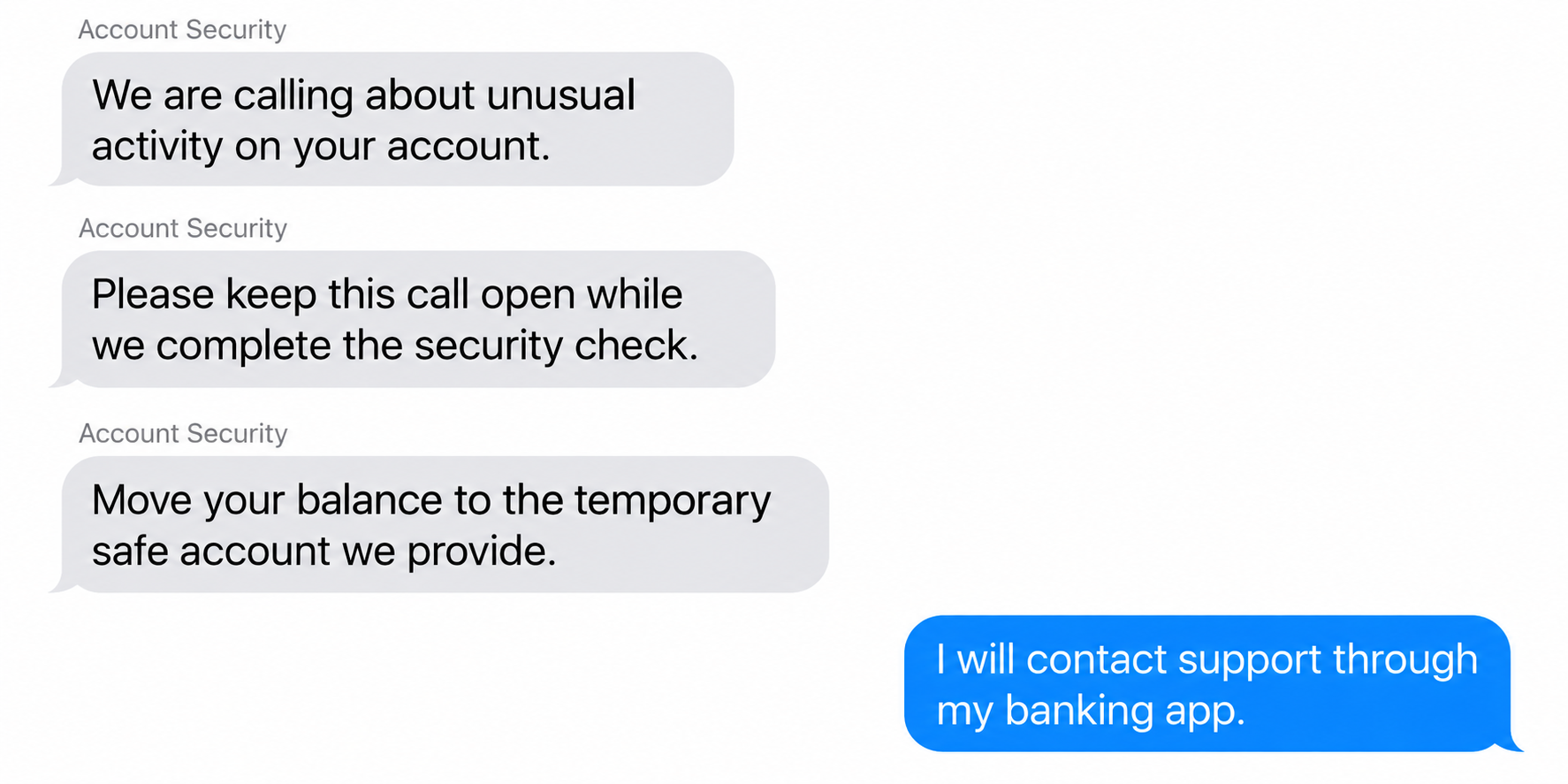
Overview
The fraud team on the phone may be an impostor
Revolut scam calls impersonate support or account-security staff. The caller uses an alleged threat to persuade you to reveal access information or perform a financial action.
They may describe suspicious spending, an unfamiliar device, or a compromised account. The claim creates a reason for urgent instructions that would otherwise seem unreasonable.
Revolut is the service being impersonated. This warning concerns callers abusing its identity, not a claim that the genuine banking app is operating the scam.
The reassuring manner is part of the approach. A person can sound professional while asking you to move money into an account they control.
A safe-account transfer is the clearest stop sign
Revolut explicitly warns that it will not ask you to transfer money into a new or supposedly safe account to protect it.
The same guidance warns against reading out one-time codes and installing remote-access software at a caller’s request. These actions can hand control to the impersonator.
An account called temporary, protected, recovery, or secure is still a payment destination. The caller’s label does not turn a transfer into a protective measure.
The request matters more than the displayed number
Caller ID, personal details, and knowledge of a familiar service can make the conversation feel authentic. They do not independently establish who is calling.
End the call if the person asks you to:
- Transfer your balance to protect it from another criminal.
- Read a verification code aloud or approve an unexpected prompt.
- Install software so they can watch or control your screen.
- Hide the conversation from genuine support staff.
- Misdescribe the reason for a payment or ignore an app warning.
You do not need to win an argument with the caller. You need to regain control of how you contact the real service.
Why a Security Call Can Feel So Believable
A fraud warning gives the caller an immediate advantage: you want the danger stopped. Asking questions can feel like delaying the person who is protecting you.
The caller may begin with harmless-sounding checks. Confirming a name or acknowledging that you use Revolut can make the later requests feel like a natural continuation.
They can also invite you to deny an invented transaction. Once you say it was not yours, the conversation shifts toward their proposed remedy.
That answer does not authenticate the call. Anyone can ask whether you recognize a made-up payment and then pretend your denial confirms an emergency.
Familiar information can come from many places. A name, email address, or partial payment detail is a reason to protect your information, not to trust the speaker.
There is another pressure at work: after spending time with a helpful-sounding person, hanging up can feel rude. It is a reasonable security decision.
A genuine problem can still be investigated through the real app. Ending an unverified conversation does not require ignoring your account.
How the Revolut Scam Call Works
Step 1: The caller announces an account emergency
The conversation starts with a reason you should pay attention immediately. A fraudulent payment, strange login, or attempt to empty the account supplies the urgency.
The caller may claim to represent Revolut directly or suggest coordination with another bank, a police unit, or technical staff.
Focus on what you can independently verify. Open your account yourself and contact support there, rather than accepting the caller’s description as your only source.
Step 2: They make normal verification seem unnecessary
The impostor may give a name, department, reference number, or explanation of how security procedures work. Those details can be invented during the conversation.
Some callers claim the regular support route is too slow or that another employee may be involved. That isolates you from the people who could interrupt the scam.
A reference number is useful only if the real organization recognizes it through an independently opened channel. Repeating it to the same caller proves nothing.
The critical choice is whether you accept their authority or verify it yourself. Verification should not depend on a link or callback number they provide.
Step 3: An access request is described as protection
The next instruction may involve a code, login approval, screen-sharing session, or software installation. Each is presented as necessary to cancel or investigate the supposed fraud.
Read the actual wording of any prompt. A screen authorizing a transfer does not become a cancellation screen because somebody on the phone calls it one.
Likewise, a code can help someone complete an action already underway. Never assume it is harmless because the caller says they are merely checking your identity.
If remote access is involved, the person may see sensitive information and guide your clicks. A legitimate support tool can still be used dishonestly.
Step 4: Money is moved through the genuine account
In a safe-account version, you are instructed to send funds away yourself. In an account-takeover version, the attacker uses access obtained during the conversation.
These routes can leave different records. Tell the provider exactly which actions you performed and which transactions or changes you did not authorize.
A real payment confirmation means the payment exists. It does not confirm that the explanation given for making it was truthful.
Even a destination displaying your name is not sufficient reassurance. Verify ownership and purpose with genuine support rather than relying on a caller’s description.
Step 5: The caller tries to defeat warnings and questions
If the app asks why you are sending money, an impersonator may dictate an answer. They may describe warnings as routine obstacles that must be bypassed.
Stop when you are asked to conceal the real reason for a transfer. An honest investigation does not need you to give the bank false information.
The caller may also insist that you remain connected while acting. That keeps their explanation in your ear and leaves less room for a second opinion.
Step 6: Further requests follow the first payment
A completed transfer may lead to another demand: move the savings balance, cover a temporary fee, or repeat a transaction that supposedly failed.
Do not use the previous payment as a reason to continue. A promise that everything will be reversed later is not a refund confirmation.
If the call ends abruptly, use that pause to contact the real service. Do not search for a replacement support number advertised by an unfamiliar website.
How to Verify a Revolut Contact Safely
Start inside the app you already use
Open Revolut from your usual installed app, without following the caller’s link. Find the support or help route there and explain the contact you received.
Revolut’s reporting guidance directs customers to in-app support to confirm suspicious calls and messages.
Tell support what was requested, not only the number displayed. A payment instruction or remote-access demand gives them more useful context than caller ID alone.
Use call verification without relying on a screenshot
Revolut describes an in-app call-checking feature that compares an ongoing call with its systems. Availability and presentation can depend on your app and account.
Check inside the real app yourself. A picture sent by the caller, a web page resembling the app, or their explanation of the result is not independent verification.
If you cannot find the feature or understand the result, end the call and use in-app chat. Uncertainty is not a reason to share a code.
Keep verification separate from the incoming connection
If calling from a landline, use a different phone where possible. Some scams exploit a connection that has not fully cleared after the recipient hangs up.
Do not use redial or a new phone number dictated during the suspicious conversation. Choose contact information from a route you already trust.
A family member can help you slow the process down, but they should not negotiate with the caller on your behalf. Contact genuine support instead.
Verify the action as well as the person
Even after reaching genuine support, explain any pending action from the earlier call. A new conversation does not automatically cancel a transfer you already scheduled.
Ask whether there are unfamiliar beneficiaries or payment requests waiting for approval. Describe what you can see without tapping buttons to demonstrate it.
Keep any screenshots for the verified support conversation. Do not send them back to the original caller, who may use balances and transaction details to refine their instructions.
If the caller switched you between several supposed departments, list that sequence in your report. Different voices do not necessarily represent independent organizations.
Be particularly careful if another bank account became involved. Contact that bank separately through its established route, because securing Revolut cannot secure an unrelated account.
Once the immediate issue is contained, write down the instructions while you remember them. A brief account can explain why an otherwise ordinary transfer was suspicious.
What Each Security Action Can Actually Protect
Freezing a card is useful when its details may have been exposed. It is not a universal switch that disables all transfers, sessions, or linked devices.
If someone may control the account, explain that specifically to support. Review access, passcodes, unfamiliar devices, and transactions rather than treating the card as the whole account.
A password change on an email account is also separate from financial recovery. It can reduce further exposure, but does not recall a payment already sent.
If you only answered the call and disclosed nothing, do not assume the phone is infected. The priority is ending the contact and reporting the attempt.
If you installed remote-control software, the response changes. Use a trusted device for sensitive account recovery while the affected one is checked.
Clear separation helps you act in the right order. Secure access, report the money movement, and address device exposure according to what actually happened.
What to Do If You Responded to a Revolut Scam Call
-
Disconnect from the caller. Stop following instructions, including requests to cancel, test, or refund a payment. Do not approve another prompt.
If screen sharing is active, end the session. If you cannot confidently stop remote control, disconnect the affected device from the network and use another trusted device.
-
Report the specific transaction in the real app. Open the relevant payment, use its help option, and describe the fraud. Contact in-app support as needed.
Revolut’s official fraud instructions explain the reporting route. Ask whether funds can be stopped or recovered, and retain the case reference.
-
Explain whether you sent the money or someone else did. Include codes disclosed, prompts approved, remote access, and any instructions to misdescribe the payment.
Do not alter the story to fit a category you think guarantees reimbursement. Accurate details allow the provider to assess the relevant protections.
-
Secure exposed access. Change a compromised app passcode through the genuine service. Freeze the relevant card if its information was shared.
Ask support about unfamiliar devices, sessions, payees, and other changes. If the caller also accessed your email, review that account’s recovery details and forwarding rules.
-
Keep the evidence in one place. Save call times, messages, payment receipts, transaction references, links, and a short description of what the caller said.
You do not need to keep talking to collect more. Existing records can support the report without exposing you to further pressure.
-
Check software exposure where relevant. If you installed a caller-directed program, follow our Windows cleanup guide or obtain trusted technical assistance.
Malwarebytes can help check for malware. AdGuard may reduce malicious-ad exposure, but neither tool verifies a caller or returns lost funds.
-
Follow up through official channels. Report the incident to police where appropriate and respond to genuine requests within the provider’s complaint process.
Refund rights vary with the transaction and your account’s jurisdiction. Reject anyone who promises guaranteed recovery if you pay an upfront fee.
Frequently Asked Questions
Would Revolut ask me to move money to a safe account?
No. Revolut specifically warns against that instruction. End the call and contact support through the real app before making any further payment.
Does knowing my name or balance prove the caller is genuine?
No. Accurate details can increase concern about exposure, but they do not authenticate the speaker. Tell verified support what information the caller appeared to know.
Are all phone calls mentioning Revolut fraudulent?
No. Evaluate the contact through official support and available in-app verification. Never accept unsafe payment or code requests merely because the call sounds professional.
Will freezing my card stop an account takeover?
Not necessarily. Card controls and account access are different. Report suspected takeover so support can address sessions, credentials, and transfers as well.
Can a transfer I approved still be part of a scam?
Yes. You may have authorized the transfer because somebody lied about its purpose. Explain that accurately when reporting it; reimbursement depends on the applicable circumstances.
What if I recognized the scam before paying?
End contact and check whether you exposed a code, password, or device access. No payment does not automatically mean nothing else needs securing.
The Bottom Line
Hang up on Revolut scam calls that demand codes, remote access, or a safe-account transfer. Open the genuine app yourself and verify the problem there.
If you already followed instructions, report the transaction and access exposure immediately. Do not make another payment because the same caller promises to undo the first.

Join the discussion
0 commentsShare your experience or ask a question about this article.
Discussion
Start the conversation
Have a question or something useful to share? Add the first comment.