

The Ryobi Hover Disc has exploded across social media, showing people standing on a bright green disc that supposedly lifts them into the air like a sci-fi flying board. The clips look polished and convincing, and many viewers are asking the same question:
Is the Ryobi Hover Disc real, or is it just another AI-generated viral trick?
After investigating the original TikTok video, brand information, and the technology behind hover devices, the answer is clear.
The Ryobi Hover Disc is completely fake.
Here’s the full breakdown.
The Viral Video: Impressive, But Misleading
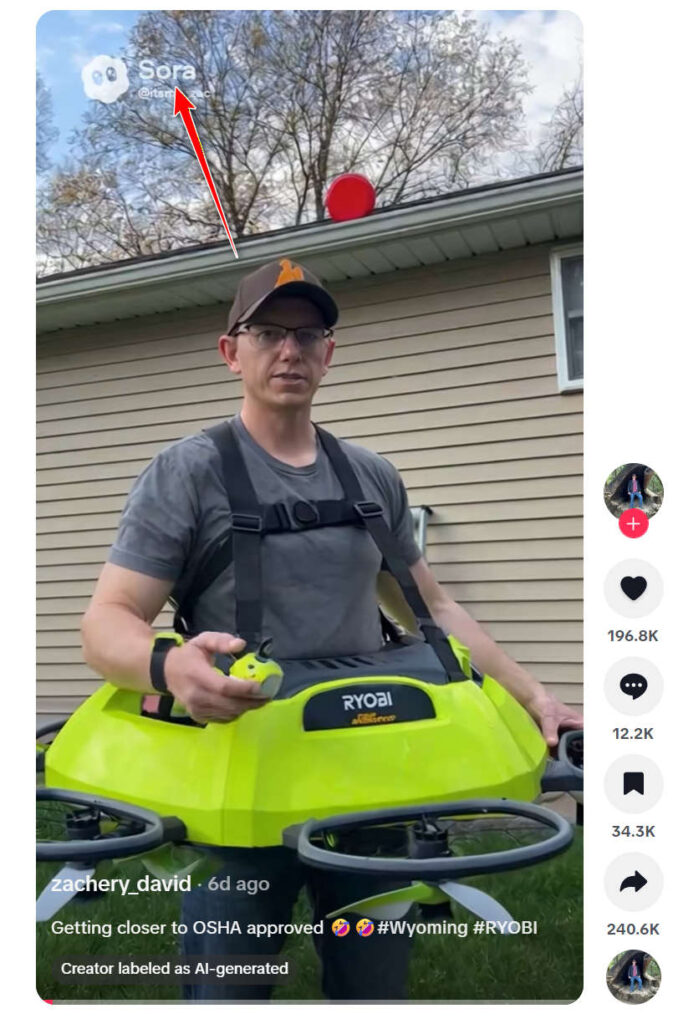
The most widely viewed clip comes from TikTok user @zachery_david, showing a man wearing a chest harness attached to a neon-green “Ryobi Hover Disc.” The man appears to lift off the ground as if the machine is generating upward thrust.
But in the bottom corner, a key detail appears:
“Creator labeled as AI-generated.”
The video includes the Sora watermark — confirming that the footage was created using OpenAI’s video-generation tool, not filmed in real life.
In other words, the Ryobi Hover Disc never existed in the first place.
First Red Flag: Ryobi Has Never Announced This Product
Ryobi designs and sells power tools, pressure washers, drills, trimmers, mowers, and workshop equipment. They have never promoted or produced:
- A hover disc
- A personal flying device
- Any prototype related to lift technology
A quick look at Ryobi’s official channels shows:
- No press releases
- No product pages
- No patents
- No engineering announcements
If Ryobi had created a device capable of lifting a full-grown adult off the ground, it would make global headlines. It would appear in tech journals, engineering blogs, and mainstream news outlets.
Instead, the only source is a TikTok video labeled AI-generated.
The Physics Don’t Add Up
Even ignoring the brand, the footage shows flight capabilities that current personal hover technology cannot match.
The viral clips show:
- A disc with extremely small fans
- No visible battery packs or power units
- No stabilization arms
- No safety frame
- No protective clothing
- Smooth, perfectly level hovering
- Zero visible thrust or downward air pressure
In reality, human lift requires enormous power output — similar to what we see in:
- Industrial drone rigs
- Jet turbine backpacks
- Multi-rotor experimental hover platforms
These machines are:
- Loud
- Large
- Heavy
- Extremely unstable without advanced sensors
The Ryobi Hover Disc shown online behaves with perfect stability and no turbulence, which isn’t possible outside of CGI or AI animation.
CGI Signs in the Video
Viewers who watched the clip closely noticed several telltale signs of artificial generation:
- Repeated motion loops
- Unrealistically smooth lift
- Shadows that don’t match movement
- Clothing behaving unnaturally
- Blades moving without affecting nearby grass
- Light reflections that flicker or jitter
All classic indicators of AI-generated video.
The Sora watermark removes any lingering doubt.
Fake Online Stores Are Now Selling It
As the video went viral, several suspicious websites appeared claiming to sell the “Ryobi Hover Disc.”
These sites often include:
- No company information
- Stock-style product descriptions
- AI-generated photos
- Unrealistic shipping promises
- No real customer reviews
- Generic checkout pages
This is the same pattern seen in dozens of fake gadget scams, where scammers exploit viral videos to sell non-existent products.
If a website claims they have Ryobi Hover Discs in stock, it is almost certainly a scam.
Community Reaction: Mostly Skepticism
Comments under the original clips openly point out that the footage looks edited or AI-generated. Some users reported:
- Ordering from third-party sites and receiving nothing
- Being shown ads for variations of the device
- Confusion about whether Ryobi secretly launched a new product line
Despite warnings, many viewers continue to fall for the illusion because the visuals are extremely convincing and the concept feels futuristic.
That’s the danger of AI-generated viral tech: it looks real enough to fool millions.
Final Verdict: Real or Fake?
The Ryobi Hover Disc is 100 percent fake.
It is:
- Not a Ryobi invention
- Not a prototype
- Not a real product being tested
- Not a device available for purchase
- Entirely created using AI video tools (Sora)
Any website claiming to sell it is most likely operating a scam.
If you ever see a viral gadget that seems too good to be true, always:
- Check the brand’s official website
- Look for patents or press releases
- Search for real-life demonstrations
- Look for AI or CGI artifacts
- Avoid buying from unfamiliar shops
The Ryobi Hover Disc is just the latest example of how AI-generated videos can blur the line between fiction and reality.








