


An email says your Bitcoin address has an unclaimed allocation after the Binance breach. There is a case reference, a deadline, and an official-sounding desk.
It even reassures you that no password or recovery phrase is needed. Before treating that as a safety check, look at what it wants you to send.
Overview
A compensation story hides a payment demand
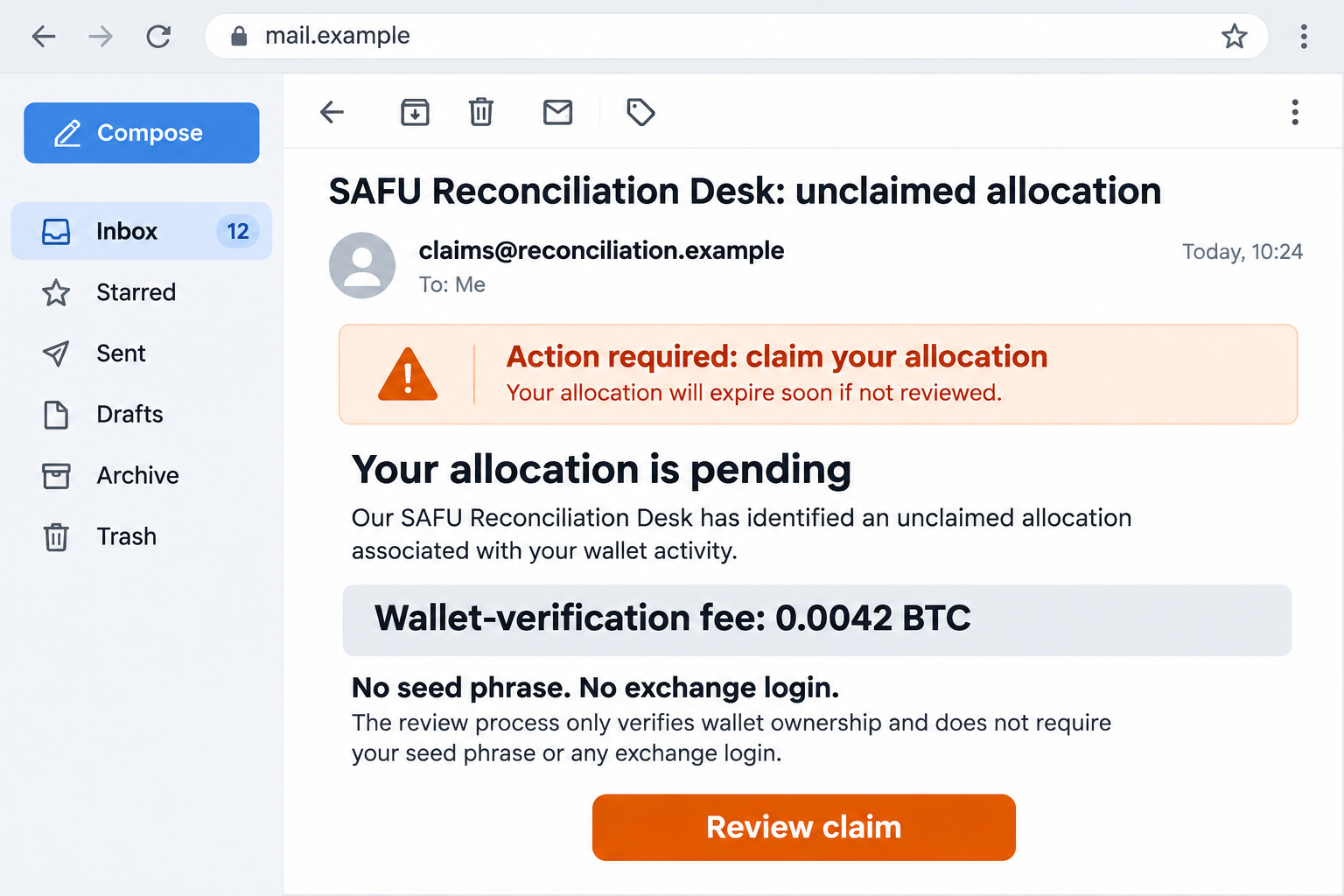
The SAFU Reconciliation Desk scam impersonates a Binance-related compensation process. Its central demand is a Bitcoin payment described as a wallet-verification fee.
Bitdefender’s Antispam Lab documented the campaign after observing it in early November. The reported request was 0.0042 BTC before an invented allocation would supposedly be released.
Binance is being impersonated. A message mentioning a genuine security incident does not establish that its sender can allocate compensation or collect payments.
The reassuring language doesn’t remove the financial risk
The email emphasizes that it doesn’t need a seed phrase, exchange login, or identity documents. That can disarm someone familiar with credential-theft warnings.
But the proposed transfer is enough. If you authorize a payment to the sender’s destination, the sender doesn’t need to break into your account first.
The image above is a fictional email illustration with a nonfunctional address. It is not an original message received by MalwareTips or a working claim portal.
The decision is whether to send, not whether to log in
- Don’t pay a stranger to prove your wallet belongs to you.
- Don’t treat a promised refund of the fee as protection.
- Check account-specific notices through the genuine exchange independently.
- If you’ve transferred funds, preserve the transaction and report the actual destination promptly.
This is a fee-first impersonation scam, not an ordinary account-verification request. You do not need to continue communicating to find out whether the allocation exists.
Why the Binance Breach Makes This Email Sound Plausible
A major security incident leaves people looking for answers. They may be checking balances, reading updates, and wondering whether an account requires attention.
A compensation message fits neatly into that uncertainty. It appears to explain why the sender contacted you and why you should respond now.
The danger is the jump from public news to a private instruction. Someone can repeat an accurate headline while supplying a completely fraudulent payment destination.
Our separate Binance breach coverage addresses the incident and account-protection questions. A supposed reconciliation email needs its own verification.
Don’t assume that being a Binance customer makes every breach-related message relevant to your account. A bulk email can use the same story with unrelated recipients.
Likewise, not being a customer doesn’t make the promised windfall more mysterious or valuable. An unexpected allocation is a claim to check, not a reason to pay.
How the SAFU Reconciliation Desk Scam Works
Step 1: The message gives your address an official-sounding status
The documented email claims an address appears in a reconciliation index as unclaimed. That wording makes a speculative reward sound like an existing administrative record.
Notice the change in perspective. Instead of deciding whether to believe an offer, you’re encouraged to think about money supposedly already assigned to you.
An index, reference number, or status label is only meaningful if a trustworthy organization actually maintains it. The email cannot authenticate its own invented records.
Step 2: Technical-looking detail makes the story harder to question
The campaign describes allocation bands, a supposed auditor, and a queue of cases. These details give the impression that a structured compensation process is underway.
They can also distract from the missing foundation: who approved the allocation, where the genuine service publishes the procedure, and why this sender can collect anything.
You don’t need to understand every term to reject the payment request. An elaborate explanation is not a substitute for independent confirmation.
Step 3: A modest-looking fee is placed before a larger payout
The reported 0.0042 BTC demand is framed as verification rather than a purchase. The sender also claims the amount will come back with the release.
That framing encourages a quick calculation: a small temporary expense seems acceptable beside the advertised allocation. But both the allocation and repayment promise come from the same unverified sender.
Don’t compare the fee only with the promised payout. Compare it with what you’ve actually established about the recipient’s authority to receive your money.
Step 4: The absence of a password request becomes false reassurance
Many people correctly refuse to share recovery phrases. The scam sidesteps that habit by inviting them to make the transfer themselves.
Self-authorized payments can still be fraudulent when the reason for sending them is a lie. Keeping your login secret doesn’t make that transaction safe.
A wallet confirmation screen may accurately show the amount and destination while saying nothing about the honesty of the compensation claim behind it.
Step 5: A deadline discourages the independent check that matters
A time limit makes delay feel expensive. The recipient may worry that checking with support will send an apparently valuable claim to the back of the queue.
End that pressure by leaving the message. Open your normal account route separately and look for a matching notice there.
If you already paid, don’t send another transfer to correct a supposed processing error. Preserve the original record and contact genuine support instead.
A Network Fee Is Not a Stranger’s Verification Fee
Cryptocurrency transactions can involve real fees. The important distinction is what the fee pays for and where the request comes from.
A network transaction fee relates to processing a transaction. A stranger asking for a separate transfer before releasing an invented reward is making a different demand.
The Bitcoin FAQ explains transaction processing and the difficulty of reversing confirmed payments. A payment’s technical validity doesn’t establish a legitimate business purpose.
Don’t let somebody blur these concepts by calling every requested amount gas, verification, settlement, activation, or compliance. Ask which operation you are actually authorizing.
If a genuine wallet displays a network cost, inspect that within the wallet’s normal transaction flow. It doesn’t validate an unrelated message directing funds elsewhere.
There is no need to make a test payment to the supposed desk. A small successful transfer proves only that the destination can receive money.
Verify the Sender Without Following Its Instructions
Use an account route you already trust
Open your installed exchange app or an established bookmark. Avoid starting with a sponsored result for emergency compensation or a link copied from the message.
Look for a corresponding account notice and use support from within the genuine service. Describe the demand without supplying your login information to the sender.
If support needs the email for investigation, provide it through the verified channel. Don’t forward it to a purported investigator who introduced themselves in the same thread.
Separate a familiar name from an authenticated sender
A display name is easy to choose. A message can put Binance or SAFU at the top without coming from an authorized support team.
Even a polished signature doesn’t solve that problem. The claimed role, email address, linked destination, and instruction must be considered together.
Don’t reply with account details to help the sender locate your claim. That supplies information before you’ve established who is asking.
Keep wallet ownership separate from control of a destination
Knowing a public wallet address isn’t the same as owning it. A person can copy an address or transaction from a public record.
The fact that a message mentions a genuine transaction therefore doesn’t give its sender authority over your funds or a compensation process.
Never provide a seed phrase as additional proof if the conversation changes. The original promise that no secrets are needed doesn’t constrain what a fraudster asks next.
What to Do If You Sent the Verification Fee
-
Stop all further payments. Don’t send a second amount for release, a failed verification, a tax correction, or reimbursement of the first transfer.
Keep the existing conversation, but don’t argue with the sender or reveal what investigators are doing. Your immediate task is limiting further loss.
-
Save the original message and payment instructions. Preserve the sender address, subject, destination, requested amount, timestamps, and any attachments without running them.
If possible, retain the original email rather than only a cropped screenshot. It contains routing information that may help the receiving organization investigate.
-
Find the actual transaction record in your wallet or exchange account. Record the asset, network, amount, destination, time, and transaction identifier.
Don’t confuse an internal withdrawal reference with a blockchain transaction hash. Keep both when available and label them so support can follow the trail.
-
Contact the service used to send the funds through its official support route. Explain that you authorized a payment after a fraudulent compensation email.
Ask whether anything is still pending or can be contained. A confirmed blockchain transfer generally cannot be recalled like an ordinary card payment.
-
Check whether you exposed anything besides money. Did you enter credentials, approve a wallet connection, sign another request, or install software?
If you only sent the fee, don’t automatically assume your recovery phrase was stolen. Address additional exposures specifically through the genuine provider’s guidance.
-
Report the impersonation to Binance through verified support and report an actual loss to the relevant authorities. Include the transaction trail and original demand.
For US reporting, use the FBI’s IC3 channel. A report supports investigation, but it doesn’t guarantee a freeze, recovery, or repayment.
-
Keep your evidence private. Share financial records with verified support or investigators, not public accounts promising to help in exchange for a direct message.
Publicly posting that you’ve lost crypto can attract recovery scammers. Redact personal details and authentication information from any warning you share.
-
Reject advance-fee recovery offers. The FBI warns about fraudulent recovery companies that demand money and claim powers they don’t possess.
A private tracing service cannot issue a seizure order. Accurate-looking blockchain diagrams don’t establish that a stranger can return the funds or represents law enforcement.
Make a Useful Report Without Exposing Another Secret
Begin with a short chronology. Explain when the email arrived, what it promised, what it requested, and which payment you made in response.
Distinguish the real exchange incident from your separate loss. Your report concerns the transfer to the impersonator, not every asset involved in the public breach.
Include the exact currency and network from your own record. A familiar coin name on a screenshot may not identify the blockchain used for the transfer.
Keep an unedited copy of the destination as supplied. If it differs from the final transaction record, note that discrepancy without guessing why it happened.
Record whether someone directed you through an exchange withdrawal or an independent wallet. That helps support identify which records it can actually access.
Never attach a recovery phrase, private key, password, or unrestricted account session. Those are access secrets, not evidence needed to describe a transaction.
Ask for a case reference and keep later communications with it. If another person contacts you about that case, verify them through the channel you established.
Don’t mistake a prompt reply for an official investigation. The same sender who created the payment story can also invent a support or recovery department.
What If You Only Read or Opened the Message?
Reading an email isn’t the same as sending a payment. If you didn’t follow its instructions, there is no reason here to declare your wallet drained.
If you opened a page but entered nothing, close it and avoid further interaction. Note any download or permission request that occurred separately.
A suspicious message can be reported without experimenting with its links. You don’t need to connect a wallet to establish that the payment demand is inappropriate.
If you entered an exchange password, secure that account through genuine controls and review active sessions and recovery settings. Protect any reused credentials as well.
If a recovery phrase was disclosed, seek the wallet provider’s compromised-wallet guidance immediately. Changing an exchange password doesn’t replace a blockchain wallet’s exposed keys.
These are different exposure paths. Respond to what actually happened rather than buying a generic cleanup service that promises to solve every possible problem.
Frequently Asked Questions
Is the SAFU Reconciliation Desk email from Binance?
The documented campaign impersonates a compensation process. Don’t send its requested verification payment. Check any genuine account concern through the exchange independently.
Why is it unsafe if no seed phrase is requested?
The sender wants you to authorize a transfer yourself. It doesn’t need your password or phrase to receive money you willingly send.
Does the 0.0042 BTC fee become safe if it’s refundable?
No. The repayment promise comes from the same unverified sender. Don’t pay on the assumption that a larger allocation will reimburse you.
Is this just a normal Bitcoin network fee?
No. The email demands a separate payment to unlock an alleged allocation. A transaction’s normal network cost doesn’t authenticate that compensation claim.
Does a genuine Binance breach make the compensation offer real?
No. Public incident details can be copied into fraudulent messages. Verify the specific process and recipient independently, not just the headline.
Can a recovery company guarantee my Bitcoin will come back?
No. Be especially wary of unsolicited helpers demanding another fee. Preserve the payment trail and work with verified providers and authorities.
The Bottom Line
Do not pay the SAFU Reconciliation Desk wallet-verification fee. Keeping your password private doesn’t protect money you transfer in response to a fraudulent allocation story.
If you’ve already sent Bitcoin, stop paying, save the exact transaction records, and contact your sending service and authorities. Don’t turn one loss into another recovery payment.

Join the discussion
0 commentsShare your experience or ask a question about this article.
Discussion
Start the conversation
Have a question or something useful to share? Add the first comment.