

Searchstore.bargains is an online store that claims to sell various products such as lights, garden stake lights, LED lamps, fairy toys and more at discounted prices. However, before you decide to shop from this website, you should be aware of some red flags that indicate that it might be a scam.
6 Resons Why Searchstore.bargains Is A Scam
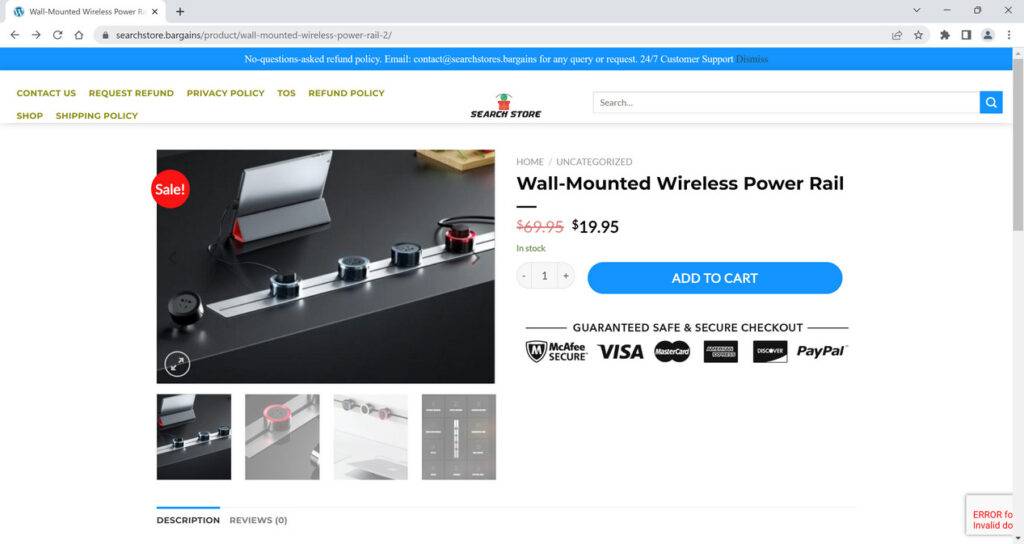
- First of all, the website was created recently in January 2023 and will expire in January 2024 . This shows that it is a short-lived website that might not be trustworthy. Moreover, the website has a very low trust score of 1%, which means that it has a high risk of being fraudulent.
- Secondly, the website does not provide any contact information such as address, phone number or email. This makes it difficult for customers to reach out to the store in case of any issues or queries. It also shows that the website is hiding its identity and location from its buyers.
- Thirdly, the website offers suspicious and outrageous discounts on its products, which are too good to be true. For example, a balance night light smart LED lamp that costs $99.99 on other websites is sold for only $19.99 on Searchstore.bargains. This could be a bait to lure customers into paying for products that they might never receive or receive in poor quality.
- Fourthly, the website has poor or no security measures to protect customers’ personal and financial information. It is not secured with any reputable security services such as McAfee or Norton. This makes the website vulnerable to hackers who can steal and tamper with customers’ data.
- Fifthly, the website has stolen most of its contents and product images from other online stores. This is a common practice among scam online stores that try to pass off products as original, but in reality deliver cheap knockoffs or nothing at all.
- Lastly, the website has no social media presence or customer reviews to verify its legitimacy and reputation. Customers who have shopped from this store have left negative feedback online stating that they either did not receive their orders or received different or inferior products. They also complained that they could not get a refund or contact the store for any resolution.
How to Avoid Online Shopping Scams like Searchstore.bargains
Online shopping scams are becoming more prevalent and sophisticated as scammers use various techniques to trick customers into giving them their money or personal information. Here are some tips on how to avoid online shopping scams:
- Do your research before buying from an online store. Check the domain name, contact information, customer reviews, social media presence, trust badges, and return policy of the website. You can also use tools such as Whois or Scamadviser to check the age and location of the domain name.
- Compare prices and products from different websites. If you find a product that is significantly cheaper than other websites or has features that are too good to be true, be wary of it. It may be a fake or counterfeit product or a scam.
- Use secure payment methods such as credit cards or PayPal when shopping online. Avoid paying with cash, wire transfers, gift cards, or cryptocurrencies as these methods are difficult to trace or recover in case of fraud.
- Keep track of your online transactions and statements. Check your bank account and credit card statements regularly for any unauthorized charges or discrepancies. If you notice any suspicious activity, report it to your bank or credit card company immediately.
- Contact the customer service team of the online store if you have any questions or concerns about your order. If you do not receive a response or a satisfactory resolution within a reasonable time frame, you may file a dispute with your payment provider or report the website to the relevant authorities.
What should you do if you have shopped from Searchstore.bargains?
- Contact your bank or financial institution: If you have paid with your credit card or debit card, you should contact your bank or financial institution as soon as possible and request them to cancel the transaction and refund your money. You should also report the website as a fraudulent site and ask them to block any future charges from it.
- Change your passwords: If you have created an account on Searchstore.bargains or used the same password for other online accounts, you should change your passwords immediately. You should also enable two-factor authentication for your accounts if possible. This will prevent hackers from accessing your accounts and stealing your personal information.
- Beware of phishing emails: You might receive emails from Searchstore.bargains or other sources claiming to be related to your order or offering you discounts or refunds. These emails are likely to be phishing attempts that aim to trick you into clicking on malicious links or downloading attachments that can infect your device with malware or steal your information. You should delete these emails and do not open any links or attachments from them.
- Use a browser-based content blocker, like AdGuard : Content blockers help stop malicious ads, Trojans, phishing, and other undesirable content that an antivirus product alone may not stop.
- Scan your device for malware. If you have downloaded any attachments or installed any programs from Searchstore.bargains run a scan with Malwarebytes Anti-Malware Free.
Searchstore.bargains Final Thoughts
Based on these red flags, we can conclude that Searchstore.bargains is not a legitimate store but a scam. We advise you to avoid shopping from this website and look for other reliable and trustworthy online stores instead. If you have already shopped from this website and have been scammed, you should report it to your bank or credit card company and try to get your money back.








