

Online shopping is convenient, fast, and often cheaper than buying in person. That is exactly why scam stores keep multiplying.
One recurring pattern involves fake shopping websites that list Service@salessupport2020.com as their only contact email. These sites are built to look like real stores, but the goal is simple: collect your money, disappear, and leave you with nothing or a cheap item that does not match what you ordered.
If you have seen a store using this email address, or you already placed an order and feel something is off, this guide will help you understand what is happening, what warning signs to look for, and what to do next.
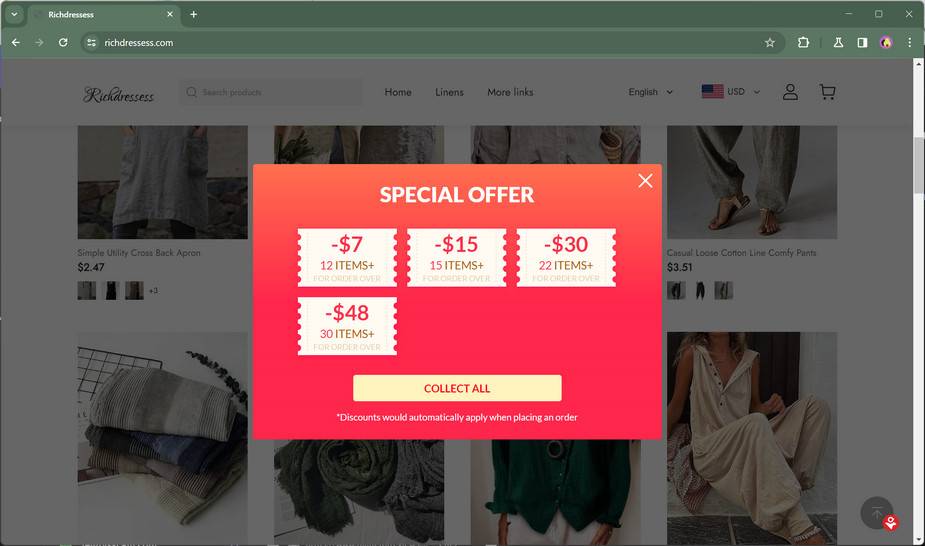
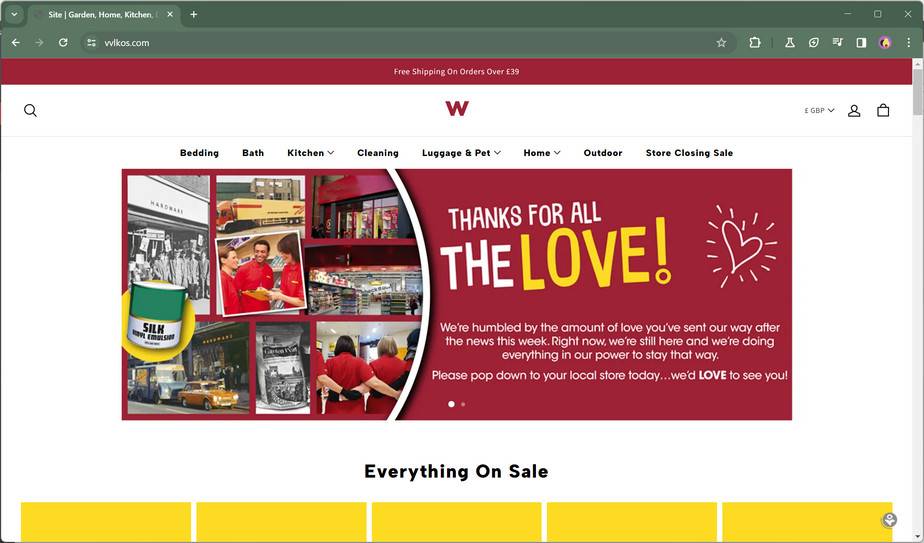
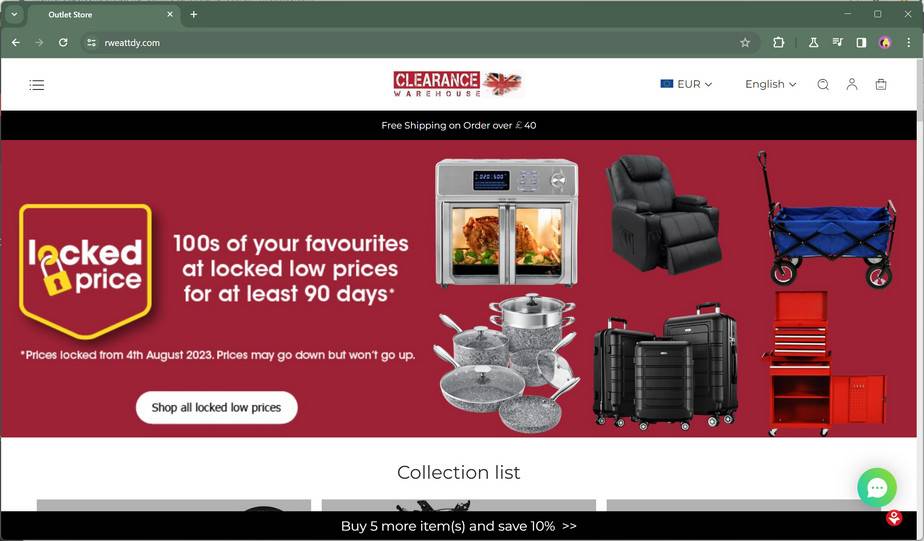
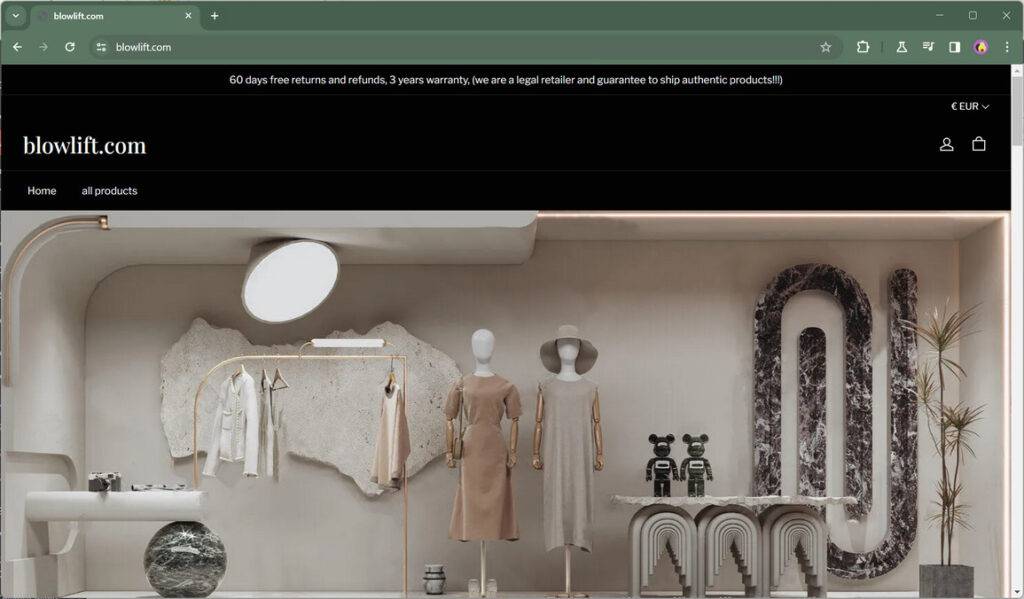
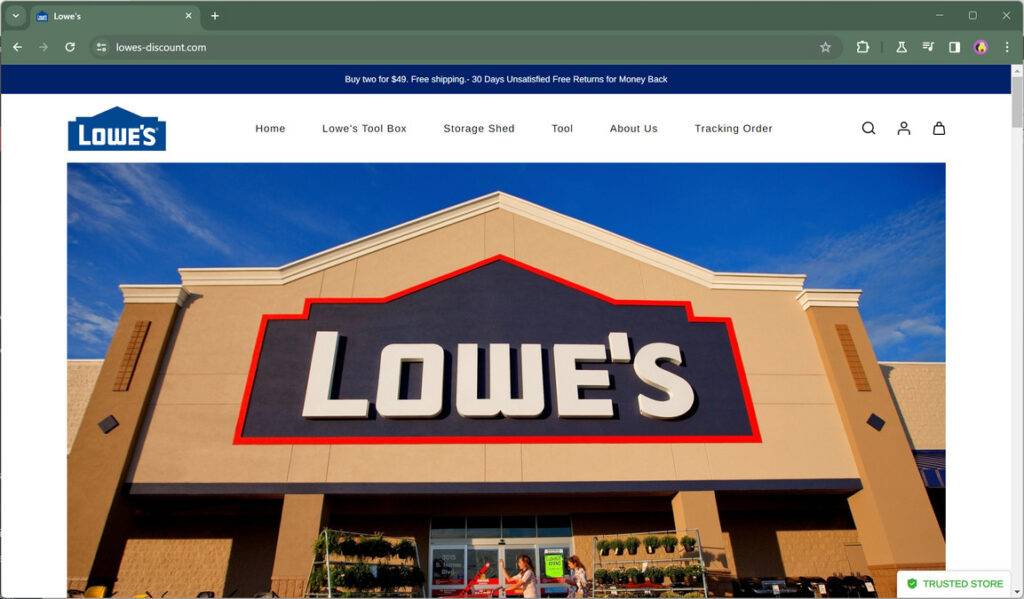
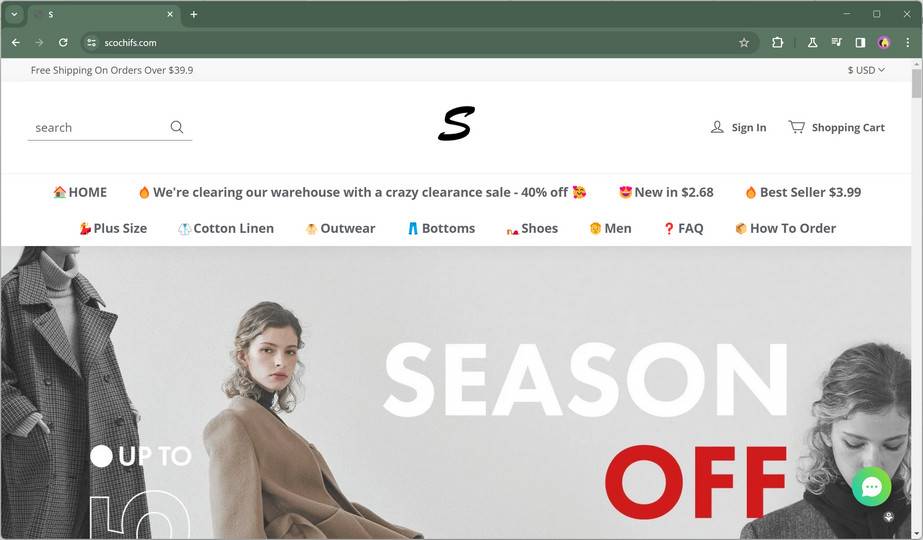
Scam Overview
The Service@salessupport2020.com scam is not just one website. It is a repeating fraud pattern used across many short-lived online stores.
These sites often look polished at first glance. They use modern layouts, product photos, sale banners, and fake trust signals that make them appear legitimate. The products vary, but the theme is usually the same: expensive or trendy items listed at prices that look impossible to ignore.
You might see:
- Electric bikes or scooters marked down from $1,500 to $99
- Branded shoes or jackets listed at 80% to 90% off
- Jewelry bundles advertised for a fraction of normal retail prices
- Power tools, home gadgets, or electronics sold at clearance-level prices
- “Warehouse liquidation” or “store closing” offers with extreme discounts
The purpose is not to build a real business. The purpose is to trigger impulse purchases before shoppers have time to investigate.

Why this email address matters
Scammers often reuse patterns across multiple fake stores. One of those patterns is the contact email address.
In this case, Service@salessupport2020.com has been linked to scam-style shopping sites where customers report the same experience:
- The store looks real
- The prices are unusually low
- Payment goes through
- Shipping updates are vague or fake
- Customer support does not respond
- The site disappears or stops working
- No refund is issued
The email address becomes a clue because the scammers use it across different domains. The website name may change, but the backend structure, product images, pricing tricks, and contact details often stay the same.
This is common in organized e-commerce fraud. The domain changes, the storefront changes, but the fraud engine stays the same.

How these scam stores attract victims
Most people do not randomly type a scam website into their browser. They are usually led there through ads.
These fake stores rely heavily on:
- Facebook ads
- Instagram ads
- Sponsored posts
- Short video ads
- “Flash sale” social media promotions
The ads are designed to stop scrolling. They use big discounts, bold claims, and product images that look premium. In many cases, the photos and videos are stolen from real brands, real sellers, or old social media posts.
The ad itself might look harmless. It may show a clean product demo, a few customer comments, and a time-sensitive message like:
- “Today only”
- “Final clearance”
- “Store closing sale”
- “90% off while supplies last”
- “Limited inventory remaining”
That is the hook.
Once you click, the website takes over and starts applying more pressure.
The fake store formula
Most of these scam websites follow a predictable formula. Once you know what to look for, the pattern becomes much easier to spot.
1) Template-based design
These sites usually use a generic e-commerce template with:
- A homepage banner
- A catalog page
- A product page
- A basic checkout flow
- A “Contact Us” page
- A refund policy page that looks copied
The design is often decent enough to pass a quick glance. That is intentional. Scammers only need a site to look trustworthy for a few minutes.
2) Unrealistic pricing
This is one of the biggest red flags.
Real businesses run discounts, but most legitimate discounts stay within reasonable limits. Scam stores go much further. They post offers so extreme that shoppers feel they might miss a once-in-a-lifetime deal.
A $700 item listed for $39 is not a normal discount. It is bait.
Scammers know that very low prices reduce skepticism for some buyers, especially when the product looks high-quality and the sale appears urgent.
3) Minimal or suspicious contact details
A legitimate store usually provides:
- A real business name
- A customer support email
- A phone number
- A physical address
- Company registration details
- Clear return instructions
Scam stores often provide only one email, such as Service@salessupport2020.com, and little else.
Sometimes they add a fake address or a random warehouse address that does not match the business. In other cases, the phone number is missing entirely or never works.
This is not a small issue. It is a major credibility problem.
4) Fake urgency and fake scarcity
These stores are built to make you rush.
Common tricks include:
- Countdown timers that reset every time you refresh the page
- “Only 3 left” messages that appear on every product
- “17 people are viewing this item” notifications
- Pop-ups showing fake recent purchases
These are not signs of a busy store. They are conversion tricks used to force a fast decision.
The more rushed you feel, the less likely you are to check reviews, search the domain, or inspect the contact page.
5) Fake reviews and trust badges
Many scam stores display:
- 5-star reviews with generic names
- Stock-photo profile pictures
- “Verified Buyer” labels
- Trust badges copied from security brands
- Payment icons placed to look official
This creates a false sense of legitimacy.
The presence of a badge on a page does not prove the website is secure or trustworthy. Anyone can paste a logo image on a website. Scammers know most shoppers will not verify it.
What victims typically report
The outcome varies, but the most common complaints fall into a few categories.
No product is ever delivered
This is the cleanest version of the scam for the fraudsters. They collect payment, send a vague order confirmation, and then stop responding.
The shopper waits for shipping updates that never come. Eventually, the site stops loading or the email goes unanswered.
A low-quality substitute arrives
Sometimes scammers send something small and worthless to make it appear that an order was fulfilled.
For example:
- A cheap accessory instead of the advertised item
- A low-grade imitation instead of a branded product
- A product that looks nothing like the photos
- An item with the wrong size, color, or material
- A broken or unusable item
This tactic can make chargeback disputes harder if the seller claims they shipped “something.” It also buys the scammer time.
Fake tracking numbers and shipping confusion
Some victims receive tracking numbers that:
- Never update
- Show delivery in the wrong city
- Appear tied to a different package
- Show “delivered” even though nothing arrived
This is another common fraud tactic. The goal is to create confusion and delay complaints until refund windows start closing.
Customer support goes silent
After payment, the support experience usually collapses.
Emails to Service@salessupport2020.com may:
- Go unanswered
- Receive generic copy-paste replies
- Bounce back
- Loop customers through meaningless “please wait” responses
At that point, the scammer has already moved on to the next domain.
Why this scam keeps working
The scam works because it combines several psychological triggers at the same time:
- A product people already want
- A price that feels impossible to pass up
- A time limit that creates pressure
- A professional-looking website
- Just enough fake trust signals to reduce doubt
Even careful people can fall for this setup, especially when browsing quickly on a phone and seeing the ad inside a trusted platform like Facebook or Instagram.
Scammers are not relying on one trick. They are stacking multiple tactics so the shopper acts before thinking.
Why the domains keep changing
Many people ask the same question after they get scammed: “Why can’t the site just be shut down for good?”
The problem is that the scammers can launch new domains quickly. They use repeatable templates, recycled content, and the same sales copy. A site can appear, collect payments for a short window, and vanish before enough complaints catch up to it.
Then they launch another one under a different name.
That is why the email address pattern matters. It helps connect the dots between stores that look different on the surface but operate the same way underneath.
The real cost of this scam
The financial loss is one part of the damage, but it is not the only part.
Victims often deal with:
- Stress and frustration
- Time spent chasing refunds
- Concern about card security
- Anxiety about identity misuse
- Follow-up scam attempts
- Loss of trust in online shopping
Some people lose $20. Others lose several hundred dollars. The amount varies, but the experience is the same. They thought they found a deal and ended up dealing with fraud.
The key takeaway is this: if you see a store using Service@salessupport2020.com, treat it as a serious warning sign. It fits a known scam pattern, and the safest move is to stop before entering payment details.
How The Scam Works
The Service@salessupport2020.com shopping scam is usually not random. It is run like a system.
Scammers move through a predictable sequence: build a store, run ads, collect payments, stall customers, then disappear. Once the cycle ends, they relaunch under a new domain and do it again.
Understanding this process makes it much easier to spot red flags early.
Stage 1: Building the fake store
This stage happens fast. Scammers do not spend months building a brand. They create a storefront just good enough to convert traffic into payments.
New domain registration
Most scam stores use newly registered domains. The names are often:
- Random
- Unfamiliar
- Hard to remember
- Not connected to a real brand
They may look like made-up strings or generic store names that sound temporary.
Because the domain is new, there is usually no real business history, no established reviews, and no reputation. That is exactly how scammers want it.
Generic e-commerce templates
To save time, scammers use ready-made store templates. These templates already include:
- Product grid pages
- “Add to cart” buttons
- Checkout forms
- Policy pages
- Newsletter pop-ups
They only need to swap in product photos, fake sale text, and the contact email.
This is why many scam stores look strangely similar even when the names are different. The layout is often the same because the same template is reused.
Stolen product photos and descriptions
Scammers rarely create original product listings.
They usually copy:
- Product photos from legitimate stores
- Descriptions from brand websites
- Specifications from real listings
- Customer reviews from unrelated sites
That is why reverse image searches often reveal the same product photo on multiple unrelated websites.
The product page may look detailed, but the content is often stolen, inconsistent, or inaccurate.
Weak or fake business information
At this stage, the scammer adds just enough contact info to avoid looking empty.
Often, that means:
- One support email: Service@salessupport2020.com
- No real phone support
- No verified address
- No company details
- No realistic return center information
Sometimes they add a policy page, but it is usually generic and vague. You may see confusing return language, unrealistic deadlines, or instructions that are hard to follow.
The point is not to support customers. The point is to reduce hesitation at checkout.
Stage 2: Driving traffic through social media ads
Once the site is live, scammers need visitors fast. Social media ads are one of the easiest ways to generate high-volume traffic quickly.
Why Facebook and Instagram are common targets
These platforms work well for scammers because:
- Products can be shown visually
- Ads can be targeted by interests
- Shoppers are used to impulse buying
- The browsing environment feels casual and low-risk
Many people click on product ads while scrolling, not while actively researching a purchase. That makes them more likely to act emotionally.
The ad creative strategy
The ad usually features a product that is easy to understand and emotionally appealing, such as:
- A stylish jacket
- A premium-looking gadget
- A bike or scooter
- A jewelry set
- A branded-looking sneaker
The video or image looks professional because it is often stolen from a real brand or reseller.
Then the text adds the bait:
- “Massive closeout sale”
- “Everything must go”
- “90% off today”
- “Only a few left”
- “Free shipping included”
This combination of strong visuals and extreme discounts is designed to stop people mid-scroll.
Audience targeting and repetition
Scammers often run ads broadly, but they may also target by:
- Shopping interests
- Fashion interests
- Electronics interests
- Cycling interests
- Age group
- Region
If someone clicks but does not buy, they may see the ad again. Repetition builds familiarity, and familiarity makes the store seem more legitimate.
Many victims end up purchasing after seeing the same offer several times.
Stage 3: Converting visitors with pressure tactics
Once a user lands on the site, the scam shifts from attraction to conversion.
The goal is to push the visitor to pay before they start investigating.
The first impression trap
The homepage usually looks clean enough to reduce suspicion. It may include:
- Sale banners
- Product collections
- A polished theme
- Pop-ups showing discounts
- “Trusted by thousands” claims
This works because most shoppers make a fast judgment in the first few seconds.
If the site looks modern, many people assume it is safe.
Fake urgency tools
Urgency is one of the strongest weapons in the scam.
Common tricks include:
- Countdown timers that pretend the sale ends soon
- “Low stock” alerts on every product
- Pop-ups saying “Someone in Texas just bought this”
- Messages about “high demand” and “limited quantities”
In many cases, these elements are automated and fake.
The timer may reset when you revisit the page. The “recent purchase” notifications may be generated by a script, not real orders.
These tools exist for one reason: to stop you from leaving the site to research it.
Fake trust builders
Scammers know shoppers look for reassurance before paying. So they add visual trust signals, even when those signals mean nothing.
Examples include:
- Fake star ratings
- Testimonials with generic names
- Security logos
- “Money back guarantee” badges
- “Verified store” claims
A real store can earn trust over time through reputation, consistent service, and transparent policies. Scam stores fake that trust with images and labels.
If you click deeper, the signs usually start to break:
- Reviews sound generic
- Product details are inconsistent
- Policy pages contain awkward copy
- Contact information is incomplete
Checkout pressure and add-ons
Scam stores often try to increase the order value during checkout.
You may see:
- Extra “discounted” items added as upsells
- Bundle offers
- Surprise shipping claims
- Coupon pop-ups
- Quantity discounts
This is not only about getting a sale. It is about getting a bigger sale before the victim changes their mind.
Stage 4: Capturing payment and personal information
This is the point where the scam becomes more serious.
Even if the money loss is small, the information submitted during checkout can create longer-term risk.
Payment collection methods
Scam stores prefer payment methods that are hard to reverse.
In some cases, they push:
- Direct card payments through obscure processors
- Bank transfers
- Gift cards
- Crypto payments
- Other low-protection payment channels
If the site accepts credit cards, that does not automatically mean it is safe. Scammers can still collect card details or route charges through shady processors.
The issue is not just what they charge. It is what data they collect.
Data submitted at checkout
A typical checkout form collects:
- Full name
- Shipping address
- Email address
- Phone number
- Payment details
That is valuable information.
Even if the order is fake, scammers can use the data for:
- Future phishing emails
- Fraud attempts
- Spam campaigns
- Identity profiling
- Resale to other scammers
This is why victims sometimes receive more scam emails and scam texts after a fake purchase.
Fake confirmations and delay tactics
After payment, the site may send:
- An order confirmation email
- A generic “processing” message
- A fake tracking number
- A shipping delay notice
These messages are designed to buy time.
The scammer does not want an immediate charge dispute. They want the victim to wait, trust the process, and miss important deadlines.
The more professional the fake update looks, the longer the victim waits.
Stage 5: Stalling support and draining the clock
This stage is where many victims realize something is wrong.
They try to contact support and run into silence or meaningless replies.
The support black hole
Emails to Service@salessupport2020.com may result in:
- No reply at all
- Auto-responses with no substance
- Repeated requests to “wait a few more days”
- Broken English copy-paste responses
- Contradictory shipping explanations
Scammers often stall intentionally because time helps them.
If enough time passes:
- The cardholder may delay a dispute
- The platform may remove the ad before the complaint is filed
- The domain may be shut down and replaced
- Evidence may become harder to collect
Fake refund promises
Some victims are promised a refund that never comes.
The scammer may reply with:
- “Refund approved, please wait 7 to 15 business days”
- “Your refund is being processed”
- “We sent it already, contact your bank”
- “We need more information first”
This creates false hope and delays action.
A real store can process a refund and provide confirmation. Scam stores use refund language as a stalling tactic.
Stage 6: The disappearing act
Once the scammers have extracted enough money, they shut down the operation.
Site vanishes
The website may:
- Stop loading
- Redirect elsewhere
- Show an error page
- Become inaccessible
- Switch to a blank storefront
At this point, many victims panic because the proof is disappearing.
That is why screenshots and order records matter.
Ads get pulled
The social media ads may disappear too.
This does not mean the scam ended. It usually means the scammers are rotating to the next domain.
They may launch a new ad campaign with:
- A different store name
- The same products
- The same photos
- The same sale claims
- A different web address
The cycle repeats.
Email contact stops working
The support email may begin bouncing or go silent entirely.
This is one of the strongest signs that the store was never a legitimate business.
A real company may have delays, but it does not usually erase itself.
Why this scam is so effective
The Service@salessupport2020.com scam works because it blends common shopping behavior with fraud tactics that look familiar.
People are used to seeing:
- Online sales
- Social media ads
- New brands
- Limited-time offers
- Influencer promotions
Scammers copy the appearance of normal e-commerce and hide the fraud in the details.
They do not need everyone to believe them. They only need a small percentage of shoppers to convert. With low-cost templates and short-lived domains, even a modest number of orders can be profitable.
The red flags inside the process
If you understand the stages, the warning signs become much easier to catch.
Look for this pattern:
- A brand-new store with huge discounts
- A social media ad pushing urgency
- A generic website with copied content
- One suspicious contact email
- No real phone support or business details
- Pressure to pay quickly
- Silence after checkout
When these signs appear together, it is not just a risky purchase. It is likely a scam.
What makes this different from a bad store
Not every bad shopping experience is fraud. Some stores are simply disorganized or slow.
The difference with a scam operation is intent.
A bad store may:
- Ship late
- Respond slowly
- Make mistakes
- Offer poor support
A scam store is built to deceive from the start.
It uses fake pricing, fake trust, fake urgency, and fake support to collect payments with no intention of delivering what was promised.
That is the key distinction.
What To Do If You Have Fallen Victim to This Scam
If you placed an order on a website using Service@salessupport2020.com, act quickly. The sooner you respond, the better your chances of limiting the damage.
Stay calm and move step by step.
1) Stop engaging with the seller
Do not keep negotiating with the scammer once you suspect fraud.
Why this matters:
- Scammers use delays to run out the clock
- They may ask for more information
- They may send fake refund promises
- Continued replies confirm your email is active
What to do now:
- Stop replying to suspicious messages
- Do not click any links in follow-up emails
- Do not provide extra personal details
- Do not send more money for “reshipping” or “customs fees”
Some scam stores try a second round of fraud by claiming your order is stuck and needs an extra payment. Do not pay anything else.
2) Contact your bank or card issuer immediately
This is the most important step if you paid by credit card or debit card.
Tell them:
- You believe the purchase was made through a fraudulent website
- The store may be part of an online shopping scam
- The contact email used was Service@salessupport2020.com
- You want to dispute the charge
Ask specifically about:
- Chargeback options
- Fraud monitoring on your card
- Replacing your card number
- Blocking future charges from the same merchant
- Any deadlines for dispute filing
Even if the charge is still pending, contact your bank right away. Early reporting helps.
If you used a payment service like PayPal, open a dispute through that platform immediately as well.
3) Secure your payment and online accounts
If you entered card details on a suspicious site, treat your card as exposed.
Take these precautions:
- Replace the card if your bank recommends it
- Turn on transaction alerts
- Review your recent charges
- Watch for small “test” transactions
- Monitor statements for at least several weeks
Also secure related accounts:
- Change your email password if you used that email for the order
- Enable 2-factor authentication on email and banking apps
- Update passwords if you reused the same password elsewhere
Email account security is especially important because scammers often use your email to send follow-up phishing messages.
4) Save evidence before the site disappears
Scam websites often vanish quickly, so document everything while you still can.
Collect and save:
- Screenshots of the website homepage
- Screenshots of the product page
- Screenshots of the checkout page
- Order confirmation email
- Payment receipt or bank transaction screenshot
- Tracking emails or fake shipping updates
- Any messages sent from Service@salessupport2020.com
- The exact website URL
If possible, also save:
- The social media ad that led you there
- The ad account name
- The ad screenshot
- Any comments under the ad
This evidence helps when:
- Filing a charge dispute
- Reporting the scam
- Warning others
- Responding to your bank’s fraud team
Do not rely on memory. Save the proof now.
5) Report the scam to the right places
Reporting may not get your money back directly, but it helps investigators, platforms, and payment companies identify repeat fraud operations.
You can report the scam to:
- The FTC (Federal Trade Commission)
- IC3 (Internet Crime Complaint Center)
- Your local consumer protection agency
- The social media platform where you saw the ad
- Your payment provider
- Your bank’s fraud department
When reporting, include:
- The website domain
- The email address Service@salessupport2020.com
- Dates of purchase
- Amount charged
- Product ordered
- Screenshots and evidence
The more specific your report is, the more useful it is.
6) Report the ad on Facebook or Instagram
If the scam came through social media, report the ad directly.
This matters because:
- It may reduce exposure for other users
- It helps platforms identify repeat scam advertisers
- It creates a record tied to the ad account
When reporting, mention that:
- The store appears fraudulent
- The order was not delivered or was misrepresented
- The site used Service@salessupport2020.com
- The ad promoted unrealistic discounts
Do this even if the ad is no longer active. If the post or page is still visible, report it.
7) Watch for follow-up scams
After a shopping scam, victims are often targeted again.
Common follow-up scams include:
- Fake refund services
- “Recovery agents” who promise to get your money back for a fee
- Phishing emails pretending to be your bank
- Fake shipping notices
- Fake fraud alerts asking you to confirm account details
Be careful with anyone who contacts you unexpectedly and claims they can fix the issue.
A real bank will not ask for full card details by email. A real fraud team will not ask you to pay a fee to process a refund.
If a message feels urgent or strange, contact the company directly through its official website or app, not through the message link.
8) Check whether your personal data was exposed
Depending on what you entered, more than your payment may be at risk.
Review what you submitted during checkout:
- Name
- Address
- Phone number
- Card details
If you also created an account on the scam website, and you reused a password, change that password anywhere else you used it.
If you are concerned about identity misuse, consider:
- Monitoring your financial accounts closely
- Watching for new account fraud
- Keeping records of all scam-related activity
Most shopping scams focus on payments, but data exposure can create problems later.
9) Keep a timeline of what happened
This sounds simple, but it helps a lot.
Write down:
- Date you saw the ad
- Date you placed the order
- Amount charged
- Product ordered
- Dates of any emails received
- Date you contacted your bank
- Date you filed reports
A clear timeline helps when:
- Your bank asks for details
- You file official complaints
- You need to follow up later
It also keeps you organized when the situation feels stressful.
10) Learn the red flags before your next online purchase
Getting scammed can make anyone feel embarrassed, but this happens to smart people every day.
The best next step is not self-blame. It is better screening.
Before buying from an unfamiliar store in the future, check:
- Does the site list a real business name and contact number?
- Is the price suspiciously low?
- Is the domain brand-new?
- Are the reviews specific and believable?
- Is the return policy clear and realistic?
- Does the site push too much urgency?
- Are you seeing copied product photos across multiple sites?
A few extra minutes of checking can prevent a much bigger problem.
11) Use safer payment habits going forward
Your payment method can make a big difference in what happens after a scam.
Safer habits include:
- Use credit cards when possible for stronger dispute protections
- Avoid wire transfers for unknown stores
- Avoid gift card payments for purchases
- Be cautious with crypto payments to unfamiliar sellers
- Use trusted marketplaces when possible
- Do not save card details on unknown sites
If a store only accepts unusual payment methods and refuses standard protections, treat that as a major warning sign.
12) Help others avoid the same scam
If you have the time, sharing your experience can help other shoppers avoid the same trap.
You can:
- Leave a factual warning on scam reporting sites
- Post a brief warning in relevant groups
- Report the domain to browser safety services
- Warn friends and family who shop through social media ads
Keep your warning specific and factual:
- Mention the website domain
- Mention Service@salessupport2020.com
- Mention what happened
- Mention whether the item never arrived or was misrepresented
Scammers depend on silence and speed. Public warnings slow them down.
A calm reminder if you are feeling stressed
If this happened to you, you are not alone, and it does not mean you were careless.
These scam stores are designed to look convincing for just long enough to get payment. They use real product photos, polished themes, and social media ads that appear inside platforms people use every day.
Focus on action, not guilt:
- Contact your bank
- Secure your accounts
- Save evidence
- Report the scam
- Monitor your statements
That is the fastest path to reducing the damage.
The Bottom Line
The Service@salessupport2020.com scam is a repeat e-commerce fraud pattern built around fake shopping sites, extreme discounts, social media ads, and disappearing customer support.
The websites may look professional, but the warning signs are consistent: unrealistic prices, weak contact details, pressure tactics, and silence after payment. If you see Service@salessupport2020.com listed on a store, treat it as a serious red flag.
Frequently Asked Questions
What is Service@salessupport2020.com?
Service@salessupport2020.com is an email address that has appeared on multiple suspicious shopping websites. Many of these sites follow the same scam pattern, including extreme discounts, weak customer support, and missing or fake business details.
Is every website using Service@salessupport2020.com a scam?
If a store lists this email, treat it as a major red flag. It has been linked to repeated scam-style behavior across multiple online shops. The safest option is to avoid entering payment details.
What products do these scam sites usually sell?
They often advertise high-demand items at very low prices, such as clothing, shoes, jewelry, electronics, scooters, bikes, and home gadgets. The products are usually shown with large discounts like 70%, 80%, or 90% off.
Why are the prices so low?
The low prices are used to create urgency and trigger impulse purchases. The goal is to get shoppers to check out quickly before they research the website.
What happens after I place an order?
Victims commonly report one of these outcomes:
- Nothing arrives
- A fake or useless tracking number is sent
- A cheap item arrives that does not match the product shown
- Customer support stops replying
Can I get my money back?
It depends on how you paid.
- Credit card: You may be able to dispute the charge through your bank
- PayPal or similar services: You may be able to open a claim
- Wire transfer, gift card, or crypto: Recovery is much harder and often not possible
The faster you report it, the better your chances.
What should I do first if I think I was scammed?
Start with these steps right away:
- Contact your bank or card issuer
- Dispute the charge
- Save screenshots and order emails
- Stop replying to the seller
- Report the website and ad
Can this scam steal more than my payment?
Yes. Scam stores may collect personal information such as your name, address, phone number, and email. In some cases, victims later receive phishing emails or other scam messages.
How can I check if a shopping site is fake?
Look for these warning signs:
- Huge discounts that seem unrealistic
- No phone number or real business address
- Generic website design and copied product photos
- Fake-looking reviews
- Countdown timers and “only a few left” messages
- Only one suspicious contact email
Are Facebook and Instagram ads safe to trust?
Not always. Many scam stores use social media ads to look legitimate. A sponsored post does not guarantee the website is real. Always check the store before buying.
Should I report the scam even if I already lost money?
Yes. Reporting helps platforms and investigators track repeat scam networks and can help prevent more victims. It also creates a record that may support your bank dispute.
What is the safest way to shop online and avoid scams?
Use trusted websites, pay with a credit card, and take a few minutes to verify the store before buying. If the deal looks too good to be true, it usually is.








