

Are you seeing text messages claiming a “final notice” from the Texas DMV about an unpaid traffic ticket? These messages are part of a complex scam designed to trick you into clicking malicious links and handing over sensitive information. Stay with me—this article will expose how the scam works, show you how to protect yourself, and guide you on what to do if you’ve already fallen victim.
Scam Overview
This scam uses deceptive texts that appear to come from the Texas Department of Motor Vehicles (DMV), presenting urgent threats about unpaid tickets and impending penalties. Here’s a detailed breakdown of the scam’s main aspects:
1. Fraudulent Identity and Authority
- Impersonation of Texas DMV: Scammers falsely claim authority by using official titles like “Texas State Department of Motor Vehicles (DMV).”
- Administrative code reference: The inclusion of a fictitious Texas Administrative Code (e.g., “15C‑16.003”) adds perceived legitimacy.
2. High-Pressure Urgency
- Threats of enforcement: The messages warn that registration will be “suspended starting May 27” and that driving privileges could be revoked.
- Immediate deadline: They demand fast payment to avoid consequences—no time for verification.
3. Deceptive Payment Link
- Domain mimicry: The scam link often looks like a real government site (e.g., “txdmv.gov‑kljv.win/portal”) but uses misleading domain names (.win, .xyz, etc.).
- Redirect chains: Clicking redirects through multiple servers, deepening the illusion.
4. Low Dollar Amount
- Minimal fine tactic: Claiming only a small fee (e.g., $5–10) encourages compliance with little suspicion.
5. PII and Financial Data Collection
- Victims are directed to a fake portal to enter personal details—name, address, phone number, email—and credit or debit card information under the guise of paying a ticket.
6. Data Exploitation
- Immediate misuse: Scammers test cards with small charges, then proceed to larger fraudulent purchases or sell the data.
- Identity threats: PII can be used for identity theft, false loan applications, or tax fraud.
7. Cover-up Practices
- Website disappearance: Scammer websites often vanish or switch domains to evade takedown.
- Reinfection risk: Victims remain vulnerable to follow-up scams or malware download attempts.
8. Broader Targeting
- Although tailored to Texas residents, this phishing approach is regional in theme but global in execution.
- Similar scams operate across multiple U.S. states, adapting names and deadlines but following a consistent playbook.
How the Scam Works
Step 1: Bulk SMS Distribution
- Purchasing or scraping phone lists: Scammers buy or harvest phone numbers using dark web sources or automated tools.
- Spoofed sender IDs: The sender may appear as “TXDMV” or a local number, reducing suspicion.
Step 2: Message Presentation
- Urgent language: “Final notice,” “enforcement penalties begin,” “suspended license.”
- Distinct deadline: Typically gives only one‑day window to fake enforcement.
- Thread instructions: “Reply Y” or click link instructions make it tempting to interact.
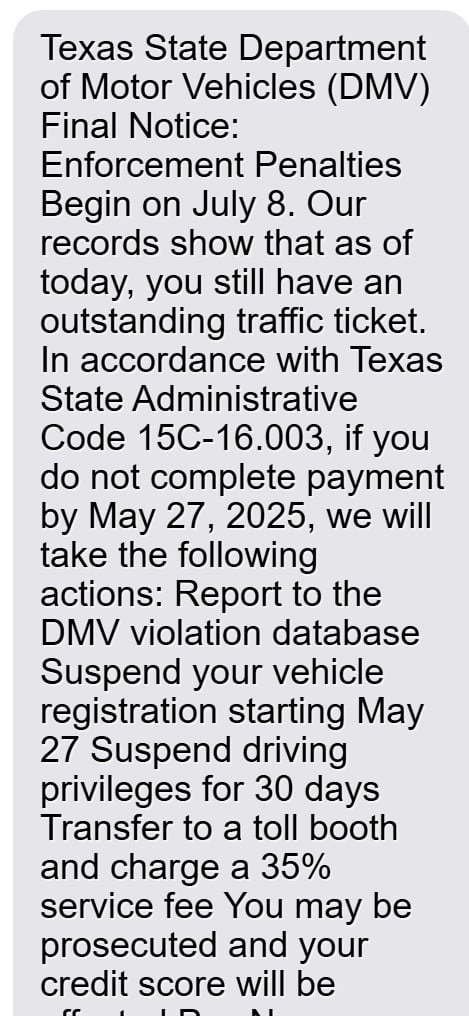
Here is how the scam text message looks:
Texas State Department of Motor Vehicles (DMV) Final Notice:
Enforcement Penalties Begin on May 28.
Our records show that as of today, you still have an outstanding traffic ticket. In accordance with Texas State Administrative Code 15C-16.003, if you do not complete payment by May 27, 2025, we will take the following actions:
- Report to the DMV violation database
- Suspend your vehicle registration starting May 27
- Suspend driving privileges for 30 days
- Transfer to a toll booth and charge a 35% service fee
- You may be prosecuted and your credit score will be affected
Pay Now:
https://txdmv.gov-kljv.win/portalPlease pay immediately before enforcement to avoid license suspension and further legal disputes.
(Reply Y and re-open this message to click the link, or copy it to your browser.)
Step 3: Clickable, Deceptive Link
- Morphing URLs: Scammers register domains like “txdmv‑gov‑kljv.win” and append plausible paths like “/portal” or “/pay.”
- Masking tactics: Some terminals hide parts of the URL to mimic authentic domains.
Step 4: Fake DMV Portal Page
- Branding mimicry: Logos, color schemes, and official terminology reinforce authenticity.
- Pre-populated fields: Basic data (like area code) may auto-populate, boosting confidence.
Step 5: Payment Request for “Traffic Penalty”
- Fine amount displayed (~$9.75).
- Multiple payment options: Credit, debit, prepaid card.
- Payment warnings: Immediate processing or deadline expiration language.
Step 6: Collecting PII and Payment Info
- Users are prompted to input:
- Name, billing address, email, phone number.
- Full credit card details (card number, CVV, expiration date).
- Possibly, date of birth or social security information.
Step 7: Submission and Fake Confirmation
- “Payment successful” screen: Mimics official receipt pages.
- Delayed withdrawal narrative: Claims that “processing takes 1–2 business days” to avoid suspicion when actual charges appear.
Step 8: Data Harvest and Misuse
- Immediate micro‑charges: Scammers test the validity of payment info.
- Larger fraudulent charges: Purchases or money transfers with stored card data.
- Sale of PII: Medical, financial, and address details packaged for resale.
Step 9: Cover-Up and Domain Rotation
- Domain switching: If reported, scammers abandon the domain and create a new one.
- Link recycling: SMS campaigns continue with fresh numbers and domains to evade detection.
Step 10: Follow-Up Exploitation
- Refinancing scam offers: Remorseful messages offering refunds trigger more data handoff.
- Malware distribution: Sites may host download traps for Trojans, keyloggers, or adware.
What to Do If You’ve Been Targeted or Victimized
1. Contact Your Bank or Card Issuer – Immediately (24/7)
- Explain the situation and report the card as “compromised.”
- Request a freeze or replacement and ask for provisional credits if fraudulent charges occurred.
2. Review and Dispute Charges
- Scrutinize recent statements and pending charges.
- Official financial institutions often waive liability for unauthorized transactions if reported promptly.
3. Set Up Fraud Alerts or Credit Freezes
- Contact Equifax, Experian, and TransUnion to request:
- A 90‑day fraud alert (one bureau contacts the others).
- A credit freeze to block new accounts being opened.
4. File a Fraud Report
- Federal Trade Commission (FTC): Submit through reportfraud.ftc.gov.
- Texas Attorney General: Use the consumer complaint portal for scam reporting.
- Local law enforcement: File with your city or county police—an official record may help financial institutions.
5. Change Credentials and Enable Two‑Factor Authentication
- Update all passwords tied to compromised emails/accounts.
- Strong, unique passwords stored via a reputable password manager.
- Enable 2FA on email, bank, shopping, and social platforms.
6. Explore Identity Theft Recovery Resources
- Free assistance is available through the FTC and some banks for victims of identity theft.
- Consider reputable services with strong privacy policies if your data is deeply exposed.
7. Notify Others
- Warn friends, family, and community via social media, neighborhood groups, or workplace.
- Provide examples of scam texts and show them what the fake website looked like.
8. Monitor Credit and Personal Accounts
- Use free credit monitoring for several months post-incident.
- Watch for suspicious activity, new account openings, or loan inquiries.
9. Stay Informed
- Subscribe to cybersecurity updates and follow sources like the FTC, CISA, or state consumer alerts.
- Recognize that criminals reuse tactics—don’t assume once is enough.
Frequently Asked Questions About the Texas DMV “Outstanding Traffic Ticket” Text Scam
What is the Texas DMV “Outstanding Traffic Ticket” text scam?
This scam involves fraudulent text messages claiming to be from the Texas Department of Motor Vehicles. Victims are told they have an unpaid traffic ticket and are urged to click a link to pay a small fine. The link leads to a fake website where scammers collect credit card details and personal information.
Is the Texas DMV contacting people by text message?
No, the official Texas Department of Motor Vehicles (DMV) does not send unsolicited text messages demanding payment for traffic tickets. Official communication regarding fines or citations is typically handled through mail or secure government websites.
How can I tell if a traffic ticket text message is a scam?
Here are clear signs of a scam message:
- The sender uses a suspicious link (e.g., “txdmv.gov-kljv.win/portal”).
- The message includes fake legal codes (e.g., “Administrative Code 15C-16.003”).
- It creates urgency with threats like license suspension or legal action.
- It asks for immediate payment through a non-government link.
What happens if I click the scam link?
Clicking the link may:
- Redirect you to a fake payment page designed to steal your credit card data.
- Prompt you to enter personal information such as your name, address, and phone number.
- Lead to unauthorized charges on your card.
- Expose your device to potential malware or spyware in some cases.
What do scammers do with the information they collect?
Scammers use or sell stolen information for:
- Making unauthorized purchases.
- Committing identity theft or opening fraudulent accounts.
- Launching follow-up scams using your contact data.
- Selling your personal and financial information on dark web marketplaces.
Is the URL “txdmv.gov-kljv.win/portal” a legitimate Texas DMV website?
No. Although it appears similar to an official domain, “txdmv.gov-kljv.win” is not affiliated with the Texas DMV. Real DMV websites will end in .gov and will never use unfamiliar suffixes like .win or .xyz.
What should I do if I clicked the link or submitted my information?
Take these steps immediately:
- Contact your bank or card provider to cancel your card and dispute any charges.
- Place a fraud alert or credit freeze with credit bureaus (Equifax, Experian, TransUnion).
- File a report with the FTC at reportfraud.ftc.gov.
- Notify the Texas Attorney General’s office through their consumer complaint portal.
- Monitor your accounts and credit reports closely for unusual activity.
Will the real Texas DMV ever ask for payment via text?
No. The Texas DMV does not request payments through text messages. Any official traffic-related fines or DMV-related payments must be made through secure, official government portals like txdmv.gov.
Can I report this scam to authorities?
Yes. Reporting helps authorities track and shut down these operations. You should:
- Report the scam text to the FTC.
- File a consumer complaint with the Texas Attorney General.
- Forward the text to 7726 (SPAM) to alert mobile carriers.
- Notify your local law enforcement agency for additional documentation.
How do I protect myself from future text scams?
To reduce your risk:
- Never click on suspicious or unsolicited links in text messages.
- Block and report suspicious senders.
- Use mobile security software with fraud detection features.
- Enable two-factor authentication on sensitive accounts.
- Keep your contact information off public websites when possible.
Who is most at risk of falling for this scam?
Anyone with a mobile phone can be targeted, but older adults, less tech-savvy individuals, and those unfamiliar with phishing tactics are especially vulnerable. Scammers rely on creating panic or confusion to get victims to act without verifying the source.
What does the fake text usually say?
It often includes language like:
“Texas State Department of Motor Vehicles (DMV) Final Notice: Enforcement Penalties Begin on May 28… You still have an outstanding traffic ticket… If you do not complete payment by May 27, we will take action…”
Always double-check such messages with the actual DMV before taking any action.
The Bottom Line
The Texas DMV “Outstanding Traffic Ticket” text scam is a ruthless phishing operation leveraging authority, pressure, and deception. By impersonating the DMV, using urgency, and a low-dollar pretext, scammers hook victims into revealing sensitive details.
Takeaway:
- Never click unsolicited links in texts regarding traffic fines.
- Verify any claim via official DMV channels—don’t trust just the message.
- Act quickly if you’ve provided information—cancel cards, freeze credit, report fraud.
- Spread awareness to help others avoid this pitfall.
Stay alert. Don’t let fear or urgency push you into clicking before thinking. The real cost of this “small fine” could be much, much higher.









txdmv.fine-txnpr[.]com
Scammers are at it again.
Hi, thank you for posting that.
That URL is another good example of how these scams try to look official by using “txdmv” in the address even though it is not a real government domain. Comments like yours help show readers that the scam is still active and changing links.