

Imagine receiving a text message claiming it’s from the Texas Department of Motor Vehicles (DMV). The message warns that you have an unpaid traffic ticket, threatens license suspension, and demands immediate payment through a link. It looks urgent and official, but it’s not real. It’s the Texas DMV Traffic Violation Text Scam. In this article, we’ll uncover how this scam works, why people fall for it, and what you should do if you become a victim.
Scam Overview
The Texas DMV Traffic Violation Text Scam is a phishing scheme targeting residents across the state. VicThe Texas DMV Traffic Violation Text Scam is one of the latest phishing schemes targeting residents across the state. It leverages fear, urgency, and trust in government authority to manipulate unsuspecting victims. The scam begins with an alarming text message, supposedly from the Texas Department of Motor Vehicles, stating that you owe an outstanding traffic ticket. It then warns of serious consequences if immediate payment is not made.
Anatomy of the Scam Message
The fraudulent text is crafted to sound official and threatening. A typical message includes:
- An urgent headline such as “Texas Department of Vehicles (DMV) Final Notice.”
- A timeline for enforcement, often beginning within 24–48 hours, such as “Enforcement Penalties Begin on June 6.”
- References to fabricated legal codes, like “Texas Transportation Code § 21-801.1,” to mimic real laws.
- A list of severe consequences, including license suspension, registration revocation, collections agency involvement, prosecution, and even adverse credit reporting.
- A fraudulent payment link disguised as an official portal.
- A call to action, instructing recipients to pay immediately to avoid penalties.
Why the Scam is Convincing
- Government Branding: The use of “Texas Department of Vehicles” and legal jargon creates a false sense of legitimacy.
- Fear Tactics: Threats of losing driving privileges or damaging one’s credit score are highly motivating and cause recipients to panic.
- Specific Deadlines: By giving exact dates and timelines, scammers create a sense of urgency that discourages victims from double-checking the facts.
- Low Payment Amounts: Many versions of this scam request fines as small as $5–$15, amounts so minor that people may pay without questioning authenticity.
- Professional Design: Scam websites often mimic real government portals, using logos, seals, and official colors.
Example of the Scam Text Message
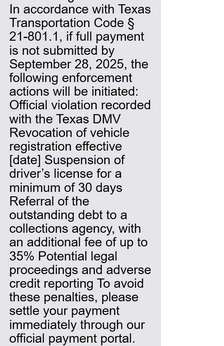
Texas Department of Vehicles (DMV) Final Notice: Enforcement Penalties Begin on [date].
Our records show that as of today, you still have an outstanding traffic ticket. In accordance with Texas Transportation Code § 21-801.1, if full payment is not submitted by September 28, 2025, the following enforcement actions will be initiated:
- Official violation recorded with the Texas DMV
- Revocation of vehicle registration effective [date]
- Suspension of driver’s license for a minimum of 30 days
- Referral of the outstanding debt to a collections agency, with an additional fee of up to 35%
- Potential legal proceedings and adverse credit reporting
To avoid these penalties, please settle your payment immediately through our official payment portal.
Pay Now: [phishing link]
Please pay immediately before enforcement to avoid license suspension and further legal disputes. (Reply Y and re-open this message to click the link, or copy it to your browser.)
The True Motives Behind the Scam
At its core, this scam is designed to harvest sensitive information and commit financial fraud. Victims who fall for it risk:
- Credit card theft: Scammers can quickly drain funds or make unauthorized purchases.
- Identity theft: Personal data such as names, addresses, phone numbers, and driver’s license details can be misused.
- Long-term exploitation: Once scammers obtain personal data, victims may be targeted with additional scams, phishing attempts, or even blackmail.
Widespread and Growing Threat
This scam is not isolated. Variants of the DMV scam have been reported in multiple states, with scammers simply swapping “Texas” for other states like Arizona, Maryland, or Connecticut. The flexibility of this scheme allows it to spread quickly, making it a persistent and evolving threat. Texas residents, however, have become prime targets due to the state’s large population and reliance on vehicle registration and driving records.
In short, the Texas DMV Traffic Violation Text Scam is a calculated, organized effort by cybercriminals to steal money and personal data. Recognizing its tactics and warning signs is the first step toward avoiding financial loss and protecting your identity
How the Scam Works (Step-by-Step)
Step 1: Bulk SMS Distribution
Scammers use automated systems to send text messages in bulk. Phone numbers are obtained from leaked databases or purchased from shady online sources. Often, the sender ID is spoofed to appear local or DMV-related.
Step 2: Creating Panic Through Language
The messages include:
- Legal threats (license suspension, collections).
- Deadlines (specific dates for penalties).
- Official terms (“Texas Transportation Code”).
This psychological manipulation causes recipients to react before thinking critically.
Step 3: The Phishing Link
The text contains a link disguised as an “official payment portal.” The URL often looks legitimate at first glance but uses strange endings like .xyz, .vip, or .info. Clicking redirects victims to a fraudulent site.
Step 4: Fake Texas DMV Website
The phishing website is carefully designed to mimic the real DMV portal. It often includes:
- Texas DMV logos and branding.
- Government-style colors and fonts.
- Secure-looking forms.
Step 5: Data Collection
Victims are prompted to submit:
- Full name
- Address
- Phone number
- Email address
- Driver’s license number
- Credit/debit card details (number, CVV, expiration date)
Step 6: Fake Payment Confirmation
After submission, the site may display a “payment successful” message. This reassures victims, delaying their suspicion until unauthorized charges appear.
Step 7: Exploitation of Data
Scammers use the stolen information to:
- Run test charges on the card.
- Make larger purchases.
- Sell personal and financial data on dark web markets.
Step 8: Covering Tracks
When victims or authorities catch on, scammers quickly switch to new domains and phone numbers, allowing them to continue the scheme.
Step 9: Secondary Attacks
Victims may receive follow-up messages claiming to offer refunds or fraud assistance—another scam attempt to gather more details.
What to Do If You Have Fallen Victim
1. Contact Your Bank or Card Issuer Immediately
- Report the card as compromised.
- Cancel and request a replacement card.
- Dispute unauthorized charges.
2. Place a Fraud Alert on Your Credit Report
- Contact one of the three major credit bureaus (Experian, Equifax, TransUnion).
- A 90-day alert makes it harder for scammers to open accounts in your name.
3. Consider a Credit Freeze
- Prevents new credit accounts from being opened without your permission.
- Free to request from each credit bureau.
4. Report the Scam
- Federal Trade Commission (FTC): Submit a report at reportfraud.ftc.gov.
- Texas Attorney General’s Office: File a consumer complaint.
- Local Law Enforcement: File a police report to document the fraud.
5. Change Your Passwords
- Update login credentials for email, financial accounts, and any services tied to the compromised information.
- Use unique, strong passwords stored in a password manager.
6. Enable Two-Factor Authentication (2FA)
- Add an extra layer of protection for banking, email, and other sensitive accounts.
7. Monitor Financial and Credit Accounts
- Review bank statements regularly.
- Check your credit report for suspicious accounts.
- Set up transaction alerts with your bank.
8. Spread Awareness
- Warn friends, family, and coworkers.
- Share information on social media or community forums.
Frequently Asked Questions About the Texas DMV Traffic Violation Text Scam
What is the Texas DMV Traffic Violation Text Scam?
It is a phishing scam where fraudsters send fake text messages pretending to be from the Texas Department of Motor Vehicles. The messages claim you have unpaid traffic tickets and must pay immediately through a provided link. The goal is to steal personal and financial information.
Does the Texas DMV send text messages about fines?
No. The Texas DMV does not send unsolicited text messages about outstanding tickets or request payments through links. Official communications are made via mail or through secure, government-owned websites ending in .gov.
How can I recognize a fake DMV text message?
Look for these red flags:
- Urgent phrases like “Final Notice” or “Enforcement Begins.”
- Threats of license suspension, registration revocation, or collections.
- References to suspicious or fabricated legal codes.
- Links that do not end with .gov.
- Requests for immediate payment without prior mailed notice.
What happens if I click the phishing link?
Clicking the link directs you to a fake payment site designed to steal your information. Once you enter your personal and financial details, scammers can make unauthorized transactions, commit identity theft, or sell your information on dark web marketplaces.
Is “Texas Transportation Code § 21-801.1” real?
No. This is a fabricated code inserted into the scam messages to make them look authentic. Scammers frequently use legal-sounding but fake citations to trick recipients.
What should I do if I entered my details?
Take immediate action:
- Call your bank or card issuer to cancel the compromised card.
- Place a fraud alert with one of the three major credit bureaus.
- Consider a credit freeze to prevent new accounts from being opened.
- Report the scam to the FTC and Texas Attorney General.
- Monitor your accounts and credit reports closely.
How much money do scammers usually request?
They often request small amounts, usually $5–$15. This makes the scam appear more credible and reduces suspicion, but once you provide payment details, much larger fraudulent charges may follow.
Can I report these scam texts?
Yes. You can:
- Forward the scam text to 7726 (SPAM) to notify your carrier.
- Report to the FTC at reportfraud.ftc.gov.
- File a complaint with the Texas Attorney General.
- Report to your local police department for documentation.
Will the Texas DMV ever demand immediate payment by text?
No. The DMV never demands immediate payment through text messages, links, or suspicious portals. Official payments are handled securely through Texas.gov websites or in person at authorized offices.
How can I protect myself from future scams?
- Never click suspicious links in unsolicited messages.
- Verify any notice by contacting the Texas DMV directly through official channels.
- Use mobile security apps that detect phishing attempts.
- Enable two-factor authentication on financial and important online accounts.
- Educate family members about text scams so they don’t fall victim.
Who is most at risk of falling for this scam?
While anyone can be targeted, individuals unfamiliar with phishing tactics, older adults, and people who drive regularly are more likely to be tricked by the messages. The fear of losing driving privileges makes the scam especially effective.
The Bottom Line
The Texas DMV Traffic Violation Text Scam is a calculated phishing attack preying on fear, urgency, and trust in government institutions. Always remember:
- The Texas DMV will never demand payment through text messages.
- Real government websites always end in .gov.
- If in doubt, verify directly with official DMV channels.
Protect yourself by staying alert, questioning suspicious messages, and reporting scams promptly.

Join the discussion
6 commentsShare your experience or ask a question about this article.
Discussion
I received the DMV fine text. It has a web sight but I didn’t press that. I was looking up and writing something from the Text but for reason my voice mail sent a text back, it was just me messing with my paper for 19 that was used it was only a voice text for 19 seconds. What do I need to do
In reply to Candace I
Hi Candace, if you did not click the link, that is the most important thing.
If your phone accidentally sent a text back, do not panic. Just delete the message thread, block the number, and report it as spam through your phone or carrier if that option is available. Also keep an eye out for any follow-up texts, since replying can sometimes confirm to scammers that a number is active.
As long as you did not open the link or enter any information, you likely avoided the real danger.
I got this earlier today. I almost thought this was real. I looked up the number it came from. The (929) area code is out of New York City of all places, pretending to be from TXDOT. This is the first time I received one of these text messages and it worried me a bit.
In reply to Michelle Evans
Hi Michelle, thanks for sharing this.
That reaction is exactly what these text scams are designed to trigger. They use official-sounding language, urgent threats, and numbers that look plausible enough to make people panic before thinking it through. Looking up the number was a smart move.
In reply to Stelian
You’re very welcome!
In reply to Michelle Evans
Glad it helped. If anything else comes up, or you spot a similar scam elsewhere, do post it – reader reports are how we find most of these.