

Trojan.JS.Redirector.xa is a JavaScript trojan that attempts to redirect your browser to another website. Trojan.JS.Redirector.xa is the generic name from Kaspersky Antivirus and Kaspersky Internet Security, however other antivirus products may detect this infection as:
Trojan:JS/Seedabutor.B (Microsoft Security Essentials)
JS.Redirector.175 (Dr.Web)
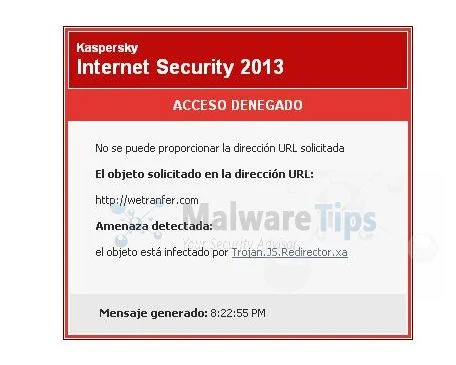
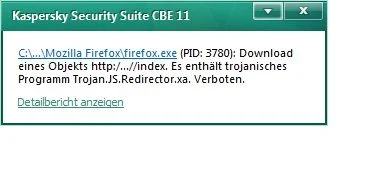
The Trojan.JS.Redirector.xa is a dangerous threat that has been circulating for several years. In the time that Trojan.JS.Redirector.xa has been in the wild there have been a number of revisions, with modifications to its functionality, infection strategy and its persistence mechanisms on an infected machine. However, the core purpose has remained: to assume full control of the machine by adding it to the ZeroAccess botnet and to monetize the new asset by downloading additional malware.
Primarily, Trojan.JS.Redirector.xa is a kernel-mode rootkit, similar in ethos to the TDL family of rootkits. It uses advanced techniques to hide its presence, is capable of functioning on both 32 and 64-bit flavors of Windows from a single installer, contains aggressive self defense functionality and acts as a sophisticated delivery platform for other malware.
The Trojan.JS.Redirector.xa virus is distributed through several means. Malicious websites, or legitimate websites that have been hacked, can infect your machine through exploit kits that use vulnerabilities on your computer to install this Trojan without your permission of knowledge.
Another method used to propagate this type of malware is spam email containing infected attachments or links to malicious websites. Cyber-criminals spam out an email, with forged header information, tricking you into believing that it is from a shipping company like DHL or FedEx. The email tells you that they tried to deliver a package to you, but failed for some reason. Sometimes the emails claim to be notifications of a shipment you have made. Either way, you can’t resist being curious as to what the email is referring to – and open the attached file (or click on a link embedded inside the email). And with that, your computer is infected with the Trojan.JS.Redirector.xa virus.
The threat may also be downloaded manually by tricking the user into thinking they are installing a useful piece of software, for instance a bogus update for Adobe Flash Player or another piece of software.
The Trojan.JS.Redirector.xa virus is also prevalent on peer-to-peer file sharing websites and is often packaged with pirated or illegally acquired software.
When the computer is infected with the Trojan.JS.Redirector.xa virus, if you visit a website containing this malicious JavaScript, the browser is redirected to dsparking.com/?epl=.
This JavaScript is usually found in webpages compromised through SQL Injection attacks or through Blackhat search engine optimization (SEO) poisoning. This detection may also be triggered if the webpage containing this script is stored in the browser’s cache.
Trojan.JS.Redirector.xa is a dangerous threat that uses advanced stealth techniques in order to hinder its detection and removal. As a consequence of being infected with this threat, you may need to repair and reconfigure some Windows security features.
Trojan.JS.Redirector.xa – Virus Removal Guide
This page is a comprehensive guide, which will remove the Trojan.JS.Redirector.xa infection from your your computer. Please perform all the steps in the correct order. If you have any questions or doubt at any point, STOP and ask for our assistance.
STEP 1: Delete Trojan.JS.Redirector.xa Temporary Internet files with Temp File Cleaner
STEP 2: Remove Trojan.JS.Redirector.xa infection with Kaspersky TDSSKiller
STEP 3: Remove Trojan.JS.Redirector.xa malicious files with RogueKiller
STEP 4: Remove Trojan.JS.Redirector.xa virus with Malwarebytes Anti-Malware Free
STEP 5: Remove the Trojan.JS.Redirector.xa infection with HitmanPro
STEP 6: Remove Trojan.JS.Redirector.xa redirect with AdwCleaner
STEP 1: Delete Trojan.JS.Redirector.xa Temporary Internet files with Temp File Cleaner
This threat may be present in your Temporary Internet Files folder. We recommend that you delete your temporary Internet files to prevent the persistent detection of this threat from within the Temporary Internet Files folder.
- You can download Temp File Cleaner from the below link:
Download Temp File CleanerYour download starts right away. - Right click on the TFC.exe icon, and if you using Windows XP select Run As, or if you are a Windows Vista, 7 or 8 user, select Run as Administrator.
![[Image: TFC.exe icon]](https://malwaretips.com/blogs/wp-content/uploads/mwt-media/45/45ecc110e23fc46477d2b94e1b6ca691dc5892c2394716aac81e83dc5b3d5524/825f6265202b3d8bf374e6f6aa43b582e3ee7aca7e2a987e623db74e77d7288d-309.webp "Temp File Cleaner icon")
If Windows prompts you as to whether or not you wish to run TFC.exe, please allow it to run. - Close your browser and save any other documents that you might have open, then click the Start button to begin the removal process.
![[Image: Temp File Cleaner starting removal process]](https://malwaretips.com/blogs/wp-content/uploads/mwt-media/17/17267cf3890a64ec38eecfda237b710079585524a68a363b559bedde809ccffd/0a75c9adccb6ab749e663c976eb80d609f3f144466d46e1f4e298136f1a0eb95-510.webp "Click on Start to remove Trojan.JS.Redirector.xa")
Depending on how often you clean temp files, execution time should be anywhere from a few seconds to a minute or two. Let it run uninterrupted to completion. - Once Temp File Cleaner has completed its task, it should reboot your computer. If it does not, please manually reboot the machine yourself to ensure a complete clean.
![[Image: Temp File Cleaner logs]](https://malwaretips.com/blogs/wp-content/uploads/mwt-media/0e/0e1b77f424bab02e5fa141e66b9f6fb225fa7efc9dda631002523ba426abb46f/1c362f08675b0c4b4e281fb94323bdb8c4a28a39adccfbb2651ed11359370759-638.webp "Temp File Cleaner Report")
STEP 2: Remove Trojan.JS.Redirector.xa infection with Kaspersky TDSSKiller
As part of its self defense mechanism, Trojan.JS.Redirector.xa will install a rootkit on the infected computer.In this first step, we will run a system scan with Kaspersky TDSSKiller to remove this rookit.
- Please download the latest official version of Kaspersky TDSSKiller.
Download TDSSKillerYour download starts right away. - Before you can run Kaspersky TDSSKiller, you first need to rename it so that
you can get it to run. To do this, right-click on the TDSSKiller.exe icon and select Rename.
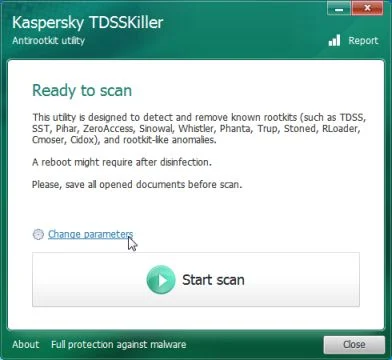
Edit the name of the file from TDSSKiller.exe to iexplore.exe, and then double-click on it to launch. - Kaspersky TDSSKiller will now start and display the welcome screen and we will need to click on Change Parameters.
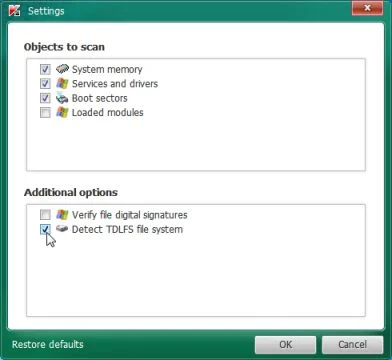
- In the new open window,we will need to enable Detect TDLFS file system, then click on OK.
- Next,we will need to start a scan with Kaspersky, so you’ll need to press the Start Scan button.
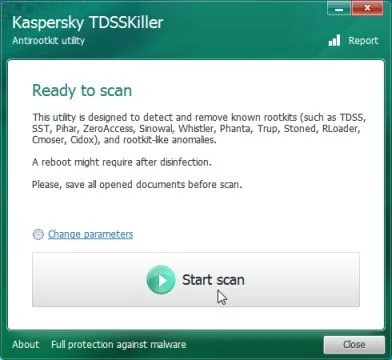
- Kaspersky TDSSKiller will now scan your computer for Trojan.JS.Redirector.xa infection.
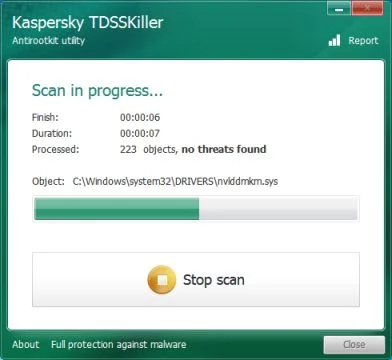
- When the scan has finished it will display a result screen stating whether or not the infection was found on your computer. If it was found it will display a screen similar to the one below.
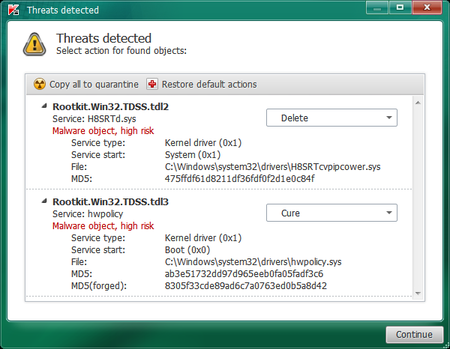
- To remove the infection simply click on the Continue button and TDSSKiller will attempt to clean the infection.A reboot will be require to completely remove any infection from your system.
STEP 3 : Remove Trojan.JS.Redirector.xa malicious files with RogueKiller
Trojan.JS.Redirector.xa has added some malicious registry keys to your Windows installation, to remove them we will need to perform a scan with RogueKiller.
- You can download RogueKiller from the below link.
Download RogueKillerOpens the download page in a new tab. - Double click on RogueKiller.exe to start this utility and then wait for the Prescan to complete.This should take only a few seconds and then you can click the Start button to perform a system scan.
![[Image: RogueKiller while scanning]](https://malwaretips.com/blogs/wp-content/uploads/mwt-media/a0/a0d25d880942dfa26618376c62dfb6122db4dce6da1f98af88226492d891c726/3b18c4b4589830dce38a71c95707969fb78876e99bee478a38dc5859de121469-600.webp "Click on the Start button to perform a system scan")
- After the scan has completed, press the Delete button to remove any malicious registry keys.
![[Image: RogueKiller removing Trojan.JS.Redirector.xa]](https://malwaretips.com/blogs/wp-content/uploads/mwt-media/9f/9f4f19530cf788dadd63ca5cb2b699db64b2c458570562cf64119031399aa734/977a2f35e7391111faf80a98edc26af95eb5f7edac47e879725c2d4fde16a6b2-600.webp "Press Delete to remove the malicious registry keys")
STEP 4: Remove Trojan.JS.Redirector.xa virus with Malwarebytes Anti-Malware Free
Malwarebytes Anti-Malware Free is a powerful on-demand scanner which will remove Trojan.JS.Redirector.xa malicious files from your computer.
- You can download Malwarebytes Anti-Malware Free from the below link, then double-click on the icon named mbam-setup.exe to install this program.
Download MalwarebytesFree official installer. Your download starts right away. - When the installation begins, keep following the prompts in order to continue with the setup process, then at the last screen click on the Finish button.
![[Image: Malwarebytes Anti-Malware final installation screen]](https://malwaretips.com/blogs/wp-content/uploads/mwt-media/47/471448d4dd5aa1d55ea545effccf0ac9c8ccb5a29622da4e38ac677b5d8c37b5/9f473303c15a00262451cc5a56b904de929157b59e19e3cfb2c03ec88f643390-402.webp "Malwarebytes Anti-Malware installation screen")
- On the Scanner tab, select Perform quick scan, and then click on the Scan button to start searching for the Trojan.JS.Redirector.xa malicious files.
![[Image: Malwarebytes Anti-Malware Quick Scan]](https://malwaretips.com/blogs/wp-content/uploads/mwt-media/1e/1eb209597ca2f06e596fd060345ac7e3100355f1ec8fc8ea2d9dec7abbb05ea0/3afba9b0b97b56945ffc33817ac48f7433c799241a22e422966180b76473a906-521.webp "Run a Quick Scan with Malwarebytes Anti-Malware")
- Malwarebytes’ Anti-Malware will now start scanning your computer for Trojan.JS.Redirector.xa virus as shown below.
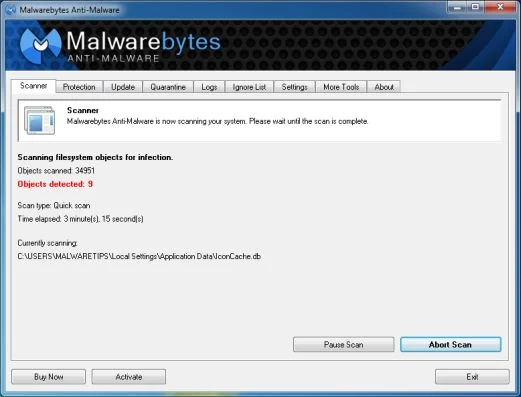
- When the Malwarebytes Anti-Malware scan has finished, click on the Show Results button.
![[Image: Malwarebytes Anti-Malware scan results]](https://malwaretips.com/blogs/wp-content/uploads/mwt-media/84/84c62dd46289424dbc686abc53672cb0810111920c8c0bbd69e973844d0a9ab0/a4c04aa700e641f47afec9965f79ff346740668e5952955ccbe5b4c3658b5897-521.webp "Malwarebytes when the system scan has completed")
- You will now be presented with a screen showing you the computer infections that Malwarebytes Anti-Malware has detected. Make sure that everything is Checked (ticked), then click on the Remove Selected button.
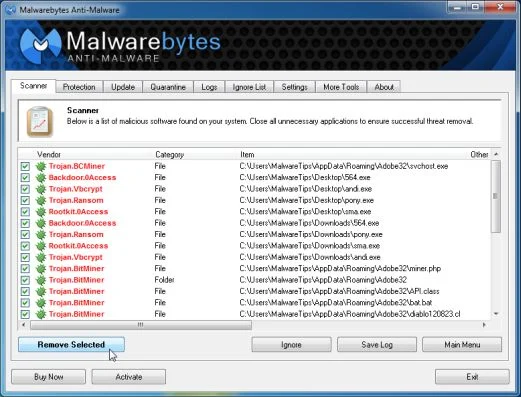
- Once your computer will restart, open Malwarebytes Anti-Malware and perform a Full System scan to verify that there are no remaining threats.
STEP 5: Remove the Trojan.JS.Redirector.xa infection with HitmanPro
HitmanPro is a cloud on-demand scanner, which will scan your computer with 5 antivirus engines for the Trojan.JS.Redirector.xa virus and was deleted” infection.
- Download HitmanPro from the below link, then double-click on it to start this program.
Download HitmanProOfficial Sophos download. Free scan, free 30-day trial to remove threats. - HitmanPro will start and you’ll need to follow the prompts (by clicking on the Next button) to start a system scan with this program.
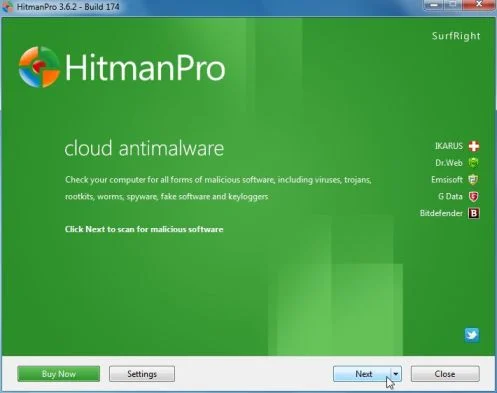
- HitmanPro will start scanning your computer for Trojan.JS.Redirector.xa malicious files as seen in the image below.
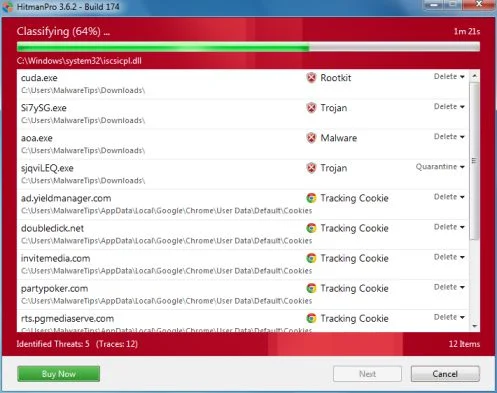
- Once the scan is complete,you’ll see a screen which will display all the infected files that this utility has detected, and you’ll need to click on Next to remove this malicious files.
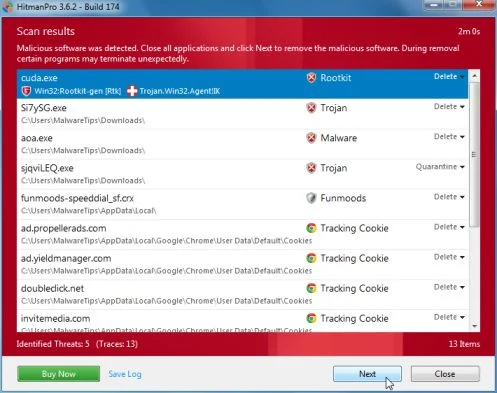
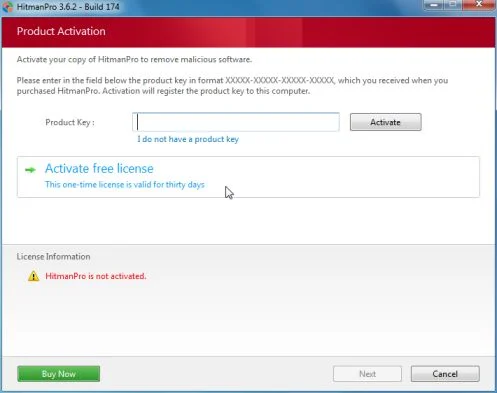
- Click Activate free license to start the free 30 days trial and remove all the malicious files from your computer.
STEP 6: Remove Trojan.JS.Redirector.xa redirect with AdwCleaner
Run a computer scan with AdwCleaner to remove Trojan.JS.Redirector.xar
The AdwCleaner utility will scan your computer for Trojan.JS.Redirector.xa malicious files and registry keys, that may have been installed on your computer without your knowledge.
- You can download AdwCleaner utility from the below link.
Download AdwCleanerFree official download. Nothing to install. - Before starting AdwCleaner, close all open programs and internet browsers, then double-click on the AdwCleaner icon.
![[Image: AdwCleaner Icon]](https://malwaretips.com/blogs/wp-content/uploads/mwt-media/5e/5e41f50f10d6a1341d28f8d8c3d5aae104053c30aa7d8e3f71f05e199cb81490/add2fb83f4552f4cf1b87c7aa54b288cb861479b8c394461fa3dcc0722e9560b-191.webp "AdwCleaner Icon")
If Windows prompts you as to whether or not you wish to run AdwCleaner, please allow it to run. - When the AdwCleaner program will open, click on the Search button as shown below.
![[Image: AdwCleaner scanning for Trojan.JS.Redirector.xa]](https://malwaretips.com/blogs/wp-content/uploads/mwt-media/09/09e2e3f118f7adf820575ab982ecc1437d86d577b378829f6da5c80f0ccbd10d/46219b67a81ff19e8e15a9f290bc4c59456a04011b4df64048a04e0dd3b824bd-531.webp "Click on Search to scan for Trojan.JS.Redirector.xa")
The program will now start to search for Trojan.JS.Redirector.xa malicious files that may be installed on your computer. When it has finished it will display a notepad screen that contains a log file of all the Mediaget extensions, files, and registry keys that have been detected. - To remove the Trojan.JS.Redirector.xa malicious files that were detected in the previous step, please click on the Delete button on the AdwCleaner screen.
![[Image: Adwcleaner removing Trojan.JS.Redirector.xa]](https://malwaretips.com/blogs/wp-content/uploads/mwt-media/61/617256698d0576ff8055530d58bea0cbebeefb60c0a338218fbd41652d6649ae/df17d88dc806f5f23a52f876a00e2f0b078f097c217cace43a9f47aa2b5167f9-692.webp "Click on Delete to remove Trojan.JS.Redirector.xa virus")
AdwCleaner will now prompt you to save any open files or data as the program will need to reboot the computer. Please do so and then click on the OK button.

Join the discussion
0 commentsShare your experience or ask a question about this article.
Your progress
Did these steps help?
Let us know how the guide worked for you.
Describe what you see and the step you reached. Keep passwords and other private information out.
Discussion
Start the conversation
Have a question or something useful to share? Add the first comment.