


A text arrives about airport parking. It mentions the right airport and maybe even your vehicle registration. You have a flight to catch, so fixing the problem feels urgent.
Before you open the link, separate what the sender knows from what they can prove. The Manchester Airports Group incident is a good example of why that matters.
Overview
Which airport services were involved
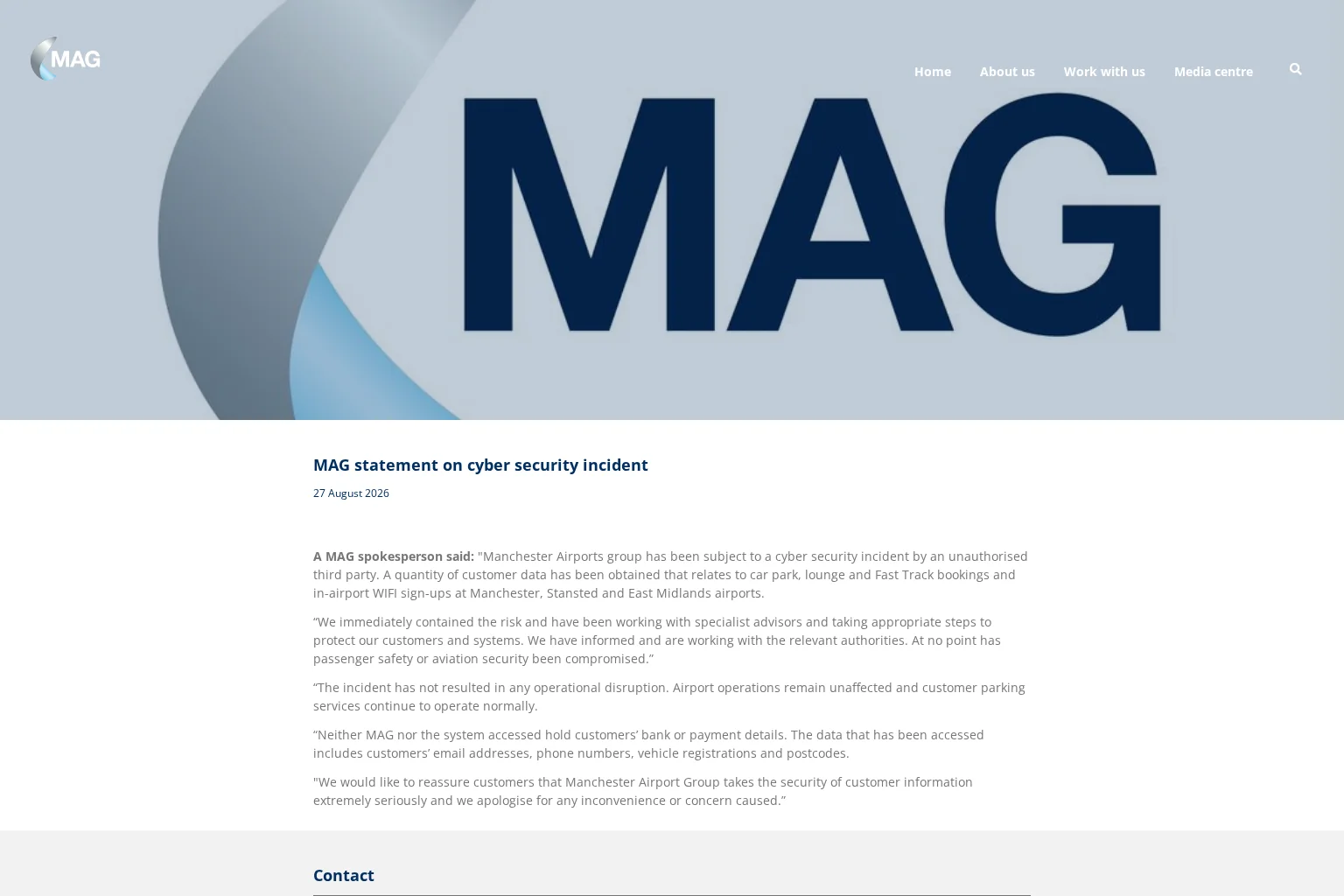
Manchester Airports Group, or MAG, operates Manchester Airport, London Stansted and East Midlands Airport. In August 2026, the group confirmed unauthorized access to some customer information.
MAG’s public statement names parking, lounges, Fast Track, and airport Wi-Fi. Those services can have records separate from your airline booking.
The Guardian reported that about 8.7 million customers were affected. The group’s statement describes the data and affected services without giving that number.
MAG said the breach did not disrupt airport operations or compromise passenger safety. It did not describe an outage affecting baggage, check-in, or air traffic services.
What the records contained and what they did not
MAG listed email addresses, phone numbers, vehicle registrations, and postcodes among the information accessed. It said the affected system did not hold customers’ bank or payment details.
Different records can contain different information. An exposed parking registration does not mean each affected person had used parking or that all the listed data types applied to every customer.
A correct booking detail can make a caller sound credible. It does not give the caller a right to your payment information.
What to check before trusting a follow-up
Anyone can copy a public breach announcement without seeing a customer record. Check a follow-up before assuming it is genuine or part of a known fraud.
- Note how you booked the service, through the airport, a parking operator, or a separate reseller.
- Check the airport and service named in your original confirmation before changing anything.
- Look for an actual balance, cancellation, or amendment in the account you already use.
- Treat a card request as new even if a message quotes your name, postcode, or registration.
- Verify a flight change with the airline, not with the party that sold parking or lounge access.
A message asking you to pay is more urgent for the sender than it is for you. Take the time to check the booking independently.
What the Airport Data Breach Means for Passengers
The original incident was not a payment message
MAG reported unauthorized access to records. The announcement did not describe customers opening messages or paying a fake fee during the original incident.
That is different from a later message asking you to verify an airport service. If you receive one, judge the new request separately and do not assume MAG sent it.
Compare a notice with the dated announcement. Use the contact route you find independently, not the name or logo displayed at the top of the message.
An airport booking and an airline booking are different records
A parking, lounge, or Fast Track booking may have its own order number and terms. Your airline confirmation usually concerns a different service and may come from another seller.
Start with the booking that needs checking. A parking reference does not prove a flight changed; open the airline’s own app to check it.
A canceled reservation is serious enough to verify. It is not a reason to let a stranger transfer you to a payment team or take control of your screen.
A booking can be real even if the demanded charge is not
You may find a valid reservation that matches the email. That proves the reservation exists, not that a new payment is due or that the email came from its operator.
Check the amount against your booking and receipt. If neither shows the claimed balance, contact the operator through its own site before paying.
Be especially wary of a message offering to refund you as soon as you provide details. Ask the company that originally processed your payment how refunds normally appear.
How to Verify Parking, Lounge, or Fast Track Messages
Find your existing purchase before starting a new one
Open the confirmation you received when you booked, not the new notice. Record the airport, provider, date, product, and reference so you can search for the correct purchase.
If that confirmation came from a reseller, start on the reseller’s independently verified contact page. An airport’s booking portal may not show an order made through another company.
Do not start a new booking because the old one cannot be found immediately. Ask the provider whether the reference uses a different email address or sales channel.
At the airport, ask at an official service desk or use the operator’s site. Do not call a number from an unexpected message or poster.
Check the details through the genuine airport route
For direct Stansted bookings, open Manage my booking from the airport’s site. Enter the email and booking reference from your confirmation, then choose Find booking.
If you cannot find the reference, the same page offers Resend confirmation. Use your booking email, then check whether the returned confirmation matches the service.
Compare the dates, product, and payment information with the confirmation you already hold. Look for a change or balance in the actual record before accepting what the message says.
Manchester’s parking information and East Midlands’ parking information provide their own booking and support routes. Do not put a different airport’s reference into the Stansted form.
For lounge or priority access, use the operator for that product. If the booking is missing, ask its support team to check the seller and date.
Check any cancellation or refund before taking action
Ask the provider whether there was an amendment or cancellation. Ask it to show the change in the official booking or confirm it in writing.
If the provider says no change is recorded, do not use the sender’s link to find a hidden payment. Preserve the message and let the official support team investigate it.
Do not share a one-time code to receive a refund. A code can authorize something you did not intend, even during a call about an otherwise real reservation.
If the official terms allow a change you want, make it through the existing booking. Keep the updated confirmation and check that any transaction matches what you approved.
Which Travel Record Should You Check First?
Use the product name and the payment receipt
If the email mentions an airport brand, check whether you bought the service from the airport directly. The card statement and original supplier confirmation can help you tell.
A parcel, hotel, and parking reservation may all use the same email address. Do not assume the sender has found more than one booking because it knows that address.
If the receipt uses a different trading name, compare it with the provider shown on the original confirmation. Ask support to explain the relationship before treating it as suspicious.
For a package that includes several airport services, ask which company manages changes. From then on, use the verified route for that part of the booking instead of starting over.
Confirm the direction money is supposed to move
An amendment may be free, increase the price, or require the operator to return some of what you paid. Ask which applies before clicking a payment or refund control.
In a genuine refund conversation, ask how the credit will appear and when to check it. If nothing arrives, contact the same provider with the transaction and booking references.
Do not send a further payment to prove you are the person entitled to a refund. If the request contradicts the existing record, ask the operator for written instructions.
Keep any receipt for a payment made in person. Compare it with the original booking to see whether both charges relate to the same service.
What to Do If You Responded to a Suspicious Airport Message
Stop using the sender’s links and keep the message
Take a screenshot that includes the sender, time and request. Keep the original email or text, but do not reopen the linked page to collect more evidence.
Make a note of anything you entered, downloaded, or approved. That tells you whether to treat it as a suspicious message, an account problem, or a financial incident.
Confirm the booking through the provider that sold it
Open the known booking site for the correct airport or reseller. Look up the original reservation and compare its service, date and status with the message.
If you cannot see the booking, contact the provider using independently verified details. Ask it to identify the correct account or confirm whether the message originated there.
If a real change is needed, request written confirmation. Save it with the original receipt so you can separate the legitimate action from the suspicious request.
Contact your bank if you gave away payment details
Use the number on your card or contact the bank from inside its app. Describe which card details you shared and whether a transfer or approval was involved.
Ask whether a card freeze or replacement is appropriate. For a payment, ask what tracing or dispute options are available and keep the case number.
Do not assume the incident exposed your card simply because you used the airport. Sharing it later with a copycat sender is a separate event.
Change credentials only through the real account
If you entered a password, go directly to the account that uses it and choose a new unique password. If you are locked out, use the official recovery route.
Update any other account that used the same password and check recent changes. Ask support how to end unfamiliar sessions if the account offers that control.
Keep recovery messages until you can confirm that your account is secure. Do not give a caller a recovery code while trying to regain access.
Make a report that matches what happened
Use Report Fraud’s reporting page for the appropriate reporting option in England, Wales or Northern Ireland. It distinguishes reports of a suspicious message from actual fraud.
Give dates, the request and any loss you can document. If you are making a fraud report, keep the crime reference and pass it to your bank when asked.
Also alert the airport or reseller through its official support channel. The operator can check its reservation records even when someone else handles the payment dispute.
Keep watching the account that could actually be affected
Check only the accounts connected to what you shared. If a bank statement or new credit entry shows something unfamiliar, contact that provider independently.
If you are worried about the original disclosure, use the ICO’s breach guidance and ask the organization what information affected you.
Save its reply and the contact date. A request for information about the breach is not a reason to send a password or card code.
Frequently Asked Questions
Were flights canceled because of this incident?
MAG said airport operations were unaffected by the August incident. That statement concerns the breach, not the current status of any specific flight.
Check your airline’s own app or website using your flight number. An email about car parking does not establish a change to a flight.
Are bank details included in the data MAG described?
MAG said the affected system did not hold customers’ bank or payment details. It did identify contact information, registrations and postcodes among the affected data.
If you later entered a card on a questionable page, tell your bank about that action. The original statement cannot tell you what the new sender obtained.
Does a correct registration prove an email is genuine?
A correct registration proves the sender knows the number. It does not establish that the sender can see your account or tell you to change a booking.
Use your original confirmation to check who took the booking. If you need help, look up that company’s contact information independently.
Where should I check a booking I made through a reseller?
Start with the merchant named on the confirmation you already received. Search for its genuine support route rather than repeating the login from a new message.
If the reseller points you to the airport, ask which reference the airport uses. Get that information through a documented support conversation before changing the booking.
Can I ask MAG which details were exposed about me?
You can ask the organization what happened to your information and what it recommends. Use the group’s or the relevant airport’s known contact route to reach it.
Keep the response for your records. If somebody contacts you unexpectedly claiming to answer that inquiry, confirm the identity before sending additional details.
Is a charge for a parking amendment always fraudulent?
A genuine provider may have terms that affect changes or cancellations. The question is whether the fee appears through the verified booking route and applies to your order.
If you cannot confirm it, do not authorize the payment. Ask the company that took your booking to explain the amount in writing.
The Bottom Line
Do not pay an airport fee or enter a password through an unexpected message. Check the exact service through the airport or reseller that sold it.
If you already shared card details or made a payment, contact the bank independently and save the message. Then confirm your real reservation separately.

Join the discussion
0 commentsShare your experience or ask a question about this article.
Community experiences
Did this happen to you?
Your experience could help someone recognize the same scam. Submit a private report for our team to review.
I experienced this tooReports are reviewed before publication. Sharing publicly is always your choice.
Discussion
Start the conversation
Have a question or something useful to share? Add the first comment.