


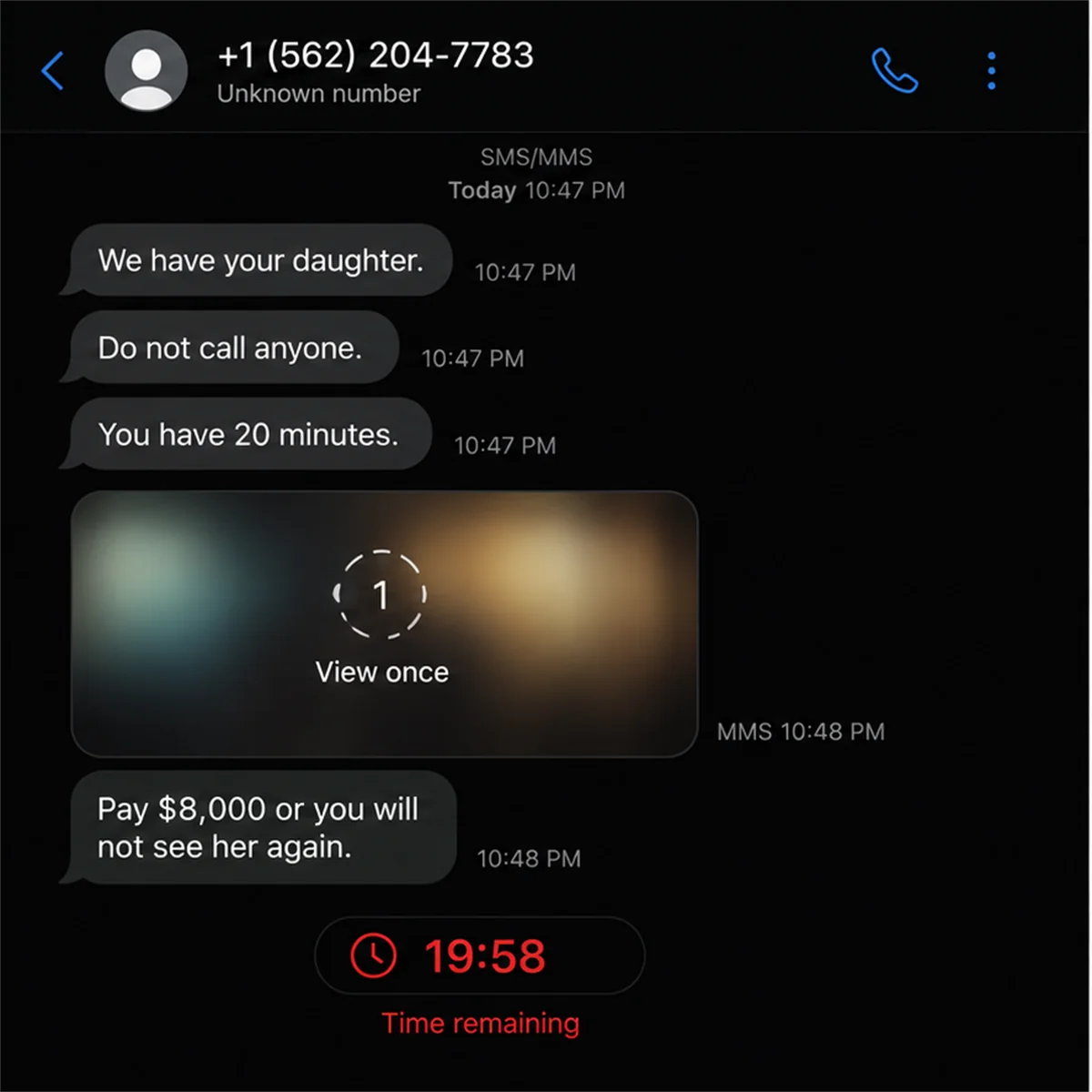
An unknown number says someone you love has been kidnapped. Then a photograph arrives that seems to show the person hurt, restrained, or trapped in an unfamiliar place.
The virtual kidnapping scam uses panic, stolen family details, and altered proof-of-life images to make verification feel too dangerous.
The message says there are only minutes to pay. Those minutes are exactly when you need to stop and make another call.
The criminal may know a relative’s name, school, travel plans, workplace, or photographs from social media. That knowledge helps a false story sound immediate and personal.
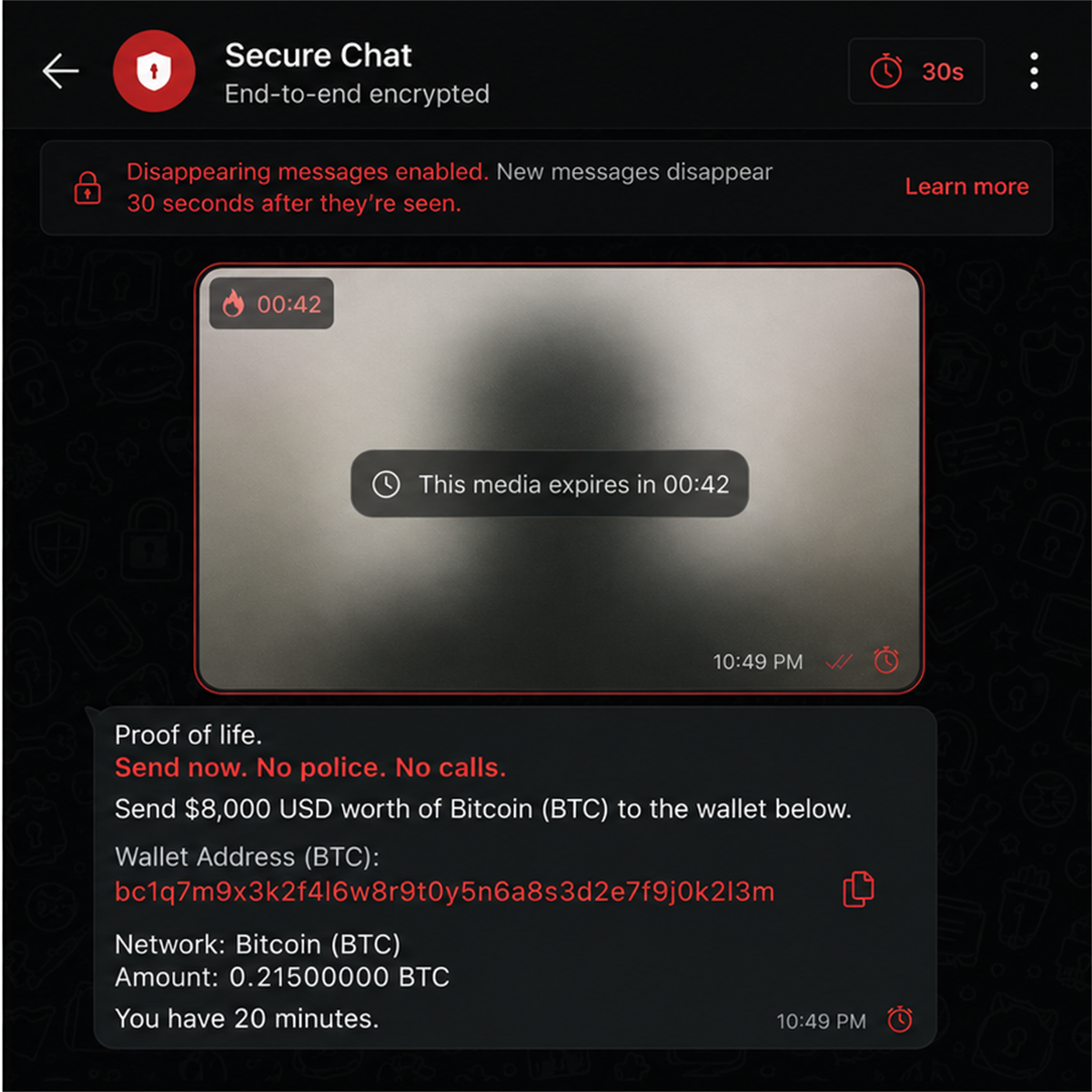
Images can be edited to change a background, add signs of injury, or place a familiar face into a fabricated scene. Timed messages limit close inspection.
The target is ordered not to call police or contact the alleged victim. Payment is demanded by wire, cryptocurrency, gift card, cash, or another fast method.
The FBI has specifically warned that criminals are altering publicly available family photos and videos to use as fake proof of life in virtual kidnapping ransom scams.
Overview
The criminal starts with information that is true
A name, photograph, phone number, trip, event, or family relationship may come from public posts, breached data, people-search sites, or earlier phishing.
Those accurate details authenticate the target, not the kidnapping claim.
Altered media manufactures proof
The scammer sends an edited photograph, synthetic image, manipulated video, or distressed audio. The media is intended to end the victim’s search for independent confirmation.
Missing tattoos, wrong proportions, inconsistent rooms, odd lighting, and disappearing-message settings can reveal the construction.
Urgency isolates the person who must pay
Threats forbid calls, police contact, or delays. The victim is kept on the phone or in chat while payment instructions arrive.
- An unknown number claims a loved one was kidnapped.
- Real personal details make the threat believable.
- An altered image or video appears as proof.
- The media may disappear after one view.
- The criminal threatens immediate violence.
- Contact with family or police is forbidden.
- A fast, difficult-to-reverse ransom is demanded.
- The claim collapses when the loved one is reached safely.
The FBI Confirmed Altered Proof-of-Life Scams
In December 2025, the FBI warned about altered proof-of-life media in virtual kidnapping scams.
The advisory says criminals take photographs found on social media or other public sites and alter them to support a false ransom demand.
Targets typically receive a text claiming a loved one has been kidnapped. The sender threatens violence and demands immediate payment for release.
A seemingly genuine photo or video follows. Close inspection may reveal missing scars or tattoos, inaccurate body proportions, and other differences from confirmed images.
Criminals sometimes use timed-message features so the recipient has little opportunity to study, record, or share the supposed evidence.
The FBI advises people to attempt contact with the loved one before considering payment and to establish a private family code word.
This is a confirmed extortion method. It is not a suggestion that every report of kidnapping is false, and a credible immediate threat should still be handled with emergency services.
How Scammers Build a Believable Family File
A public birthday post can identify relationships, nicknames, ages, and locations. School announcements, sports pages, travel check-ins, and workplace profiles provide additional context.
Photographs reveal faces, clothing, vehicles, homes, favorite places, and distinguishing features. Captions explain when and where an image was taken.
Data breaches and people-search services can connect names to phone numbers and addresses. A compromised account can expose private conversations and current plans.
The scammer does not need a complete biography. Two or three accurate details, delivered during a frightening claim, can make the target fill in the missing story.
A current trip or unanswered call creates an especially useful window. Ordinary reasons for silence become apparent evidence that something happened.
Missing-person posts can create another opportunity. Families publicly share photographs and contact details while seeking help, and criminals may respond with fabricated information or demands.
Reducing public exposure helps, but privacy settings are not a guarantee. Friends can share posts, accounts can be compromised, and old data can remain available elsewhere.
What Altered Proof of Life May Look Like
A simple edit can place a familiar portrait over another body or replace the background. More advanced tools can change expressions, create injuries, or animate a still image.
The operator may crop tightly so hands, surroundings, clothing, and proportions are hard to compare. Blur and low resolution are blamed on a poor camera or hurried recording.
One-view media and short timers prevent careful inspection. They also discourage the recipient from sending the file to another family member or police.
Audio can be edited or generated from public voice samples. A short scream, sob, or single word requires less accuracy than a sustained conversation.
Look for inconsistent teeth, ears, fingers, jewelry, scars, tattoos, lighting, shadows, edges, reflections, and room geometry. Compare with recent confirmed images.
Visible flaws are helpful, but perfect-looking media still is not independent proof. Verification must happen through separate contact with the person, companions, school, employer, hotel, or authorities.
Do not spend the entire deadline analyzing pixels. The criminal wants attention trapped inside the supplied evidence while safer verification routes remain unused.
How the Virtual Kidnapping Scam Works
Step 1: A family and timing are selected
Criminals identify a relative who appears to be traveling, at school, working late, attending an event, or otherwise temporarily difficult to reach.
Public posts and breached data help them connect that person to someone likely to pay.
Step 2: An alarming message arrives
The first text or call gives no room for discussion. It says the loved one is being held and will be harmed unless instructions are followed exactly.
The sender may spoof a local number or use a compromised messaging account. Caller ID does not prove location or identity.
Step 3: Personal details close the credibility gap
The criminal mentions a name, nickname, vehicle, trip, school, workplace, or family detail. The target recognizes the information and assumes the rest of the claim is also true.
In reality, the true details may have come from ordinary online research.
Step 4: Altered media appears as proof of life
A photo, video, or audio clip seems to show the relative in danger. The content may be manipulated from a public image or generated using collected samples.
A disappearing timer and threats discourage saving or examining it.
Step 5: The victim is isolated
The scammer orders the target not to hang up, call anyone, contact police, or send messages. Background voices and repeated threats maintain panic.
Isolation prevents the single action most likely to expose the lie: contacting the loved one through another route.
Step 6: A rapid ransom payment is demanded
The instructions use cryptocurrency, a wire, payment app, gift cards, cash pickup, or another method that can move before verification occurs.
The requested amount may be calibrated to what the victim can obtain quickly rather than a dramatic movie-style ransom.
Step 7: New demands follow any payment
Paying does not prove anyone is safe. The criminal may claim the amount was wrong, taxes are due, another kidnapper needs payment, or silence must be purchased.
The extortion stops only when contact ends, verification succeeds, or authorities intervene.
Identity, Address, Support, and Traceability Checks
The incoming number is not an identity
Phone numbers and display names can be spoofed, rented, stolen, or abandoned. A local area code does not place the sender nearby.
Record the number, but verify the claim through different known contacts.
The family details need an independent source
Ask yourself whether each fact could be found in a public post. A school, trip, birthday, or relative’s name may sound private while being widely visible.
Do not confirm new details to the caller by correcting or expanding their story.
The media must be compared with confirmed information
Save screenshots when safe and compare scars, tattoos, clothing, proportions, background, voice, and current circumstances with recent genuine material.
Media analysis supports verification but should not replace direct contact and emergency guidance.
The payment destination must be preserved, not trusted
A bank account, wallet, payment handle, or cash instruction may help investigators trace the scheme. It does not authenticate the kidnapper’s claim.
Do not send a small test amount. Give the instructions to law enforcement and the payment provider.
What to Do During the First Five Minutes
Try to stay on the line without agreeing to payment while signaling another trusted person to call emergency services. Follow local law-enforcement instructions for credible threats.
Use another device to contact the loved one directly. Call their usual number, send messages, try workplace or school contacts, and reach companions who may know their location.
Ask for the family code word if one exists. Do not reveal the answer first or supply clues the criminal can repeat.
Ask the caller to describe a current fact not visible online, but avoid provoking them if authorities advise otherwise. A scammer may answer with more threats instead of verifiable information.
Record the call where lawful, screenshot messages, and preserve disappearing media if the application allows it. Do not circulate sensitive material publicly.
Do not rush to a bank, cryptocurrency exchange, gift-card store, or cash location while driving or while emotionally overwhelmed. Physical safety remains important.
If direct contact confirms the loved one is safe, stop engaging and report the extortion. Do not taunt the sender or expose more family information.
Warning Signs of a Virtual Kidnapping Demand
- The first contact comes from an unknown number.
- The caller supplies threats before verifiable details.
- Contact with the loved one is strictly forbidden.
- The proof image is blurred, cropped, or altered.
- The media disappears after one view.
- Publicly available facts are treated as secret knowledge.
- A very short ransom deadline is imposed.
- Payment must use crypto, gift cards, wires, or cash.
- The amount changes after the victim agrees.
- The criminal refuses a family code word or current detail.
Even when several signs point to fraud, involve emergency services if you cannot independently confirm the person’s safety.
How Families Can Prepare Before a Threat Arrives
Create a private code word known only to close family. Choose something absent from public posts and change it if anyone reveals it outside the group.
Maintain current phone numbers for schools, employers, travel companions, neighbors, hotels, and caregivers. An independent contact tree saves time during panic.
Review social privacy settings and remove public posts that disclose live travel, school schedules, home addresses, or predictable routines.
Discuss how the family will verify an emergency. Decide who calls police, who contacts the person, and which payment demands nobody will follow without independent confirmation.
Ask relatives not to publish missing-person phone numbers more broadly than necessary. Coordinate posts with authorities and use a designated contact where possible.
Practice the plan without making children feel responsible for sophisticated crime. The goal is a calm routine: pause, verify, contact help, preserve evidence.
What to Do if You Have Fallen Victim to This Scam
- Confirm immediate safety. Contact the loved one and call emergency services. Explain that altered proof-of-life media and a ransom demand were used.
- Stop additional payments. Do not send a correction, fee, tax, silence payment, or recovery charge after the first transfer.
- Contact the payment provider now. Ask the bank, wire service, app, gift-card issuer, or cryptocurrency exchange to freeze, recall, flag, or trace the transaction.
- Preserve every detail. Save phone numbers, usernames, timestamps, audio, screenshots, media, wallet addresses, receipts, transaction hashes, and payment instructions.
- Protect compromised accounts. Change exposed passwords, secure email and social media with multifactor authentication, and review unknown sessions and forwarding rules.
- Remove malicious software. If the sender made you install an app or open a file, disconnect unnecessary access and run a full Malwarebytes scan from a safe device.
- Reduce repeat contact. AdGuard can block some known phishing links and malicious ads, but it cannot identify a kidnapper or replace emergency services.
- Limit exposed family data. Remove live location posts, lock down profiles, ask friends not to tag current travel, and change the family code word.
- Report the extortion. File with the FBI IC3, local police, the messaging service, and the payment provider using the saved evidence.
- Expect recovery impostors. Anyone guaranteeing a refund for an upfront fee, remote access, gift cards, or cryptocurrency may be targeting the family again.
Frequently Asked Questions
What is a virtual kidnapping scam?
It is extortion in which criminals falsely claim a person has been kidnapped and demand ransom without actually holding that person.
Can scammers create convincing proof-of-life images?
Yes. They can alter public photographs or generate media. Visual realism does not replace independent contact with the loved one.
Should I hang up immediately?
Follow emergency-service guidance. If possible, use another device to contact police and the loved one while preserving the incoming call or messages.
What if I cannot reach my family member?
Contact police and people near them, such as companions, school, workplace, hotel, or neighbors. Do not treat silence alone as proof.
Why do scammers use disappearing messages?
Short timers limit inspection, sharing, and evidence collection. Capture what you safely can and record the setting in your report.
Can ransom already sent be recovered?
Sometimes speed helps providers freeze or recall funds, but recovery is not guaranteed. Report immediately and reject anyone promising a certain refund for a fee.
The Bottom Line
The virtual kidnapping scam uses a true name, a stolen photo, and a false deadline to manufacture a family emergency. Altered proof-of-life media is designed to replace independent verification.
Contact the loved one through another route, involve emergency services, and do not let the sender isolate you. A few disciplined calls can break a story built to survive only a few frantic minutes.

Join the discussion
0 commentsShare your experience or ask a question about this article.
Discussion
Start the conversation
Have a question or something useful to share? Add the first comment.