

A beautiful sofa appears in your social feed at a price that barely seems possible. The page carries familiar Wayfair colors, product photos and a countdown claiming the deal will disappear tonight.
That sense of familiarity is exactly what makes the offer dangerous. Wayfair is a legitimate retailer, but scammers regularly borrow the names and visual identities of recognizable stores to make fake shopping websites feel safe.
Wayfair Scams and Cloned Websites Overview
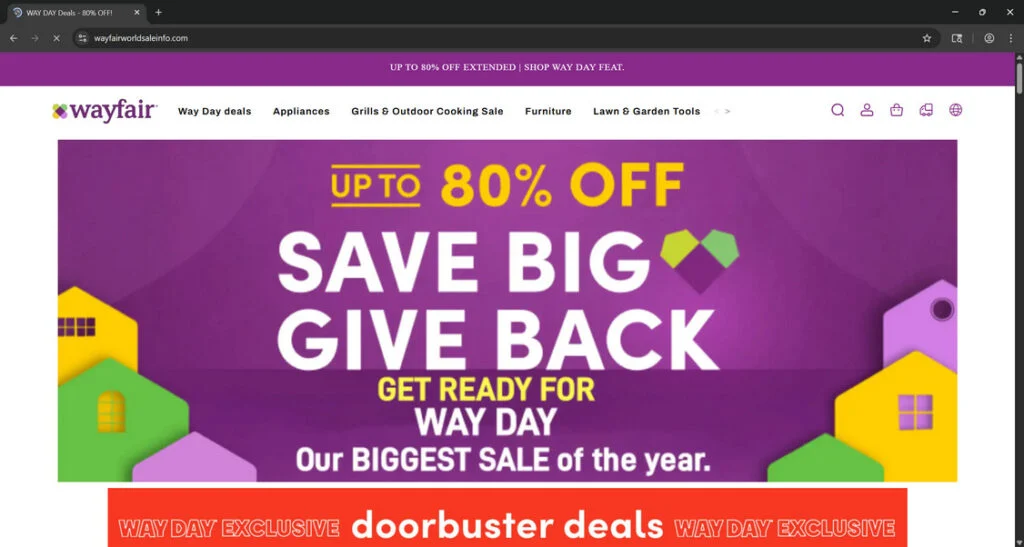
Wayfair is a legitimate retailer. Wayfairworldsaleinfo.com and Wayfarhouse.shop are not legitimate Wayfair outlets. They are confirmed copycat stores that used Wayfair’s name, logo, colors and sales material to deceive shoppers.
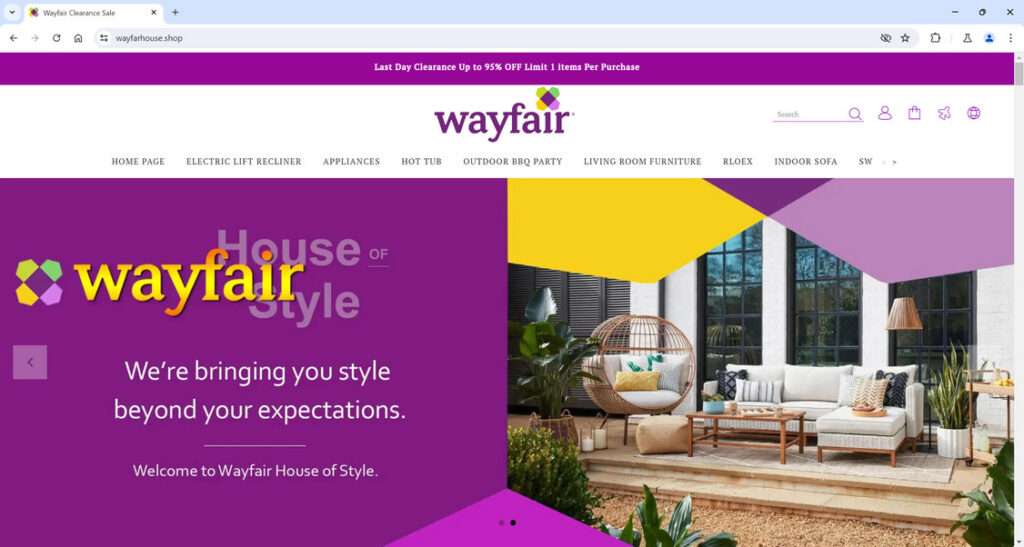
The screenshots show exactly how convincing this fraud can look. Wayfairworldsaleinfo.com copied the Wayfair header and Way Day campaign while advertising discounts of up to 80%. Wayfarhouse.shop displayed the Wayfair logo above a “Last Day Clearance” promotion claiming up to 95% off.
Those pages were not simply independent stores selling similar furniture. They presented themselves as Wayfair properties even though their domain names had no official connection to Wayfair.com. The branding was copied to borrow the reputation of a company shoppers already recognize.
The purpose of the scheme is straightforward: make an unbelievable offer look trustworthy long enough to secure an order. Victims are pushed through a fake storefront and checkout where the operators can collect payment details, names, addresses, phone numbers and email accounts.
After payment, the promised furniture may never arrive. Some victims may receive a low-value item, an unrelated parcel or tracking information designed to delay a dispute. Customer support then stops responding, refund requests go nowhere and the fake store can disappear or return under another domain.
Bottom line: these are fraudulent Wayfair impersonation websites, not questionable discount stores. Their professional appearance is part of the scam, and entering payment information on them puts both the purchase and the shopper’s personal data at risk.
The safest comparison is simple: a real Wayfair purchase remains visible in the account and uses Wayfair’s verified domain, support channels and payment flow. A clone may copy every visual detail while sending the order to an unrelated business with no realistic fulfillment or return operation. When the price, domain and seller identity do not agree, trust the identity checks rather than the familiar design.
What a Fake Wayfair Website Can Look Like
A cloned store does not always look crude. Modern website templates allow scammers to create a polished storefront quickly, and copied product material can make the catalog appear as complete as a major retailer’s.
A familiar design on the wrong domain
The strongest warning sign is often the web address. A fake page may use Wayfair in a longer domain, add words such as outlet or clearance, replace letters, or operate from an unrelated address that has no legitimate connection to the retailer.
The logo cannot prove ownership. Images and brand graphics can be copied in seconds, while the domain name shows where the page actually lives.
Clearance prices that overwhelm common sense
Fraudulent stores frequently promote expensive furniture, patio sets or appliances at reductions of 80% or 90%. A small clearance section can be normal, but an entire catalog of premium items at near-giveaway prices deserves scrutiny.
The discount is not merely a sales tactic. It is the hook that encourages shoppers to ignore inconsistencies elsewhere on the website.
Social ads that lead directly to checkout
Many people meet a cloned store through a sponsored post rather than a search result. The ad may describe a warehouse closing, overstock liquidation, anniversary sale or unclaimed inventory event.
Being displayed by a major social platform does not make an advertiser trustworthy. Scam campaigns can run briefly, collect orders and disappear before complaints catch up with them.
How the Fake Wayfair Store Scam Works
Step 1: A fake clearance ad promises an impossible deal
The scam usually begins with a social media ad, sponsored post or promotional link promising Wayfair furniture at 80% or 95% off. The offer may be framed as a Way Day event, warehouse closing, overstock liquidation or final clearance.
The discount is deliberately extreme. It gives the shopper a reason to click immediately and makes the supposed savings feel more important than checking who actually owns the website.
Step 2: The link opens a cloned Wayfair storefront
The visitor lands on a site filled with copied Wayfair logos, purple branding, furniture photos, product categories and familiar sale graphics. Wayfairworldsaleinfo.com and Wayfarhouse.shop both used this approach to create the impression that shoppers had reached an official Wayfair promotion.
This visual copy is the trust-building layer of the fraud. The page does not need to be perfect; it only needs to look familiar enough that the shopper stops questioning the domain.
Step 3: The real domain is hidden in plain sight
The browser address is the clearest sign that the store is fake. Instead of Wayfair.com, the shopper is on an unrelated domain built around words such as Wayfair, house, sale, world, outlet or clearance.
Scammers count on people reading the large logo instead of the small address bar. HTTPS and a padlock do not make the site legitimate; they only encrypt the connection to whoever operates the fake store.
Step 4: Urgency prevents a careful check
“Last day” banners, countdown timers, low-stock messages and limited-purchase warnings create pressure. The shopper is made to believe that closing the page for a few minutes will mean losing $100s in savings.
That pressure is intentional. It reduces the chance that someone will open Wayfair.com separately, compare the price, search the suspicious domain or notice that the store has no verifiable business identity.
Step 5: The checkout captures money and personal information
Once the victim reaches checkout, the site requests the same information a real retailer would need: a name, delivery address, email address, phone number and payment details. That familiar process makes the transaction feel routine.
The operators now have the payment and a useful package of personal data. If the shopper also created an account using a reused password, the damage can spread beyond the fake store.
Step 6: Fake confirmations and tracking delay the dispute
A confirmation email or tracking number does not prove that the order is real. Scam stores may send automated updates, provide tracking for a low-value parcel or claim that international shipping is delayed.
Every delay gives the operators more time before the buyer contacts the card issuer. When the victim finally demands a refund, messages may bounce, support may stop responding or the website may already be offline.
Step 7: The store disappears and the operation starts again
Once complaints build up or the domain is blocked, the fake store can be abandoned. The same template, copied products and checkout system may then reappear under a new name and a fresh domain.
This is why remembering one fraudulent address is not enough. Shoppers must verify the domain every time, even when the page carries a logo they know and an offer that appears to come from a major retailer.
Warning Signs of a Cloned Wayfair Store
No single clue proves that a website is fraudulent. Several warning signs appearing together, however, should be enough to stop the purchase.
The address is not Wayfair.com
Look at the full domain, not just the logo or page title. Extra words, unusual endings, misspellings and unrelated domain names are important warnings.
A padlock icon only means the connection is encrypted. It does not prove that the company behind the website is honest.
Nearly every item has an extreme discount
Legitimate retailers run promotions, but scam stores often make every product look like a once-in-a-lifetime bargain. The original prices may be invented solely to make the discount appear dramatic.
The sale depends on pressure
Countdown timers, repeated low-stock alerts and warnings that hundreds of people are viewing the same item are meant to prevent careful comparison.
A real purchase can survive a few minutes of research. If the offer falls apart when you pause, walking away is the safer choice.
Contact information does not hold up
Check whether the store provides a verifiable business address, working phone support and email addresses tied to the same domain. Generic inboxes, copied addresses and contact forms with no company details provide little accountability.
The policies feel copied or contradictory
Read the shipping, returns and privacy pages. Fake stores often reuse text from unrelated businesses, leave another company name in the wording or promise a refund without explaining where returns must be sent.
The payment method removes your protection
Be especially cautious if checkout pushes cryptocurrency, gift cards, bank transfers or person-to-person payment methods. These options can make recovery much harder than a credit-card dispute.
How to Check a Wayfair Offer Before Buying
- Open a fresh browser tab. Type
wayfair.comyourself instead of following the advertisement. - Search for the same product. Compare the item name, normal price, photos and availability on the official website.
- Inspect the complete domain. Ignore logos and focus on the address shown before the first slash.
- Search the unfamiliar domain separately. Look for independent complaints, ownership information and reports from other shoppers.
- Read the refund terms. Confirm who operates the store, where returns go and how long a refund should take.
- Choose a protected payment method. A credit card usually gives shoppers a clearer dispute path than irreversible payment options.
Do not use a login button on a suspicious page to check whether your Wayfair account works. That button may be a phishing form created to capture the password.
What Can Happen After You Place an Order
The first sign of trouble may be silence. A professional-looking checkout can end with no receipt, no customer account and no reliable delivery estimate.
In other cases, the seller sends a small, low-value parcel so that a tracking number shows a completed delivery. That record can make a payment dispute more confusing even though the buyer never received the advertised furniture.
Payment is only part of the risk. A fake checkout can also collect an email address, home address, phone number and password. Those details may be used in later phishing attempts that refer to the supposed order.
What to Do If You Paid a Fake Wayfair Website
Move quickly, but keep a record of each step. The sooner the payment provider is notified, the better the chance of stopping or disputing the transaction.
- Contact the card issuer or payment service. Explain that the purchase was made through an impersonation website and ask about a charge dispute.
- Lock or replace the card if necessary. Follow the provider’s advice, especially if the full card number and security code were entered.
- Save the evidence. Keep screenshots, the domain, order page, confirmation messages, advertisements, receipts and tracking details.
- Change reused passwords. If the fake website received a password used elsewhere, replace it on every affected account and enable two-factor authentication.
- Watch for follow-up phishing. Be skeptical of messages about refunds, delivery fees or account verification connected to the order.
- Report the fraud. US consumers can file a report at ReportFraud.ftc.gov. You can also notify the advertising platform and the real retailer whose identity was copied.
If a package arrives, photograph the label and contents before discarding anything. That evidence can help show that the delivered item did not match the order.
How to Avoid Brand-Impersonation Shopping Scams
- Navigate to major retailers through a saved bookmark or a manually typed address.
- Do not treat a sponsored label as proof that an advertiser has been fully vetted.
- Compare a dramatic discount with the price shown by the official retailer.
- Avoid purchases made under pressure from timers or artificial stock counters.
- Use unique passwords so one fake checkout cannot expose several accounts.
- Pay by credit card when possible and review transaction alerts promptly.
- Pause when a store has no verifiable operator, address or working support channel.
The goal is not to distrust every sale. It is to separate a real promotion from a page that uses familiarity and urgency as camouflage.
Frequently Asked Questions
Is Wayfair a scam?
No. Wayfair is a legitimate online retailer. The scam discussed here involves unrelated websites and advertisements that misuse Wayfair’s name, branding or product images.
How can I identify the official Wayfair website?
For US shoppers, the official domain is wayfair.com. Type it directly into the browser and confirm the domain before entering account or payment information.
Can a fake Wayfair website have HTTPS and a padlock?
Yes. Encryption protects data while it travels to the website, but it does not verify that the website belongs to Wayfair or that the seller will honor an order.
Are Wayfair clearance ads on social media real?
Some promotions may be legitimate, but the platform and the ad format cannot confirm the destination. Open the official Wayfair website separately and look for the same promotion there.
Can I recover money paid to a cloned store?
Recovery depends on the payment method and timing. Contact the card issuer or payment provider immediately, describe the impersonation clearly and provide screenshots and receipts.
What if I created an account on the fake website?
Change the password anywhere it was reused. Monitor the associated email account for password-reset attempts and enable two-factor authentication where available.
Final Verdict
Wayfair’s name can make an unfamiliar offer feel reassuring, but a copied logo is not proof of a real connection. The domain, seller identity, payment method and quality of the store’s policies matter far more than the design.
If a page promises expensive home goods at 80% or 90% off and demands an immediate decision, close it and visit Wayfair.com independently. A short pause can prevent a lost payment, a stolen password and weeks of trying to reach a seller that never existed.

Join the discussion
0 commentsShare your experience or ask a question about this article.
Discussion
Start the conversation
Have a question or something useful to share? Add the first comment.