What Power Plan do you use in your PC?


Open MalwareTips from your Home Screen or desktop. Follow discussions, find answers and pick up where you left off.
If you cannot find an install option, update your browser or use its bookmark option to keep MalwareTips close.
After installation, open the app and sign in. Enable push notifications in Preferences if you want alerts. On iPhone and iPad, push requires a Home Screen web app and iOS or iPadOS 16.4 or later.
Sign in to manage notificationsInstallation is optional. Your notification settings stay under your control.


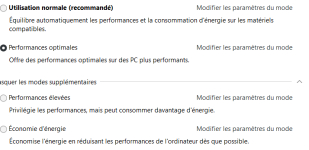
Available by default only in Enterprise versions, but there is a hack to show it in Pro version.High, first time i even hear about ultimate existing. Is there difference in endgame rig, if benchmarked?
High, first time i even hear about ultimate existing. Is there difference in endgame rig, if benchmarked?
Also Home.Available by default only in Enterprise versions, but there is a hack to show it in Pro version.

Nice :Bitsum Highest Performance which comes with Process Lasso
Bitsum Highest Performance Mode
Process Lasso’s Performance Mode induces the ‘Bitsum Highest Performance’ power plan that keeps your CPU ready to execute code at all times. This eliminates latency otherwise encountered while bringing the CPU out of a low power state. This especially benefits bursting CPU loads, which are the most common real-world CPU use pattern.
With ParkControl, we revealed hidden CPU settings that control core parking, and wrote about how CPU core parking and frequency scaling can affect performance of real-world CPU loads. Put simply, these power saving technologies come with a performance trade-off, so they should be disabled when maximum performance is desired.
Both ParkControl and Process Lasso offer a power profile, Bitsum Highest Performance, that is pre-configured for ultimate performance. In this power plan, your CPU always remains ready to execute new code. Core parking is disabled and the CPU never drops below its nominal (base) frequency.
Since you probably don’t want to be in this power plan all the time, we include automation to switch the active power plan when specific applications or games are running (Performance Mode), or only when the user is active (IdleSaver).
Process Lasso also allows for specific power profiles to be associated with an application in case you want to use different power plans.
Finally, the IdleSaver feature of Process Lasso will switch to a more conservative power plan when you go idle. Similarly, ParkControl has a function called Dynamic Boost that is essentially the opposite of IdleSaver – it raises to a more aggressive power plan when the system is active.


After selecting "ultimate plan" and PC is still slowSuper Extra Super Extra++ Performance +++

Members who viewed this thread in the last 5 minutes