


The MalwareTips app
Your community, one tap away.
Open MalwareTips from your Home Screen or desktop. Follow discussions, find answers and pick up where you left off.
- Home Screen access
- Optional push alerts
- Your community
You're ready to explore.Explore what's new
Installation instructions
iPhone & iPad
- Open MalwareTips in Safari and tap Share. You may need to open the Page Menu first.
- Choose Add to Home Screen. If it is not listed, use Edit Actions to add it.
- Keep Open as Web App enabled if shown, then tap Add.
Android
- Open MalwareTips in Chrome or another browser that supports app installation.
- Open the browser menu and look for Install app, Install and create shortcut, or Add to Home screen.
- Choose Install and confirm. Wording varies by browser.
Desktop
- Chrome: use the install icon in the address bar, or the menu under Cast, save and share.
- Edge: open the menu, then More tools, Apps and Install this site as an app.
- Safari on Mac: choose Share or File, then Add to Dock. Firefox on Windows: look for the web apps button in the address bar.
If you cannot find an install option, update your browser or use its bookmark option to keep MalwareTips close.
Keep up with your conversations
After installation, open the app and sign in. Enable push notifications in Preferences if you want alerts. On iPhone and iPad, push requires a Home Screen web app and iOS or iPadOS 16.4 or later.
Sign in to manage notificationsInstallation is optional. Your notification settings stay under your control.
You are using an out of date browser. It may not display this or other websites correctly.
You should upgrade or use an alternative browser.
You should upgrade or use an alternative browser.
New Update 3P-Matrix-lite new version is available in Chrome Webstore with improved functionality
-
 Thread starter
LinuxFan58
Thread starter
LinuxFan58
- Start date
- 97 Replies
- 8,140 Views
Thread details

 you beat me to it, but given the circumstances and context I think an okay looking download should be checked.
When 2 DNS services and Google safe browsing or Smartscreen have not flagged it, but VT does no know download URL and it comes from a domain often used to spread malware, then probably inconclusive is good enough for me.
Last edited:
If you want to try out the improvement, test it with this download (installer.zip):
MPC-BE
View attachment 300859
P.S.
Check these 2 FP with your protection 11:
Global Privacy Control — Interacting With The GPC Signal
Test cases for brave/brave-browser#4239
Although it is possible to add them to the "Allow List" and thus open those websites with 3PM at Level 1.
@LinuxFan58
3P-Matrix 4.4.0 is perfect.

The 2 websites listed above have been removed from the list.
P.S.
As for your follow-up questions, I personally would leave everything as is.
I would probably improve the layout of the phishing alert (or at least the one in this category that has the most detections).
I don't think many users would immediately recognize it as part of Protection 11.
hxxps://phishtank.org/phish_search.php?valid=y&active=y&Search=Search
Test:
hxxps://adamzlp.lat/
Last edited:
What do you think of adding an option to suppress inconclusive judgement warnings?@LinuxFan58
3P-Matrix 4.4.0 is perfect.
The 2 websites listed above have been removed from the list.
What do you think of adding an option to suppress inconclusive judgement warnings?
Do whatever you think is best for the extension.
I will add it and enable it when FP reduction is on medium and higherDo whatever you think is best for the extension.
@LinuxFan58
Focus on improving the layout of the Option 11 security alert:
hxxps://urlhaus.abuse.ch/url/4012458/
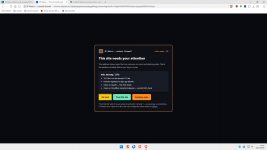
P.S.
It's interesting that this malware link is currently considered clean by all available DNS on list.
And the on-screen warning should also account for the possibility that malware is being blocked.
Focus on improving the layout of the Option 11 security alert:
hxxps://urlhaus.abuse.ch/url/4012458/
P.S.
It's interesting that this malware link is currently considered clean by all available DNS on list.
And the on-screen warning should also account for the possibility that malware is being blocked.
Last edited:
Can you explain a little more?@LinuxFan58
Focus on improving the layout of the Option 11 security alert:
hxxps://urlhaus.abuse.ch/url/4012458/
View attachment 300872
P.S.
It's interesting that this malware link is currently considered clean by all available DNS on list.
And the on-screen warning should also account for the possibility that malware is being blocked.
P.S. pushed new version to CWS which also applies string obfuscation protection for function, setTimer and setInterval outside safer regions. Hope you are happy now.
FYI these functions (Eval, function, aetTimer and setInterval) are only blocked when code obfuscation is applied in the string. So it will fail the test of the BlockEval extensions, because that one blocks the function complete, while function, setTimer and setInterval have many legitimate applications,
Edit: is already in Chrome Web Store
Last edited:

Can you explain a little more?
P.S. pushed new version to CWS which also applies string obfuscation protection for function, setTimer and setInterval outside safer regions. Hope you are happy now.
FYI these functions (Eval, function, aetTimer and setInterval) are only blocked when code obfuscation is applied in the string. So it will fail the test of the BlockEval extensions, because that one blocks the function complete, while function, setTimer and setInterval have many legitimate applications,
Edit: is already in Chrome Web Store
View attachment 300878
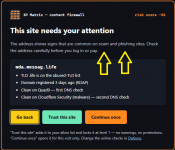
What everyone will encounter is malware.
Not a scam, not phishing.
In my opinion, the on-screen warning needs to be revised to avoid potentially dangerous misunderstandings.
Can you explain a little more?
P.S. pushed new version to CWS which also applies string obfuscation protection for function, setTimer and setInterval outside safer regions. Hope you are happy now.
FYI these functions (Eval, function, aetTimer and setInterval) are only blocked when code obfuscation is applied in the string. So it will fail the test of the BlockEval extensions, because that one blocks the function complete, while function, setTimer and setInterval have many legitimate applications,
Edit: is already in Chrome Web Store
View attachment 300878
@ to all
@LinuxFan58 has provided you with these three additional features, which are always part,conceptually, of the “Eval” function.
Of course, the test would be inconclusive, as the developer has already explained.
I'm just sharing this to clarify the concept further.
Test Eval
Last edited:

I know unofficial port but works and enforces in Safari 27. Only parts that do not work in Safari are the ones that explictly call "webbundle" fyi if you ever plan on making an official Safari extension it actually works. Even the VirusTotal and DNS checks are confirmed.
Now debating how which Security DNS servers to supplement as 1st and 2nd check when I already have Control D as my DNS provider.
Now debating how which Security DNS servers to supplement as 1st and 2nd check when I already have Control D as my DNS provider.
Differences of 3PM Matrix and uBD Dynamic DNR filtering
Picture 3PM Matrix versus uBD DNR monitor
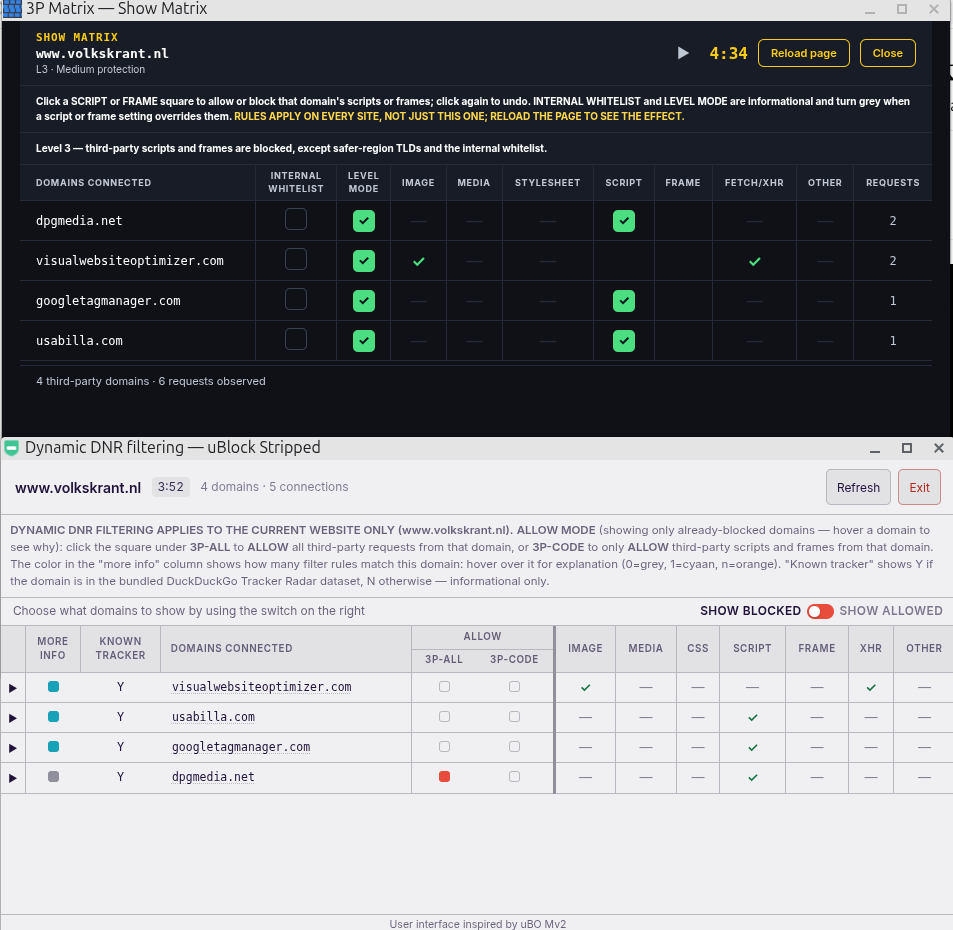
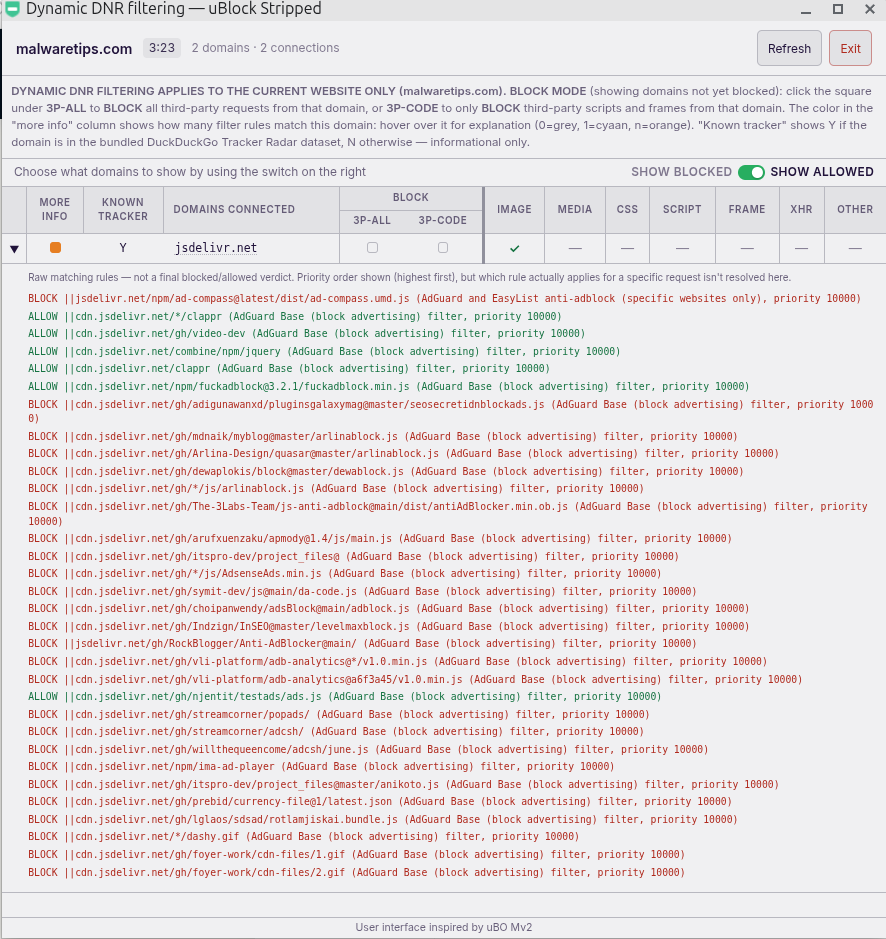
Example of expanded rule in uBD DNR monitor. grey = no rule, cyan= 1 rule, orange = multiple rules
Intended use
- 3PM matrix, applies 3P-script and/or 3P-frame blocks GLOBALLY while uBD monitor applies to CURRENT WEBSITE ONLY
- 3PM scope is 3P script and/or 3P frame, while uBD is 3P-code (scripts and frames) or 3P-all (all third-party)
- 3PM uses a click mechanism (switch from allow to block and back) while uBD uses a switch (to show wat is blocked or allowed)
- 3PM shows the mode belonging to the level (e.g. level 3 allow com, so all domains with com TLD are marked green),
uBD shows whether domain is in the known tracker data base of DuckDuckGo (Y = Yes, N = No).
- 3PM has an indicator whether a 3P-script or 3P-frame is on the internal white list
uBD has a more info indicator, when you expand shows which rules are applied on a Domain (rules with highest priority win)
Picture 3PM Matrix versus uBD DNR monitor
Example of expanded rule in uBD DNR monitor. grey = no rule, cyan= 1 rule, orange = multiple rules
Intended use
- 3PM Matrix
To trouble shoot exceptions for level 3 safer-regions (but that is very rare), occasional level 4 high risk unblocks (I don't use level 5)
- uBD DNR monitor
To strip websites from left over trackers when you visit those websites often but never login.
All uBD powertools are intended to strip websites you visit often from annoyances:
- Cookie consent clicker - to automate your cookie choices
- Cosmetic element picker - to hide left over ads or empty place holders
- Dynamic DNR filtering - to block left over trackers (using DDG tracker DB as indication)
- Privacy Inspector - to block fingerprinting
Using the powertools it is possible to completely strip a website you visit often, this is for non-english speakers an advantage because the EL filters tend to focus on English language websites.
Last edited:
@LinuxFan58
My friend, I hope you won’t take what follows as mere criticism… it’s meant to be constructive criticism.
I’d like to block all websites where I download software to be updated to Level 4 with the following protections enabled:
1, 2, 3, 5, 8, 11, 12, 17, 18, 19, 20, 21
After 2 or 3 downloads from different websites, I’ve got a headache……
Wouldn’t it be possible to improve the download blocking so it doesn’t open in a separate window, and to make resuming downloads,which seems rather complicated to me,easier……
Try it for yourself.
Test:
Sumatra PDF - Free, Fast PDF Reader for Windows
Another small issue.
It’s difficult,at least for people who aren’t exactly young anymore, like us,to remember all the websites where you’ve set a different level than the one you normally use.
Would it be possible, at least in the options, to have a list of the websites where we’ve chosen a level other than the “startup level”?
My friend, I hope you won’t take what follows as mere criticism… it’s meant to be constructive criticism.
I’d like to block all websites where I download software to be updated to Level 4 with the following protections enabled:
1, 2, 3, 5, 8, 11, 12, 17, 18, 19, 20, 21
After 2 or 3 downloads from different websites, I’ve got a headache……
Wouldn’t it be possible to improve the download blocking so it doesn’t open in a separate window, and to make resuming downloads,which seems rather complicated to me,easier……
Try it for yourself.
Test:
Sumatra PDF - Free, Fast PDF Reader for Windows
Another small issue.
It’s difficult,at least for people who aren’t exactly young anymore, like us,to remember all the websites where you’ve set a different level than the one you normally use.
Would it be possible, at least in the options, to have a list of the websites where we’ve chosen a level other than the “startup level”?
@Sampei.Nihira
The locked list is in the Json when you save the settings.
About your headache, stop throwing stones at your windows all day long, just to check that your window is strong enough. Your Windows is strong enough. Take a break and relax. No stones = no popups
The locked list is in the Json when you save the settings.
About your headache, stop throwing stones at your windows all day long, just to check that your window is strong enough. Your Windows is strong enough. Take a break and relax. No stones = no popups
@Sampei.Nihira
The locked list is in the Json when you save the settings.
About your headache, stop throwing stones at your windows all day long, just to check that your window is strong enough. Your Windows is strong enough. Take a break and relax. No stones = no popups
When I was a kid, I used to ring people’s doorbells and then run away… so it must be something on a subconscious level.
I’m almost tempted to dress up as a wall ( 3P matrix ) this Halloween (next Saturday) and go ring doorbells like I did when I was a kid… will they give me a treat, considering you’re playing a trick on me?
I know unofficial port but works and enforces in Safari 27. Only parts that do not work in Safari are the ones that explictly call "webbundle" fyi if you ever plan on making an official Safari extension it actually works. Even the VirusTotal and DNS checks are confirmed.
Now debating how which Security DNS servers to supplement as 1st and 2nd check when I already have Control D as my DNS provider.
I get the best results with COntrolD (which you already have), DNS4EU and Cloudflare
V 4.4.5 corrected that some websites (e.g. sharepoint.com) should not be dealt with on domain level (otherwise companyA.sharepoint.com would be trusted because companyB.sharepoint.com was added to allow list)
V 4.4.6 corrected colors of the buttons of website and download warning pages (were not applied identically)
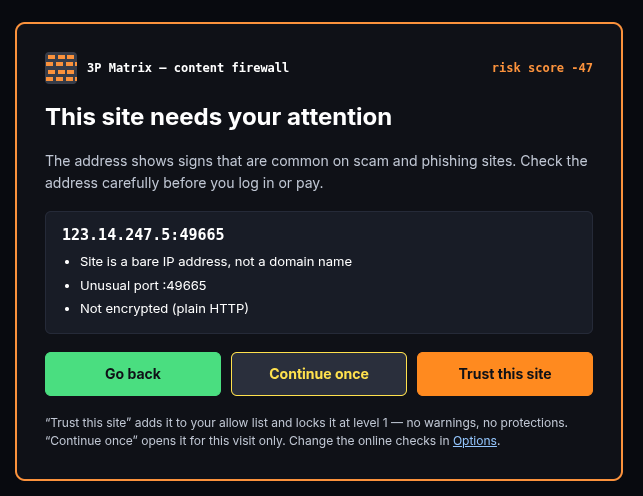
V 4.4.6 corrected colors of the buttons of website and download warning pages (were not applied identically)
Last edited:
Recently browsing
Members who viewed this thread in the last 5 minutes