Hot Take 3P-Matrix-lite : uMatrix revived for Chromium browsers using DNR

I expected to see the same blocks as I saw with the custom rule *$script,subdocument,third-party. But I see only the two blocks I showed before. It makes no difference when I change settings in Brave, f.i. agressively or not, custom filters or not. Perhaps my log doesn't work well. But if you can not reproduce it, you should take your own experience as benchmark, not mine.

BTW, tonight I'm not anymore on line.

PS: I didn't see your post before I posted mine.
 
Ahh, Brave filters out ads and trackers, before extension get to see the page, so that could also be the reason 3P-Matrix-lite does not block them, because Brave shields already has filtered them out.

But thanks for testing I found another issue with the logger which is fixed in 1.5.
 
  • Like
Reactions: Sorrento
I'm earlier back home as expected, so still tonight I can react. In my first post about this matter I tried to make clear that Brave Shields during my little test were activated. In my case I would use 3P in that way.
Then I looked what was blocked only by Brave Shields and then in combination with 3P and with earlier mentioned custom filter rule. After all the results should show the added value of 3P respectively the custom rule.
3P added two blocks and the filter rule four blocks. As said, I expected the same result. I will repeat the test with version 1.5. Maybe the modified logger shows another result.
 
I'm earlier back home as expected, so still tonight I can react. In my first post about this matter I tried to make clear that Brave Shields during my little test were activated. In my case I would use 3P in that way.
Then I looked what was blocked only by Brave Shields and then in combination with 3P and with earlier mentioned custom filter rule. After all the results should show the added value of 3P respectively the custom rule.
3P added two blocks and the filter rule four blocks. As said, I expected the same result. I will repeat the test with version 1.5. Maybe the modified logger shows another result.
please disable the shields when you test it.
 
Congratulations. 3P version 1.6 now blocks on level 5 the same requests as the strict custom rule *$script,subdocument,third-party. You're doing a great job.

PS: I didn't disable Brave Shields, because during normal daily browsing I also wouldn't do it.
 
Last edited:
The log isn't still perfect.
1. When I shut the log-tab, the next tab opens and not the tab that was logged.
2. When I open the log-tab, sometimes it still shows the results from another tab that was logged.
I hope I could make it clear enough.
 
The log isn't still perfect.
1. When I shut the log-tab, the next tab opens and not the tab that was logged.
2. When I open the log-tab, sometimes it still shows the results from another tab that was logged.
I hope I could make it clear enough.
Did you close the tab of press the stop & close? Because I am using a Chrome mechanisme (debug rules) which should (when I did it right) provide more accurate results than building a logger yourself. Downside is that you have to close, that is why it counts down from 5 minutes and has a close button. When I want to control other tabs I need to give the extension also tabs permissions. Google does not like that (because when an extension has all host permissions (can see all URL's) and has tabs permission it can see what you do on other tabs, which is in theory a privacy concern.

Thanks for reporting. I will evaluate using this mechanism (after it is piblished). I followed the guidelines as much as possible, but maybe I am the naive and best behaving boy of the class (¨braafste jongetje van de klas¨) when I look at other extensions. :-(
 
Ad. 1. No difference between pressing 'stop & close' or clicking on the cross. The next tab opens.
I mean you said somewhere that choosing a log-tab instead of a popup (like in ApiVoid Script Stop) was a matter of performance. But I prefer a popup.

PS: Log in a new window (like uBO and AG) is maybe better as a log-tab.
 
Last edited:
Ad. 1. No difference between pressing 'stop & close' or clicking on the cross. The next tab opens.
I mean you said somewhere that choosing a log-tab instead of a popup (like in ApiVoid Script Stop) was a matter of performance. But I prefer a popup.

PS: Log in a new window (like uBO and AG) is maybe better as a log-tab.
Okay thanks for confirming. (y)

first I have a look at the bug, next I will investigate a popup (I started as developer, but programmed only 3 years before I got promoted to designer, but that was 45 years ago, so I have to do some study and prototyping first).

Yes but NVT managed to polish away the performance drop as reported by Sampei-san. So there must be a smarter way.
 
Another suggestion: In level 4 and 5 it's possible to unblock (= allow) domains in the logger. Please add this possibility to level 2 and 3.
BTW, I never thought I would love Belgians so much. ;)
Well for 2 and 3 I would need to add the domain whitelist also. This could be done by a dual panel pane (now the lower part only shows either blacklist TLD or Whitelist TLD and that would be changed into two panels, in level 2 (Domain whitelist | TLD blacklist ) and level 3 (Domain Whitelist | TLD Whitelist) the sliders of level 2 and 3 would be shown in TLD tab itself. When we set the number of shown Domains in the Domain Whitelist to 10 or 15, it would be probably be as high as the TLD with slider in it.

When level 2 and 3 also can add domains, I think it is les confusing to show only blocked domains. (with reason 3P-script, 3P-frame, HTTP, IP-only, unusual-Port)

what do you think about such a change?
 
  • Like
Reactions: Sorrento
I got a problem with viewing videos on ad.nl. At default embedded videos are whitelisted. That's o.k. But videos in the collection 'Kijk' get blocked (on level 3). Probably because of the .video TLD. It is not possible to whitelist that TLD (it doesn't belong to a countryname). So I thought whitelisting individual blocked items could be a solution. I understand it makes the extension more complicated. I believe it's always possible in SS, but I haven't checked it now.

PS: The whitelist could be splitted in two tabs, one for TLD's, one for domains. Adding domains only by the logger. Eventually removing domains possible on the tab. Perhaps you meant the same. It wasn't quite clear to me.
 
Last edited:
There is something wrong @Mods please remove the chrome store link

When I use version 1.6.1 from github and side load it, it works
When I use version 1.6.1 from webstore it does not work

I have to investigate this ??
 
Last edited:
I got a problem with viewing videos on ad.nl. At default embedded videos are whitelisted. That's o.k. But videos in the collection 'Kijk' get blocked (on level 3). Probably because of the .video TLD. It is not possible to whitelist that TLD (it doesn't belong to a countryname). So I thought whitelisting individual blocked items could be a solution. I understand it makes the extension more complicated. I believe it's always possible in SS, but I haven't checked it now.

PS: The whitelist could be splitted in two tabs, one for TLD's, one for domains. Adding domains only by the logger. Eventually removing domains possible on the tab.
For kijk to show add TLD video in level 3

Kijk is also blocked because third-party frames from Google APIS are blocked. Will add it to the whitelist in next version
 
New (refactored) version available in github: 3P-Matrix-lite/3P-Matrix-lite-v1_8_0.zip at main · Kees1958/3P-Matrix-lite

Yes, it took some cycles to find a smart solution for the popup! (I actually bumped from 1.6.2 to 1.7.8) I started with a refactor to structure code (JS) and screens (html/css) before adding new functions (beter add something to a clean base). Next I improved the internal whitelist. so 3 of the version bumps were because of improving code quality drastically and 2 for improving and restructuring whitelist, some 4 bumos were for streamlining the UI and user workflow and all others in developing a new popup which should be fast. This is also the reason why it is only available in level 4 and 5 and needs to be started with a button (so it does not need to run all the time).

@Jan Willy AD.NL now must run fine a other top 5 news papers in extended EU-zone and 5 Eyes countries using video embeds. I only added the payment services to the whitelist in case a user forgets to lower level to 1 when doing important (payment) buying/banking. Advice is to always switch to level 1 (and keep that as startmode) when doing money related (trans)action. (also included the leading payment services in extended EU-zone and 5 Eyes, but as posted this is a safety net when USER FORGETS to switch to level 1 or has not locked bank or webshops to level 1).

1783493230444.png


edit I bumped to 1.8.1 to also show hundreds of seconds in the timer :-)
 
Last edited:
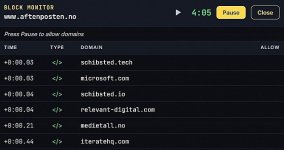
Thanks for the modifications. Because I always want to see what's blocked (and eventually want to whitelist), I switched from level 3 (no log anymore) to level 4 with the 'show blocks' option (BTW I also could have chosen level 5). I made this medium mode easy bij adding much used TLD's ('*.com' etc.) to the domain whitelist. So far the only problem I see, is that the 'show blocks' list only shows whitelisted items and not the blocks (even when Brave Shields are disabled). I experimented on the site Aftenposten. I didn't whitelist the TLD '.no'. The extension icon shows the number 8. On the 'show blocks' list I see only six whitelisted items (incl. the TLD's '.com' and '.io' I had whitelisted). Brave Shieds were disabled.

blocklist.jpg
 
Last edited:
  • Hundred Points
Reactions: oldschool
@Jan Willy When I set protection to level 4 and go to Aftenposten (do you also Skandinavian Languages?) the blocks are also listed in the develop inspect of the browser, so the blocks shown in the popup seem correct to me?

e.g. iteratehq.com is mentioned in the popup and is blocked according, richt click inspect, show network (in red at the bottom)

1783509911477.png


But please keep providing suggestions. Is the show blocks panel how you had imagined it (did I understand your requirements well)?
 
  • Like
Reactions: oldschool
I got a problem with viewing videos on ad.nl. At default embedded videos are whitelisted. That's o.k. But videos in the collection 'Kijk' get blocked (on level 3). Probably because of the .video TLD. It is not possible to whitelist that TLD (it doesn't belong to a countryname). So I thought whitelisting individual blocked items could be a solution. I understand it makes the extension more complicated. I believe it's always possible in SS, but I haven't checked it now.

PS: The whitelist could be splitted in two tabs, one for TLD's, one for domains. Adding domains only by the logger. Eventually removing domains possible on the tab. Perhaps you meant the same. It wasn't quite clear to me.
I don´t think adding TLD's to the domain whitelist works in level 4 and 5 as expected. Don´t worry about the logger. First task is to make it a really easy to use uMatrix replacement. The logger for level 4 and 5 is straightforward, but for level 3 it becomes fluid should we put TLD's on the whitelist from the logger of Domains? You will get your logger for level2 and 3, but the user interface is not clear to me yet.

So first priority is to get the logger working for level 4 and 5, next use that as template or module for levels 2 and 3. In the meantime I am also refininhg the build-in whitelist to prevent website breakage for the mentioned categories (payment services, video embeds, captcha's and important JS-libraries).

And of course I am learning from mistakes ;)
 
Last edited:
  • +Reputation
Reactions: oldschool
do you also Skandinavian Languages?
No. I experimented on this page because I had added often used TLD's to the domain whitelist (level 4). And I would see the results on a not whitelisted TLD.

I don´t think adding TLD's to the domain whitelist works in level 4 and 5 as expected.
I thought it would work. But you're right, it doesn't, unfortunately. The reason I believed it would work, was confusion. I saw 8 blocks on the icon and 6 on the show-blocks-list. Somehow I interpreted this as the list doesn't show blocks at all, but only whitelisted items. Sorry for that. Obviously the number on the icon doesn't show the amount of blocked domains but shows all blocked requests (also from the same domain, like uBO does).

So first priority is to get the logger working for level 4 and 5
As said earlier, level 4 and 5 would work for me if self-chosen TLD's could be whitelisted in addition to self-chosen whitelisted domains. In level 3 I miss last option. Why not a show-blocks-list in level 3 with whitelist possibility like in level 4 and 5 (instead of a logger)? The only complication could be the creation of a second tab for whitelisted domains (besides a tab for whitelisted TLD's).
 
Last edited:
  • Hundred Points
Reactions: oldschool