

The MalwareTips app
Your community, one tap away.
Open MalwareTips from your Home Screen or desktop. Follow discussions, find answers and pick up where you left off.
- Home Screen access
- Optional push alerts
- Your community
You're ready to explore.Explore what's new
Installation instructions
iPhone & iPad
- Open MalwareTips in Safari and tap Share. You may need to open the Page Menu first.
- Choose Add to Home Screen. If it is not listed, use Edit Actions to add it.
- Keep Open as Web App enabled if shown, then tap Add.
Android
- Open MalwareTips in Chrome or another browser that supports app installation.
- Open the browser menu and look for Install app, Install and create shortcut, or Add to Home screen.
- Choose Install and confirm. Wording varies by browser.
Desktop
- Chrome: use the install icon in the address bar, or the menu under Cast, save and share.
- Edge: open the menu, then More tools, Apps and Install this site as an app.
- Safari on Mac: choose Share or File, then Add to Dock. Firefox on Windows: look for the web apps button in the address bar.
If you cannot find an install option, update your browser or use its bookmark option to keep MalwareTips close.
Keep up with your conversations
After installation, open the app and sign in. Enable push notifications in Preferences if you want alerts. On iPhone and iPad, push requires a Home Screen web app and iOS or iPadOS 16.4 or later.
Sign in to manage notificationsInstallation is optional. Your notification settings stay under your control.
You are using an out of date browser. It may not display this or other websites correctly.
You should upgrade or use an alternative browser.
You should upgrade or use an alternative browser.
Advanced Security 7Oz-64's Mobile Security Config
- Thread starter 7Oz-64
- Start date
Mobile Setup Configuration Help & Showcase
10 Replies
1,353 Views
Archived configuration (not current) · expand details
Thread details
- Last updated
- Aug 10, 2022
- Mobile brand
- samsung
- Mobile model
- M31
- Mobile operating system
- Android
- Mobile OS version
- Android 12 OneUi 4.1 latest january security update
- Mobile system updates
- Automatic updates
- App store(s)
- Google Play Store
- Samsung Galaxy Store
- App updates
- Check and install app updates manually
- Screen lock method
- Password
- Biometric security
- None
- Stolen Device Protection
- Security and privacy apps
- AdGuard(added NextDNS personal server + Built in (mcafee) protection.
- Firewall and VPN apps
- Firewall : AdGuard
VPN : IVPN
- Mobile browsers
- Chrome (personal settings)
- File and photo backups
- No important files, no backup needed
- Subscriptions
- None
- Feedback preference
Detailed suggestions and alternatives welcome

Your security setup seems to be decent, but here are a few suggestions to improve it further:
1. Biometric security: Consider adding biometric security features like fingerprint or facial recognition. These features can provide an additional layer of security to your phone.
2. Regular backups: Even if you don't have important files, it's always a good idea to have a backup of your phone data. Consider setting up automatic backups to the cloud or to an external device.
3. App store updates: While manual updates for apps can be a good security practice, it can be time-consuming. Consider enabling automatic updates for both Google Play Store and Samsung Galaxy Store.
4. Use a password manager: Password managers can generate complex passwords and securely store them, reducing the risk of using weak passwords or reusing passwords across multiple accounts.
5. Consider using a mobile security suite: While AdGuard and IVPN are good choices for firewall and VPN apps, consider using a comprehensive mobile security suite that can provide additional protection against malware, phishing, and other cyber threats.
6. Be cautious while browsing: Even if you only visit popular and safe sites, it's essential to be cautious while browsing. Avoid clicking on suspicious links, downloading apps from untrusted sources, and sharing personal information online.
Overall, your security setup seems to be good, but it's always better to take extra precautions to protect your phone and data.
1. Biometric security: Consider adding biometric security features like fingerprint or facial recognition. These features can provide an additional layer of security to your phone.
2. Regular backups: Even if you don't have important files, it's always a good idea to have a backup of your phone data. Consider setting up automatic backups to the cloud or to an external device.
3. App store updates: While manual updates for apps can be a good security practice, it can be time-consuming. Consider enabling automatic updates for both Google Play Store and Samsung Galaxy Store.
4. Use a password manager: Password managers can generate complex passwords and securely store them, reducing the risk of using weak passwords or reusing passwords across multiple accounts.
5. Consider using a mobile security suite: While AdGuard and IVPN are good choices for firewall and VPN apps, consider using a comprehensive mobile security suite that can provide additional protection against malware, phishing, and other cyber threats.
6. Be cautious while browsing: Even if you only visit popular and safe sites, it's essential to be cautious while browsing. Avoid clicking on suspicious links, downloading apps from untrusted sources, and sharing personal information online.
Overall, your security setup seems to be good, but it's always better to take extra precautions to protect your phone and data.

7Oz-64's Mobile Security Config · Setup v2
Updated Oct 11, 2026
What changed
Feedback on this setup is welcome.
Updated Oct 11, 2026
What changed
- Mobile brand: samsung → Google
- Mobile model: M31 → Pixel 10a
- Mobile browsers: Chrome (personal settings) → Vannadium + built-in security
- Mobile OS version: Android 12 OneUi 4.1 latest january security update → Latest GrapheneOS on Pixel 10a
- Security and privacy apps: AdGuard(added NextDNS personal server + Built in (mcafee) protection. → Main GrapheneOS Security Features and Mechanisms
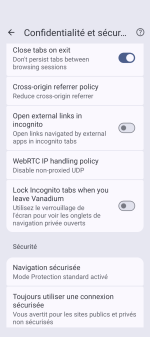
Vanadium: Hardened browser designed to protect against web-based attacks and exploits.
Auditor: Cryptographic verification of device and operating system integrity.
Exploit Protection: Multiple security mechanisms designed to mitigate vulnerability exploitation.
Secure App Spawning: Strengthens application process isolation and startup security.
Network Permission: Allows network access to be disabled on a per-app basis.
Storage Scopes: Limits applications' access to personal files and storage.
Contact Scopes: Restricts applications' access to the contacts database.
Sensors Permission: Controls applications' access to device sensors.
Camera and Microphone Toggles: Quickly disable camera and microphone access.
USB-C Port Control: Restricts USB data connections to reduce physical attack risks.
Private Space: Provides an isolated space for sensitive applications.
User Profiles: Separates applications, accounts, and data across multiple user profiles.
Secure Paste: Provides additional clipboard protections.
Duress Password: A special password mechanism designed to trigger secure data wiping when entered instead of the normal unlock password. Use with caution, as the action is destructive and intended to be irreversible.
Verified Boot: Verifies operating system integrity during startup.
Data Encryption: Protects locally stored data using device encryption.
Application Sandboxing: Isolates applications from one another.
Hardened Memory Allocator (hardened_malloc): Mitigates certain memory-corruption vulnerabilities and exploitation techniques.
Security Updates: Regular patches for the operating system and supported components.
Official documentation: GrapheneOS features overview - Firewall and VPN apps: Firewall : AdGuard
VPN : IVPN → NextDNS System-Wide On-Demand IVPN, most of the time IVPN disabled - App store(s): Google Play Store, Samsung Galaxy Store → Other store or source
- Mobile security update support: Older selection — review required → Supported - still receiving security updates
- Android security patch date: Not specified → 2026-10-09
- App updates: Older selection — review required → Auto-update on any connection
- Screen lock method: Older selection — review required → PIN
- SIM and mobile number protection: Older selection — review required → Lock SIM card with a PIN
- Stolen Device Protection: Older selection — review required → Not applicable - unavailable on this device
- Password and passkey manager: Not specified → rarely surfing on web
- Phone & Caller ID: Not specified → built in
- Two-factor authentication: Not specified → Not needed
- Find a lost device: Older selection — review required → Off
- Cloud storage: Not specified → not needed
- Messaging: Not specified → Fossify messages
- Music & Podcasts: Not specified → NewPipe
- Photo & Video: Not specified → Built-in
- Entertainment: Not specified → NO
- Note-taking: Not specified → NO
- Games: Not specified → NO
- Android launcher: Not specified → Built-in
- Notable changes: Not specified → Change from Android to GrapheneOS, just built in store, only used for phone calls, messaging, wakeup alarm, GPS , disturbing is free.
Additionals apps from official sources (apk) :
Magic Earth + Sherpa TTS, Compass, HeliBoard
My current setup
- Mobile operating system: Android
- Mobile OS version: Latest GrapheneOS on Pixel 10a
- Mobile model: Pixel 10a
- Mobile brand: Google
- Security and privacy apps: Main GrapheneOS Security Features and Mechanisms
Vanadium: Hardened browser designed to protect against web-based attacks and exploits.
Auditor: Cryptographic verification of device and operating system integrity.
Exploit Protection: Multiple security mechanisms designed to mitigate vulnerability exploitation.
Secure App Spawning: Strengthens application process isolation and startup security.
Network Permission: Allows network access to be disabled on a per-app basis.
Storage Scopes: Limits applications' access to personal files and storage.
Contact Scopes: Restricts applications' access to the contacts database.
Sensors Permission: Controls applications' access to device sensors.
Camera and Microphone Toggles: Quickly disable camera and microphone access.
USB-C Port Control: Restricts USB data connections to reduce physical attack risks.
Private Space: Provides an isolated space for sensitive applications.
User Profiles: Separates applications, accounts, and data across multiple user profiles.
Secure Paste: Provides additional clipboard protections.
Duress Password: A special password mechanism designed to trigger secure data wiping when entered instead of the normal unlock password. Use with caution, as the action is destructive and intended to be irreversible.
Verified Boot: Verifies operating system integrity during startup.
Data Encryption: Protects locally stored data using device encryption.
Application Sandboxing: Isolates applications from one another.
Hardened Memory Allocator (hardened_malloc): Mitigates certain memory-corruption vulnerabilities and exploitation techniques.
Security Updates: Regular patches for the operating system and supported components.
Official documentation: GrapheneOS features overview - Mobile browsers: Vannadium + built-in security
- File and photo backups: No important files, no backup needed
- Mobile security update support: Supported - still receiving security updates
- Mobile system updates: Automatic updates
- Android security patch date: 2026-10-09
- App store(s): Other store or source
- App updates: Auto-update on any connection
- Screen lock method: PIN
- Biometric security: None
- SIM and mobile number protection: Lock SIM card with a PIN
- Stolen Device Protection: Not applicable - unavailable on this device
- Find a lost device: Off
- Firewall and VPN apps: NextDNS System-Wide On-Demand IVPN, most of the time IVPN disabled
- Password and passkey manager: rarely surfing on web
- Phone & Caller ID: built in
- Messaging: Fossify messages
- Music & Podcasts: NewPipe
- Photo & Video: Built-in
- Entertainment: NO
- Note-taking: NO
- Cloud storage: not needed
- Games: NO
- Android launcher: Built-in
- Two-factor authentication: Not needed
- Subscriptions: None
- Notable changes: Change from Android to GrapheneOS, just built in store, only used for phone calls, messaging, wakeup alarm, GPS , disturbing is free.
Additionals apps from official sources (apk) :
Magic Earth + Sherpa TTS, Compass, HeliBoard - Feedback preference: Detailed suggestions and alternatives welcome
7Oz-64's Mobile Security Config · Setup v3
Updated Oct 11, 2026
What changed
Feedback on this setup is welcome.
Updated Oct 11, 2026
What changed
- Mobile operating system: Android → Other mobile operating system
My current setup
- Mobile operating system: Other mobile operating system
- Mobile OS version: Latest GrapheneOS on Pixel 10a
- Mobile model: Pixel 10a
- Mobile brand: Google
- Security and privacy apps: Main GrapheneOS Security Features and Mechanisms
Vanadium: Hardened browser designed to protect against web-based attacks and exploits.
Auditor: Cryptographic verification of device and operating system integrity.
Exploit Protection: Multiple security mechanisms designed to mitigate vulnerability exploitation.
Secure App Spawning: Strengthens application process isolation and startup security.
Network Permission: Allows network access to be disabled on a per-app basis.
Storage Scopes: Limits applications' access to personal files and storage.
Contact Scopes: Restricts applications' access to the contacts database.
Sensors Permission: Controls applications' access to device sensors.
Camera and Microphone Toggles: Quickly disable camera and microphone access.
USB-C Port Control: Restricts USB data connections to reduce physical attack risks.
Private Space: Provides an isolated space for sensitive applications.
User Profiles: Separates applications, accounts, and data across multiple user profiles.
Secure Paste: Provides additional clipboard protections.
Duress Password: A special password mechanism designed to trigger secure data wiping when entered instead of the normal unlock password. Use with caution, as the action is destructive and intended to be irreversible.
Verified Boot: Verifies operating system integrity during startup.
Data Encryption: Protects locally stored data using device encryption.
Application Sandboxing: Isolates applications from one another.
Hardened Memory Allocator (hardened_malloc): Mitigates certain memory-corruption vulnerabilities and exploitation techniques.
Security Updates: Regular patches for the operating system and supported components.
Official documentation: GrapheneOS features overview - Mobile browsers: Vannadium + built-in security
- File and photo backups: No important files, no backup needed
- Mobile security update support: Supported - still receiving security updates
- Mobile system updates: Automatic updates
- Android security patch date: 2026-10-09
- App store(s): Other store or source
- App updates: Auto-update on any connection
- Screen lock method: PIN
- Biometric security: None
- SIM and mobile number protection: Lock SIM card with a PIN
- Stolen Device Protection: Not applicable - unavailable on this device
- Find a lost device: Off
- Firewall and VPN apps: NextDNS System-Wide On-Demand IVPN, most of the time IVPN disabled
- Password and passkey manager: rarely surfing on web
- Phone & Caller ID: built in
- Messaging: Fossify messages
- Music & Podcasts: NewPipe
- Photo & Video: Built-in
- Entertainment: NO
- Note-taking: NO
- Cloud storage: not needed
- Games: NO
- Android launcher: Built-in
- Two-factor authentication: Not needed
- Subscriptions: None
- Notable changes: Change from Android to GrapheneOS, just built in store, only used for phone calls, messaging, wakeup alarm, GPS , disturbing is free.
Additionals apps from official sources (apk) :
Magic Earth + Sherpa TTS, Compass, HeliBoard - Feedback preference: Detailed suggestions and alternatives welcome
7Oz-64's Mobile Security Config · Setup v4
Updated Oct 11, 2026
What changed
Feedback on this setup is welcome.
Updated Oct 11, 2026
What changed
- Mobile browsers: Vannadium + built-in security → Vanadium + built-in security
My current setup
- Mobile operating system: Other mobile operating system
- Mobile OS version: Latest GrapheneOS on Pixel 10a
- Mobile model: Pixel 10a
- Mobile brand: Google
- Security and privacy apps: Main GrapheneOS Security Features and Mechanisms
Vanadium: Hardened browser designed to protect against web-based attacks and exploits.
Auditor: Cryptographic verification of device and operating system integrity.
Exploit Protection: Multiple security mechanisms designed to mitigate vulnerability exploitation.
Secure App Spawning: Strengthens application process isolation and startup security.
Network Permission: Allows network access to be disabled on a per-app basis.
Storage Scopes: Limits applications' access to personal files and storage.
Contact Scopes: Restricts applications' access to the contacts database.
Sensors Permission: Controls applications' access to device sensors.
Camera and Microphone Toggles: Quickly disable camera and microphone access.
USB-C Port Control: Restricts USB data connections to reduce physical attack risks.
Private Space: Provides an isolated space for sensitive applications.
User Profiles: Separates applications, accounts, and data across multiple user profiles.
Secure Paste: Provides additional clipboard protections.
Duress Password: A special password mechanism designed to trigger secure data wiping when entered instead of the normal unlock password. Use with caution, as the action is destructive and intended to be irreversible.
Verified Boot: Verifies operating system integrity during startup.
Data Encryption: Protects locally stored data using device encryption.
Application Sandboxing: Isolates applications from one another.
Hardened Memory Allocator (hardened_malloc): Mitigates certain memory-corruption vulnerabilities and exploitation techniques.
Security Updates: Regular patches for the operating system and supported components.
Official documentation: GrapheneOS features overview - Mobile browsers: Vanadium + built-in security
- File and photo backups: No important files, no backup needed
- Mobile security update support: Supported - still receiving security updates
- Mobile system updates: Automatic updates
- Android security patch date: 2026-10-09
- App store(s): Other store or source
- App updates: Auto-update on any connection
- Screen lock method: PIN
- Biometric security: None
- SIM and mobile number protection: Lock SIM card with a PIN
- Stolen Device Protection: Not applicable - unavailable on this device
- Find a lost device: Off
- Firewall and VPN apps: NextDNS System-Wide On-Demand IVPN, most of the time IVPN disabled
- Password and passkey manager: rarely surfing on web
- Phone & Caller ID: built in
- Messaging: Fossify messages
- Music & Podcasts: NewPipe
- Photo & Video: Built-in
- Entertainment: NO
- Note-taking: NO
- Cloud storage: not needed
- Games: NO
- Android launcher: Built-in
- Two-factor authentication: Not needed
- Subscriptions: None
- Notable changes: Change from Android to GrapheneOS, just built in store, only used for phone calls, messaging, wakeup alarm, GPS , disturbing is free.
Additionals apps from official sources (apk) :
Magic Earth + Sherpa TTS, Compass, HeliBoard - Feedback preference: Detailed suggestions and alternatives welcome
7Oz-64's Mobile Security Config · Setup v5
Updated Oct 11, 2026
What changed
Feedback on this setup is welcome.
Updated Oct 11, 2026
What changed
- Mobile operating system: Other mobile operating system → Custom Android ROM
- Mobile OS version: Latest GrapheneOS on Pixel 10a → Latest GrapheneOS on Pixel 10a Android 17 based
My current setup
- Mobile operating system: Custom Android ROM
- Mobile OS version: Latest GrapheneOS on Pixel 10a Android 17 based
- Mobile model: Pixel 10a
- Mobile brand: Google
- Security and privacy apps: Main GrapheneOS Security Features and Mechanisms
Vanadium: Hardened browser designed to protect against web-based attacks and exploits.
Auditor: Cryptographic verification of device and operating system integrity.
Exploit Protection: Multiple security mechanisms designed to mitigate vulnerability exploitation.
Secure App Spawning: Strengthens application process isolation and startup security.
Network Permission: Allows network access to be disabled on a per-app basis.
Storage Scopes: Limits applications' access to personal files and storage.
Contact Scopes: Restricts applications' access to the contacts database.
Sensors Permission: Controls applications' access to device sensors.
Camera and Microphone Toggles: Quickly disable camera and microphone access.
USB-C Port Control: Restricts USB data connections to reduce physical attack risks.
Private Space: Provides an isolated space for sensitive applications.
User Profiles: Separates applications, accounts, and data across multiple user profiles.
Secure Paste: Provides additional clipboard protections.
Duress Password: A special password mechanism designed to trigger secure data wiping when entered instead of the normal unlock password. Use with caution, as the action is destructive and intended to be irreversible.
Verified Boot: Verifies operating system integrity during startup.
Data Encryption: Protects locally stored data using device encryption.
Application Sandboxing: Isolates applications from one another.
Hardened Memory Allocator (hardened_malloc): Mitigates certain memory-corruption vulnerabilities and exploitation techniques.
Security Updates: Regular patches for the operating system and supported components.
Official documentation: GrapheneOS features overview - Mobile browsers: Vanadium + built-in security
- File and photo backups: No important files, no backup needed
- Mobile security update support: Supported - still receiving security updates
- Mobile system updates: Automatic updates
- Android security patch date: 2026-10-09
- App store(s): Other store or source
- App updates: Auto-update on any connection
- Screen lock method: PIN
- Biometric security: None
- SIM and mobile number protection: Lock SIM card with a PIN
- Stolen Device Protection: Not applicable - unavailable on this device
- Find a lost device: Off
- Firewall and VPN apps: NextDNS System-Wide On-Demand IVPN, most of the time IVPN disabled
- Password and passkey manager: rarely surfing on web
- Phone & Caller ID: built in
- Messaging: Fossify messages
- Music & Podcasts: NewPipe
- Photo & Video: Built-in
- Entertainment: NO
- Note-taking: NO
- Cloud storage: not needed
- Games: NO
- Android launcher: Built-in
- Two-factor authentication: Not needed
- Subscriptions: None
- Notable changes: Change from Android to GrapheneOS, just built in store, only used for phone calls, messaging, wakeup alarm, GPS , disturbing is free.
Additionals apps from official sources (apk) :
Magic Earth + Sherpa TTS, Compass, HeliBoard - Feedback preference: Detailed suggestions and alternatives welcome
Ok same as @oldschool, i understand @harlan4096 based on MalwareTips criterias for review, but members should know that actually no other operating Android/Apple Os can beats GrapheneOS security, @harlan impartial security reviewer

I have commented sometimes, that to get in general (although I may be flexible depending on the case) an Advanced Plus tag, You have to fill out completely most of security aspects of the config, and this section criteria has nothing to do with the own security system installed in the device  ... for example, if there is no backup solution on the config (no matter if not needed), or no PIN, or no Biometric, etc.. this will lower the level of the tag, and so on... still I have been "weighed" and assigned Advanced tag to the both Graphene configs, even though They do not comply with all the security sections of the configuration.
... for example, if there is no backup solution on the config (no matter if not needed), or no PIN, or no Biometric, etc.. this will lower the level of the tag, and so on... still I have been "weighed" and assigned Advanced tag to the both Graphene configs, even though They do not comply with all the security sections of the configuration.
Ok @harlan4096 understand, i will not added fake security config just for desserve the "Plus" tag, i 'm ok with, honest human here

Sure,
Attachments
Recently browsing
Members who viewed this thread in the last 5 minutes
You may also like...
-
Advanced Plus Security pytroman86's Mobile Security Config
-
 Advanced Security Minimalist's Mobile Security Config
 -

-

- N
