

The MalwareTips app
Your community, one tap away.
Open MalwareTips from your Home Screen or desktop. Follow discussions, find answers and pick up where you left off.
- Home Screen access
- Optional push alerts
- Your community
You're ready to explore.Explore what's new
Installation instructions
iPhone & iPad
- Open MalwareTips in Safari and tap Share. You may need to open the Page Menu first.
- Choose Add to Home Screen. If it is not listed, use Edit Actions to add it.
- Keep Open as Web App enabled if shown, then tap Add.
Android
- Open MalwareTips in Chrome or another browser that supports app installation.
- Open the browser menu and look for Install app, Install and create shortcut, or Add to Home screen.
- Choose Install and confirm. Wording varies by browser.
Desktop
- Chrome: use the install icon in the address bar, or the menu under Cast, save and share.
- Edge: open the menu, then More tools, Apps and Install this site as an app.
- Safari on Mac: choose Share or File, then Add to Dock. Firefox on Windows: look for the web apps button in the address bar.
If you cannot find an install option, update your browser or use its bookmark option to keep MalwareTips close.
Keep up with your conversations
After installation, open the app and sign in. Enable push notifications in Preferences if you want alerts. On iPhone and iPad, push requires a Home Screen web app and iOS or iPadOS 16.4 or later.
Sign in to manage notificationsInstallation is optional. Your notification settings stay under your control.
You are using an out of date browser. It may not display this or other websites correctly.
You should upgrade or use an alternative browser.
You should upgrade or use an alternative browser.
9 Microsoft Edge Features Chrome Doesn't Have (...yet)
-
 Thread starter
amirr
Thread starter
amirr
- Start date
- 16 Replies
- 3,639 Views

Looks like Tea or Coffee video as well!This looks like a "Learn Tai-Chi" video!

The relationship between Chrome and derivatives like Edge is similar to the relationship between auto makers like Mercedes and AMG and tuning shops.


It may also be related to the fact that the Edge icon looks like the "Yin Yang".This looks like a "Learn Tai-Chi" video!

Same broOne thing I did not know was that Immersive Reader in Edge, can bypass paywall.
F
ForgottenSeer 92963
Here are 5 security features which Chrome does not have
1. De-elevation on start of broker process
What it does: when you run Edge as Admin, the broker process de-elevates from high to medium level integrity rights.
Why this matters: Medium Ievel Integrity rights processes have no write access to UAC protected folders (Windows, Program Files and most Program Data folders). This comes (security wise for Edge only) closer to running as a standard user than UAC.
2. Code Integrity Guard of renderer process
What it does: this allows only Microsoft signed DLL's to be loaded into the renderer process.
Why this matters: DLL's are dynamic load libraries. These DLL's can be injected in the renderer processes of your browser. Malware can not misuse this mechanisme to take control over the renderer process and ultimately over your PC (through a staged attack).
3. AppContainer for renderer process
This new feature will come to you automatically in next versions, early birds can enable this in registry or group policy.
What it does: it lowers the integrity rights of the renderer process from Untrusted to AppContainer. AppContainer is the build-in rights sandbox of the Windows OS (explanation). It isolates the renderer from unneeded resources and other application. No access means no opportunities for malware to misuse bugs and exploits in the chromium renderer process (the process which does the heavy work showing web content correctly on your screen).
Why it matters: It makes it harder for malware to escape the Chrome sandbox (the sandbox of Chromium based browsers)
4. Super duper secure mode/new security mitigations option
Can be set through flags and settings (the latter has a smart balanced option).
What it does: it disables the Just In Tim (JIT) javascript compiler. Compiled code is code which the CPU can process. It looks like a string of zeroes and ones. It is much harder to 'read' compiled code then plain javascript sourcecode.
Why it matters: Some windows protection mechanisms can't read/handle compiled code. Without JIT enabled Windows can apply more checks and balances (like CET and ACG), simply because it can read the javascript sourcecode. These cross checks make it harder for malware to sneak through (professionals I know, this is a layman's explanation, feel free to add comments when you have a better way to explain it).
Downside: Compiled code is faster than interpreted code. In the past this differences was huge. With modern Javascript engines these differences are minimal for most common web applications. Only a few javascript intensive applications might rely on pre-compiled code. So fair chance you won't notice it. When you enable this feature, choose 'balanced mode' to be prevent issues.
5. Automatic HTTPS
Can be set through flags and settings (will become default in the near future since most websites are encrypted HTTPS).
What it does: Tries to switch from unencrpted HTTP traffic through encrypted HTTPS (sort of same as HTTPS everywhere extension)
Why it matters: Encrypted data is gibberish, so your ISP and anyone else on your way to the world wide web does not understand what goes over the line/air.
1. De-elevation on start of broker process
What it does: when you run Edge as Admin, the broker process de-elevates from high to medium level integrity rights.
Why this matters: Medium Ievel Integrity rights processes have no write access to UAC protected folders (Windows, Program Files and most Program Data folders). This comes (security wise for Edge only) closer to running as a standard user than UAC.
2. Code Integrity Guard of renderer process
What it does: this allows only Microsoft signed DLL's to be loaded into the renderer process.
Why this matters: DLL's are dynamic load libraries. These DLL's can be injected in the renderer processes of your browser. Malware can not misuse this mechanisme to take control over the renderer process and ultimately over your PC (through a staged attack).
3. AppContainer for renderer process
This new feature will come to you automatically in next versions, early birds can enable this in registry or group policy.
What it does: it lowers the integrity rights of the renderer process from Untrusted to AppContainer. AppContainer is the build-in rights sandbox of the Windows OS (explanation). It isolates the renderer from unneeded resources and other application. No access means no opportunities for malware to misuse bugs and exploits in the chromium renderer process (the process which does the heavy work showing web content correctly on your screen).
Why it matters: It makes it harder for malware to escape the Chrome sandbox (the sandbox of Chromium based browsers)
4. Super duper secure mode/new security mitigations option
Can be set through flags and settings (the latter has a smart balanced option).
What it does: it disables the Just In Tim (JIT) javascript compiler. Compiled code is code which the CPU can process. It looks like a string of zeroes and ones. It is much harder to 'read' compiled code then plain javascript sourcecode.
Why it matters: Some windows protection mechanisms can't read/handle compiled code. Without JIT enabled Windows can apply more checks and balances (like CET and ACG), simply because it can read the javascript sourcecode. These cross checks make it harder for malware to sneak through (professionals I know, this is a layman's explanation, feel free to add comments when you have a better way to explain it).
Downside: Compiled code is faster than interpreted code. In the past this differences was huge. With modern Javascript engines these differences are minimal for most common web applications. Only a few javascript intensive applications might rely on pre-compiled code. So fair chance you won't notice it. When you enable this feature, choose 'balanced mode' to be prevent issues.
5. Automatic HTTPS
Can be set through flags and settings (will become default in the near future since most websites are encrypted HTTPS).
What it does: Tries to switch from unencrpted HTTP traffic through encrypted HTTPS (sort of same as HTTPS everywhere extension)
Why it matters: Encrypted data is gibberish, so your ISP and anyone else on your way to the world wide web does not understand what goes over the line/air.
Last edited by a moderator:

We should get this pinned up on browsers > edge > and you could write up a guide how to enable these features and members could keep the thread up to date incase of features are getting removed or features are being added. Like pinned thread with topic something like '' unlocking advanced features of microsoft edge' 'Here are 5 security features which Chrome does not have
1. De-elevation on start of broker process
What it does: when you run Edge as Admin, the broker process de-elevates from high to medium level integrity rights.
Why this matters: Medium Ievel Integrity rights processes have no write access to UAC protected folders (Windows, Program Files and most Program Data folders). This comes (security wise for Edge only) closer to running as a standard user than UAC.
2. Code Integrity Guard of renderer process
What it does: this allows only Microsoft signed DLL's to be loaded into the renderer process.
Why this matters: DLL's are dynamic load libraries. These DLL's can be injected in the renderer processes of your browser. Malware can not misuse this mechanisme to take control over the renderer process and ultimately over your PC (through a staged attack).
3. AppContainer for renderer process
This new feature will come to you automatically in next versions, early birds can enable this in registry or group policy.
What it does: it lowers the integrity rights of the renderer process from Untrusted to AppContainer. AppContainer is the build-in rights sandbox of the Windows OS (explanation). It isolates the renderer from unneeded resources and other application. No access means no opportunities for malware to misuse bugs and exploits in the chromium renderer process (the process which does the heavy work showing web content correctly on your screen).
Why it matters: It makes it harder for malware to escape the Chrome sandbox (the sandbox of Chromium based browsers)
4. Super duper secure mode/new security mitigations option
Can be set through flags and settings (the latter has a smart balanced option).
What it does: it disables the Just In Tim (JIT) javascript compiler. Compiled code is code which the CPU can process. It looks like a string of zeroes and ones. It is much harder to 'read' compiled code then plain javascript sourcecode.
Why it matters: Some windows protection mechanisms can't read/handle compiled code. Without JIT enabled Windows can apply more checks and balances (like CET and ACG), simply because it can read the javascript sourcecode. These cross checks make it harder for malware to sneak through (professionals I know, this is a layman's explanation, feel free to add comments when you have a better way to explain it).
Downside: Compiled code is faster than interpreted code. In the past this differences was huge. With modern Javascript engines these differences are minimal for most common web applications. Only a few javascript intensive applications might rely on pre-compiled code. So fair chance you won't notice it. When you enable this feature, choose 'balanced mode' to be prevent issues.
5. Automatic HTTPS
Can be set through flags and settings (will become default in the near future since most websites are encrypted HTTPS).
What it does: Tries to switch from unencrpted HTTP traffic through encrypted HTTPS (sort of same as HTTPS everywhere extension)
Why it matters: Encrypted data is gibberish, so your ISP and anyone else on your way to the world wide web does not understand what goes over the line/air.

Did anyone notice this new bloatware "feature" Microsoft wants to add to Edge?
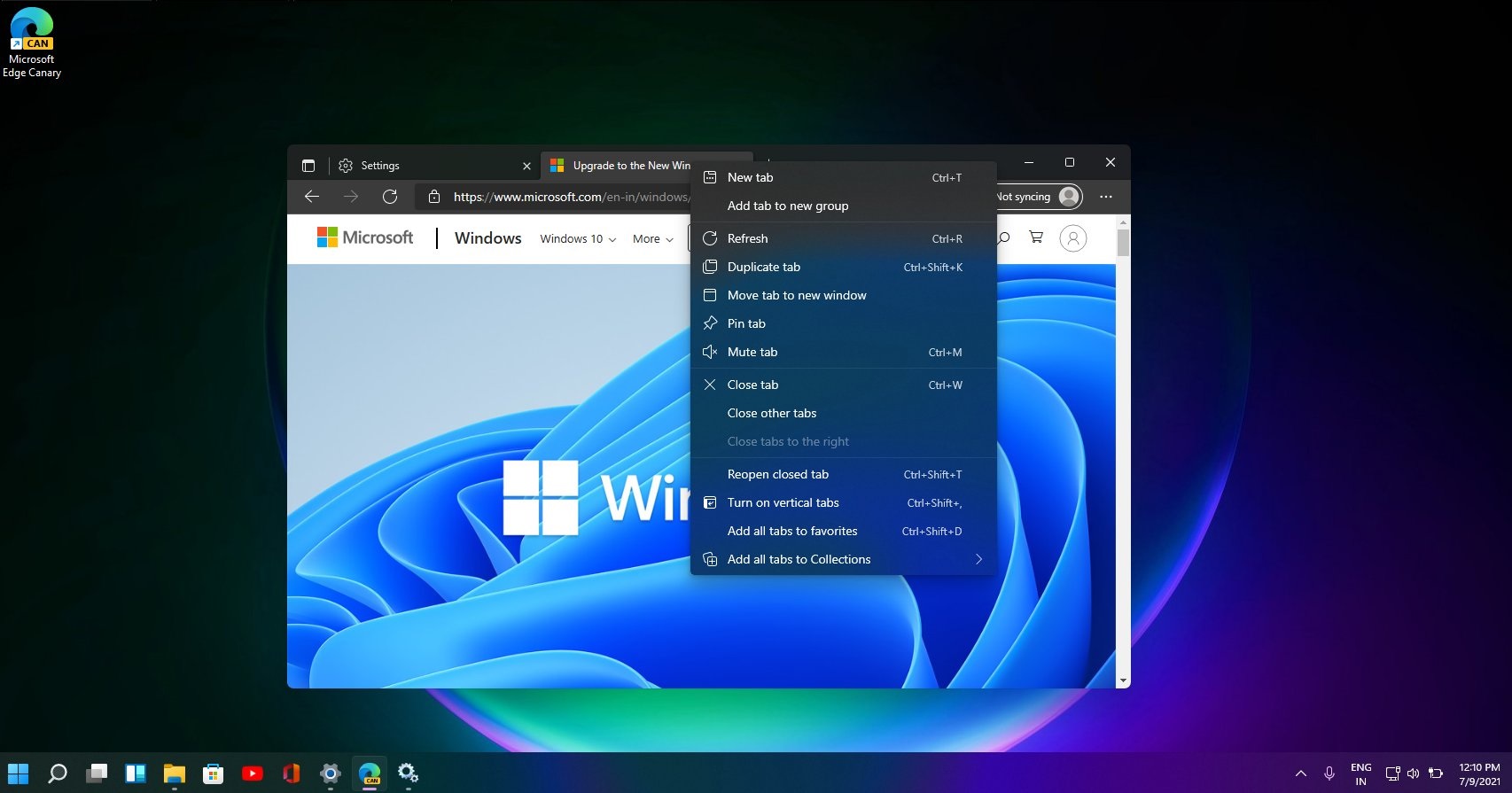
 www.windowslatest.com
Microsoft Edge faces backlash over new shopping feature/bloatware
Microsoft Edge, apart from its features and performance, is known for its modern user interface that matches the look of Windows 10 and Windows 11. With minimal bloatware, Microsoft Edge has been fast and user friendly. However, the company has been slowly adding unnecessary shopping features to...
www.windowslatest.com

Gandalf_The_Grey
Level 86
Verified
Honorary Member
Top Poster
Content Creator
Well-known
Forum Veteran
Not sure if I will ever see it, because I have disabled "Save time and money with Shopping in Microsoft Edge" and "Save and fill payment info".Did anyone notice this new bloatware "feature" Microsoft wants to add to Edge?
Microsoft Edge faces backlash over new shopping feature/bloatware
Microsoft Edge, apart from its features and performance, is known for its modern user interface that matches the look of Windows 10 and Windows 11. With minimal bloatware, Microsoft Edge has been fast and user friendly. However, the company has been slowly adding unnecessary shopping features to...
Not sure if I will ever see it, because I have disabled "Save time and money with Shopping in Microsoft Edge" and "Save and fill payment info".
Thanks for this, Gandalf. Where would I find "Save time and money with Shopping in Microsoft Edge"?
EDIT:
NM, I found it. I was initially too lazy to search for it
Last edited:
F
ForgottenSeer 92963
I looked at the integrity levels of Edge with the registry or GPO tweak to enable AppContainer for renderer processes, to understand the benefits of using the strictest form of containment for the renderer process. A typical edge browser would show the following Integrity levels with Process Explorer
Edge broker process - medium level (but this process is kept in the basic user sandbox with the de-elevation on startup feature of Edge)
Network service process - medium level
GPU service process - low level
Data Storage service process - untrusted level - used to store and retrieve (temporary) data
Entity Extraction service process - untrusted level - used to extract entities out of webcontent like passwords, addresses, drm licenses etcetera
Renderer processes (2 or more depending on your RAM) - appcontainer - used to process webcontent
With the renderer process now having the lowest rights container (lowered from untrusted to appcontainer), the service modules are protected from side-by-side infections by the renderer processes (lower IL's can't change higher Integrity Levels). This clearly shows that AppContainer not only makes it harder for malware to escape the renderer processes (because the renderer handles content, javascript running in the renderer process could be injected by malware writers into the webpage you are browsing), but ALSO protects other important service processes in Edge (running as untrusted).
For people running Microsoft Defender with no other security programs (than Andy Ful's tools ) this integrity rights level structure also shows the benefits of adding theCode Integrity Guard protection of Edge to ALL Edge processes. By default Microsofts protects the renderer process with Code Integrity Guard, but it is very easy to add all Edge processes using Microsoft Defender's build-in Exploit Protection.
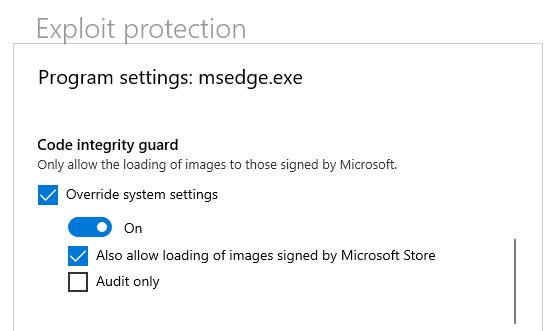
NB. I only use extensions from the Microsoft store. I can imagine that CIG also blocks extensions from the Google Chrome store.
Edge broker process - medium level (but this process is kept in the basic user sandbox with the de-elevation on startup feature of Edge)
Network service process - medium level
GPU service process - low level
Data Storage service process - untrusted level - used to store and retrieve (temporary) data
Entity Extraction service process - untrusted level - used to extract entities out of webcontent like passwords, addresses, drm licenses etcetera
Renderer processes (2 or more depending on your RAM) - appcontainer - used to process webcontent
With the renderer process now having the lowest rights container (lowered from untrusted to appcontainer), the service modules are protected from side-by-side infections by the renderer processes (lower IL's can't change higher Integrity Levels). This clearly shows that AppContainer not only makes it harder for malware to escape the renderer processes (because the renderer handles content, javascript running in the renderer process could be injected by malware writers into the webpage you are browsing), but ALSO protects other important service processes in Edge (running as untrusted).
For people running Microsoft Defender with no other security programs (than Andy Ful's tools ) this integrity rights level structure also shows the benefits of adding theCode Integrity Guard protection of Edge to ALL Edge processes. By default Microsofts protects the renderer process with Code Integrity Guard, but it is very easy to add all Edge processes using Microsoft Defender's build-in Exploit Protection.
NB. I only use extensions from the Microsoft store. I can imagine that CIG also blocks extensions from the Google Chrome store.
Last edited by a moderator:

When looking at the new settings in Edge 96.x, I noticed it had opted me INTO suggesting "charities" for me to donate to BASED ON MY WEB BROWSING HABITS, with no notice to me. Not exactly a privacy-respecting default.Did anyone notice this new bloatware "feature" Microsoft wants to add to Edge?
Microsoft Edge faces backlash over new shopping feature/bloatware
Microsoft Edge, apart from its features and performance, is known for its modern user interface that matches the look of Windows 10 and Windows 11. With minimal bloatware, Microsoft Edge has been fast and user friendly. However, the company has been slowly adding unnecessary shopping features to...
Yeah, that's not good.When looking at the new settings in Edge 96.x, I noticed it had opted me INTO suggesting "charities" for me to donate to BASED ON MY WEB BROWSING HABITS, with no notice to me. Not exactly a privacy-respecting default.
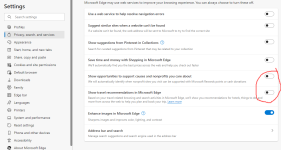

Every update requires a stroll through the settings to disable, disable, disable ... every new piece of bloat.These two new settings were defaulted to ON:
Update - Microsoft Edge Stable (Chromium) Now Available for Download
But, wo unto all those noob users who usually don't venture into settings to begin with!
Recently browsing
Members who viewed this thread in the last 5 minutes


