How are you using AdGuard DNS with Windows 11 settings? The AdGuard public DoH DNS and the DoH DNS with an AdGuard account do not provide an IP address, which is necessary for configuring DoH in Windows 11.Adguard account here. Never experienced issues or at least not untill today.


The MalwareTips app
Your community, one tap away.
Open MalwareTips from your Home Screen or desktop. Follow discussions, find answers and pick up where you left off.
- Home Screen access
- Optional push alerts
- Your community
You're ready to explore.Explore what's new
Installation instructions
iPhone & iPad
- Open MalwareTips in Safari and tap Share. You may need to open the Page Menu first.
- Choose Add to Home Screen. If it is not listed, use Edit Actions to add it.
- Keep Open as Web App enabled if shown, then tap Add.
Android
- Open MalwareTips in Chrome or another browser that supports app installation.
- Open the browser menu and look for Install app, Install and create shortcut, or Add to Home screen.
- Choose Install and confirm. Wording varies by browser.
Desktop
- Chrome: use the install icon in the address bar, or the menu under Cast, save and share.
- Edge: open the menu, then More tools, Apps and Install this site as an app.
- Safari on Mac: choose Share or File, then Add to Dock. Firefox on Windows: look for the web apps button in the address bar.
If you cannot find an install option, update your browser or use its bookmark option to keep MalwareTips close.
Keep up with your conversations
After installation, open the app and sign in. Enable push notifications in Preferences if you want alerts. On iPhone and iPad, push requires a Home Screen web app and iOS or iPadOS 16.4 or later.
Sign in to manage notificationsInstallation is optional. Your notification settings stay under your control.
You are using an out of date browser. It may not display this or other websites correctly.
You should upgrade or use an alternative browser.
You should upgrade or use an alternative browser.
Question Adguard DNS is extremely slow today
-
 Thread starter
Divine_Barakah
Thread starter
Divine_Barakah
- Start date
- 77 Replies
- 7,515 Views
Help answer the author's question with clear explanations and useful steps.

Try this test:
Fastest DNS Speed Test - Find Optimal DNS Server | No Install
In my case, Cloudflare is consistently the fastest DNS of all the others you have considered.
Fastest DNS Speed Test - Find Optimal DNS Server | No Install
In my case, Cloudflare is consistently the fastest DNS of all the others you have considered.

It shows NextDNS for me is very slow, while in real-life it is not tha awful1
It shows NextDNS for me is very slow, while in real-life it is not tha awful1
View attachment 294167
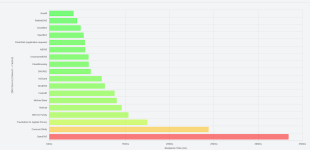
In my case, NextDNS, AG DNS,ControlD DNS are almost always quite close.
Quad9 is often ahead of all those listed above.
P.S.
But values vary greatly over time.
Last edited:
It is the fastest for me too.Quad9 is often ahead of all those listed above
I have got faster controld in my test, the remaining are almost the same, and actually controld is marginally faster than NextDNS for me, and both are faster than AG after its late significant slow down.My results:
View attachment 294170
Quad9 results aren't consistent and fail sometimes. I added some local websites to the list, to see how fast they will resolve those as those popular domains they already have cached.

AdGuard servers I'm connected to are around 1.100 km away, this is why it's the second slowest for me. If I was connected to Frankfurt, the result would be similar to ControlD, though that's still very bad.I have got faster controld in my test, the remaining are almost the same, and actually controld is marginally faster than NextDNS for me, and both are faster than AG after its late significant slow down.
Cloudflare is usually on the first place for me with ping varying from 1-5ms, but now it is on second place because my ISP is connecting me to Vienna currently; to there I usually have ping 5-10ms.
Keep in mind that the result also depends on type of internet connection you have. I have fiber optic connection with ping towards my ISP 1-4ms. Someone using copper wires will have ping to their ISP 20-35ms, which means ping towards DNS servers will be worst or the same in best scenario.
Here's the results for me. Left out the unknown slow ones at the bottom.
OpenDNS 16ms
DNS4EU 35ms

Might be worth trying out this too: GRC's | DNS Nameserver Performance Benchmark
Usually get better/realistic scores with that
OpenDNS 16ms
DNS4EU 35ms
Might be worth trying out this too: GRC's | DNS Nameserver Performance Benchmark
Usually get better/realistic scores with that
According to the location; I have quite the reverse, very fast Cloudflare and Google, and very slow Mullvad.Here's the results for me. Left out the unknown slow ones at the bottom.
OpenDNS 16ms
DNS4EU 35ms
View attachment 294171
Might be worth trying out this too: GRC's | DNS Nameserver Performance Benchmark
Usually get better/realistic scores with that
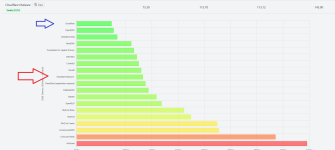

Find that the online test is not accurate 100% from my test. I sometimes got significantly different results from the test than actual nextdns and controld. It probably picks locations to check different than what those services actually pick for you.
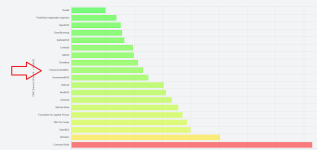
The more filtered, the less the response time.Guys, I added Cloudflare for malware (DOH), without adult content.
As you can see, the speed of Cloudflare for malware is different from Cloudflare DNS (1.1.1.1):
View attachment 294172
P.S.
Add it like this:
Set up
Code:https://security.cloudflare-dns.com/dns-query
View attachment 294174
The more filtered, the less the response time.
That's right.

Even my personal DOH account NextDNS is slower than NEXTDNS, although not by much.
Perhaps this is the correct way to interpret this test.
P.S.
But not always:
Last edited:
That's completely normal and expected. Whenever you put a DNS request, your DNS server first needs to check if the domain you requested is present in some kind of blocklist you selected. If it isn't, just then it goes to check for corresponding IP address that will return to you.
Same goes for ad blockers; the more lists you subscribe to, the slower will websites load due to ad blocker having to check your domain and rules against every filter list. Unfiltered DNS server don't have to do that and straight go to find the corresponding IP address, which explains why they are faster.
Nonetheless; I prefer blocking on DNS level as filtering is done on the network-level rather than your device doing the checking. Reduces CPU usage and saves battery life.
Same goes for ad blockers; the more lists you subscribe to, the slower will websites load due to ad blocker having to check your domain and rules against every filter list. Unfiltered DNS server don't have to do that and straight go to find the corresponding IP address, which explains why they are faster.
Nonetheless; I prefer blocking on DNS level as filtering is done on the network-level rather than your device doing the checking. Reduces CPU usage and saves battery life.
That's completely normal and expected. Whenever you put a DNS request, your DNS server first needs to check if the domain you requested is present in some kind of blocklist you selected. If it isn't, just then it goes to check for corresponding IP address that will return to you.
Same goes for ad blockers; the more lists you subscribe to, the slower will websites load due to ad blocker having to check your domain and rules against every filter list.
Yes, for speed reasons, it seems convenient to have few filter lists.
I currently have only one subscribed.
I have controld with hagezi tif only; feel slightly faster tha NextDNS and Adguard with several filter lists.Yes, for speed reasons, it seems convenient to have few filter lists.
I currently have only one subscribed.

I have Adguard DNS Personal Plan.How are you using AdGuard DNS with Windows 11 settings? The AdGuard public DoH DNS and the DoH DNS with an AdGuard account do not provide an IP address, which is necessary for configuring DoH in Windows 11.
No, no, he asked how do you have it set up in Windows. Do you use some kind of software for using AdGuard DNS system-wide or?I have Adguard DNS Personal Plan.
Recently browsing
Members who viewed this thread in the last 5 minutes
You may also like...
-
 New Update Adguard v8 released
 -

-

-
-
