New Update Announcing Windows 11 Insider Preview builds [Mega-Thread]

Hello Windows Insiders, today we are releasing Windows 11 Insider Preview Build 28020.1619 to the Canary Channel (KB 5077230)
What’s new in Canary Build 28020.1619

Changes and Improvements gradually being rolled out with toggle on*

[Cross Device Resume]

  • This update expands the functionality of Cross‑Device Resume, which Microsoft first introduced in the May 2025 Windows non-security update (KB5058499). You can continue activities from your Android phone on your PC based on the apps and services you use, including resuming Spotify playback, working in Word, Excel, or PowerPoint, or continuing a browsing session.
  • Vivo Android phone users can continue browsing from Vivo Browser on their PC.
  • If you use an Android phone from HONOR, OPPO, Samsung, Vivo, or Xiaomi, you can resume online files that you opened in the Microsoft Copilot app on your phone and continue working on them on your PC. Files open in the corresponding Microsoft 365 app on your PC if it is installed. If the app is not installed, the files open in your default web browser. This feature does not support offline files stored only on your phone.
FEEDBACK: Please file feedback in Feedback Hub (WIN + F) under Devices and Drivers > Linked Phone.

[Personalize what Narrator announces]

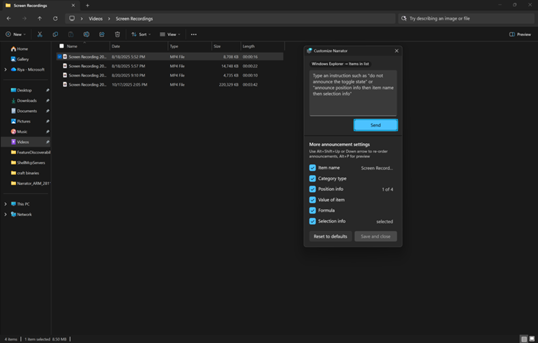
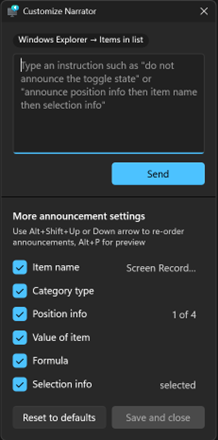
  • Narrator now gives you more control over how it announces on‑screen controls. You can choose which details are spoken and adjust their order to match how you navigate apps. These settings apply throughout the app to help reduce extra speech and make Narrator easier to follow.
[caption id="attachment_178650" align="alignnone" width="538"]UI showing the Narrator customization panel in Windows 11. UI showing the Narrator customization panel in Windows 11.[/caption] [caption id="attachment_178649" align="alignnone" width="218"]UI showing the Narrator customization panel adjustable announcement settings in Windows 11. UI showing the Narrator customization panel adjustable announcement settings in Windows 11.[/caption] FEEDBACK: Please file feedback in Feedback Hub (WIN + F) under Accessibility > Narrator.
[Windows Hello]

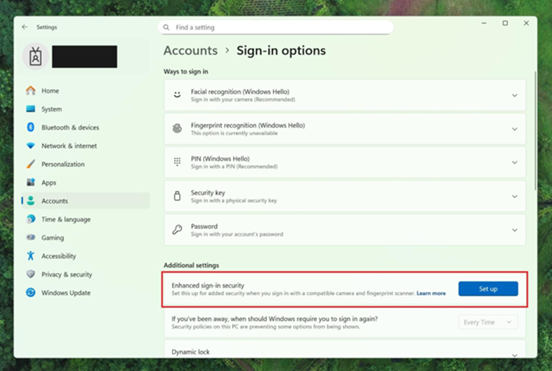
  • Windows Hello Enhanced Sign-in Security Now Supports Peripheral Fingerprint Sensors: Windows Hello Enhanced Sign-in Security (ESS) is expanding to support peripheral fingerprint sensors in Windows 11. Previously, ESS was only available on PCs with built-in biometric sensors, but now Windows 11 PCs, including desktops and Copilot+ PCs, can benefit from the most secure sign-in experience Windows Hello has to offer. Just plug in a supported ESS fingerprint reader, head to Settings > Accounts > Sign-in options and follow the prompts to enroll.
[caption id="attachment_178648" align="alignnone" width="552"]Settings dialog showing where additional settings has an option outlined in red for “Enhanced sign-in security” with a button for “Set up”. Settings dialog showing where additional settings has an option outlined in red for “Enhanced sign-in security” with a button for “Set up”.[/caption] FEEDBACK: Please file feedback in Feedback Hub (WIN + F) under Security and Privacy > Windows Hello Fingerprint.
[Voice Typing]

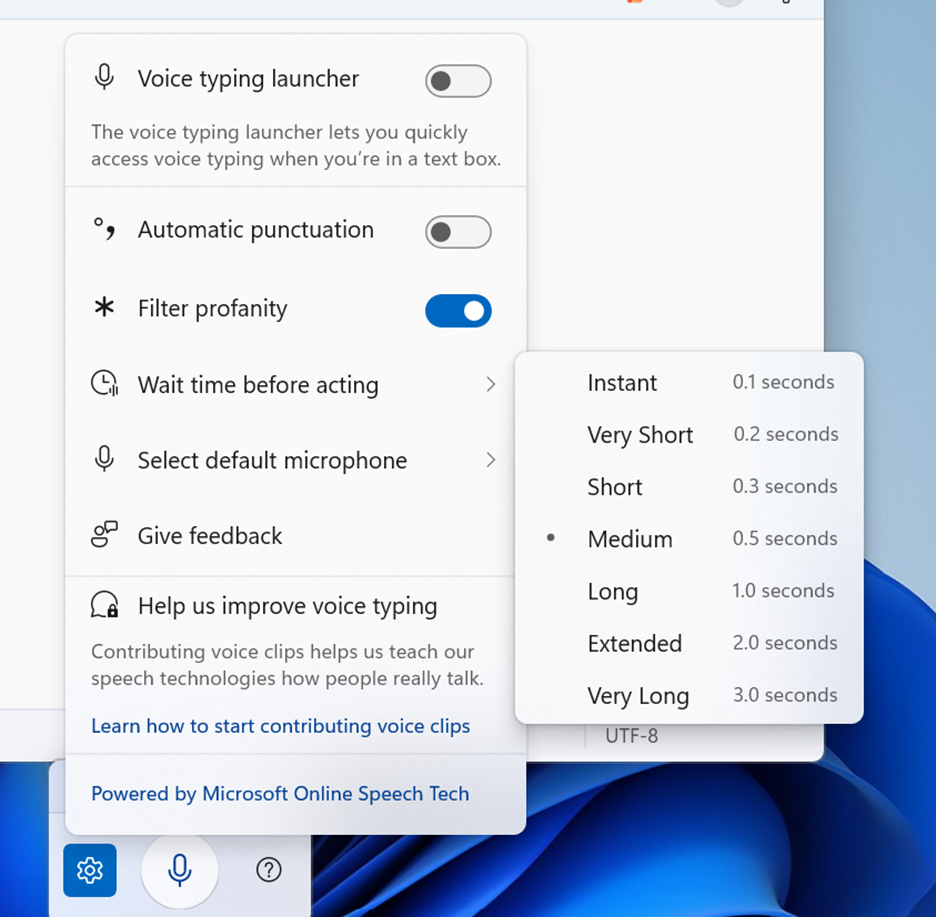
  • We are introducing a new ‘Wait time before acting’ setting in Voice Typing, allowing users to configure the delay before a voice command is executed. This provides greater flexibility for users with varying speech patterns, enabling more accurate recognition whether speaking slowly or quickly. (Update: This is rolling out for all desktop types, not just Copilot+ PCs.)
[caption id="attachment_178647" align="alignnone" width="936"]Voice typing settings supports “Wait time before acting” with timing options like “Instant – 0.1 seconds” to “Very Long – 3.0 seconds”. Voice typing settings supports “Wait time before acting” with timing options like “Instant – 0.1 seconds” to “Very Long – 3.0 seconds”.[/caption]
[Voice Access]

  • We’re introducing a more streamlined setup flow to make it even easier to get started with Voice Access. The redesigned flow helps download the right speech model for your language of choice; select your preferred input microphone & highlights what Voice Access can help you do on your PC.

[Settings Agent Language Expansion]

  • Last September, we announced that Agent in Settings experience was expanded to include French in Dev and Beta Now, the languages supported by the Settings Agent continue to be expanded. The following locales and languages are supported with this release:
Current:
  • English: en-gb, en-us
  • French: fr-fr, fr-ca
New:
  • German: de-de
  • Portuguese: pt-br, pt-pt
  • Spanish: es-es, es-mx
  • Korean: ko-kr
  • Japanese: ja-jp
  • Hindi: hi-in
  • Italian: it-it
  • Chinese (Simplified): zh-cn

[General]

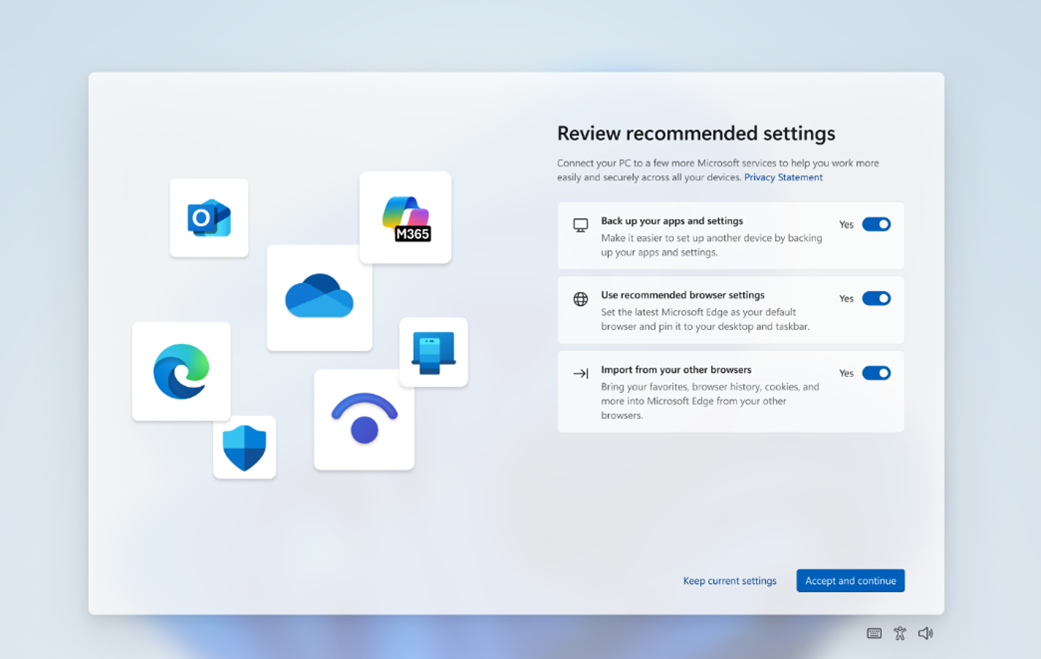
  • Some Windows Insiders will see a refreshed SCOOBE screen (Second Chance Out of Box Experience) for reviewing recommended settings on your PC. This redesigned screen is meant to be more intuitive and streamlined, allowing you to choose the recommended settings you want for your PC without having to navigate through multiple setup screens. If you see this screen, let us know if you have any feedback via Feedback Hub.
[caption id="attachment_178651" align="alignnone" width="1041"]Refreshed SCOOBE screen for reviewing recommended settings. Refreshed SCOOBE screen for reviewing recommended settings.[/caption]
Paint App update rolling out to Canary & Dev Channels

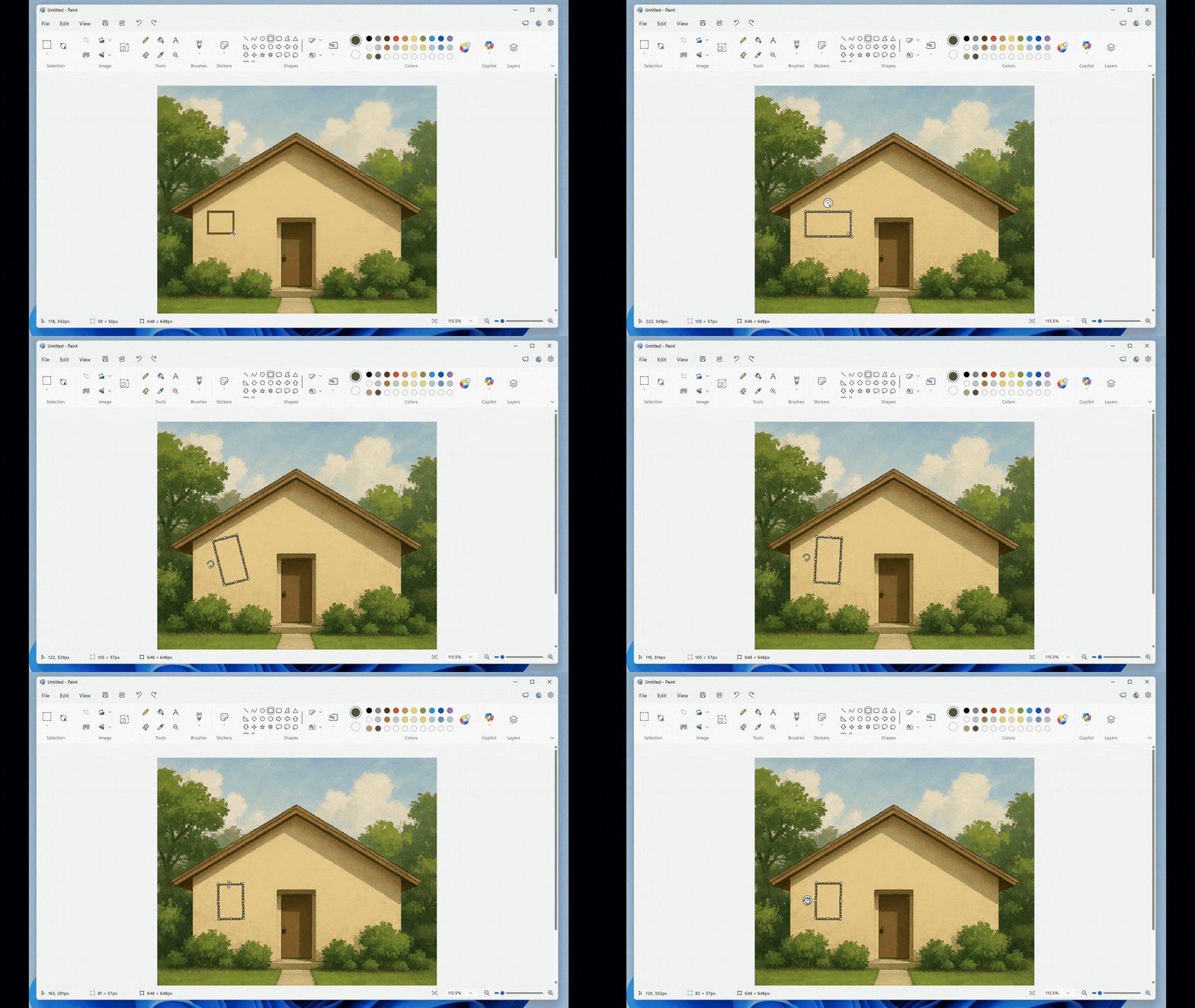
  • With Paint version 11.2601.391.0, we’re excited to introduce freeform rotate, a highly requested feature that gives you more control when editing your artwork. You can now rotate shapes, text, and any active selection to any angle. To get started, open Paint and select a shape, text, or selection. When the object is active, use the rotate handle above it to rotate freely in any direction. For more precise control, you can also choose Custom rotate from the Rotate menu and enter a specific angle. Try using freeform rotate in your artwork to adjust elements exactly the way you want and add more flexibility to your creative workflow.
[caption id="attachment_178644" align="alignnone" width="1920"]Paint App GIF showing freeform rotate. Paint App GIF showing freeform rotate.[/caption]

Reminders for Windows Insiders in the Canary Channel

  • Many features in the Canary Channel are rolled out using Control Feature Rollout technology, starting with a subset of Insiders and ramping up over time as we monitor feedback to see how they land before pushing them out to everyone in this channel.
  • The desktop watermark shown at the lower right corner of the desktop is normal for Windows Insider pre-release builds.
  • Some features may show up in the Dev and Beta Channels first before showing up in the Canary Channel.
  • Some features in active development we preview with Windows Insiders may not be fully localized and localization will happen over time as features are finalized. As you see issues with localization in your language, please report those issues to us via Feedback Hub.
  • To get off the Canary Channel, a clean install of Windows 11 will be required. As a reminder - Insiders can’t switch to a channel that is receiving builds with lower build numbers without doing a clean installation of Windows 11 due to technical setup requirements.
  • Check out Flight Hub for a complete look at what build is in which Insider channel.
Thanks, Windows Insider Program Team

Source: Announcing Windows 11 Insider Preview Build 28020.1619 (Canary Channel)
 
Hello Windows Insiders, today we are releasing Windows 11 Insider Preview Build 26300.7877 (KB5077232) to the Dev Channel. Changes in Dev Channel builds and updates are documented in two buckets: new features, and improvements (including notable fixes) that are being gradually rolled out for Insiders who have turned on the toggle to get the latest updates as they are available (via Settings > Windows Update*) and then new features, and improvements (including notable fixes) rolling out to everyone in the Dev Channel. For more information, see the Reminders section at the bottom of this blog.

Changes and Improvements gradually being rolled out with toggle on*

[Context Menu]

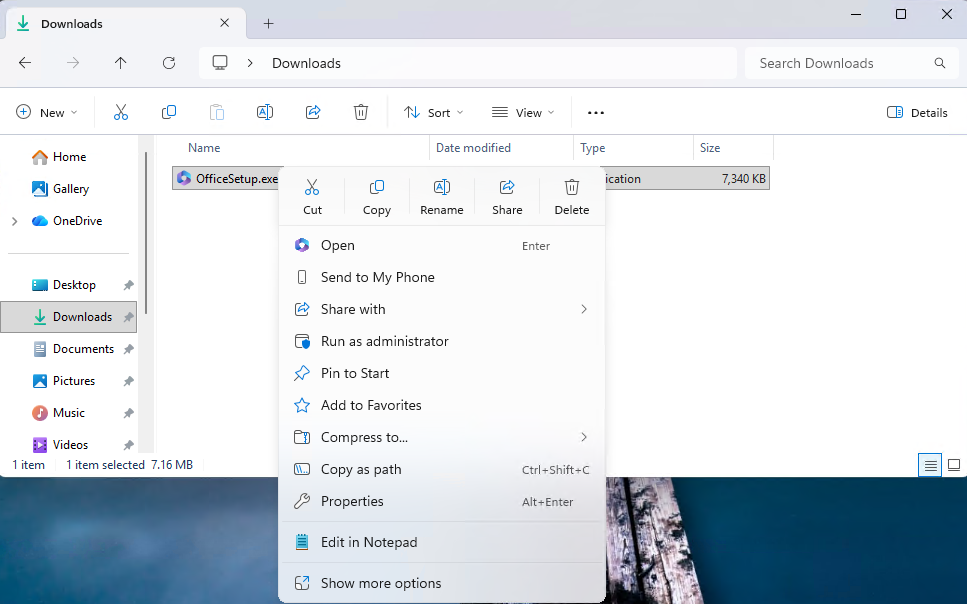
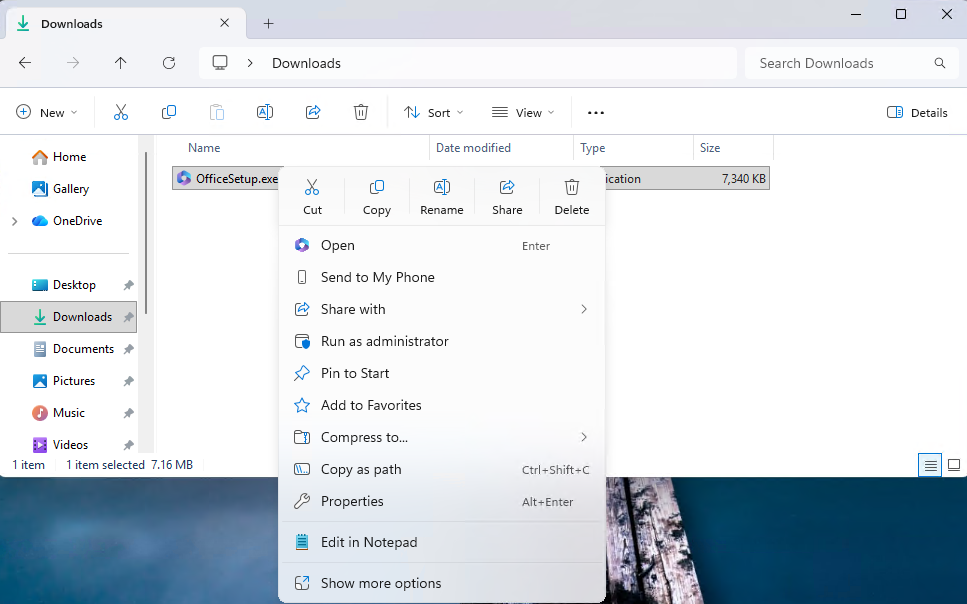
  • When right clicking on a .exe, .bat, or .cmd file, the context menu's "Open" verb will now match the icon associated with the file's default app.
[caption id="attachment_178640" align="alignnone" width="967"]The context menu’s “Open” verb matches the icon in the default app. The context menu’s “Open” verb matches the icon in the default app.[/caption]
  • Feedback: Share your thoughts in Feedback Hub (WIN + F) under File Folders and Online Storage > File Explorer.

[Settings]

  • Device Cards:
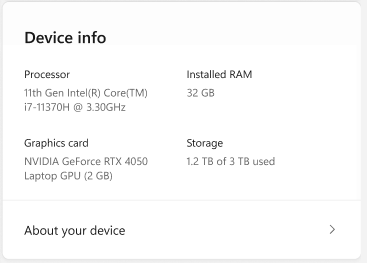
    • Previously released to WIP channels June 2025, the 'Device info' Card on the Settings Home page has been refined based on early learnings. This update simplifies key device specifications and improves consistency across the end to end flow from the Home Card to the Settings > System > About page, making information easier to scan and understand. This consumer experience is currently rolling out to Insiders in the United States.
    • A version of the Device info Card intended for enterprise users on IT managed devices continues to be available.
[caption id="attachment_178641" align="alignnone" width="367"]Device card with simplified device specifications. Device card with simplified device specifications.[/caption]
  • In Settings > System > About, based on early customer feedback, key device hardware details are once again prominently displayed at the top of the page, making it easy to understand your device at a glance. The Device information section now brings together additional system details such as graphics and storage information in a single location, with easy copy/paste support to simplify sharing or support scenarios. Device related frequently asked questions are not currently surfaced as we continue iterating the best way to deliver contextual help across Settings.
  • Feedback: Share your thoughts in Feedback Hub (WIN + F) under the Settings category.

[Taskbar & System Tray]

  • We have improved the animations for mousing over app groups on the taskbar.
  • Improved reliability of showing app icons in the system tray when the taskbar was set to autohide.

[File Explorer]

  • Addressed an issue where all File Explorer open windows and tabs might unexpectedly jump to Desktop or Home.

[Nearby Sharing]

  • Improved the reliability of sending larger files using nearby sharing.

Paint App update rolling out

  • With Paint version 11.2601.391.0, we’re excited to introduce freeform rotate, a highly requested feature that gives you more control when editing your artwork. You can now rotate shapes, text, and any active selection to any angle. To get started, open Paint and select a shape, text, or selection. When the object is active, use the rotate handle above it to rotate freely in any direction. For more precise control, you can also choose Custom rotate from the Rotate menu and enter a specific angle. Try using freeform rotate in your artwork to adjust elements exactly the way you want and add more flexibility to your creative workflow.
[caption id="attachment_178644" align="alignnone" width="1920"]Paint App GIF showing freeform rotate. Paint App GIF showing freeform rotate.[/caption]

Reminders for Windows Insiders in the Dev Channel

  • Updates are based on Windows 11, version 25H2 via an enablement package (Build 26300.7877).
  • Many features are rolled out using Controlled Feature Rollout technology, starting with a subset of Insiders and ramping up over time as we monitor feedback to see how they land before pushing them out to everyone in this channel.
  • The desktop watermark shown at the lower right corner of the desktop is normal for Windows Insider pre-release builds.
  • For Windows Insiders who want to be the first to get features gradually rolled out to you, you can turn ON the toggle to get the latest updates as they are available via Settings > Windows Update*. Over time, we will increase the rollouts of features to everyone with the toggle turned on. Should you keep this toggle off, new features will gradually be rolled out to your PC over time once they are ready.
  • Features and experiences included in these builds may never get released as we try out different concepts and get feedback. Features may change over time, be removed, or replaced and never get released beyond Windows Insiders. Some of these features and experiences could show up in future Windows releases when they’re ready.
  • Some features in active development we preview with Windows Insiders may not be fully localized and localization will happen over time as features are finalized. As you see issues with localization in your language, please report those issues to us via Feedback Hub.
  • Check out Flight Hub for a complete look at what build is in which Insider channel.
Thanks, Windows Insider Program Team

Source: Announcing Windows 11 Insider Preview Build 26300.7877 (Dev Channel)
 
Hello Windows Insiders, today we are releasing Windows 11 Insider Preview Build 26220.7872 (KB5077231) to the Beta Channel. Changes in Beta Channel builds and updates are documented in two buckets: new features, and improvements (including notable fixes) that are being gradually rolled out for Insiders who have turned on the toggle to get the latest updates as they are available (via Settings > Windows Update*) and then new features, and improvements (including notable fixes) rolling out to everyone in the Beta Channel. For more information, see the Reminders section at the bottom of this blog post.

Changes and Improvements gradually being rolled out with toggle on*

[Context Menu]

  • When right clicking on a .exe, .bat, or .cmd file, the context menu's "Open" verb will now match the icon associated with the file's default app.
[caption id="attachment_178640" align="alignnone" width="967"]The context menu’s “Open” verb matches the icon in the default app. The context menu’s “Open” verb matches the icon in the default app.[/caption]
  • Feedback: Share your thoughts in Feedback Hub (WIN + F) under File Folders and Online Storage > File Explorer.

[Settings]

  • Device Cards:
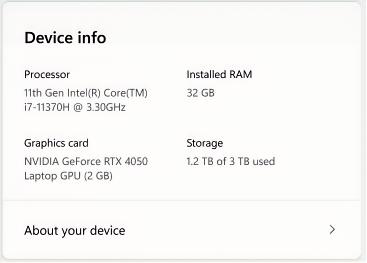
    • Previously released to WIP channels June 2025, the 'Device info' Card on the Settings Home page has been refined based on early learnings. This update simplifies key device specifications and improves consistency across the end to end flow from the Home Card to the Settings > System > About page, making information easier to scan and understand. This consumer experience is currently rolling out to Insiders in the United States.
    • A version of the Device info Card intended for enterprise users on IT managed devices continues to be available.
[caption id="attachment_178639" align="alignnone" width="367"]Device card with simplified device specifications. Device card with simplified device specifications.[/caption]
  • In Settings > System > About, based on early customer feedback, key device hardware details are once again prominently displayed at the top of the page, making it easy to understand your device at a glance. The Device information section now brings together additional system details such as graphics and storage information in a single location, with easy copy/paste support to simplify sharing or support scenarios. Device related frequently asked questions are not currently surfaced as we continue iterating the best way to deliver contextual help across Settings.
  • Feedback: Share your thoughts in Feedback Hub (WIN + F) under the Settings category.

[Taskbar & System Tray]

  • We have improved the animations for mousing over app groups on the taskbar.

Reminders for Windows Insiders in the Beta Channel

  • Updates are based on Windows 11, version 25H2 via an enablement package (Build 26220.7872).
  • Many features are rolled out using Controlled Feature Rollout technology, starting with a subset of Insiders and ramping up over time as we monitor feedback to see how they land before pushing them out to everyone in this channel.
  • For Windows Insiders who want to be the first to get features gradually rolled out to you, you can turn ON the toggle to get the latest updates as they are available via Settings > Windows Update*. Over time, we will increase the rollouts of features to everyone with the toggle turned on. Should you keep this toggle off, new features will gradually be rolled out to your PC over time once they are ready.
  • Features and experiences included in these builds may never get released as we try out different concepts and get feedback. Features may change over time, be removed, or replaced and never get released beyond Windows Insiders. Some of these features and experiences could show up in future Windows releases when they’re ready.
  • Some features in active development we preview with Windows Insiders may not be fully localized and localization will happen over time as features are finalized. As you see issues with localization in your language, please report those issues to us via Feedback Hub.
  • Check out Flight Hub for a complete look at what build is in which Insider channel.
Thanks, Windows Insider Program Team

Source: Announcing Windows 11 Insider Preview Build 26220.7872 (Beta Channel)
 
Hello Windows Insiders, today we are releasing Windows 11 Insider Preview Build 26220.7934 (KB5077242) to the Beta Channel. Changes in Beta Channel builds and updates are documented in two buckets: new features, and improvements (including notable fixes) that are being gradually rolled out for Insiders who have turned on the toggle to get the latest updates as they are available (via Settings > Windows Update*) and then new features, and improvements (including notable fixes) rolling out to everyone in the Beta Channel. For more information, see the Reminders section at the bottom of this blog post.

New features gradually being rolled out with toggle on*

[Enhanced security and performance for batch files]

We are giving administrators and Application Control for Business policy authors additional controls over the processing of batch files and CMD scripts. Starting with this release, administrators may enable a more secure mode for processing batch files that ensures they do not change during execution by adding a value to the registry key HKEY_LOCAL_MACHINE\Software\Microsoft\Command Processor named LockBatchFilesWhenInUse (DWORD, value 0 or 1). Policy authors may also use the LockBatchFilesWhenInUse application manifest control documented here to enable this mode. This enhances the performance and security of batch file processing when code integrity is enabled, as signature validation will only required to be performed a single time, instead of per statement executed in the batch file. Feedback: Share your thoughts in Feedback Hub (WIN + F) under Developer Platform > Command Line.

Changes and Improvements gradually being rolled out with toggle on*

[Shared audio (preview) gets more control]

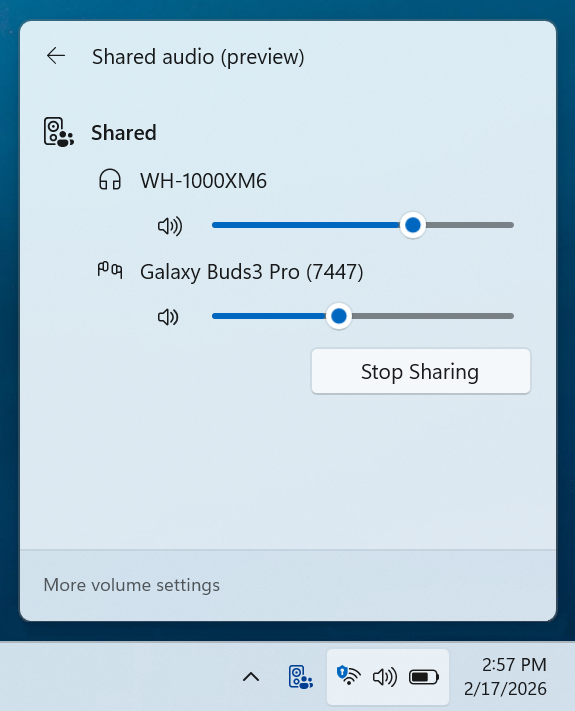
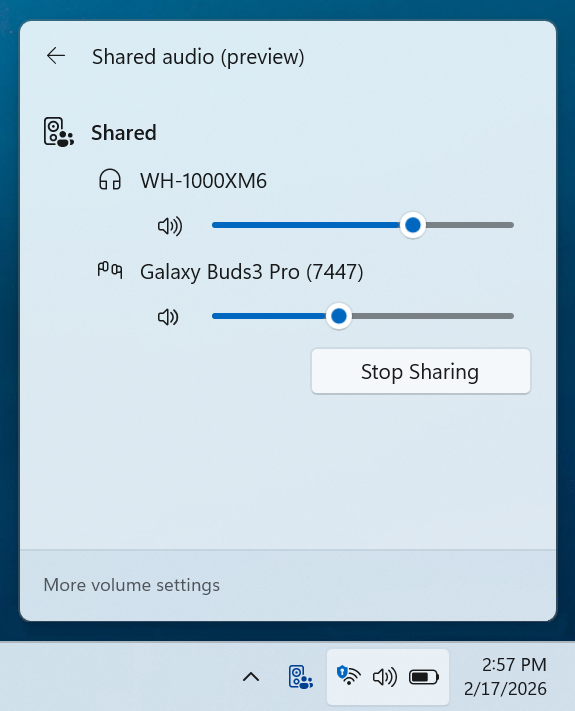
  • Shared audio (preview) was first announced last fall, and allows 2 people to share audio between their two capable Bluetooth LE Audio headphones, speakers, earbuds, or hearing aids. With this update Windows now provides individual sliders for each listener which adjusts their volume without affecting the other. You can continue to adjust volume for both listeners at the same time through the main volume controls available through Quick Settings or on-device and keyboard controls.
  • You’ll also see a new taskbar indicator while you’re sharing, giving a quick reminder that audio is still being shared. Clicking the indicator is a fast path to open sharing settings to change volume or stop sharing.
  • The LE Audio accessory ecosystem also continues to grow. In addition to the accessories announced before, we’re excited to share that the Samsung Galaxy Buds 4 and Buds 4 Pro, Sony WF‑1000XM6, and Xbox Wireless Headset all have support for shared audio!
[caption id="attachment_178663" align="alignnone" width="575"]Independent sliders for each listener. Independent sliders for each listener.[/caption]
  • Feedback: Share your thoughts in Feedback Hub (WIN + F)under Devices and Drivers > Bluetooth - Audio quality, glitches, choppiness and stuttering.

[Narrator]

  • Narrator users can now use a new command Narrator key + \ to read contents of status bar in Apps such as Microsoft Word, Excel, PowerPoint, etc. For example, in Microsoft Word, users can use this to read count of pages or words in a document. In Microsoft Excel, users can select a few data cells and hear sum or average of the data in the selected cells without having to change your focus.

[Taskbar]

  • We temporarily paused the rollout of the improved animations when your taskbar is set to autohide, and improved reliability of loading taskbar components in safe mode. Thanks, Insiders, for sharing feedback!

[Storage]

  • Improved reliability of removing Windows Update files / windows.old files via Settings > System > Storage.

[Input]

  • Improved reliability of typing when using the ADLaM keyboard.

Paint App update rolling out

  • With Paint version 11.2601.391.0, we’re excited to introduce freeform rotate, a highly requested feature that gives you more control when editing your artwork. You can now rotate shapes, text, and any active selection to any angle. To get started, open Paint and select a shape, text, or selection. When the object is active, use the rotate handle above it to rotate freely in any direction. For more precise control, you can also choose Custom rotate from the Rotate menu and enter a specific angle. Try using freeform rotate in your artwork to adjust elements exactly the way you want and add more flexibility to your creative workflow.
[caption id="attachment_178644" align="alignnone" width="1920"]Paint App GIF showing freeform rotate. Paint App GIF showing freeform rotate.[/caption]

Reminders for Windows Insiders in the Beta Channel

  • Updates are based on Windows 11, version 25H2 via an enablement package (Build 26220.7934).
  • Many features are rolled out using Controlled Feature Rollout technology, starting with a subset of Insiders and ramping up over time as we monitor feedback to see how they land before pushing them out to everyone in this channel.
  • [New] The desktop watermark shown at the lower right corner of the desktop is normal for Windows Insider pre-release builds.
  • For Windows Insiders who want to be the first to get features gradually rolled out to you, you can turn ON the toggle to get the latest updates as they are available via Settings > Windows Update*. Over time, we will increase the rollouts of features to everyone with the toggle turned on. Should you keep this toggle off, new features will gradually be rolled out to your PC over time once they are ready.
  • Features and experiences included in these builds may never get released as we try out different concepts and get feedback. Features may change over time, be removed, or replaced and never get released beyond Windows Insiders. Some of these features and experiences could show up in future Windows releases when they’re ready.
  • Some features in active development we preview with Windows Insiders may not be fully localized and localization will happen over time as features are finalized. As you see issues with localization in your language, please report those issues to us via Feedback Hub.
  • Check out Flight Hub for a complete look at what build is in which Insider channel.
Thanks, Windows Insider Program Team

Source: Announcing Windows 11 Insider Preview Build 26220.7934 (Beta Channel)
 
Hello Windows Insiders, today we are releasing Windows 11 Insider Preview Build 26300.7939 (KB 5077243) to the Dev Channel. Changes in Dev Channel builds and updates are documented in two buckets: new features, and improvements (including notable fixes) that are being gradually rolled out for Insiders who have turned on the toggle to get the latest updates as they are available (via Settings > Windows Update*) and then new features, and improvements (including notable fixes) rolling out to everyone in the Dev Channel. For more information, see the Reminders section at the bottom of this blog.

New features gradually being rolled out with toggle on*

[Enhanced security and performance for batch files]

We are giving administrators and Application Control for Business policy authors additional controls over the processing of batch files and CMD scripts. Starting with this release, administrators may enable a more secure mode for processing batch files that ensures they do not change during execution by adding a value to the registry key HKEY_LOCAL_MACHINE\Software\Microsoft\Command Processor named LockBatchFilesWhenInUse (DWORD, value 0 or 1). Policy authors may also use the LockBatchFilesWhenInUse application manifest control documented here to enable this mode. This enhances the performance and security of batch file processing when code integrity is enabled, as signature validation will only required to be performed a single time, instead of per statement executed in the batch file. Feedback: Share your thoughts in Feedback Hub (WIN + F) under Developer Platform > Command Line.

Changes and Improvements gradually being rolled out with toggle on*

[Shared audio (preview) gets more control]

  • Shared audio (preview) was first announced last fall, and allows 2 people to share audio between their two capable Bluetooth LE Audio headphones, speakers, earbuds, or hearing aids. With this update Windows now provides individual sliders for each listener which adjusts their volume without affecting the other. You can continue to adjust volume for both listeners at the same time through the main volume controls available through Quick Settings or on-device and keyboard controls.
  • You’ll also see a new taskbar indicator while you’re sharing, giving a quick reminder that audio is still being shared. Clicking the indicator is a fast path to open sharing settings to change volume or stop sharing.
  • The LE Audio accessory ecosystem also continues to grow. In addition to the accessories announced before, we’re excited to share that the Samsung Galaxy Buds 4 and Buds 4 Pro, Sony WF‑1000XM6, and Xbox Wireless Headset all have support for shared audio!
[caption id="attachment_178663" align="alignnone" width="575"]Independent sliders for each listener. Independent sliders for each listener.[/caption]
  • Feedback: Share your thoughts in Feedback Hub (WIN + F)under Devices and Drivers > Bluetooth - Audio quality, glitches, choppiness and stuttering.

[Narrator]

  • Narrator users can now use a new command Narrator key + \ to read contents of status bar in Apps such as Microsoft Word, Excel, PowerPoint, etc. For example, in Microsoft Word, users can use this to read count of pages or words in a document. In Microsoft Excel, users can select a few data cells and hear sum or average of the data in the selected cells without having to change your focus.

[Taskbar]

  • We temporarily paused the rollout of the improved animations when your taskbar is set to autohide, and improved reliability of loading taskbar components in safe mode. Thanks, Insiders, for sharing feedback!

[Storage]

  • Improved reliability of removing Windows Update files / windows.old files via Settings > System > Storage.

[Input]

  • Improved reliability of typing when using the ADLaM keyboard.

Reminders for Windows Insiders in the Dev Channel

  • Updates are based on Windows 11, version 25H2 via an enablement package (Build 26300.7939).
  • Many features are rolled out using Controlled Feature Rollout technology, starting with a subset of Insiders and ramping up over time as we monitor feedback to see how they land before pushing them out to everyone in this channel.
  • The desktop watermark shown at the lower right corner of the desktop is normal for Windows Insider pre-release builds.
  • For Windows Insiders who want to be the first to get features gradually rolled out to you, you can turn ON the toggle to get the latest updates as they are available via Settings > Windows Update*. Over time, we will increase the rollouts of features to everyone with the toggle turned on. Should you keep this toggle off, new features will gradually be rolled out to your PC over time once they are ready.
  • Features and experiences included in these builds may never get released as we try out different concepts and get feedback. Features may change over time, be removed, or replaced and never get released beyond Windows Insiders. Some of these features and experiences could show up in future Windows releases when they’re ready.
  • Some features in active development we preview with Windows Insiders may not be fully localized and localization will happen over time as features are finalized. As you see issues with localization in your language, please report those issues to us via Feedback Hub.
  • Check out Flight Hub for a complete look at what build is in which Insider channel.
Thanks, Windows Insider Program Team

Source: Announcing Windows 11 Insider Preview Build 26300.7939 (Dev Channel)
 
Hello Windows Insiders, today we are releasing Windows 11 Insider Preview Build 28020.1673 to the Canary Channel. (KB 5077240)

What’s new in Canary Build 28020.1673

Changes and Improvements gradually being rolled out with toggle on*

[Emoji]

  • The Emoji 16.0 releaseintroduces a small thoughtfully curated set of new emojis, one from each major category. Each emoji carries timeless symbolism and practical versatility. These new emojis now appear in the emoji panel.

[Backup & Restore]

  • The first sign-in restore experience is now part of Windows Backup for Organizations, bringing this restore capability to more device types. This experience restores user settings and Microsoft Store apps automatically at first sign-in on Microsoft Entra hybrid joined devices, Cloud PCs, and multi‑user environments. This capability helps create a consistent setup process during device refreshes, upgrades, or migrations.

[Quick Machine Recovery]

  • Quick Machine Recovery (QMR) now turns on automatically for enterprise managed Windows Professional devices, as well as Windows Professional devices that are not domain-joined. These devices receive the same recovery features available to Windows Home users. For domain-joined devices, QMR stays off unless it is enabled by the organization.

[Taskbar & System Tray]

  • A built‑in network speed test is now available from the taskbar. You can open it from the Wi‑Fi or Cellular Quick Settings, or by right-clicking the network icon in the system tray. The speed test opens in the default browser and measures Ethernet, Wi‑Fi, and cellular connections. This feature helps check network performance and troubleshoot issues.

[Accounts]

  • The account menu on the Start menu now includes a new option that directs you to the benefits page, making it easier to explore and manage your Microsoft account benefits.

[Camera Settings]

  • You can control pan and tilt for supported cameras in the Settings app. The controls appear under Settings> Bluetooth & devices > Cameras, in the “Basic settings” section for your selected camera.

[Widgets]

  • Widget Settings now open as a full‑page experience in the Widgets app instead of opening in a dialog.

[Search on Taskbar]

  • Group headers now show the number of results, so you can quickly see when more results are available. Select a group header to see all results for that group and hide results from other groups.
  • You can preview search results by hovering over a result and selecting Preview to see the content without opening it.

[Remote Server Administration Tools (RSAT)]

  • This update adds support for Remote Server Administration Tools (RSAT) on Windows 11 Arm64 devices. IT administrators can now install and use tools such as Active Directory Domain Services and Lightweight Directory Services Tools, Active Directory Certificate Services Tools, Server Manager, Group Policy Management Tools, DNS Server Tools, and DHCP Server Tools. These tools are available as optional features and can be installed through Settings > System > Optional Features or from Control Panel > Programs > Turn Windows features on or off.

[File Explorer]

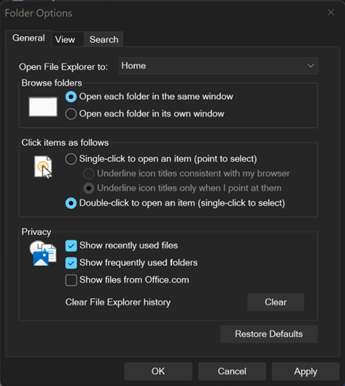
  • We’re continuing to make improvements to the dark mode experience in File Explorer. You will now see a consistent dark mode experience in the Folder Options dialog.
[caption id="attachment_178664" align="alignnone" width="345"]Updates to the Folder Options dialog in dark mode. Updates to the Folder Options dialog in dark mode.[/caption]
  • Addressed an issue where all File Explorer open windows and tabs might unexpectedly jump to Desktop or Home.

[Settings]

  • Improved reliability of configuring options in Settings > Bluetooth & Devices > Wheel.

[Nearby Sharing]

  • Improved the reliability of sending larger files using nearby sharing.

Reminders for Windows Insiders in the Canary Channel

  • Many features in the Canary Channel are rolled out using Control Feature Rollout technology, starting with a subset of Insiders and ramping up over time as we monitor feedback to see how they land before pushing them out to everyone in this channel.
  • The desktop watermark shown at the lower right corner of the desktop is normal for Windows Insider pre-release builds.
  • Some features may show up in the Dev and Beta Channels first before showing up in the Canary Channel.
  • Some features in active development we preview with Windows Insiders may not be fully localized and localization will happen over time as features are finalized. As you see issues with localization in your language, please report those issues to us via Feedback Hub.
  • To get off the Canary Channel, a clean install of Windows 11 will be required. As a reminder - Insiders can’t switch to a channel that is receiving builds with lower build numbers without doing a clean installation of Windows 11 due to technical setup requirements.
  • Check out Flight Hub for a complete look at what build is in which Insider channel.
Thanks, Windows Insider Program Team

Source: Announcing Windows 11 Insider Preview Build 28020.1673 (Canary Channel)
 
Hello Windows Insiders, today we are releasing Windows 11 Insider Preview Build 26300.7965 (KB 5079385) to the Dev Channel. Changes in Dev Channel builds and updates are documented in two buckets: new features, and improvements (including notable fixes) that are being gradually rolled out for Insiders who have turned on the toggle to get the latest updates as they are available (via Settings > Windows Update*) and then new features, and improvements (including notable fixes) rolling out to everyone in the Dev Channel. For more information, see the Reminders section at the bottom of this blog.

New features gradually being rolled out with toggle on*

[Administrator Protection]

Administrator protection is being re-enabled and aims to protect free floating admin rights for administrator users, allowing them to still perform all admin functions with just-in-time admin privileges. This feature is OFF by default and can be enabled via OMA-URI in Intune or via group policy.

Changes and Improvements gradually being rolled out with toggle on*

[Sharing]

Based on feedback we’re making some refinements to drag tray, using a smaller peek view to reduce accidental invocation and make it easier to dismiss when interacting near the top of the screen.

[File Explorer]

  • You can now use voice typing (Windows key plus H) when renaming files in File Explorer.
  • Removed white flash when launching new File Explorer windows or tabs when File Explorer was set to open to This PC. Also removed white flashes when resizing elements of File Explorer.
  • Improved reliability of unblocking files downloaded from the internet in order to preview them in File Explorer.

Reminders for Windows Insiders in the Dev Channel

  • Updates are based on Windows 11, version 25H2 via an enablement package (Build 26300.7965).
  • Many features are rolled out using Controlled Feature Rollout technology, starting with a subset of Insiders and ramping up over time as we monitor feedback to see how they land before pushing them out to everyone in this channel.
  • The desktop watermark shown at the lower right corner of the desktop is normal for Windows Insider pre-release builds.
  • For Windows Insiders who want to be the first to get features gradually rolled out to you, you can turn ON the toggle to get the latest updates as they are available via Settings > Windows Update*. Over time, we will increase the rollouts of features to everyone with the toggle turned on. Should you keep this toggle off, new features will gradually be rolled out to your PC over time once they are ready.
  • Features and experiences included in these builds may never get released as we try out different concepts and get feedback. Features may change over time, be removed, or replaced and never get released beyond Windows Insiders. Some of these features and experiences could show up in future Windows releases when they’re ready.
  • Some features in active development we preview with Windows Insiders may not be fully localized and localization will happen over time as features are finalized. As you see issues with localization in your language, please report those issues to us via Feedback Hub.
  • Check out Flight Hub for a complete look at what build is in which Insider channel.
Thanks, Windows Insider Program Team

Source: Announcing Windows 11 Insider Preview Build 26300.7965 (Dev Channel)
 
Hello Windows Insiders, today we are releasing Windows 11 Insider Preview Build 26220.7961 (KB 5079382) to the Beta Channel. Changes in Beta Channel builds and updates are documented in two buckets: new features, and improvements (including notable fixes) that are being gradually rolled out for Insiders who have turned on the toggle to get the latest updates as they are available (via Settings > Windows Update*) and then new features, and improvements (including notable fixes) rolling out to everyone in the Beta Channel. For more information, see the Reminders section at the bottom of this blog post.

New features gradually being rolled out with toggle on*

[Administrator Protection]

Administrator protection is being re-enabled and aims to protect free floating admin rights for administrator users, allowing them to still perform all admin functions with just-in-time admin privileges. This feature is OFF by default and can be enabled via OMA-URI in Intune or via group policy.

Changes and Improvements gradually being rolled out with toggle on*

[Sharing]

Based on feedback we’re making some refinements to drag tray, using a smaller peek view to reduce accidental invocation and make it easier to dismiss when interacting near the top of the screen.

[File Explorer]

  • You can now use voice typing (Windows key plus H) when renaming files in File Explorer.
  • Removed white flash when launching new File Explorer windows or tabs when File Explorer was set to open to This PC. Also removed white flashes when resizing elements of File Explorer.
  • Improved reliability of unblocking files downloaded from the internet in order to preview them in File Explorer.

Reminders for Windows Insiders in the Beta Channel

  • Updates are based on Windows 11, version 25H2 via an enablement package (Build 26220.7961).
  • Many features are rolled out using Controlled Feature Rollout technology, starting with a subset of Insiders and ramping up over time as we monitor feedback to see how they land before pushing them out to everyone in this channel.
  • The desktop watermark shown at the lower right corner of the desktop is normal for Windows Insider pre-release builds.
  • For Windows Insiders who want to be the first to get features gradually rolled out to you, you can turn ON the toggle to get the latest updates as they are available via Settings > Windows Update*. Over time, we will increase the rollouts of features to everyone with the toggle turned on. Should you keep this toggle off, new features will gradually be rolled out to your PC over time once they are ready.
  • Features and experiences included in these builds may never get released as we try out different concepts and get feedback. Features may change over time, be removed, or replaced and never get released beyond Windows Insiders. Some of these features and experiences could show up in future Windows releases when they’re ready.
  • Some features in active development we preview with Windows Insiders may not be fully localized and localization will happen over time as features are finalized. As you see issues with localization in your language, please report those issues to us via Feedback Hub.
  • Check out Flight Hub for a complete look at what build is in which Insider channel.
Thanks, Windows Insider Program Team

Source: Announcing Windows 11 Insider Preview Build 26220.7961 (Beta Channel)
 
Hello Windows Insiders, today we are releasing Windows 11 Insider Preview Build 28020.1685 to the Canary Channel. (KB 5079381)

What’s new in Canary Build 28020.1685

Changes and Improvements gradually being rolled out with toggle on*

[Storage]

  • Improved reliability of removing Windows Update files / windows.old files via Settings > System > Storage.

[File Explorer]

  • You can now use voice typing (Windows key plus H) when renaming files in File Explorer.

Reminders for Windows Insiders in the Canary Channel

  • Many features in the Canary Channel are rolled out using Control Feature Rollout technology, starting with a subset of Insiders and ramping up over time as we monitor feedback to see how they land before pushing them out to everyone in this channel.
  • The desktop watermark shown at the lower right corner of the desktop is normal for Windows Insider pre-release builds.
  • Some features may show up in the Dev and Beta Channels first before showing up in the Canary Channel.
  • Some features in active development we preview with Windows Insiders may not be fully localized and localization will happen over time as features are finalized. As you see issues with localization in your language, please report those issues to us via Feedback Hub.
  • To get off the Canary Channel, a clean install of Windows 11 will be required. As a reminder - Insiders can’t switch to a channel that is receiving builds with lower build numbers without doing a clean installation of Windows 11 due to technical setup requirements.
  • Check out Flight Hub for a complete look at what build is in which Insider channel.
Thanks, Windows Insider Program Team

Source: Announcing Windows 11 Insider Preview Build 28020.1685 (Canary Channel)
 
Hello Windows Insiders, today we’re releasing Windows 11 Builds 26100.8106 and 26200.8106 (KB5079387) to Insiders in the Release Preview Channel on Windows 11, versions 24H2 (Build 26100) and 25H2 (Build 26200). This update is available through two release phases: gradual rollout and normal rollout. A gradual rollout delivers an update in phases, so features reach devices over time instead of all at once, meaning availability varies by device. A normal rollout is the broad release to all eligible devices at the same time, usually when it reaches general availability (GA).

Gradual rollout

Windows 11 PC experiences

This section highlights new features and enhancements for Windows 11 PCs, including AI-powered capabilities, continuous innovation, and performance improvements.
  • [Narrator] New!1 Narrator provides rich image descriptions on Copilot+ PCs and now works with Copilot on all Windows11 devices. Press Narrator key + Ctrl + D to describe the focused image or Narrator key + Ctrl + S to describe the full screen. Copilot opens with the image ready, allowing you to enter a prompt for a customized description. The image is shared only after you choose to describe it. On Copilot+ PCs, Narrator gives instant, on‑device descriptions, and you can select Ask Copilot for more detail.
  • [Smart App Control] New! You can turn Smart App Control (SAC) on or off without needing a clean install. To make changes, go to Settings > Windows Security > App & Browser Control > Smart App Control settings. When turned on, SAC helps block untrusted or potentially harmful apps. To learn more, see App & Browser Control in the Windows Security App – Microsoft Support. This feature was previously disclosed in the January 2026 release notes (KB5074105) and is now beginning to roll out.
  • [Settings]
    • New! The Settings About page (Settings > System > About) has been improved to provide a more structured and intuitive experience, offering clearer device specifications and easier navigation to related device components, including quick access to Storage settings.
    • New!2 The device information card on the Settings Home pagesimplifies key device specifications and improves consistency across the end-to-end flow from the Home Card to the Settings > System > About page, making information easier to scan and understand.
    • Improved the performance of loading Home in Settings.
    • Improved reliability of downloading necessary updates when prompted in Settings > System > Advanced.
  • [Account Settings]
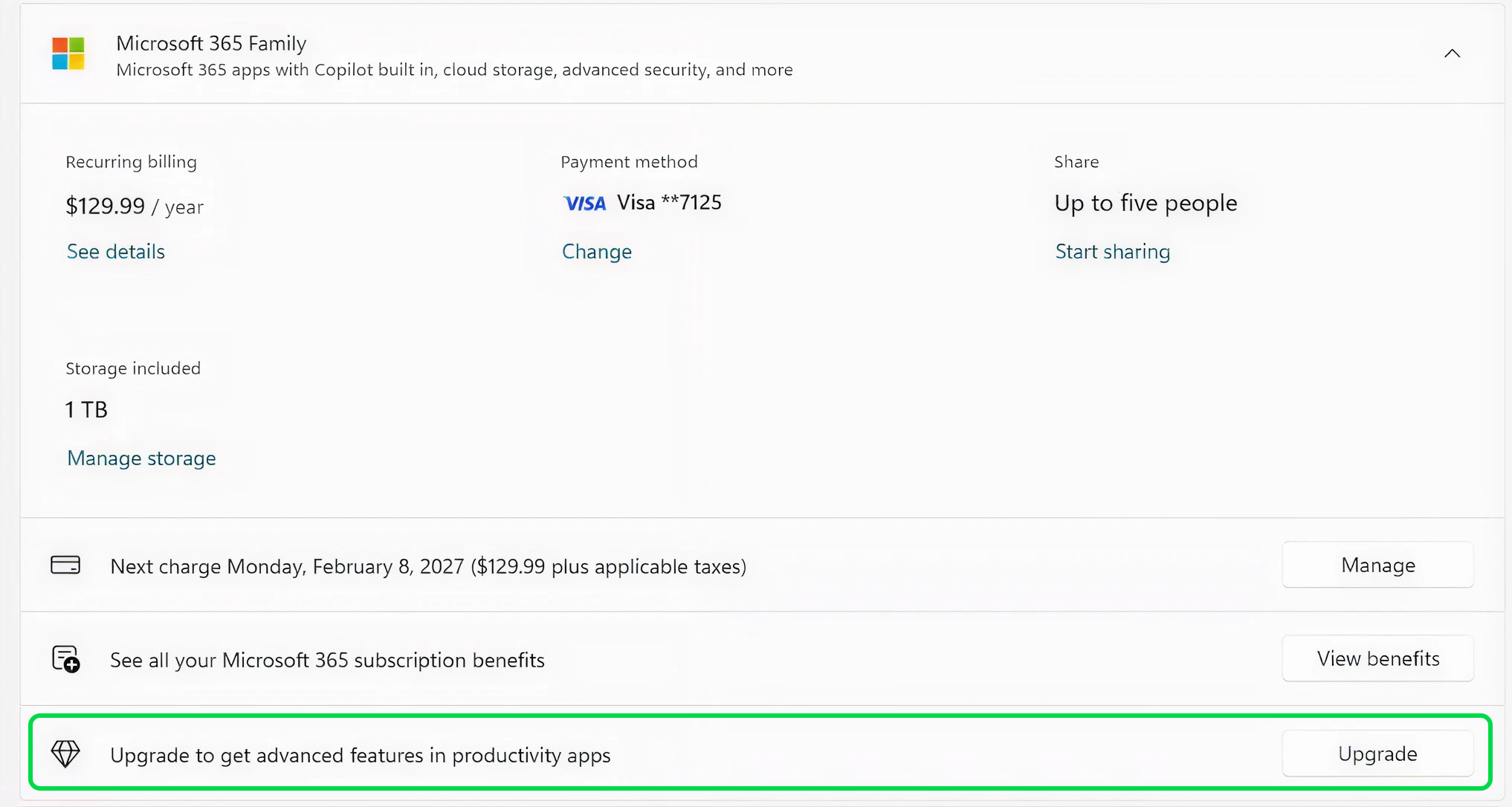
    • New! Microsoft 365 Family subscribers can upgrade to a different Microsoft 365 plan from Settings > Accounts. To remove the upgrade option, turn off Suggested content in Settings.
    • New! This update improves the design of the dialog boxes in Settings > Accounts > Other users to match the modern Windows look and support dark mode. The visibility of the dialog box option depends on whether the device has a domain joined work or school account.
  • [Input] New! Windows introduces a cleaner, modern pen setting experience. You can now choose the new Same as Copilot key option, which enables the pen tail button to open the same app as the Copilot key.
  • [File Explorer]
    • Improved reliability of unblocking files downloaded from the internet in order to preview them in File Explorer.
    • You can now use Voice Typing (Windows key plus H) when renaming a file in File Explorer.
    • You can now sort the permissions entries in the Advanced Security Settings window for a folder in File Explorer by Principal.
  • [Display]
    • Monitors can now report refresh rates higher than 1000 Hz.
    • While using a native USB4 monitor connection, the USB controller can now go to the lowest power level while the PC is sleeping, saving battery life.
    • Improved reliability of auto rotation after resuming from sleep.
    • Improved HDR reliability for displays with non-compliant DisplayID 2.0 blocks.
    • Monitors with DisplayID now report a more accurate size when using the WMI monitor APIs.
  • [Printing]
    • Updated downlevel baseline support for printer connections to be Windows 10, version 1607 / Windows Server 2016 (Build 14393).
  • [Windows Hello] Improved: Windows Hello Fingerprint reliability for certain devices.
  • [Safe mode] Improved reliability of loading components of the taskbar in safe mode.
  • [Voice Access] Improved how numbers are detected and written when using Voice Access in English.
  • [Start menu] Improved reliability of applying Start menu layout via group policy when desktopAppLink is present in the JSON.
  • [Remote Desktop] The Set-RDSessionCollectionConfiguration PowerShell command now recognizes DisableSeamlessLanguageBar.
  • [Audio] Improved handling of short MIDI messages in cases where an application was initialized without providing long message buffers.
  • [System File Checker] Removed extraneous error message you might unexpectedly see when running sfc /scannow.
1This feature isn’t available in the European Economic Area. 2Availability will vary by device and market.

Normal rollout

This non-security update includes quality improvements. The following summary outlines key issues addressed by the KB update after you install it. Also, included are available new features. The bold text within the brackets indicates the item or area of the change.
  • [Narrator] This update improves the Natural Voices experience in Narrator. It also makes Natural Voices setup more reliable.
  • [Performance & Reliability] This update improves stability in Windows Recovery Environment (Windows RE) when you run x64 apps on ARM64 devices. These apps run more smoothly and respond as expected.
Thanks, Windows Insider Program Team

Source: Releasing Windows 11 Builds 26100.8106 and 26200.8106 to the Release Preview Channel
 
I might give this a go, and report back.
OK. I dsabled SAC, and enroled in Insider program, downloaded release preview. Result: SAC is off, and enable options are greyed out. Fail.
I will wipe and load recent image. This time I will keep SAC enabled and join Insider release preview program, and see what happens.
 
  • Like
Reactions: Parkinsond
Hello Windows Insiders, today we are releasing Windows 11 Insider Preview Build 26220.8062 (KB 5079458) to the Beta Channel. Changes in Beta Channel builds and updates are documented in two buckets: new features, and improvements (including notable fixes) that are being gradually rolled out for Insiders who have turned on the toggle to get the latest updates as they are available (via Settings > Windows Update*) and then new features, and improvements (including notable fixes) rolling out to everyone in the Beta Channel. For more information, see the Reminders section at the bottom of this blog post.

Changes and Improvements gradually being rolled out with toggle on*

[Policy-Based Removal of Preinstalled Microsoft Apps]

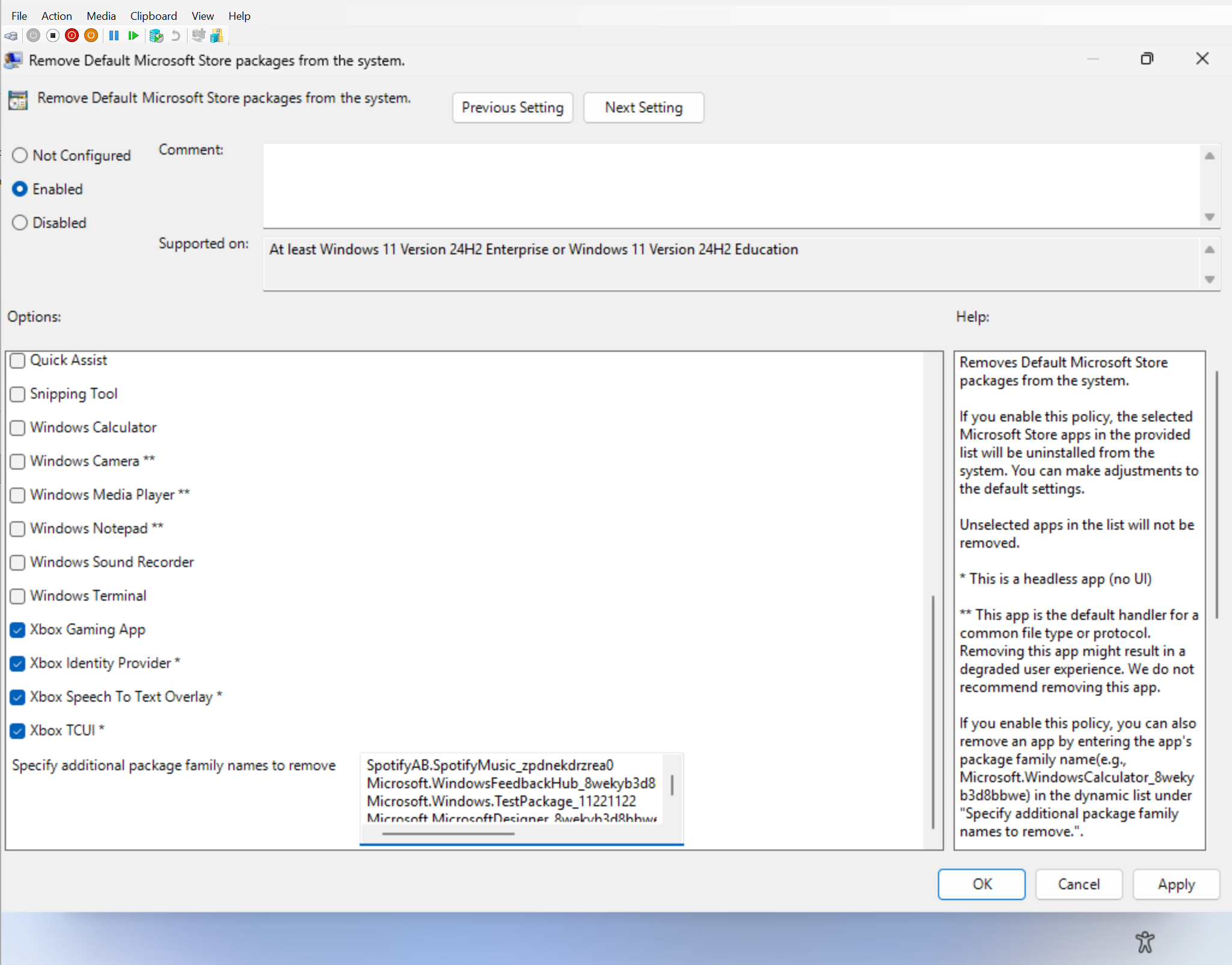
  • We have updated the “Remove Default Microsoft Store packages” policy for Windows ENT/EDU to include a dynamic app removal list. IT administrators can now remove MSIX/APPX apps by adding their app package family name (PFNs) to a dynamic list.
  • To access the policy in Group Policy settings, open the local Group Policy Editor (gedit.msc) and navigate to Computer Configuration > Administrative Templates > Windows Components > App Package Deployment > Remove Default Microsoft Store packages from the system.
  • To remove an app via the dynamic list, add its app family package name to the multi-text list under “Specify additional package family names to remove.”
  • To find app family package names, run the Get-AppxPackage command in a terminal. For example, here’s a command to get the package family name for Notepad:

    • Get-AppxPackage *Notepad* | Select-Object PackageFamilyName
[caption id="attachment_178722" align="alignnone" width="2049"]IT Administrator view of removing preinstalled Microsoft Store packages. IT Administrator view of removing preinstalled Microsoft Store packages.[/caption]
  • The dynamic list is currently unavailable in the corresponding Intune CSP. When this feature becomes generally available, you can search for Remove Default Microsoft Store packages settings in the Settings picker.
    • Known Limitation – OMA-URI and Multi-Entry Validation: OMA-URI cannot be used to validate multi-entry ADMX multi-Text policies; therefore, validation for the dynamic list must be done via Settings Catalog in Intune or Group Policy. Given that the Intune setting is not yet available in WIP, you will need to test using Group Policy.
  • For information on the generally available policy, visit Policy-based in-box app removal.
Feedback: Share your thoughts in Feedback Hub (WIN + F) under Developer Platform > App Deployment.

[Windows Setup Experience]

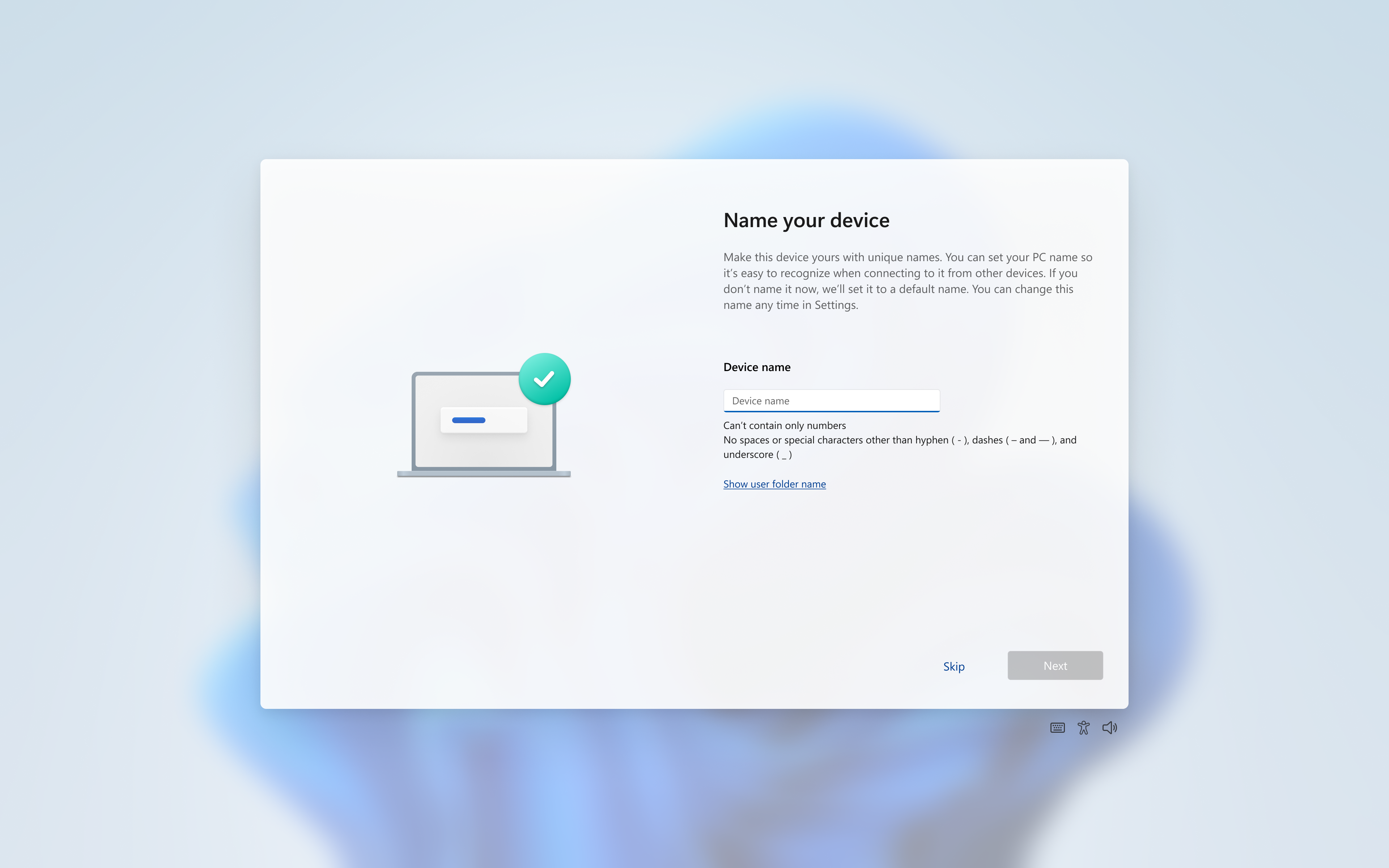
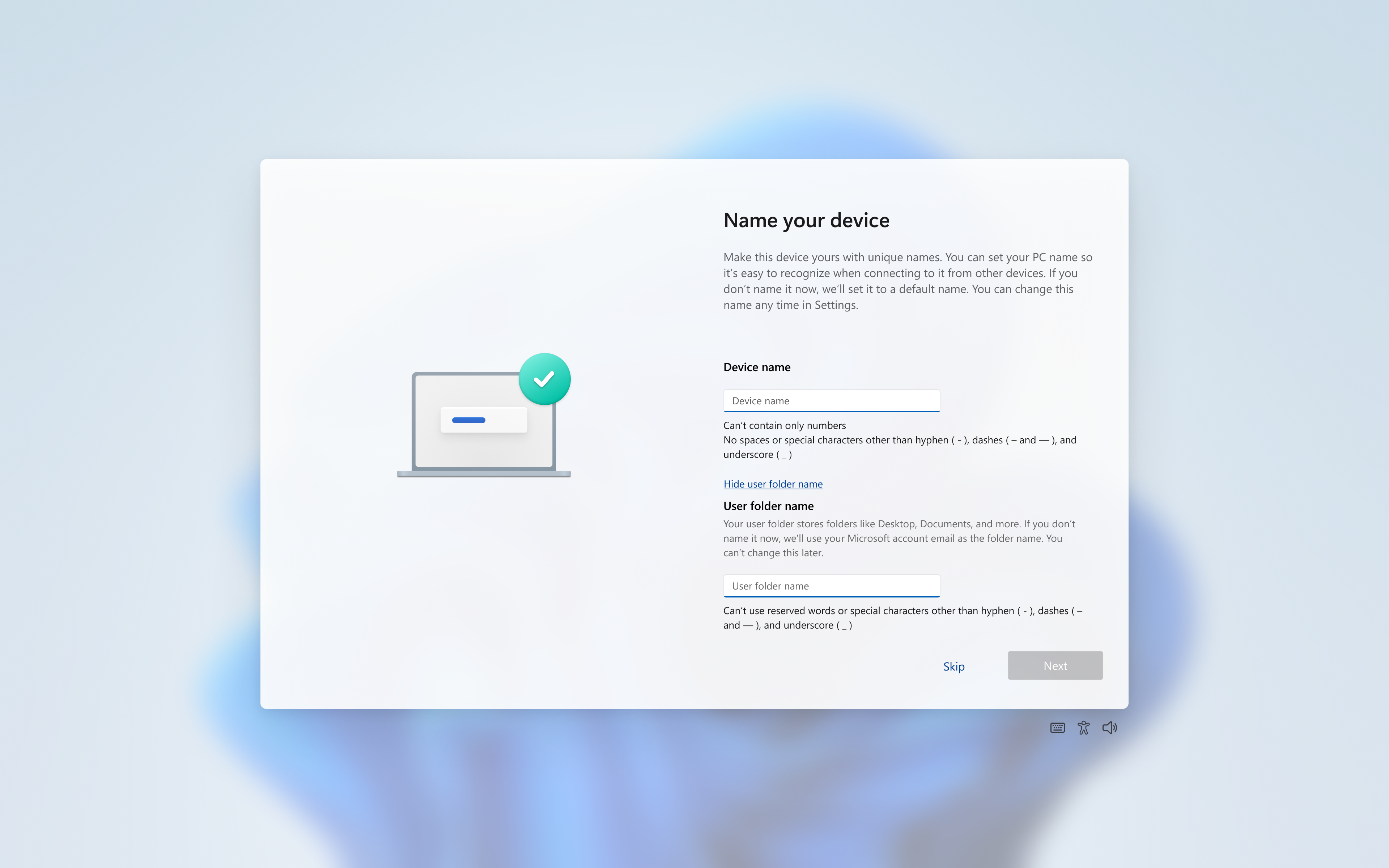
  • Expanding on our work which started rolling to Insiders last fall, you can now choose a custom name for your user folder on the Device Name page when going through Windows setup. This most recent update now makes it easier to choose a custom name. The naming option is available during setup only. If you skip this step, Windows will use the default folder name and continue setup as usual.
  • Note: User folder names must follow standard Windows naming requirements.
[caption id="attachment_178725" align="alignnone" width="3840"]Default state of the device name page. Default state of the device name page.[/caption] [caption id="attachment_178726" align="alignnone" width="3840"]Expanded state with the user folder input box. Expanded state with the user folder input box.[/caption] Feedback: Share your thoughts in Feedback Hub (WIN + F) under Install and Update > Initial out of box setup.

[Windows Driver Policy update]

  • The Windows kernel has historically allowed 3rd party kernel drivers from the now- deprecated cross-signed root program and the Windows Hardware Compatibility Program (WHCP). The WHCP program is a major step up in security compared to the cross-signed driver program, requiring driver compatibility testing, identity vetting and verification and virus scanning.
  • Starting with this update, the Windows kernel will enforce a new policy removing default trust for cross-signed drivers. The policy allows 3rd party drivers from the WHCP program by default, with an allow list of trustworthy publishers and drivers from the cross-signing program.
  • The feature is enabled in audit mode for a minimum of 100 hours and 3 reboots. If Windows determines that the drivers loaded during this time are compatible with the new policy, the feature is enabled. Otherwise, the system stays in audit mode.
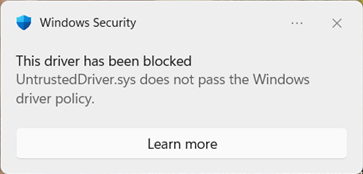
  • After enablement, while unlikely, some users running in enforcement mode may see cross-signed drivers blocked:
[caption id="attachment_178723" align="alignnone" width="363"]Driver block toast notification. Driver block toast notification.[/caption] Feedback: Share your thoughts in Feedback Hub (WIN + F) under Security and Privacy > Application Control.

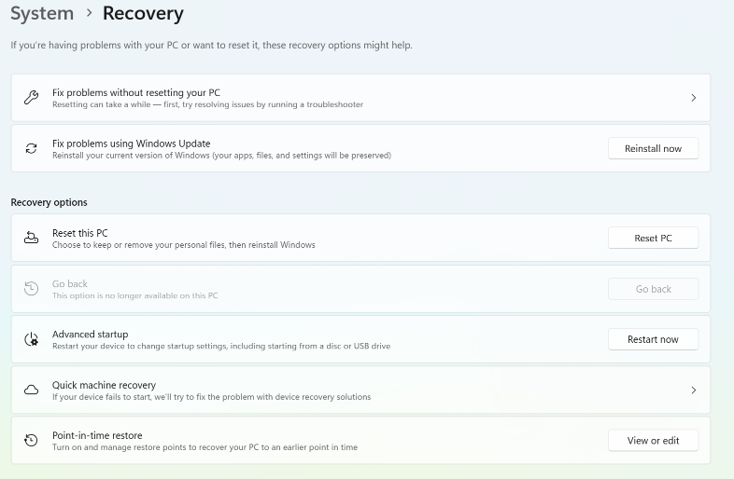
[Point-in-time restore updates]:

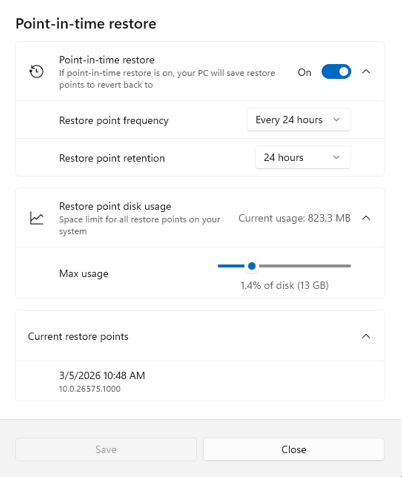
  • When you launch point-in-time restore, local admins will see a settings dialog (behind a User Account Control (UAC) prompt) where they can view or change the default restore settings.
  • This experience also now shows a list of restore points available on the device.
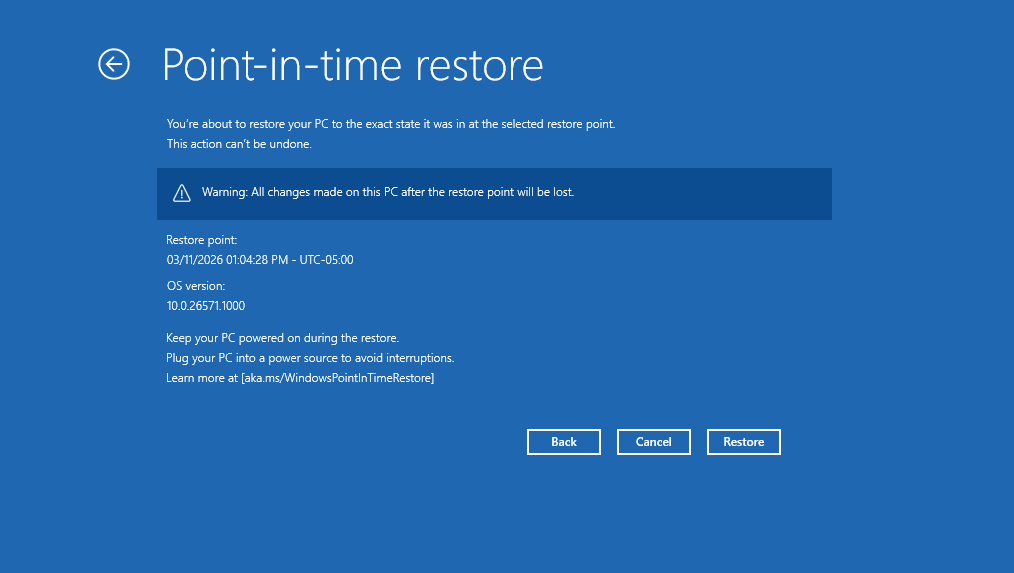
[caption id="attachment_178719" align="alignnone" width="734"]Point-in-time restore settings (local admin view). Point-in-time restore settings (local admin view).[/caption] [caption id="attachment_178720" align="alignnone" width="402"]List of available restore points. List of available restore points.[/caption] Updated messaging in the WinRE restore experience:
  • Added a recommendation to plug your device into a power source during the restore.
  • The OS version number is now shown in a 4-part format (instead of 2-part).
[caption id="attachment_178721" align="alignnone" width="1014"]Point-in-time restore updated messaging. Point-in-time restore updated messaging.[/caption] Feedback: Share your thoughts in Feedback Hub (WIN + F) under Recovery and Uninstall > Point-in-time restore.

[Drag Tray > Drop Tray]

  • Expanding on our work last week, Drag Tray has been now renamed to Drop Tray. We’re also moving the corresponding settings for Drop Tray from Nearby Sharing to now be under System > Multitasking.

[Input]

  • Pen settings: we have made refinements to the Pen settings page including small changes to the options for the pen tail button. A new option, "Same as Copilot key", enables the pen tail button to launch the same app as the Copilot key.
Feedback: Share your thoughts in Feedback Hub (WIN + F) under Devices and Drivers > Bluetooth – Keyboards, Mice, and Pens.

[File Explorer]

[Other]

  • Improved reliability of setting and using preferred display language.
  • Removed extraneous unexpected error from sfc/scannow.

Reminders for Windows Insiders in the Beta Channel

  • Updates are based on Windows 11, version 25H2 via an enablement package (Build 26220.8062).
  • Many features are rolled out using Controlled Feature Rollout technology, starting with a subset of Insiders and ramping up over time as we monitor feedback to see how they land before pushing them out to everyone in this channel.
  • The desktop watermark shown at the lower right corner of the desktop is normal for Windows Insider pre-release builds.
  • For Windows Insiders who want to be the first to get features gradually rolled out to you, you can turn ON the toggle to get the latest updates as they are available via Settings > Windows Update*. Over time, we will increase the rollouts of features to everyone with the toggle turned on. Should you keep this toggle off, new features will gradually be rolled out to your PC over time once they are ready.
  • Features and experiences included in these builds may never get released as we try out different concepts and get feedback. Features may change over time, be removed, or replaced and never get released beyond Windows Insiders. Some of these features and experiences could show up in future Windows releases when they’re ready.
  • Some features in active development we preview with Windows Insiders may not be fully localized and localization will happen over time as features are finalized. As you see issues with localization in your language, please report those issues to us via Feedback Hub.
  • Check out Flight Hub for a complete look at what build is in which Insider channel.
Thanks, Windows Insider Program Team

Source: Announcing Windows 11 Insider Preview Build 26220.8062 (Beta Channel)
 
Hello Windows Insiders, today we are releasing Windows 11 Insider Preview Build 26300.8068 (KB 5079464) to the Dev Channel. Changes in Dev Channel builds and updates are documented in two buckets: new features, and improvements (including notable fixes) that are being gradually rolled out for Insiders who have turned on the toggle to get the latest updates as they are available (via Settings > Windows Update*) and then new features, and improvements (including notable fixes) rolling out to everyone in the Dev Channel. For more information, see the Reminders section at the bottom of this blog.

Changes and Improvements gradually being rolled out with toggle on*

[Policy-Based Removal of Preinstalled Microsoft Apps]

  • We have updated the “Remove Default Microsoft Store packages” policy for Windows ENT/EDU to include a dynamic app removal list. IT administrators can now remove MSIX/APPX apps by adding their app package family name (PFNs) to a dynamic list.
  • To access the policy in Group Policy settings, open the local Group Policy Editor (gedit.msc) and navigate to Computer Configuration > Administrative Templates > Windows Components > App Package Deployment > Remove Default Microsoft Store packages from the system.
  • To remove an app via the dynamic list, add its app family package name to the multi-text list under “Specify additional package family names to remove.”
  • To find app family package names, run the Get-AppxPackage command in a terminal. For example, here’s a command to get the package family name for Notepad.

    • Get-AppxPackage *Notepad* | Select-Object PackageFamilyName
[caption id="attachment_178722" align="alignnone" width="2049"]
IT Administrator view of removing preinstalled Microsoft Store packages.
IT Administrator view of removing preinstalled Microsoft Store packages.[/caption]
  • The dynamic list is currently unavailable in the corresponding Intune CSP. When this feature becomes generally available, you can search for Remove Default Microsoft Store packages settings in the Settings picker.
    • Known Limitation – OMA-URI and Multi-Entry Validation: OMA-URI cannot be used to validate multi-entry ADMX multi-Text policies; therefore, validation for the dynamic list must be done via Settings Catalog in Intune or Group Policy. Given that the Intune setting is not yet available in WIP, you will need to test using Group Policy.
  • For information on the generally available policy, visit Policy-based in-box app removal.
Feedback: Share your thoughts in Feedback Hub (WIN + F) under Developer Platform > App Deployment.

[Windows Setup Experience]

  • Expanding on our work which started rolling to Insiders last fall, you can now choose a custom name for your user folder on the Device Name page when going through Windows setup. This most recent update now makes it easier to choose a custom name. The naming option is available during setup only. If you skip this step, Windows will use the default folder name and continue setup as usual.
Note: User folder names must follow standard Windows naming requirements. [caption id="attachment_178725" align="alignnone" width="3840"]
Default state of the device name page.
Default state of the device name page.[/caption] [caption id="attachment_178726" align="alignnone" width="3840"]
Expanded state with the user folder input box.
Expanded state with the user folder input box.[/caption] Feedback: Share your thoughts in Feedback Hub (WIN + F) under Install and Update > Initial out of box setup.

[Windows Driver Policy update]

  • The Windows kernel has historically allowed 3rd party kernel drivers from the now- deprecated cross-signed root program and the Windows Hardware Compatibility Program (WHCP). The WHCP program is a major step up in security compared to the cross-signed driver program, requiring driver compatibility testing, identity vetting and verification and virus scanning.
  • Starting with this update, the Windows kernel will enforce a new policy removing default trust for cross-signed drivers. The policy allows 3rd party drivers from the WHCP program by default, with an allow list of trustworthy publishers and drivers from the cross-signing program.
  • The feature is enabled in audit mode for a minimum of 100 hours and 3 reboots. If Windows determines that the drivers loaded during this time are compatible with the new policy, the feature is enabled. Otherwise, the system stays in audit mode.
  • After enablement, while unlikely, some users running in enforcement mode may see cross-signed drivers blocked:
[caption id="attachment_178723" align="alignnone" width="363"]
Driver block toast notification
Driver block toast notification.[/caption] Feedback: Share your thoughts in Feedback Hub (WIN + F) under Security and Privacy > Application Control.

[Point-in-time restore updates]:

  • When you launch point-in-time restore, local admins will see a settings dialog (behind a User Account Control (UAC) prompt) where they can view or change the default restore settings.
  • This experience also now shows a list of restore points available on the device.
[caption id="attachment_178719" align="alignnone" width="734"]
Point-in-time restore settings (local admin view).
Point-in-time restore settings (local admin view).[/caption] [caption id="attachment_178720" align="alignnone" width="402"]
List of available restore points.
List of available restore points.[/caption] Updated messaging in the WinRE restore experience:
  • Added a recommendation to plug your device into a power source during the restore.
  • The OS version number is now shown in a 4-part format (instead of 2-part).
[caption id="attachment_178721" align="alignnone" width="1014"]
Point-in-time restore updated messaging.
Point-in-time restore updated messaging.[/caption] Feedback: Share your thoughts in Feedback Hub (WIN + F) under Recovery and Uninstall > Point-in-time restore.

[Account Settings]

Microsoft 365 Family subscribers will find an option to upgrade to a different 365 plan on the Accounts page within the Settings app. You can also remove the upgrade option by turning off suggested content in settings. [caption id="attachment_178609" align="alignnone" width="2034"]
New upgrade prompt on the Accounts page.
New upgrade prompt on the Accounts page.[/caption] Feedback: Share your thoughts in Feedback Hub (WIN + F) under Settings > Settings Homepage.

[Drag Tray > Drop Tray]

  • Expanding on our work last week, Drag Tray has been now renamed to Drop Tray. We’re also moving the corresponding settings for Drop Tray from Nearby Sharing to now be under System > Multitasking.

[Input]

  • Pen settings: we have made refinements to the Pen settings page including small changes to the options for the pen tail button. A new option, "Same as Copilot key", enables the pen tail button to launch the same app as the Copilot key.
Feedback: Share your thoughts in Feedback Hub (WIN + F) under Devices and Drivers > Bluetooth – Keyboards, Mice, and Pens.

[File Explorer]

[Other]

  • Improved reliability of setting and using preferred display language.
  • Removed extraneous unexpected error from sfc/scannow.

Reminders for Windows Insiders in the Dev Channel

  • Updates are based on Windows 11, version 25H2 via an enablement package (Build 26300.8068).
  • Many features are rolled out using Controlled Feature Rollout technology, starting with a subset of Insiders and ramping up over time as we monitor feedback to see how they land before pushing them out to everyone in this channel.
  • The desktop watermark shown at the lower right corner of the desktop is normal for Windows Insider pre-release builds.
  • For Windows Insiders who want to be the first to get features gradually rolled out to you, you can turn ON the toggle to get the latest updates as they are available via Settings > Windows Update*. Over time, we will increase the rollouts of features to everyone with the toggle turned on. Should you keep this toggle off, new features will gradually be rolled out to your PC over time once they are ready.
  • Features and experiences included in these builds may never get released as we try out different concepts and get feedback. Features may change over time, be removed, or replaced and never get released beyond Windows Insiders. Some of these features and experiences could show up in future Windows releases when they’re ready.
  • Some features in active development we preview with Windows Insiders may not be fully localized and localization will happen over time as features are finalized. As you see issues with localization in your language, please report those issues to us via Feedback Hub.
  • Check out Flight Hub for a complete look at what build is in which Insider channel.
Thanks, Windows Insider Program Team

Source: Announcing Windows 11 Insider Preview Build 26300.8068 (Dev Channel)
 
Hello Windows Insiders, today we are releasing Windows 11 Insider Preview Build 28020.1737 to the Canary Channel. (KB 5079452)

What’s new in Canary Build 28020.1737

Changes and Improvements gradually being rolled out with toggle on*

[Input]

  • Pen settings: we have made refinements to the Pen settings page including small changes to the options for the pen tail button. A new option, "Same as Copilot key", enables the pen tail button to launch the same app as the Copilot key.
Feedback: Share your thoughts in Feedback Hub (WIN + F) under Devices and Drivers > Bluetooth – Keyboards, Mice, and Pens.

Reminders for Windows Insiders in the Canary Channel

  • Many features in the Canary Channel are rolled out using Control Feature Rollout technology, starting with a subset of Insiders and ramping up over time as we monitor feedback to see how they land before pushing them out to everyone in this channel.
  • The desktop watermark shown at the lower right corner of the desktop is normal for Windows Insider pre-release builds.
  • Some features may show up in the Dev and Beta Channels first before showing up in the Canary Channel.
  • Some features in active development we preview with Windows Insiders may not be fully localized and localization will happen over time as features are finalized. As you see issues with localization in your language, please report those issues to us via Feedback Hub.
  • To get off the Canary Channel, a clean install of Windows 11 will be required. As a reminder - Insiders can’t switch to a channel that is receiving builds with lower build numbers without doing a clean installation of Windows 11 due to technical setup requirements.
  • Check out Flight Hub for a complete look at what build is in which Insider channel.
Thanks, Windows Insider Program Team

Source: Announcing Windows 11 Insider Preview Build 28020.1737 (Canary Channel)
 
Hello Windows Insiders, today we’re releasing Windows Insider Preview Build 29550.1000 to the Windows 11 Insider Canary Channel on the optional 29500 build series.

What’s new in Canary Build 29550.1000

Changes and Improvements gradually being rolled out with toggle on*

  • This update includes platform changes in moving to a new active development build.

[Emoji]

  • The Emoji 16.0 release introduces a small thoughtfully curated set of new emojis, one from each major category. Each emoji carries timeless symbolism and practical versatility. These new emojis now appear in the emoji panel.

[Camera Settings]

  • You can control pan and tilt for supported cameras in the Settings app. The controls appear under Settings> Bluetooth & devices > Cameras, in the “Basic settings” section for your selected camera.

[Power]

  • Changes to global power settings (for example, Display, Sleep, Hibernate timeouts, Power/Sleep button, and lid close actions) from Settings are now applied to all power plans. This should help improve persistence of chosen settings.

[File Explorer]

  • You can now use voice typing (Windows key plus H) when renaming files in File Explorer.

[Settings]

  • Improved performance of loading Settings Home.
  • Improved Settings reliability when navigating to Privacy & Security.
  • Improved reliability of updating necessary components when prompted under System > Advanced > File Explorer.
  • Improved reliability of configuring custom tools in Bluetooth & Devices > Wheel.

[Nearby Sharing]

  • Improved the reliability of sending larger files using nearby sharing.

[Other]

Reminders for Windows Insiders in the Canary Channel

  • These builds can be unstable and may be released with limited documentation. Join Windows Insider – Get early access to Windows 11 features & updates
  • The builds we release to the Canary Channel represent the latest platform changes early in the development cycle and should not be seen as matched to any specific release of Windows. Features and experiences included in these builds may never get released as we try out different concepts and get feedback. Features may change over time, be removed, or replaced and never get released beyond Windows Insiders. Some of these features and experiences could show up in future Windows releases when they’re ready.
  • Many features in the Canary Channel are rolled out using Control Feature Rollout technology, starting with a subset of Insiders and ramping up over time as we monitor feedback to see how they land before pushing them out to everyone in this channel.
  • The desktop watermark shown at the lower right corner of the desktop is normal for Windows Insider pre-release builds.
  • Some features may show up in the Dev and Beta Channels first before showing up in the Canary Channel.
  • Some features in active development we preview with Windows Insiders may not be fully localized and localization will happen over time as features are finalized. As you see issues with localization in your language, please report those issues to us via Feedback Hub.
  • To get off the Canary Channel, a clean install of Windows 11 will be required.
  • Check out Flight Hub for a complete look at what build is in which Insider channel.
Thanks, Windows Insider Program Team

Source: Announcing Windows 11 Insider Preview Build for Canary Channel 29550.1000
 
Ok, I did a wipe & reload of image from backup. enroled and downloaded insider release preview and turned off SAC. Still unable to activate after turning off. It would appear that this is a gradual feature release from Microsoft and my PC did not have a winning lottery ticket.
 
  • +Reputation
Reactions: Parkinsond
Hello Windows Insiders, today we are releasing Windows 11 Insider Preview Build 26220.8079 (KB 5079482) to the Beta Channel. Changes in Beta Channel builds and updates are documented in two buckets: new features, and improvements (including notable fixes) that are being gradually rolled out for Insiders who have turned on the toggle to get the latest updates as they are available (via Settings > Windows Update*) and then new features, and improvements (including notable fixes) rolling out to everyone in the Beta Channel. For more information, see the Reminders section at the bottom of this blog post.

Changes and Improvements gradually being rolled out with toggle on*

[Input]

  • Improved explorer.exe reliability when closing the input flyout.
  • Improved reliability of configuring fluid dictation option in voice typing (Windows key plus H) settings.

[Network and Sharing]

  • We fixed an issue where the Network and Sharing Center could incorrectly display two active Wi-Fi connections after switching from one Wi-Fi network to another. The Network and Sharing Center now correctly reflects a single active Wi-Fi connection when you connect to a new network.

Reminders for Windows Insiders in the Beta Channel

  • Many features are rolled out using Controlled Feature Rollout technology, starting with a subset of Insiders and ramping up over time as we monitor feedback to see how they land before pushing them out to everyone in this channel.
  • The desktop watermark shown at the lower right corner of the desktop is normal for Windows Insider pre-release builds.
  • For Windows Insiders who want to be the first to get features gradually rolled out to you, you can turn ON the toggle to get the latest updates as they are available via Settings > Windows Update*. Over time, we will increase the rollouts of features to everyone with the toggle turned on. Should you keep this toggle off, new features will gradually be rolled out to your PC over time once they are ready.
  • Features and experiences included in these builds may never get released as we try out different concepts and get feedback. Features may change over time, be removed, or replaced and never get released beyond Windows Insiders. Some of these features and experiences could show up in future Windows releases when they’re ready.
  • Some features in active development we preview with Windows Insiders may not be fully localized and localization will happen over time as features are finalized. As you see issues with localization in your language, please report those issues to us via Feedback Hub.
  • Check out Flight Hub for a complete look at what build is in which Insider channel.
Thanks, Windows Insider Program Team

Source: Announcing Windows 11 Insider Preview Build 26220.8079 (Beta Channel)
 
Hello Windows Insiders, today we are releasing Windows 11 Insider Preview Build 26300.8085 (KB 5079483) to the Dev Channel. Changes in Dev Channel builds and updates are documented in two buckets: new features, and improvements (including notable fixes) that are being gradually rolled out for Insiders who have turned on the toggle to get the latest updates as they are available (via Settings > Windows Update*) and then new features, and improvements (including notable fixes) rolling out to everyone in the Dev Channel. For more information, see the Reminders section at the bottom of this blog.

Changes and Improvements gradually being rolled out with toggle on*

[Pointer Indicator: Accessibility setting for low vision Windows users]

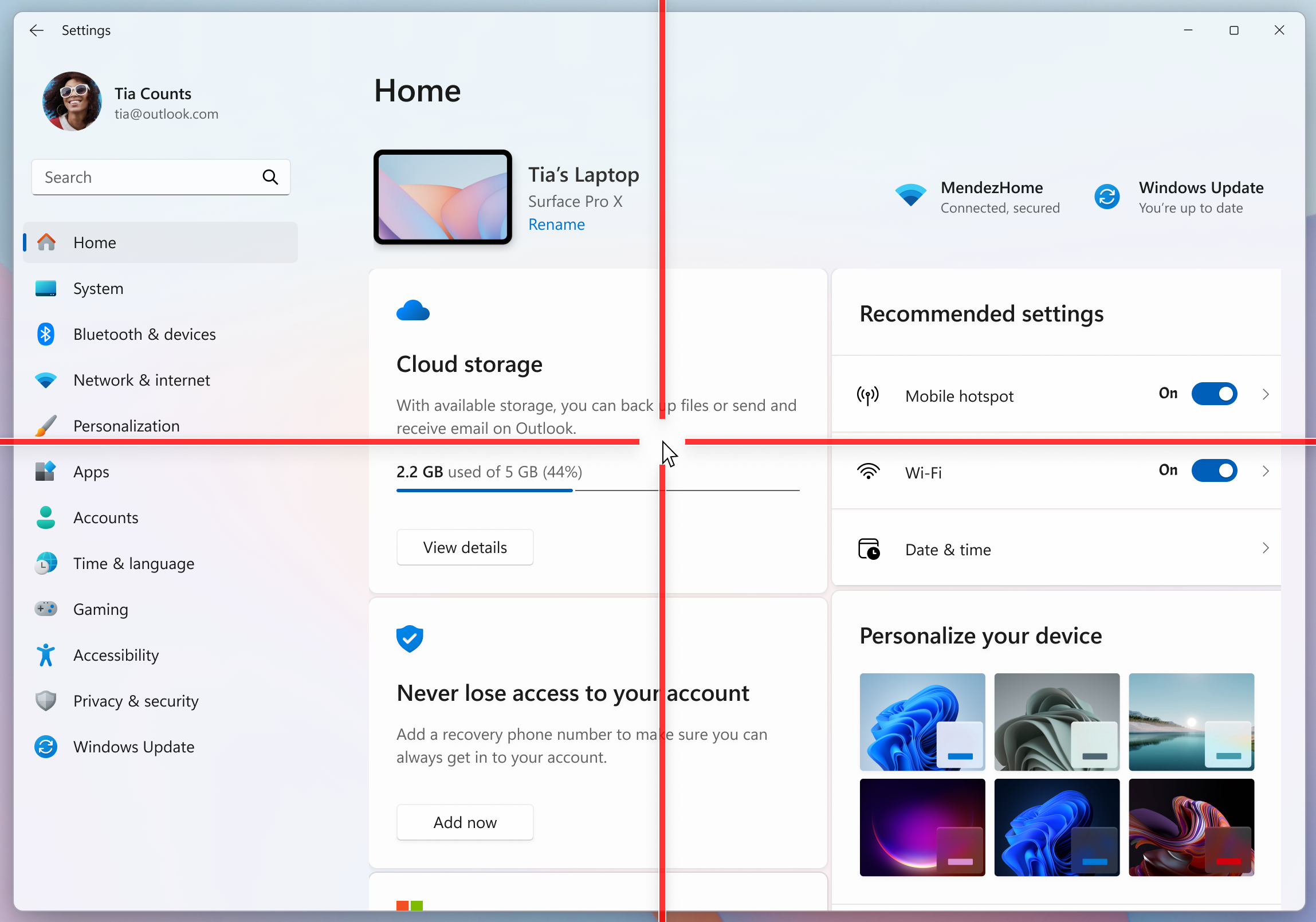
We are resuming the rollout of the Point Indicator Accessibility setting. This feature enables low vision users on Windows to easily locate and use their cursor to increase productivity and efficiency when using a Windows device. [caption id="attachment_178779" align="alignnone" width="2297"]
Mouse pointer indicator shown over Settings in Windows 11.
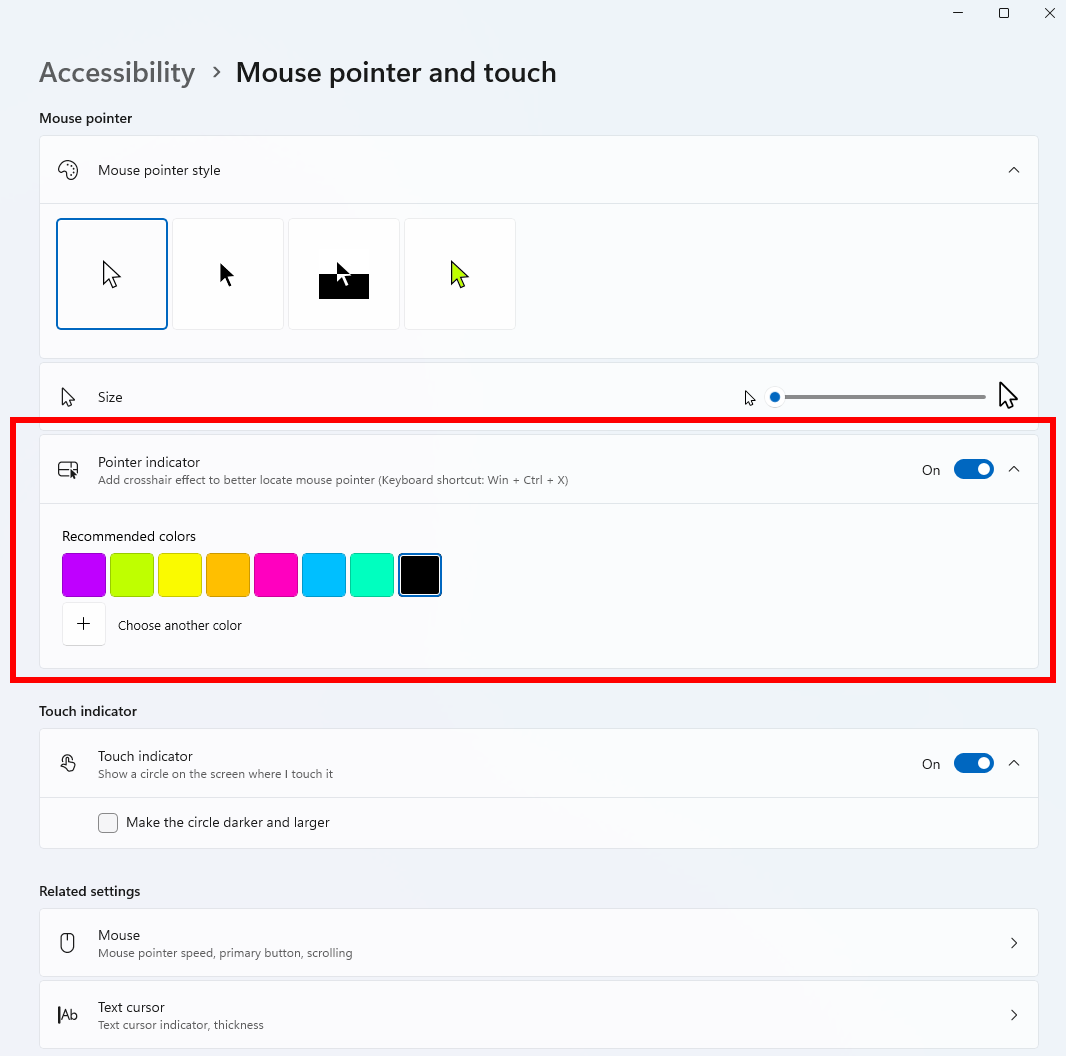
Mouse pointer indicator shown over Settings in Windows 11.[/caption] To enable this experience, go to Settings > Accessibility > Mouse pointer and touch and enable the Pointer indicator setting. You can also search for the setting by name. When the setting is enabled, you can toggle it on/off with the keyboard shortcut, Win + Ctrl + Shift + X. [caption id="attachment_178780" align="alignnone" width="1066"]
Settings shown for turning on the mouse pointer indicator.
Settings shown for turning on the mouse pointer indicator.[/caption] We welcome your feedback about the cursor and crosshair experience with this accessibility setting. FEEDBACK: Please file feedback in Feedback Hub (WIN + F) under Accessibility > Accessibility Settings.

[Windows Magnifier]

  • Windows magnifier can now magnify protected content.

[Network and Sharing]

  • We fixed an issue where the Network and Sharing Center could incorrectly display two active Wi-Fi connections after switching from one Wi-Fi network to another. The Network and Sharing Center now correctly reflects a single active Wi-Fi connection when you connect to a new network.

[Input]

  • Improved explorer.exe reliability when closing the input flyout.
  • Improved reliability of configuring fluid dictation option in voice typing (Windows key plus H) settings.

[Feedback Hub]

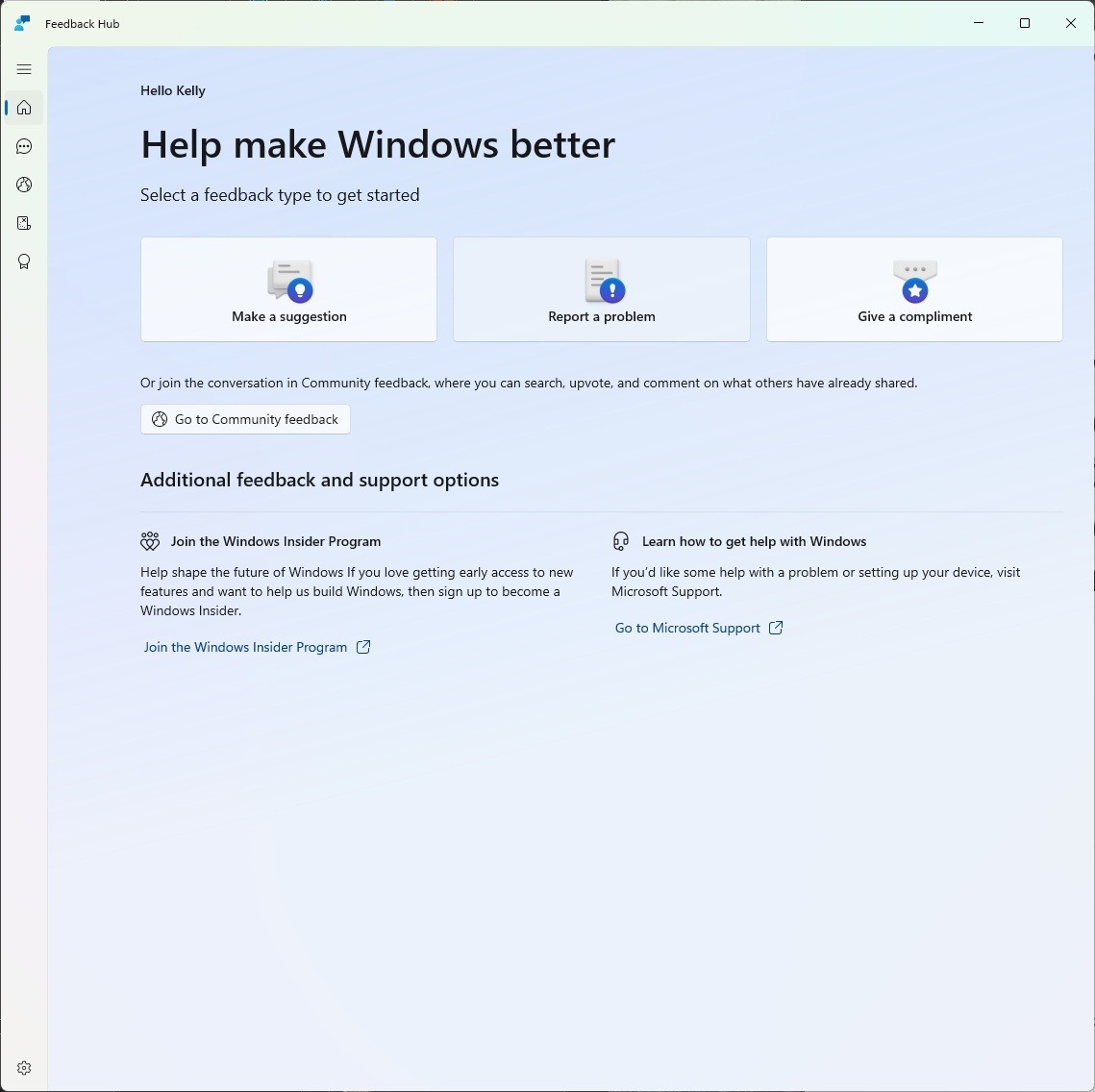
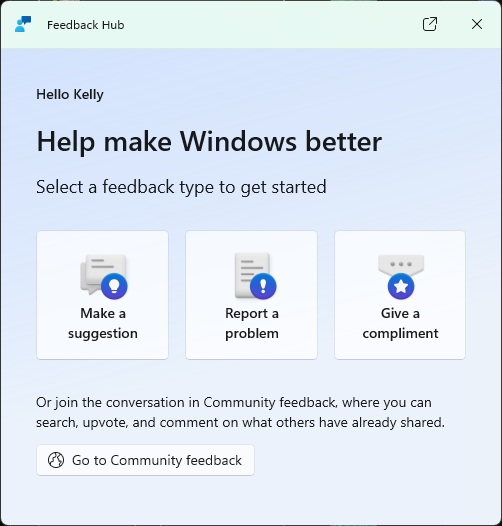
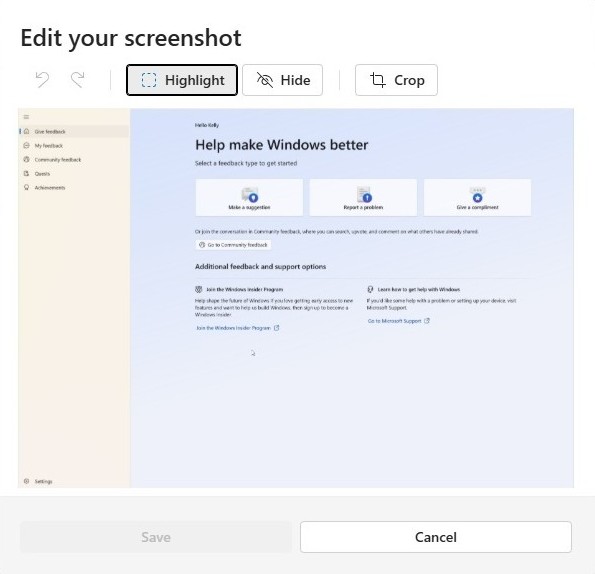
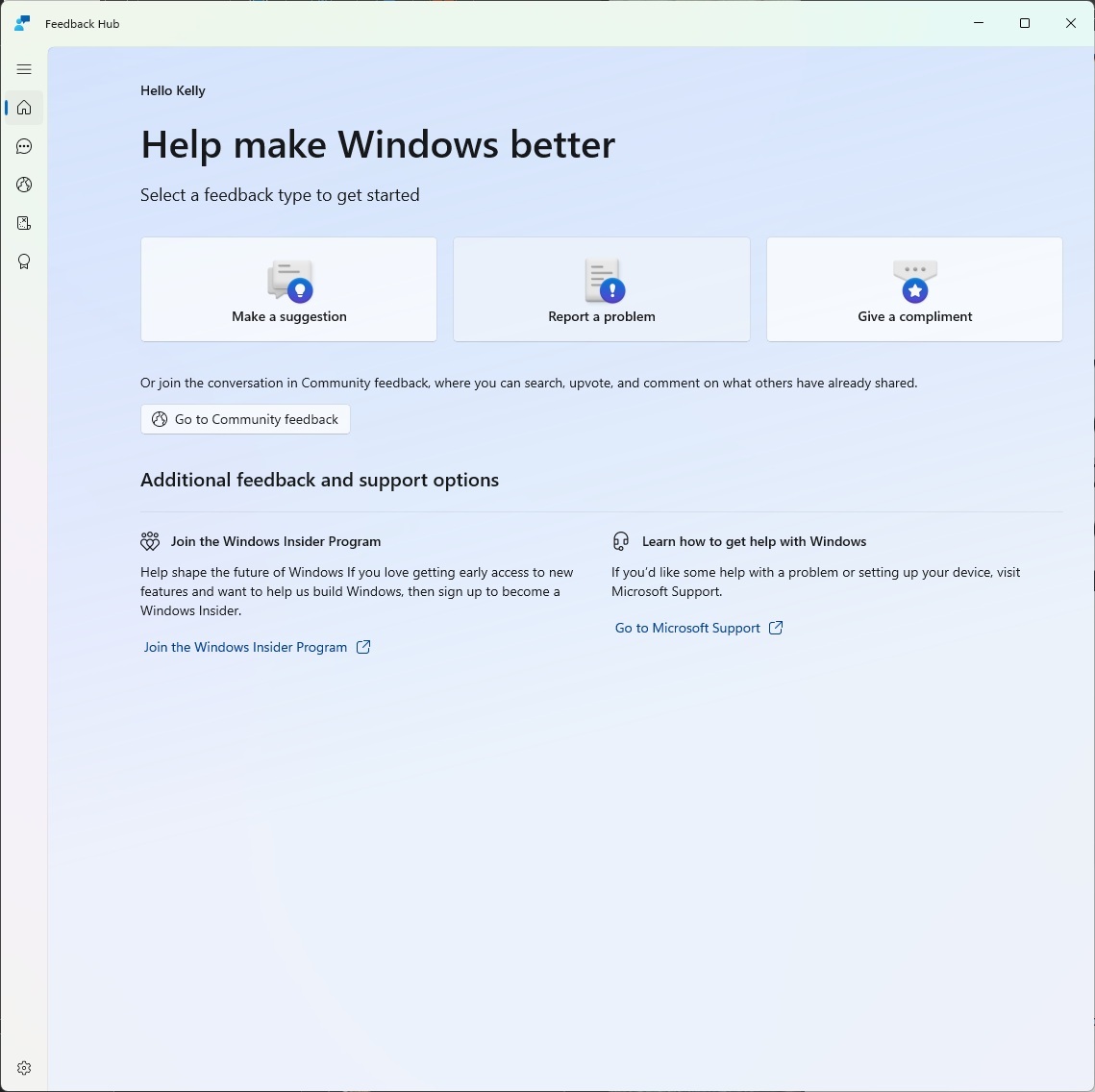
Introducing the new Feedback Hub, bringing a refreshed, modernized experience available as an app update today for Insiders in Dev and Canary. [caption id="attachment_178787" align="alignnone" width="1139"]
The new Feedback Hub home page where you can file suggestions, problems or compliments.
The new Feedback Hub home page where you can file suggestions, problems or compliments.[/caption] What’s new in Feedback Hub
  • Simpler feedback submission flow: Feedback is now submitted using a single unified template, with the added ability to search categories. The feedback form itself has been modernized enabling for faster iteration and future improvements.
  • Simpler navigation: My Feedback now lives directly in the navigation pane, and Community feedback (formerly All feedback) makes it easier to discover and engage with feedback from others. The Announcements page has been removed to focus more on giving and exploring feedback. You can still find announcements on the Windows Insider Blog.
  • New compliment feedback type: Call out what’s working well.
  • Private or public feedback: Choose whether your feedback is visible to the Insider community.
  • New focused feedback experience: a new smaller Feedback Hub surface, making it easier to provide quick, in-the-moment feedback. You can expand to the full Feedback Hub experience by pressing the button in the upper right corner.
[caption id="attachment_178782" align="alignnone" width="502"]
The new focused feedback experience.
The new focused feedback experience.[/caption]
  • Improved screenshot capture and review tooling: making it easier to capture and include visuals when sharing feedback.
[caption id="attachment_178788" align="alignnone" width="595"]
Edit your screenshot by clicking on the screenshot to highlight, hide or crop.
Edit your screenshot by clicking on the screenshot to highlight, hide or crop.[/caption] Feedback: Your feedback helps shape what comes next, so try out the new experience and share your thoughts in Feedback Hub (WIN + F) under Apps > Feedback Hub.

Reminders for Windows Insiders in the Dev Channel

  • Many features are rolled out using Controlled Feature Rollout technology, starting with a subset of Insiders and ramping up over time as we monitor feedback to see how they land before pushing them out to everyone in this channel.
  • The desktop watermark shown at the lower right corner of the desktop is normal for Windows Insider pre-release builds.
  • For Windows Insiders who want to be the first to get features gradually rolled out to you, you can turn ON the toggle to get the latest updates as they are available via Settings > Windows Update*. Over time, we will increase the rollouts of features to everyone with the toggle turned on. Should you keep this toggle off, new features will gradually be rolled out to your PC over time once they are ready.
  • Features and experiences included in these builds may never get released as we try out different concepts and get feedback. Features may change over time, be removed, or replaced and never get released beyond Windows Insiders. Some of these features and experiences could show up in future Windows releases when they’re ready.
  • Some features in active development we preview with Windows Insiders may not be fully localized and localization will happen over time as features are finalized. As you see issues with localization in your language, please report those issues to us via Feedback Hub.
  • Check out Flight Hub for a complete look at what build is in which Insider channel.
Thanks, Windows Insider Program Team

Source: Announcing Windows 11 Insider Preview Build 26300.8085 (Dev Channel)
 
Hello Windows Insiders, today we are releasing Windows 11 Insider Preview Build 28020.1743 to the Canary Channel. (KB 5081339)

What’s new in Canary Build 28020.1743

Changes and Improvements gradually being rolled out with toggle on*

[Shared audio (preview) gets more control]

  • Shared audio (preview) was first announced last fall, and allows 2 people to share audio between their two capable Bluetooth LE Audio headphones, speakers, earbuds, or hearing aids. With this update Windows now provides individual sliders for each listener which adjusts their volume without affecting the other. You can continue to adjust volume for both listeners at the same time through the main volume controls available through Quick Settings or on-device and keyboard controls.
  • You’ll also see a new taskbar indicator while you’re sharing, giving a quick reminder that audio is still being shared. Clicking the indicator is a fast path to open sharing settings to change volume or stop sharing.
  • The LE Audio accessory ecosystem also continues to grow. In addition to the accessories announced before, we’re excited to share that the Samsung Galaxy Buds 4 and Buds 4 Pro, Sony WF‑1000XM6, and Xbox Wireless Headset all have support for shared audio!
[caption id="attachment_178784" align="alignnone" width="575"]Independent sliders for each listener. Independent sliders for each listener.[/caption]
  • Feedback: Share your thoughts in Feedback Hub (WIN + F)under Devices and Drivers > Bluetooth – Audio quality, glitches, choppiness and stuttering.

[Context Menu]

  • When right clicking on a .exe, .bat, or .cmd file, the context menu’s “Open” verb will now match the icon associated with the file’s default app.
[caption id="attachment_178778" align="alignnone" width="967"]The context menu’s “Open” verb matches the icon in the default app. The context menu’s “Open” verb matches the icon in the default app.[/caption]
  • Feedback: Share your thoughts in Feedback Hub (WIN + F) under File Folders and Online Storage > File Explorer.

[File Explorer]

[Feedback Hub]

Introducing the new Feedback Hub, bringing a refreshed, modernized experience available as an app update today for Insiders in Dev and Canary. [caption id="attachment_178783" align="alignnone" width="1139"]The new Feedback Hub home page where you can file suggestions, problems or compliments. The new Feedback Hub home page where you can file suggestions, problems or compliments.[/caption] What’s new in Feedback Hub
  • Simpler feedback submission flow: Feedback is now submitted using a single unified template, with the added ability to search categories. The feedback form itself has been modernized enabling for faster iteration and future improvements.
  • Simpler navigation: My Feedback now lives directly in the navigation pane, and Community feedback (formerly All feedback) makes it easier to discover and engage with feedback from others. The Announcements page has been removed to focus more on giving and exploring feedback. You can still find announcements on the Windows Insider Blog.
  • New compliment feedback type: Call out what’s working well.
  • Private or public feedback: Choose whether your feedback is visible to the Insider community.
  • New focused feedback experience: a new smaller Feedback Hub surface, making it easier to provide quick, in-the-moment feedback. You can expand to the full Feedback Hub experience by pressing the button in the upper right corner.
[caption id="attachment_178782" align="alignnone" width="502"]The new focused feedback experience. The new focused feedback experience.[/caption]
  • Improved screenshot capture and review tooling: making it easier to capture and include visuals when sharing feedback.
[caption id="attachment_178788" align="alignnone" width="595"]Edit your screenshot by clicking on the screenshot to highlight, hide or crop. Edit your screenshot by clicking on the screenshot to highlight, hide or crop.[/caption] Feedback: Your feedback helps shape what comes next, so try out the new experience and share your thoughts in Feedback Hub (WIN + F) under Apps > Feedback Hub.

Reminders for Windows Insiders in the Canary Channel

  • Many features in the Canary Channel are rolled out using Control Feature Rollout technology, starting with a subset of Insiders and ramping up over time as we monitor feedback to see how they land before pushing them out to everyone in this channel.
  • The desktop watermark shown at the lower right corner of the desktop is normal for Windows Insider pre-release builds.
  • Some features may show up in the Dev and Beta Channels first before showing up in the Canary Channel.
  • Some features in active development we preview with Windows Insiders may not be fully localized and localization will happen over time as features are finalized. As you see issues with localization in your language, please report those issues to us via Feedback Hub.
  • To get off the Canary Channel, a clean install of Windows 11 will be required. As a reminder - Insiders can’t switch to a channel that is receiving builds with lower build numbers without doing a clean installation of Windows 11 due to technical setup requirements.
  • Check out Flight Hub for a complete look at what build is in which Insider channel.
Thanks, Windows Insider Program Team

Source: Announcing Windows 11 Insider Preview Build 28020.1743 (Canary Channel)
 

You may also like...