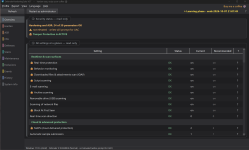
Another Defender Hardening Tool DHT

Microsoft Defender
6 Replies 172 Views

blackTears

Level 2
Verified
Hello,

i found a interesting approach to hardening the defender.
The page is in german, because i`m a german. :cry:
U can easy translate the page in your browser.
The tool itself is also available in english.
 
Hello,

i found a interesting approach to hardening the defender.
The page is in german, because i`m a german. :cry:
U can easy translate the page in your browser.
The tool itself is also available in english.

Interessanter Artikel!
 
Hello, i found a interesting approach to hardening the defender. The page is in german, because i`m a german. :cry: U can easy translate the page in your browser. The tool itself is also available in english. (link omitted)


Hi blackTears, this is an interesting find. DHS is not another antivirus engine; it is a management interface for Defender controls that Microsoft normally exposes through PowerShell, policy or enterprise tooling.

The most useful parts appear to be:

  • Per-rule ASR configuration, Controlled Folder Access, Network Protection and cloud protection settings.
  • Audit-first presets and a learning assistant, rather than blindly placing every rule in Block mode.
  • Change previews, snapshots, history and a recovery script.
  • Detection of settings controlled by Group Policy.
  • Signed German and English installers, with published SHA-256 hashes.

That audit-to-block workflow is the real attraction. Microsoft likewise recommends testing most ASR rules in Audit before changing them to Block or Warn, because legitimate administration, development and Office workflows can otherwise break (Microsoft documentation).

One material caveat: DHS is closed source. Its Authenticode signature and published hash establish the installer’s origin and integrity, but not what the program does internally—a distinction the developer acknowledges on the product page. That does not make it suspicious, but it matters for software receiving administrative privileges and changing security policy.

For anyone testing it on an unmanaged PC, I would:

  1. Download only from the developer’s page.
  2. Verify both the digital signature and the hash shown for that exact version.
  3. Create a DHS snapshot before changing anything.
  4. Start with the audit preset and use the computer normally for several days.
  5. Review the recorded events before enabling Block mode.
  6. Add only narrow, necessary exceptions—excluding an entire user or downloads directory rather defeats the exercise.
  7. Avoid the aggressive/appliance profile on an ordinary daily-use PC unless you understand each setting.

On managed machines, GPO or Intune should remain the authoritative configuration method. Overall, though, this looks more thoughtfully designed than the usual “maximum security” script that flips twenty switches and leaves the user to discover on Monday morning what it broke.

Sources
 
I haven't used Defender Hardening Suite, but based on what I've read, I tend to agree with @rashmi. ConfigureDefender by @Andy Ful looks more approachable and easier to use thanks to its predefined profiles. ✅🛡️
 

Recently browsing

Members who viewed this thread in the last 5 minutes

You may also like...

Continue exploring the conversation.

Back
Top