

The MalwareTips app
Your community, one tap away.
Open MalwareTips from your Home Screen or desktop. Follow discussions, find answers and pick up where you left off.
- Home Screen access
- Optional push alerts
- Your community
You're ready to explore.Explore what's new
Installation instructions
iPhone & iPad
- Open MalwareTips in Safari and tap Share. You may need to open the Page Menu first.
- Choose Add to Home Screen. If it is not listed, use Edit Actions to add it.
- Keep Open as Web App enabled if shown, then tap Add.
Android
- Open MalwareTips in Chrome or another browser that supports app installation.
- Open the browser menu and look for Install app, Install and create shortcut, or Add to Home screen.
- Choose Install and confirm. Wording varies by browser.
Desktop
- Chrome: use the install icon in the address bar, or the menu under Cast, save and share.
- Edge: open the menu, then More tools, Apps and Install this site as an app.
- Safari on Mac: choose Share or File, then Add to Dock. Firefox on Windows: look for the web apps button in the address bar.
If you cannot find an install option, update your browser or use its bookmark option to keep MalwareTips close.
Keep up with your conversations
After installation, open the app and sign in. Enable push notifications in Preferences if you want alerts. On iPhone and iPad, push requires a Home Screen web app and iOS or iPadOS 16.4 or later.
Sign in to manage notificationsInstallation is optional. Your notification settings stay under your control.
You are using an out of date browser. It may not display this or other websites correctly.
You should upgrade or use an alternative browser.
You should upgrade or use an alternative browser.
Advice Request Auslogics boostspeed vs wise care 365 Which is better?
-
 Thread starter
peter1111
Thread starter
peter1111
- Start date
- 9 Replies
- 3,742 Views
Share practical recommendations that address the author's needs.

these types of programs have many "addons", "features" and "modules" that are often unnecessary/useless. Web Browsers have the option to delete cookies, cache and browsing data when closing the browser itself. to Defragment HDD/SSD(?) Windows it has its own utility without the need to install anything else, "Cleaning" the registry can be bad in the short or medium time.
from my humble point of view, less is more.
from my humble point of view, less is more.

Both brands are good and trustworthy, but Wise offers more for free. You might also consider Glarysoft, while it is not much to look at, it offers a lot.
I prefer Wise myself, I use separate utilities though with no limitations, since they are completely free. Wise Disk Cleaner and Wise Registry Cleaner.
I prefer Wise myself, I use separate utilities though with no limitations, since they are completely free. Wise Disk Cleaner and Wise Registry Cleaner.

I got boost speed's free key (though their giveaway), at the same time I also got wise care pro's key though another giveaway wise offered.Both brands are good and trustworthy, but Wise offers more for free. You might also consider Glarysoft, while it is not much to look at, it offers a lot.
I prefer Wise myself, I use separate utilities though with no limitations, since they are completely free. Wise Disk Cleaner and Wise Registry Cleaner.
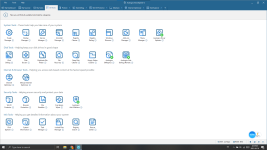
The one thing I am trying to deiced is boost speed offer huge amount of tools, while it is slow, and not that easy to use.
I mean look at this
to do this progress it takes 3 min
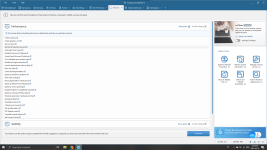
On the other hand, wise care
it is a fast tool, and a easy looking one, but it offers less tools....(only like 10? while boostspeed got 20+)
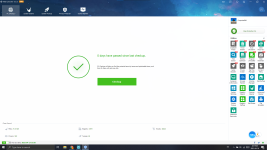
They can't be used together if I used wise scan, boostspeed tells me it need to be changed, so I really dk which to chose.
Attachments
Last edited by a moderator:


Of the two, Boostspeed is safer to use. Wise Care's registry cleaner has minor issues with false positives and will sometimes delete valid registry keys. Doing so could cause problems. This can be avoided by not using its registry cleaner (you usually never need to clean the registry anyway), or manually checking what it wants to delete to make sure it doesn't want to delete anything that is needed. Having said that, I doubt it would every cause any major issues, but it is something to be aware of. On the other hand Boostspeed's registry cleaner is safe to use as it never deletes needed registry keys. Aside from the minor issues with its registry cleaner, the other functions in Wise Care are safe to use.
I prefer Wise Care, to Boostspeed, but it's just a matter of personal preference. Use whatever works best for you. One thing to consider with Boostspeed, is that in some cases its background monitoring can make your system run slower, but this can be disabled if you need to. If you don't need the tweaking functions in Wise Care and just want to clean junk, then Wise Disk Cleaner would be a better option. It's free and has no registry cleaner. As I already mentioned, you don't need to use a registry cleaner anyway.
Another option to consider is Kerish Doctor. There's no free version, but is safe to use and works very well. Or, you could use none of them and quite possibly your system will run fine anyway.
I prefer Wise Care, to Boostspeed, but it's just a matter of personal preference. Use whatever works best for you. One thing to consider with Boostspeed, is that in some cases its background monitoring can make your system run slower, but this can be disabled if you need to. If you don't need the tweaking functions in Wise Care and just want to clean junk, then Wise Disk Cleaner would be a better option. It's free and has no registry cleaner. As I already mentioned, you don't need to use a registry cleaner anyway.
Another option to consider is Kerish Doctor. There's no free version, but is safe to use and works very well. Or, you could use none of them and quite possibly your system will run fine anyway.
Of the two, Boostspeed is safer to use. Wise Care's registry cleaner has minor issues with false positives and will sometimes delete valid registry keys. Doing so could cause problems. This can be avoided by not using its registry cleaner (you usually never need to clean the registry anyway), or manually checking what it wants to delete to make sure it doesn't want to delete anything that is needed. Having said that, I doubt it would every cause any major issues, but it is something to be aware of. On the other hand Boostspeed's registry cleaner is safe to use as it never deletes needed registry keys. Aside from the minor issues with its registry cleaner, the other functions in Wise Care are safe to use.
I prefer Wise Care, to Boostspeed, but it's just a matter of personal preference. Use whatever works best for you. One thing to consider with Boostspeed, is that in some cases its background monitoring can make your system run slower, but this can be disabled if you need to. If you don't need the tweaking functions in Wise Care and just want to clean junk, then Wise Disk Cleaner would be a better option. It's free and has no registry cleaner. As I already mentioned, you don't need to use a registry cleaner anyway.
Another option to consider is Kerish Doctor. There's no free version, but is safe to use and works very well. Or, you could use none of them and quite possibly your system will run fine anyway. Very detailed thanks, I think I will use wise disk+boostspeed(safe+better cleaning)

I usually find giveaway copies of WiseCare Pro, so I've been able to use that. But I don't run it at startup or resident; I just use the cleaner and optimizer if there are problems with the system and it's still slow even after I use what's built-in.
For defrag, even with an SSD in the boot, I notice that things eventually slow down, even with the built-in defrag running at default or run manually (and it just trims the SSD and does a regular defrag of the other hard drives, including one where other programs are installed because the SSD will be full). If it's still slow after using anything else that's built-in, like updates, driver updates, sfc etc., then I try a cleaner and optimizer like what was mentioned plus third-party defrag, and for some weird reason it speeds up. That is, programs load faster, together with folders containing many combinations of large and small files, etc.
I've tried several, and results have been mixed, but the one that seems to do a good job is O&O Defrag, where I usually find giveaway copies of slightly older versions.
For defrag, even with an SSD in the boot, I notice that things eventually slow down, even with the built-in defrag running at default or run manually (and it just trims the SSD and does a regular defrag of the other hard drives, including one where other programs are installed because the SSD will be full). If it's still slow after using anything else that's built-in, like updates, driver updates, sfc etc., then I try a cleaner and optimizer like what was mentioned plus third-party defrag, and for some weird reason it speeds up. That is, programs load faster, together with folders containing many combinations of large and small files, etc.
I've tried several, and results have been mixed, but the one that seems to do a good job is O&O Defrag, where I usually find giveaway copies of slightly older versions.
Better not get too old one, I got a older version of ccleaner(guess wot happened blue screen)I usually find giveaway copies of WiseCare Pro, so I've been able to use that. But I don't run it at startup or resident; I just use the cleaner and optimizer if there are problems with the system and it's still slow even after I use what's built-in.
For defrag, even with an SSD in the boot, I notice that things eventually slow down, even with the built-in defrag running at default or run manually (and it just trims the SSD and does a regular defrag of the other hard drives, including one where other programs are installed because the SSD will be full). If it's still slow after using anything else that's built-in, like updates, driver updates, sfc etc., then I try a cleaner and optimizer like what was mentioned plus third-party defrag, and for some weird reason it speeds up. That is, programs load faster, together with folders containing many combinations of large and small files, etc.
I've tried several, and results have been mixed, but the one that seems to do a good job is O&O Defrag, where I usually find giveaway copies of slightly older versions.
copy of wise care 5.6.3 WiseCare365_PRO_5.6.3.exe pre-registered (not too old, like 0.0.3 older)
Windows 10 does actually defrag SSDs when it thinks its needed. Recent versions of O&O Defrag include defrag modes specifically for SSDs. CrystalDiskMark has shown an increase in SSD performance after defragging with O&O Defrag.I've tried several, and results have been mixed, but the one that seems to do a good job is O&O Defrag, where I usually find giveaway copies of slightly older versions.
Recently browsing
Members who viewed this thread in the last 5 minutes


