Av Gurus - Security Config

Windows Edition
Pro
User Access Control
Notify me only when programs try to make changes to my computer
Real-time security
Windows Defender with PUA/PUP, Sandboxie, Shadow Defender, PeerBlock, Windows 10 Firewall Control
Periodic malware scanners
Zemana AM, HitmanPro, EEK
Malware sample testing
Browser(s) and extensions
Chrome (TrafficLight, HTTPS Everywhere)
Maintenance tools
CCleaner, Secure Folders, Keyscrambler
Any suggestion, something to add or remove?
 
  • Like
Reactions: Logethica
Thank you for sharing your config...I would add a better realtime AV and one anti-exploit ( EMET, HMP alert, MB anti-exploit).:)
 
Thank you for sharing your config...I would add a better realtime AV and one anti-exploit ( EMET, HMP alert, MB anti-exploit).:)

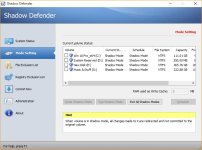
No need for better RT AV because Shadow Defender is set to go shadow mode on boot :)

Clipboard01.jpg

Only thing that i might add is Sandboxie...later...
 
I imagined this...but still would prefer a better AV.:)
What about system changes you would like to keep (updates, downloads...)?
 
  • Like
Reactions: Logethica
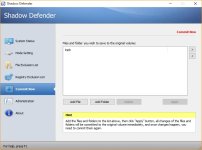
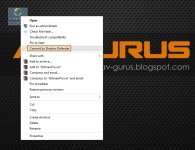
If i have OS update then restart in "Normal mode" but if i download something and want to keep then SD have options "Commit Now" or just right click at that file and then "Commit by SD".

Clipboard01.jpg Clipboard02.jpg
 
  • Like
Reactions: Logethica
Is there any problem if the SD is set to boot in shadow mode on start and RX rollback?
Do you need something to change in the settings?
 
  • Like
Reactions: Logethica
Hi @Av Gurus I have uBlock origin and in Settings i have enabled Fanboy’s Enhanced Tracking List‎ and Fanboy’s Annoyance List and it works fine
 
I "copy" activate Disconnect tracking list on Privacy for my system. ;) The only difference we have now is Fanboy’s Annoyance List (I have it activated) and MVPS HOSTS .

Yoy have a light and strong configuration my friend. thanks for sharing and for your tips
 
My opinion is that you add Malwarebytes Anti- Malware as an ODS. And Anti-Exploit for protection.