

Troubleshoot Avast blocking applications from starting since update

Atlas147

Level 30
Thread author
Verified
Honorary Member
Top Poster
Content Creator
Well-known
Forum Veteran
Jul 28, 2014
1,989
8,250
2,889
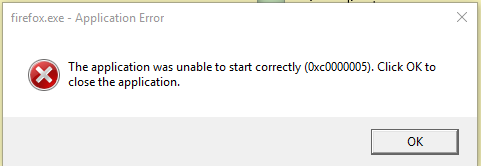
This dialog box comes up whenever Avast shields are all activated but not when I down all the shields.

Already posted in their forums, but I just wanted to see if anyone here is experiencing the same issue?
upload_2017-2-11_17-36-56.png
 
try to perform a Repair via control panel
it might fix many problems. That the first thing people on avast suggest. I did fix a afew of my problems also. Some still persist

edit: if it doesn't fix, uninstall avast -> reboot -> reinstall with minimal + behavior shield (+firewall)
 
Upvote 0
Do you have hardened mode enabled?
try to perform a Repair via control panel
it might fix many problems. That the first thing people on avast suggest. I did fix a afew of my problems also. Some still persist

edit: if it doesn't fix, uninstall avast -> reboot -> reinstall with minimal + behavior shield (+firewall)

Found the reason, Avast's new behavioral blocker component is causing some issues. Some people in the avast forums are having the same issue, solved by disabling the component. Guess that's a temporary fix until avast patches it in the future updates
 
Upvote 0
If you set it to Always Ask, IDP should notify you. Are you able to try or already uninstalled the component?

Able to try, set the settings as always ask, started the component and faced the same issue again. No notifications from avast, just windows telling me that an error has occurred
 
Upvote 0
It blocked most of windows 10 processes had to do a clean install and now it conflicts with comodo firewall and asks me to uninstall comodo firewall!

wow seems a little excessive! Have you modified any settings? I have mine on one of the highest settings and it's still not as bad as yours
 
Upvote 0
Hardened mode is enabled but there isn't any pop up from avast, I know what hardened mode looks like :p
Sometimes hardened mode silently does stuffs like I have experienced situation where I ran an installer & clicked yes on UAC prompt & nothing appeared And disabling hardened mode solved the issue;)
 
  • Like
Reactions: JB007 and JM Safe
Upvote 0
Among the large AV companies Avast has the worst beta testing. They release buggy final releases all the time.

If you are a user I would recommend waiting a week or 2 before installing the next program update. Give them time to sort it out.
 
  • Like
Reactions: JB007 and Andytay70
Upvote 0
Sometimes hardened mode silently does stuffs like I have experienced situation where I ran an installer & clicked yes on UAC prompt & nothing appeared And disabling hardened mode solved the issue;)

Really don't think hardened mode would be blocking something as well known as firefox in their system :p but I'll check it out the next time it happens. For now it seems that disabling the behavioral blocker works
 
  • Like
Reactions: JB007
Upvote 0
It blocked most of windows 10 processes had to do a clean install and now it conflicts with comodo firewall and asks me to uninstall comodo firewall!
Are you sure? Please report to Avast forums with screenshots, am eager to see what's happening.

I have Avast Hardened Mode set to Aggressive and only seen 2 notifications for OBS and AppFalcon. No process by Microsoft / Windows 10 being blocked on my end.
 
  • Like
Reactions: JB007
Upvote 0
I have avast new version running in hardened mode/aggressive, without issues. I did not change the default settings for behavior blocker.
I suspect that the people who are seeing issues have other security software that is conflicting.
 
Upvote 0
I have avast new version running in hardened mode/aggressive, without issues. I did not change the default settings for behavior blocker.
I suspect that the people who are seeing issues have other security software that is conflicting.

I Had comodo firewall 10 and Avast didnt like it!
I even tried installing Avast with basic settings and even going back to comodo firewall 8 but it still trashed my PC.
 
  • Like
Reactions: JB007
Upvote 0
Among the large AV companies Avast has the worst beta testing. They release buggy final releases all the time.

If you are a user I would recommend waiting a week or 2 before installing the next program update. Give them time to sort it out.
I have to agree, Avast has the worst beta testers ( The forums not much better either)and if this was M$ that had released a dodgy update it would be plastered all over the web forums.
I'm dissapointed in avast for allowing such a bug ridden security software out for public use!
 
Upvote 0
I Had comodo firewall 10 and Avast didnt like it!
I even tried installing Avast with basic settings and even going back to comodo firewall 8 but it still trashed my PC.
so that's what I am saying. sounds like the new avast and the new comodo don't like each other very much, according to your report.
 
  • Like
Reactions: JB007 and Andytay70
Upvote 0