Question Avast custom installation

Please provide comments and solutions that are helpful to the author of this topic.
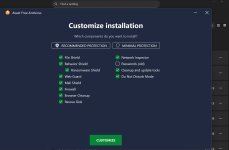
Previously, it was allowed to use custom installation mode and select the required items.
Currently, this mode was deprecated, but after installing the whole package, I can remove the item I do not need from settings.
And, of course, Avast One essential does not have the option to remove any items.
 
You can't customize it during install, but can afterwards. I guess they wanted everyone to run it in full version install mode, too maybe nag us more, or to show its full potential?

If you go into Apps, and click Avast/Modify, they can be changed from there. I would do a restart to confirm the settings were changed.

avast apps.png


avast modify.jpg
 
That's too bad. Avast was one of the only products that allowed its user to choose what components to install.

It seems that GData is the only product that is still offering this config. Too bad.
 
Does it install Avast browser too?

I believe for the free version, it's a separate app. I don't remember if I was asked to install it when I installed Avast free.

The browser extensions need to be manually installed through the Web Stores.
 
I believe for the free version, it's a separate app. I don't remember if I was asked to install it when I installed Avast free.
Ealier, Avas default installation would install Chrome, then replaced by Avast browser, unless you choose custom installation and deselect.
Obviously, they received backlash for this malicious behavior, then stopped including the promoted browser by default.
 
I believe for the free version, it's a separate app. I don't remember if I was asked to install it when I installed Avast free.

The browser extensions need to be manually installed through the Web Stores.
No need for the extension. Same goes for Norton. The web shield does it for you.
 
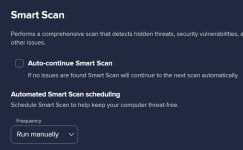
As well as removing bloat by reducing features, shut up smartscan:poop: by going to... settings/protection/smartscan/frequency and set to run manually, and also uncheck auto continue smartscan...... smartscan was a huge annoyance for me and is now silent:D, except of course invitations/suggestions to use it in several places... avoid it like the plague!!!
 
Last edited:
As well as removing bloat by reducing features, shut up smartscan:poop: by going to... settings/protection/smartscan/frequency and set to run manually, and also uncheck auto continue smartscan...... smartscan was a huge annoyance for me and is now silent:D.

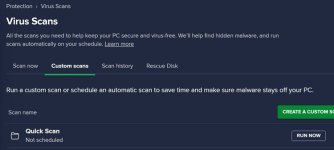
Same thing I did for the same reason(s). And will occasionally run a Quick Scan.

smartscan.jpg quick scan.jpg
 
Last edited:
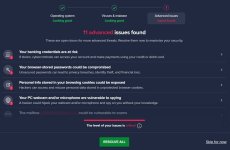
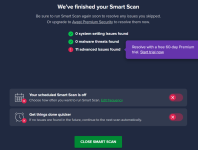
Regarding Smart Scan, has anyone allowed Avast to change the recommended settings that come in the first step (two options if I remember correctly) or ignore them and move on to the next step to check the result of the malware scan?
 
Regarding Smart Scan, has anyone allowed Avast to change the recommended settings that come in the first step (two options if I remember correctly) or ignore them and move on to the next step to check the result of the malware scan?
You mean the advanced issues detected? Norton on a clean install detected to advanced issues one regarding exploit protection and the other was about my notifications and privacy and I applied the fixes and never say that again.
 
Regarding Smart Scan, has anyone allowed Avast to change the recommended settings that come in the first step (two options if I remember correctly) or ignore them and move on to the next step to check the result of the malware scan?

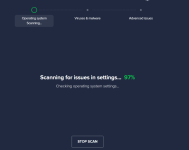
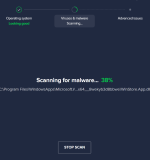
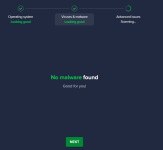
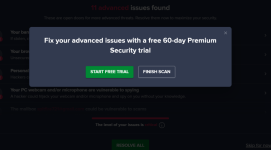
I've never had an issue with the first scan, to see if it was going to recommend anything or 2nd scan found malware. I just keep hitting next and skip. I keep it disabled (last image and Smart Scan in settings), and let the real time protection do it's thing, along with an occasional Quick Scan and running the Software updater once in a while.

Screenshot 2025-12-09 201413.png Screenshot 2025-12-09 201440.png Screenshot 2025-12-09 201511.png new updated.jpgScreenshot 2025-12-09 201631.png Screenshot 2025-12-09 201717.png
 
Last edited:
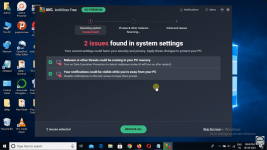
@Jonny Quest I searched for the settings that Avast modifies during the "Operating System Scanning" phase and found them. The one I mentioned called "Data Execution Prevention" and appear in the following image:

Screenshot 2025-12-11 at 04-44-45 How to Install AVG Antivirus in Windows 10 - YouTube.png

To check if it has been modified in your system, you need to do the following:
  • Open the Control Panel.
  • Click System and Security > System > Advanced System Settings.
  • Once you are on the Advanced tab, click Settings.
  • Click the Data Execution Prevention tab.
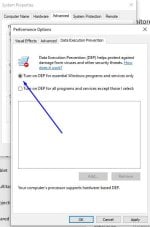
The default setting should be as shown in the following image:

Enable-DEP-step-5.jpeg

If the other option is selected, then Avast has modified it.

This was really difficult to find. 😫
 
@Jonny Quest I searched for the settings that Avast modifies during the "Operating System Scanning" phase and found them. The one I mentioned called "Data Execution Prevention" and appear in the following image:

View attachment 293621

To check if it has been modified in your system, you need to do the following:
  • Open the Control Panel.
  • Click System and Security > System > Advanced System Settings.
  • Once you are on the Advanced tab, click Settings.
  • Click the Data Execution Prevention tab.
The default setting should be as shown in the following image:

View attachment 293622

If the other option is selected, then Avast has modified it.

This was really difficult to find. 😫

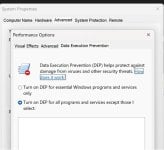
Thank you for that heads up. On the initial Smart Scan, it may have shown some options that I allowed, as here is where I'm at. It's configured the same way on my F-Secure laptop.

DEP.jpg
 

You may also like...