


The MalwareTips app
Your community, one tap away.
Open MalwareTips from your Home Screen or desktop. Follow discussions, find answers and pick up where you left off.
- Home Screen access
- Optional push alerts
- Your community
You're ready to explore.Explore what's new
Installation instructions
iPhone & iPad
- Open MalwareTips in Safari and tap Share. You may need to open the Page Menu first.
- Choose Add to Home Screen. If it is not listed, use Edit Actions to add it.
- Keep Open as Web App enabled if shown, then tap Add.
Android
- Open MalwareTips in Chrome or another browser that supports app installation.
- Open the browser menu and look for Install app, Install and create shortcut, or Add to Home screen.
- Choose Install and confirm. Wording varies by browser.
Desktop
- Chrome: use the install icon in the address bar, or the menu under Cast, save and share.
- Edge: open the menu, then More tools, Apps and Install this site as an app.
- Safari on Mac: choose Share or File, then Add to Dock. Firefox on Windows: look for the web apps button in the address bar.
If you cannot find an install option, update your browser or use its bookmark option to keep MalwareTips close.
Keep up with your conversations
After installation, open the app and sign in. Enable push notifications in Preferences if you want alerts. On iPhone and iPad, push requires a Home Screen web app and iOS or iPadOS 16.4 or later.
Sign in to manage notificationsInstallation is optional. Your notification settings stay under your control.
You are using an out of date browser. It may not display this or other websites correctly.
You should upgrade or use an alternative browser.
You should upgrade or use an alternative browser.
Be Careful With Third Party Uninstallers
- Thread starter lokamoka820
- Start date
System utilities
13 Replies
2,122 Views
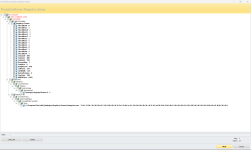


wdym?!
F
ForgottenSeer 109138
That there is some irony lol.Trying to uninstall Auslogics Registry Cleaner using Revo Uninstaller Advanced Mode and this is what it finds
View attachment 282998
I wouldn't be using either one of those system file smashing softwares. Might as well wipe it and start fresh.

Judging 3rd party uninstallers based on "fake" 3rd party uninstallers. That is like people saying that AVs suck, because fake AVs never detect anything.

Can someone clarify what is wrong in the screenshot?
It found HiBit Uninstaller's Registry Cleaner as leftovers for Auslogics Registry Cleaner, which will break it.wdym?!
Even HiBit Uninstaller could break things, there is no such thing as safe uninstaller, you have to check what it will delete.That there is some irony lol.
I wouldn't be using either one of those system file smashing softwares. Might as well wipe it and start fresh.
Here is the best advice I have get about removing software in Windows:
In this case I use AppBuster to remove some Microsoft programs that came with Windows 11 and that Microsoft does not want me to remove. That is already questionable.
Removing leftovers could break Windows 11 if it removed the wrong things.
Another example is Comodo Firewall if you remove it with Revo the cleanup script that Comodo runs after the uninstall is removed as leftover and the result is that there are more leftovers with Revo than if you just let Comodo do the uninstall.
Leftovers are generally speaking harmless.
The only time they matter is when uninstalling AV software.
Then I use some other programs after the uninstall and reboot:

Troubleshooting - Not a real problem, but I think it is weird none the less?
Not even sure if I should post this here in this forum, but here it goes. Okay, over a month ago I uninstalled KSC Free because I wanted to try Ziggo Safe online from F-Secure. (And I like Ziggo Safe Online so far.) Now today I used a program called HiBit System Information so that I would have...malwaretips.com
I do use the registry cleaner in CCleaner and had no issues with it.
But it is not really needed.

F
ForgottenSeer 109138
The best advice you could have if you do a lot of installing and uninstalling "experimenting with software ect" is to get yourself an imaging software and create snapshots of a clean stable system, then if you need, you can always restore the snapshot, makes life much simpler.Even HiBit Uninstaller could break things, there is no such thing as safe uninstaller, you have to check what it will delete.
Here is the best advice I have get about removing software in Windows:
I clarify the screenshot, it is my fault.Can someone clarify what is wrong in the screenshot?
Is Revo Uninstaller "fake"? I thought it a well known product, isn't it?Judging 3rd party uninstallers based on "fake" 3rd party uninstallers. That is like people saying that AVs suck, because fake AVs never detect anything.

For years I have been using total uninstall professional together with a registry cleaner called JCleaner: I use many software and always keep them updated. Installations, uninstallations and updates are the order of the day in my Windows operating systems. After every uninstallation - very thorough - a cleaning of the Windows registry always follows. Obviously I constantly save OS images with Aomei backupper professional and R-Drive image. There are no universal rules in this regard: for example, my OS "maintained" constantly with deep uninstallations and registry cleanups have never had the slightest stability problem. I don't use pirated software.
Always double-check the leftovers detected by third-party uninstallers. I use HiBit Uninstaller and review the detected remnants or logs generated by Installation Monitoring. I take care of scanning and cleaning up any remnants, regardless of the uninstalled program's notification for a system restart.
Recently browsing
Members who viewed this thread in the last 5 minutes


