

The MalwareTips app
Your community, one tap away.
Open MalwareTips from your Home Screen or desktop. Follow discussions, find answers and pick up where you left off.
- Home Screen access
- Optional push alerts
- Your community
You're ready to explore.Explore what's new
Installation instructions
iPhone & iPad
- Open MalwareTips in Safari and tap Share. You may need to open the Page Menu first.
- Choose Add to Home Screen. If it is not listed, use Edit Actions to add it.
- Keep Open as Web App enabled if shown, then tap Add.
Android
- Open MalwareTips in Chrome or another browser that supports app installation.
- Open the browser menu and look for Install app, Install and create shortcut, or Add to Home screen.
- Choose Install and confirm. Wording varies by browser.
Desktop
- Chrome: use the install icon in the address bar, or the menu under Cast, save and share.
- Edge: open the menu, then More tools, Apps and Install this site as an app.
- Safari on Mac: choose Share or File, then Add to Dock. Firefox on Windows: look for the web apps button in the address bar.
If you cannot find an install option, update your browser or use its bookmark option to keep MalwareTips close.
Keep up with your conversations
After installation, open the app and sign in. Enable push notifications in Preferences if you want alerts. On iPhone and iPad, push requires a Home Screen web app and iOS or iPadOS 16.4 or later.
Sign in to manage notificationsInstallation is optional. Your notification settings stay under your control.
You are using an out of date browser. It may not display this or other websites correctly.
You should upgrade or use an alternative browser.
You should upgrade or use an alternative browser.
Serious Discussion Best free antivirus for windows?
- Thread starter andyDD
- Start date
General Security Discussions
15 Replies
2,376 Views


Microsoft Defender


Avira, Avast/AVG for lightness of footprint but Avast/AVG has the worst nags verging on scareware
Regards Eck
Regards Eck

Windows defender is more than sufficient these days and should already be installed on your PC.
But if you want to use a 3rd party antivirus, here are some:
But if you want to use a 3rd party antivirus, here are some:
- Kaspersky Free: Shows good scan detection rate, powerful behavior detection, runs fast with fluid performance, and has the least false positives.
- Bitdefender Free: Performs decently in scan detection rate and great behavior detection; however, it’s a bit laggy on performance and has high false positives.
- Avast/AVG Free: Has a nice, organized interface with a great detection rate, decent behavior detection, and has few false positives. The downside is the annoying pop-up and being a bit sluggish.

MS Defender


Comparison
 www.av-comparatives.org
Check for real-world and malware protection and performance.
Take note that several of those tested are not the free versions.
Given that, the top four would be Avast, AVG, Bitdefender, and Kaspersky.
My interpretation of the results:
The most complete and the one with the highest protection level is Avast. (I think Bitdefender lacks some features needed against ransomware and Kaspersky lacks the firewall.)
The one that's set-and-forget with no nags is Bitdefender. (For Avast, you can block them by enabling game mode and do not disturb, but you will only see warnings via a blue dot in the system tray icon. For Kaspersky, popups will appear once every few weeks and can't be disabled.)
The lightest is Kaspersky. You can test performance by installing, testing, and uninstalling AVs, but you have to use a test machine for that because multiple installation and uninstallation may damage the system.
I found Windows Defender one of the heaviest, but only for some tasks. (It's said to be the lightest for gaming, although several third-party AVs also have game mode.) Avast caused momentary freezes for some apps and the browser. AVG left remnants when I uninstalled. Side note: Kaspersky Standard (paid) felt heavier than the free version, and very likely because more security features are activated.
Given all that, I decided to just use Kaspersky. If they make Avast lighter, I'll switch to that. If they make Windows Defender lighter and better in terms of performance, I'll uninstall Kaspersky.

Its always been Avast, Defender, Kaspersky and Bitdefender for free AV's, they all have their good points and their warts. My choice would be Bitdefender or Windows Defender. There is no "best", best is what works best for you. ( Yikes, did I just use a sentence with the word "best" in it 3 times?)

Avast Free and AVG Free. Don't listen to the people complaining about the nags, nowadays if you set it up right you won't get any.
Microsoft Defender is decent, but it slows down your PC, even if you don't hardened it, but if you do it, it's even worse. Its web protection only works with Edge. The ransomware protection blocks everything, you constantly need to be allowing all the new stuff.
You can even get AVG Internet Security for $2 on gaming keys websites, to have a few more extras, but the Free version is very complete, it includes a firewall and ransomware protection that does everything fully automated without asking you for any action.
Microsoft Defender is decent, but it slows down your PC, even if you don't hardened it, but if you do it, it's even worse. Its web protection only works with Edge. The ransomware protection blocks everything, you constantly need to be allowing all the new stuff.
You can even get AVG Internet Security for $2 on gaming keys websites, to have a few more extras, but the Free version is very complete, it includes a firewall and ransomware protection that does everything fully automated without asking you for any action.
Last edited:

If you turn these two off, you won't get the pop-ups. The only real nag screen is when you run a Smart scan and you have 6 Advanced issues that need to be, can only be resolved with Premium. Otherwise, just disable the Smart scan and run a Quick scan occasionally from the Other scans/Scheduled scans list, no more nag screen. The free version has been working well on 4 PC's so far.Avast Free and AVG Free. Don't listen to the people complaining about the nags, nowadays if you set it up right you won't get any.
Microsoft Defender is decent, but it slows down your PC, even if you don't hardened it, but if you do it, it's even worse. Its web protection only works with Edge. The ransomware protection blocks everything, you constantly need to be allowing stuff.
You can even get AVG Internet Security for $2 on gaming keys websites, to have a few more extras, but the Free version is very complete, it includes a firewall and ransomware protection that does everything fully automated.
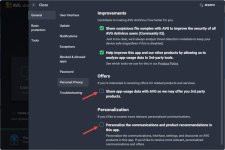
Yes, if you disable those and remove the scheduled smart scan, you almost don't get any popups. Top antivirus and lightweight, easy choice imo.If you turn these two off, you won't get the pop-ups. The only real nag screen is when you run a Smart scan and you have 6 Advanced issues that need to be, can only be resolved with Premium. Otherwise, just disable the Smart scan and run a Quick scan occasionally from the Other scans/Scheduled scans list, no more nag screen. The free version has been working well on 4 PC's so far.
View attachment 284364


Should you use free antivirus software? The pros and cons
Here are the pros and cons of free antivirus software and whether you should consider upgrading to paid antivirus suites.
 www.pcworld.com
Acadia
Recently browsing
Members who viewed this thread in the last 5 minutes
You may also like...
-

-
Serious Discussion What would you add to your antivirus?
-

-

-
K
Advice Request computer security for a beginner