Advice Request best image blocking technique for firefox?

Please provide comments and solutions that are helpful to the author of this topic.
Status
Not open for further replies.

shmu26

Level 85
Thread author
Verified
Honorary Member
Top Poster
Content Creator
Well-known
Forum Veteran
Jul 3, 2015
8,148
1
31,237
8,388
Middle Earth
on chrome, I go into content settings/Images and I tick "Do not show any images".
What to do on firefox?
I tried a bunch of firefox extensions that say they are image blockers, but none of them is as effective as the above chrome setting.
 
  • Like
Reactions: _CyberGhosT_
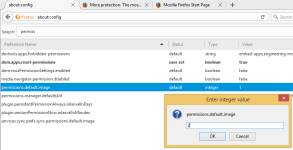
Relaunch browser after changing this setting.
  • Open Firefox
  • In the address bar, type "about:config" (without quotes).
  • Search for "permissions.default.image" (without quotes).
  • Change value to 2 > OK
1 - Allow all images to load, regardless of origin. (Default)
2 - Block all images from loading.
3 - Prevent third-party images from loading.
Source: How can I make Firefox not-display images? | Firefox Support Forum | Mozilla Support
Source: Permissions.default.image - MozillaZine Knowledge Base

upload_2016-6-9_13-59-17.pngupload_2016-6-9_13-59-50.png
 
You can install this extension : Image and Flash Blocker

From its developer :

You can choose in 1 click
Make right click on your mouse then you will see the "Image flash block" then you can choose between 4
"Images on, Flash on"
or
"Images off, Flash on"
or
"Images on, Flash off"
or
"Images off, Flash off"
 
Last edited:
To disable loading of images in Firefox

1. Open Firefox

2. Go to Tools -> Options

3. Switch to Content tab

4. Uncheck the option Load images automatically

and I'm using an extension (ImageX) for chrome this works for single tab simply click button for on/off image of a page.
ImageX
 
Status
Not open for further replies.