Advice Request Best practices for setting up a new router: single vs multi-band SSID & firewall security level?

Please provide comments and solutions that are helpful to the author of this topic.

lokamoka820

Level 50
Thread author
Verified
Top Poster
Well-known
Mar 1, 2024
3,957
3
13,949
4,869
Banana Republic
Hi everyone, just got a new router and want to make sure I configure it correctly.

SSID / band setup:
Do you recommend splitting the SSID into separate dedicated SSIDs per band (e.g., 2.4GHz and 5GHz, maybe 6GHz too), or is it better to use one combined SSID with band steering enabled? What are the pros/cons in real-world usage (range, speed, roaming behavior, smart devices compatibility)?

Security / firewall level:
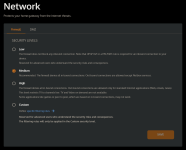
My router UI shows a firewall/security level and the default is “Medium.” Is “Medium” generally the right choice for home use, or should I change it to “High”? What risks/trade-offs should I expect (e.g., gaming, remote access, VPN quirks, false blocks)?

If it matters, I’m using it for a typical home setup (phones/laptops, PlayStation, Wi-Fi range extender) and I’m not doing anything super advanced right now.

Thanks in advance!
 
Do you recommend splitting the SSID into separate dedicated SSIDs per band (e.g., 2.4GHz and 5GHz, maybe 6GHz too), or is it better to use one combined SSID with band steering enabled?
I have 5GHz turned off all the time; it cannot reach the next room; in addition, it do not use phone for downloading or online gaming.
My router UI shows a firewall/security level and the default is “Medium.” Is “Medium” generally the right choice for home use, or should I change it to “High”?
Keep it "medium"; I used to set it to "high", but when my kiddo came visiting and tried to play online, it was not allowed with "high".
 
I have mine set in dual band, for the reasons being, my Roku Stick TV, a Tower PC, and a Echo are downstairs, so the connection is better with the 2.4 GHz signal. I also have my 2 upstairs Echo's on the 2.4. When I was researching it, it was mentioned some of the older Echo's connect better with the 2.4?

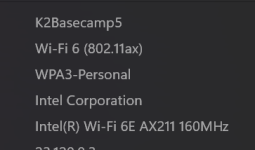
For my laptop that I sometimes connect to my TV to watch YouTube videos without ads, I use the 5 GHz signal for a better, overall connection. It's only about 15' away from the TV and router. Which for my laptop, Windows is using the Wi-Fi 6 Protocol.

I just like the the ability to see the different signal names, it makes it easier for me to differentiate them (5 & 2.4), especially when I was setting up the Echos to the 2.4

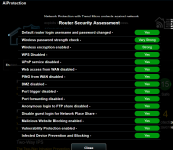
As far as the security, a more advanced member can help you there. I'm using a Asus RT-BE3600 router with Trend Micro AiProtection, so that helped to establish some of the fundamental security settings.

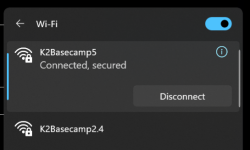
Screenshot 2026-07-28 174837.png Screenshot 2026-07-28 181009.png Screenshot 2026-07-28 180051.png
 
Last edited:
I have mine set in dual band, for the reasons being, my Roku Stick TV, a Tower PC, and a Echo are downstairs, so the connection is better with the 2.4 GHz signal. I also have my 2 upstairs Echo's on the 2.4. When I was researching it, it was mentioned some of the older Echo's connect better with the 2.4?

For my laptop that I sometimes connect to my TV to watch YouTube videos without ads, I use the 5 GHz signal for a better, overall connection. It's only about 15' away from the TV and router. Which for my laptop, Windows is using the Wi-Fi 6 Protocol.

I just like the the ability to see the different signal names, it makes it easier for me to differentiate them (5 & 2.4), especially when I was setting up the Echos to the 2.4

As far as the security, a more advanced member can help you there. I'm using a Asus RT-BE3600 router with Trend Micro AiProtection, so that helped to establish some of the fundamental security settings.

View attachment 299096 View attachment 299098 View attachment 299097
Thank you for the details and the screenshots, they’re very helpful. I tried using one SSID for convenience, assuming each device would connect to the appropriate band. But I noticed that all devices are connected to the 2.4 GHz network, and none are connecting to 5 GHz, even the new devices. That’s why I asked about the signals.
 
I have mine set in dual band, for the reasons being, my Roku Stick TV, a Tower PC, and a Echo are downstairs, so the connection is better with the 2.4 GHz signal. I also have my 2 upstairs Echo's on the 2.4. When I was researching it, it was mentioned some of the older Echo's connect better with the 2.4?

For my laptop that I sometimes connect to my TV to watch YouTube videos without ads, I use the 5 GHz signal for a better, overall connection. It's only about 15' away from the TV and router. Which for my laptop, Windows is using the Wi-Fi 6 Protocol.

I just like the the ability to see the different signal names, it makes it easier for me to differentiate them (5 & 2.4), especially when I was setting up the Echos to the 2.4

As far as the security, a more advanced member can help you there. I'm using a Asus RT-BE3600 router with Trend Micro AiProtection, so that helped to establish some of the fundamental security settings.

View attachment 299096 View attachment 299098 View attachment 299097
You got Wifi7 there brother.
Is Merlin supported on your Asus Model?
 
What router did you get?
It’s new, but I didn’t buy it separately. My family asked the ISP for an extender, and they recommended getting their Wi‑Fi 6 router, which includes an extender. It’s an Orange Nokia router. We also have a TP-Link Archer C6, but I currently have it disconnected so I can test the ISP router.
 
It’s new, but I didn’t buy it separately. My family asked the ISP for an extender, and they recommended getting their Wi‑Fi 6 router, which includes an extender. It’s an Orange Nokia router. We also have a TP-Link Archer C6, but I currently have it disconnected so I can test the ISP router.
I see. The one from ISP. I thought it's an Asus. You get more configs and extras in Entware like Skynet Firewall, Adguard Home and Wireguard with Asus Merlin. More things to play with I should say.
Plus the Trend Micro AI.
 
You got Wifi7 there brother.
Is Merlin supported on your Asus Model?
I haven't checked, but I'm not the tweak and try type as far as Merlin, I'd probably get myself in trouble with the extended settings options :) I haven't set up a Wi-Fi 7 band, as I don't think my laptop(s) wireless card supports it? I'd have to look into it, but from my understanding, it just allows more devices to connect without losing signal strength, which I believe Wi-Fi 6 also does?

My Roku Ultra is connected via Ethernet to the router and then connected by HDMI to my Denon receiver to the TV, so that is a max speed and efficiency :)
 
I haven't checked, but I'm not the tweak and try type as far as Merlin, I'd probably get myself in trouble with the extended settings options :) I haven't set up a Wi-Fi 7 band, as I don't think my laptop(s) wireless card supports it? I'd have to look into it, but from my understanding, it just allows more devices to connect without losing signal strength, which I believe Wi-Fi 6 also does?

My Roku Ultra is connected via Ethernet to the router and then connected by HDMI to my Denon receiver to the TV, so that is a max speed and efficiency :)
Yes the Client and Router should support both Wifi 7 to optimize the usage. Either way those are backwards compatible for AX,AC,N and sometimes B/G.

I'm staying put on Wifi 6 for now until the AI demand slows down and lower the prices of semicons.
 
Yes the Client and Router should support both Wifi 7 to optimize the usage. Either way those are backwards compatible for AX,AC,N and sometimes B/G.

I'm staying put on Wifi 6 for now until the AI demand slows down and lower the prices of semicons.

And if this makes any difference, my internet speed is ~115 Mbps down, and ~22 up. So I don't think much would be gained in trying to set up Wi-Fi 7?
 
Do you recommend splitting the SSID into separate dedicated SSIDs per band (e.g., 2.4GHz and 5GHz, maybe 6GHz too), or is it better to use one combined SSID with band steering enabled? What are the pros/cons in real-world usage (range, speed, roaming behavior, smart devices compatibility)?
I’m not the tweaking A/B type, but I’ll comment on one of my “community” router setups. For ease of use, I try to keep everything under one SSID (using OneMesh, whatever advantage that may bring). Ultimately, though, the ease of use may be kind of imaginary (or just the initial setup), because if a person’s devices are set up on the different SSIDs, they switch sort of automatically—or people get used to turning Wi‑Fi off and then back on whenever the network doesn't seem to be as fast as it could be, which is something we sometimes have to do with the OneMesh arrangement anyway.

The marginal cases are for performance and compatibility reasons. When a device is at the border between the mesh stations, you want it connected to the backbone routers rather than the extenders, so multiple SSIDs are preferable. I also seem to have problems with Apple devices (iPhone and iPad); some seem to do terribly with the combined 2.4/5 GHz setup, and seem to do better with an explicit band connection, but that may be a problem with the network devices that I am using.

TLD;R: The optimal setup most likely will depend on people who use the network regularly.
 
I used to split the frequencies but no longer feel the need my ASUS RT-BE92U Triband (with trend & by far the best router I've ever had)) works fine as it is, I do have a separate IOT & also a guest SSID, but find all my devices connect to the frequency they can, the furthest device is a Fire Stick TV in a bedroom usually connects at 2.4 but still gets over 100 despite being in sort of built in wardrobe system, I find I don't need a MESH system since I placed the router in the middle of the house & this gives good coverage in my garden too - Up until recently & it was necessary to split but now no longer feel the need as everything works fine, just looked & there are 14 connected but my wife is away with her gear & no visitors, often when grandkids etc call in many more.
 
Last edited:
Hi everyone, just got a new router and want to make sure I configure it correctly.

SSID / band setup:
Do you recommend splitting the SSID into separate dedicated SSIDs per band (e.g., 2.4GHz and 5GHz, maybe 6GHz too), or is it better to use one combined SSID with band steering enabled? What are the pros/cons in real-world usage (range, speed, roaming behavior, smart devices compatibility)?
I prefer them separate. Some devices might have issues with multiple bands under one SSID, while other can select the wrong band (you need 5 GHz, but it connects to 2.4).

This way is better because it gives you control, let's you choose which device will be connected to which band.
Security / firewall level:
My router UI shows a firewall/security level and the default is “Medium.” Is “Medium” generally the right choice for home use, or should I change it to “High”? What risks/trade-offs should I expect (e.g., gaming, remote access, VPN quirks, false blocks)?

If it matters, I’m using it for a typical home setup (phones/laptops, PlayStation, Wi-Fi range extender) and I’m not doing anything super advanced right now.

Thanks in advance!
I'm not sure. Firewall on my Asus router is set to On. Trend Micro protection is disabled entirely though. For privacy reasons.

Just:
  • regularly update firmware
  • change default username and use strong password
  • disable UPnP if you don't use it
  • make your router inaccessible from the outside web
and you'll be safe...
 
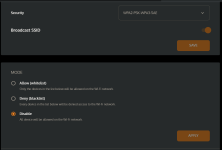
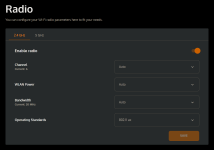
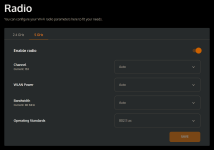
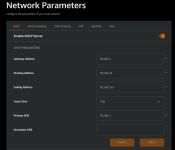
To ensure nothing is missed, here are the available settings on my ISP router. Are they configured correctly, or do you recommend any modifications?

1785352560054.png1785352616291.png1785352648712.png1785352721403.png1785352806969.png