

The MalwareTips app
Your community, one tap away.
Open MalwareTips from your Home Screen or desktop. Follow discussions, find answers and pick up where you left off.
- Home Screen access
- Optional push alerts
- Your community
You're ready to explore.Explore what's new
Installation instructions
iPhone & iPad
- Open MalwareTips in Safari and tap Share. You may need to open the Page Menu first.
- Choose Add to Home Screen. If it is not listed, use Edit Actions to add it.
- Keep Open as Web App enabled if shown, then tap Add.
Android
- Open MalwareTips in Chrome or another browser that supports app installation.
- Open the browser menu and look for Install app, Install and create shortcut, or Add to Home screen.
- Choose Install and confirm. Wording varies by browser.
Desktop
- Chrome: use the install icon in the address bar, or the menu under Cast, save and share.
- Edge: open the menu, then More tools, Apps and Install this site as an app.
- Safari on Mac: choose Share or File, then Add to Dock. Firefox on Windows: look for the web apps button in the address bar.
If you cannot find an install option, update your browser or use its bookmark option to keep MalwareTips close.
Keep up with your conversations
After installation, open the app and sign in. Enable push notifications in Preferences if you want alerts. On iPhone and iPad, push requires a Home Screen web app and iOS or iPadOS 16.4 or later.
Sign in to manage notificationsInstallation is optional. Your notification settings stay under your control.
You are using an out of date browser. It may not display this or other websites correctly.
You should upgrade or use an alternative browser.
You should upgrade or use an alternative browser.
bettersurf still here

STEP 1: Clean your temporary files to gain more hard drive space and remove the junk files
- Download Ccleaner from the below link:
CCLEANER DOWNLOAD LINK (This link will automatically download Ccleaner on your computer)- Install Ccleaner by following the prompts
- Start Ccleaner

- Click
and choose

- Uncheck

- Then go back to
and click to run it.
- Exit CCleaner.
On your computer is there any program called GreatArcade Hits, Scorpion Saver, Highlightly?
STEP 1: Run a scan with OTL by OldTimer
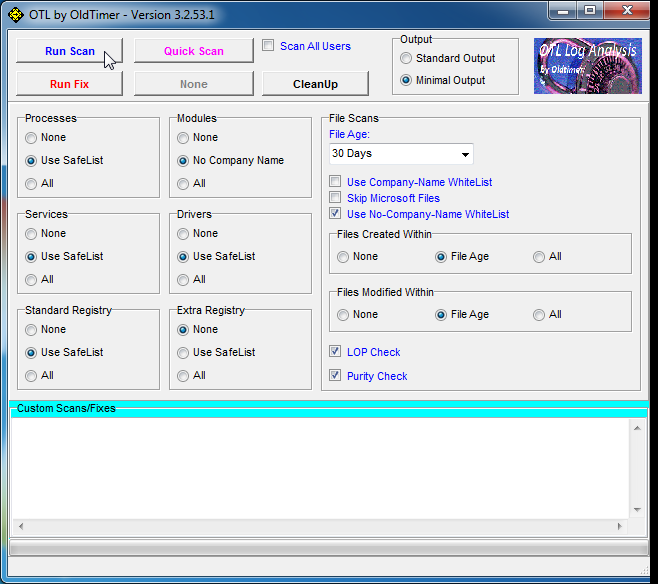
Settings You need to Select in OTL
- Download the OTL utility using the below link :
OTL DOWNLOAD LINK (This link will automatically download OTL on your computer) - Double click on the icon to run it. Make sure all other windows are closed and to let it run uninterrupted.
- When the window appears, underneath Output at the top change it to Minimal Output.
- Check the boxes beside LOP Check and Purity Check.
- Click the Run Scan button.
- When the scan completes, it will open two notepad windows. OTL.Txt and Extras.Txt. These are saved in the same location as OTL.
Please post this 2 logs in your first reply..
Settings You need to Select in OTL
- Click the Scan All Users checkbox.
- Change Standard Registry to All.
- Check the boxes beside LOP Check and Purity Check.
Please check what is this program is for
[WhatPulse] C:\Program Files (x86)\WhatPulse2\whatpulse.exe
Are you using this on?
STEP 2: Run the below OTL fix
[WhatPulse] C:\Program Files (x86)\WhatPulse2\whatpulse.exe
Are you using this on?
STEP 2: Run the below OTL fix
- Start OTL.exe
- Copy/paste the following text written inside of the code box into the Custom Scans/Fixes box located at the bottom of OTL
Code::OTL [2014/01/10 06:48:58 | 000,000,000 | ---D | M] (Start Page) -- C:\Users\OWNER\AppData\Roaming\mozilla\Firefox\Profiles\ooej3oam.default\extensions\{58d2a791-6199-482f-a9aa-9b725ec61362} [2014/01/18 23:00:04 | 000,940,775 | ---- | M] () (No name found) -- C:\Users\OWNER\AppData\Roaming\mozilla\firefox\profiles\ooej3oam.default\extensions\{d10d0bf8-f5b5-c8b4-a8b2-2b9879e08c5d}.xpi [2013/12/20 10:54:47 | 000,000,000 | ---D | M] (Default) -- C:\Program Files (x86)\Mozilla Firefox\browser\extensions\{972ce4c6-7e08-4474-a285-3208198ce6fd} CHR - plugin: Widevine Content Decryption Module (Enabled) = C:\Users\OWNER\AppData\Local\Google\Chrome\User Data\WidevineCDM\1.4.1.376\_platform_specific\win_x86\widevinecdmadapter.dll CHR - plugin: Native Client (Enabled) = C:\Program Files (x86)\Google\Chrome\Application\32.0.1700.102\ppGoogleNaClPluginChrome.dll :commands [emptytemp] [reboot]
NOTICE: This script was written specifically for this user, for use on that particular machine. Running this on another machine may cause damage to your operating system - Then click the Run Fix button at the top
- Let the program run unhindered, reboot when it is done
- Attach the new log produced by OTL (C:\_OTL)
Last edited:
All processes killed
========== OTL ==========
C:\Users\OWNER\AppData\Roaming\mozilla\Firefox\Profiles\ooej3oam.default\extensions\{58d2a791-6199-482f-a9aa-9b725ec61362}\chrome\content folder moved successfully.
C:\Users\OWNER\AppData\Roaming\mozilla\Firefox\Profiles\ooej3oam.default\extensions\{58d2a791-6199-482f-a9aa-9b725ec61362}\chrome folder moved successfully.
C:\Users\OWNER\AppData\Roaming\mozilla\Firefox\Profiles\ooej3oam.default\extensions\{58d2a791-6199-482f-a9aa-9b725ec61362} folder moved successfully.
C:\Users\OWNER\AppData\Roaming\mozilla\firefox\profiles\ooej3oam.default\extensions\{d10d0bf8-f5b5-c8b4-a8b2-2b9879e08c5d}.xpi moved successfully.
C:\Program Files (x86)\Mozilla Firefox\browser\extensions\{972ce4c6-7e08-4474-a285-3208198ce6fd} folder moved successfully.
File C:\Users\OWNER\AppData\Local\Google\Chrome\User Data\WidevineCDM\1.4.1.376\_platform_specific\win_x86\widevinecdmadapter.dll not found.
C:\Program Files (x86)\Google\Chrome\Application\32.0.1700.102\ppGoogleNaClPluginChrome.dll moved successfully.
========== COMMANDS ==========
[EMPTYTEMP]
User: All Users
User: Default
->Temp folder emptied: 0 bytes
->Temporary Internet Files folder emptied: 0 bytes
->Flash cache emptied: 56466 bytes
User: Default User
->Temp folder emptied: 0 bytes
->Temporary Internet Files folder emptied: 0 bytes
->Flash cache emptied: 0 bytes
User: OWNER
->Temp folder emptied: 1996958 bytes
->Temporary Internet Files folder emptied: 4680573 bytes
->Java cache emptied: 65692 bytes
->FireFox cache emptied: 4790461 bytes
->Google Chrome cache emptied: 210463104 bytes
->Flash cache emptied: 57764 bytes
User: Public
%systemdrive% .tmp files removed: 0 bytes
%systemroot% .tmp files removed: 0 bytes
%systemroot%\System32 .tmp files removed: 0 bytes
%systemroot%\System32 (64bit) .tmp files removed: 0 bytes
%systemroot%\System32\drivers .tmp files removed: 0 bytes
Windows Temp folder emptied: 608 bytes
%systemroot%\sysnative\config\systemprofile\AppData\Local\Microsoft\Windows\Temporary Internet Files folder emptied: 19841976 bytes
RecycleBin emptied: 32926 bytes
Total Files Cleaned = 231.00 mb
OTL by OldTimer - Version 3.2.69.0 log created on 01302014_170757
========== OTL ==========
C:\Users\OWNER\AppData\Roaming\mozilla\Firefox\Profiles\ooej3oam.default\extensions\{58d2a791-6199-482f-a9aa-9b725ec61362}\chrome\content folder moved successfully.
C:\Users\OWNER\AppData\Roaming\mozilla\Firefox\Profiles\ooej3oam.default\extensions\{58d2a791-6199-482f-a9aa-9b725ec61362}\chrome folder moved successfully.
C:\Users\OWNER\AppData\Roaming\mozilla\Firefox\Profiles\ooej3oam.default\extensions\{58d2a791-6199-482f-a9aa-9b725ec61362} folder moved successfully.
C:\Users\OWNER\AppData\Roaming\mozilla\firefox\profiles\ooej3oam.default\extensions\{d10d0bf8-f5b5-c8b4-a8b2-2b9879e08c5d}.xpi moved successfully.
C:\Program Files (x86)\Mozilla Firefox\browser\extensions\{972ce4c6-7e08-4474-a285-3208198ce6fd} folder moved successfully.
File C:\Users\OWNER\AppData\Local\Google\Chrome\User Data\WidevineCDM\1.4.1.376\_platform_specific\win_x86\widevinecdmadapter.dll not found.
C:\Program Files (x86)\Google\Chrome\Application\32.0.1700.102\ppGoogleNaClPluginChrome.dll moved successfully.
========== COMMANDS ==========
[EMPTYTEMP]
User: All Users
User: Default
->Temp folder emptied: 0 bytes
->Temporary Internet Files folder emptied: 0 bytes
->Flash cache emptied: 56466 bytes
User: Default User
->Temp folder emptied: 0 bytes
->Temporary Internet Files folder emptied: 0 bytes
->Flash cache emptied: 0 bytes
User: OWNER
->Temp folder emptied: 1996958 bytes
->Temporary Internet Files folder emptied: 4680573 bytes
->Java cache emptied: 65692 bytes
->FireFox cache emptied: 4790461 bytes
->Google Chrome cache emptied: 210463104 bytes
->Flash cache emptied: 57764 bytes
User: Public
%systemdrive% .tmp files removed: 0 bytes
%systemroot% .tmp files removed: 0 bytes
%systemroot%\System32 .tmp files removed: 0 bytes
%systemroot%\System32 (64bit) .tmp files removed: 0 bytes
%systemroot%\System32\drivers .tmp files removed: 0 bytes
Windows Temp folder emptied: 608 bytes
%systemroot%\sysnative\config\systemprofile\AppData\Local\Microsoft\Windows\Temporary Internet Files folder emptied: 19841976 bytes
RecycleBin emptied: 32926 bytes
Total Files Cleaned = 231.00 mb
OTL by OldTimer - Version 3.2.69.0 log created on 01302014_170757
i think its dead now but the symptoms only left after i followed a seperate guide so i dont know if its gone for good but if it comes back ill be sure to come back here because you are tenacios at tryying to fix my computer. any post infection tips would be appreciated thanks for all your help ohh as for the fix.
go to your extensions activate dev tools look at the file address for the extension enter windows explorer use the organize tab to reveal hidden files and folders follow file address and terminate with extreme prejudice. well i haven't slept in three days so good night internet.
ohh as for the fix.go to your extensions activate dev tools look at the file address for the extension enter windows explorer use the organize tab to reveal hidden files and folders follow file address and terminate with extreme prejudice. well i haven't slept in three days so good night internet.
Recently browsing
Members who viewed this thread in the last 5 minutes
You may also like...
- J
-
 Software Review Norton 360 Deluxe 2026
 -

-

-
