bettersurf still here

angryone

New Member
Thread author
Verified
Jan 29, 2014
16
0
5
36
After having gone through this http://malwaretips.com/blogs/bettersurf-virus-removal/#uninstall guide i still have "bettersurf" deeply entrenched in my computer I have become fed up with it but i cant format my computer as it doesn't have any disk drives or anyway of backing it up.so in short, help me ohh great swamis of the digital frontier.

p.s. i did perform these scans but dont know where they went.
 
Hi and welcome to the malwaretips.com forums!

I'm Kuttus and I am going to try to assist you with your problem. Please take note of the below:
  • I will start working on your malware issues, this may or may not, solve other issues you have with your machine.
  • The fixes are specific to your problem and should only be used for this issue on this machine!
  • The process is not instant. Please continue to review my answers until I tell you your machine is clear. Absence of symptoms does not mean that everything is clear.
  • If you don't know, stop and ask! Don't keep going on.
  • Please reply to this thread. Do not start a new topic.
  • Refrain from running self fixes as this will hinder the malware removal process.
  • It may prove beneficial if you print of the following instructions or save them to notepad as I post them.
Your security programs may give warnings for some of the tools I will ask you to use. Be assured, any links I give are safe.


Before we start:
Please be aware that removing malware is a potentially hazardous undertaking. I will take care not to knowingly suggest courses of action that might damage your computer. However it is impossible for me to foresee all interactions that may happen between the software on your computer and those we'll use to clear you of infection, and I cannot guarantee the safety of your system. It is possible that we might encounter situations where the only recourse is to re-format and re-install your operating system, or to necessitate you taking your computer to a repair shop.

Because of this, I advise you to backup any personal files and folders before you start.
------------------------------------------------------------------------------------------------------------------------------

STEP 1: Run a scan with Farbar Recovery Scan Tool

Please download Farbar Recovery Scan Tool and save it to your desktop.

Note: You need to run the version compatibale with your system. If you are not sure which version applies to your system download both of them and try to run them.
Only one of them will run on your system, that will be the right version.


  • Double-click to run it. When the tool opens click Yes to disclaimer.
  • Press Scan button.
  • It will make a log (FRST.txt) in the same directory the tool is run. Please attach it to your reply.
  • The first time the tool is run, it makes also another log (Addition.txt). Please attach it to your reply.

------------------------------------------------------------------------------------------------------------------------------
 
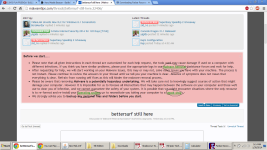
Could you please tell me where you see it now? If possible please send me a Screenshots of it.

To Take Screen Of Your Screen.
  1. Press PRINT SCREEN (Print Scr) key on Your Keyboard.
  2. Now Open MS Paint
  3. Open Paint by clicking the Start button
    4f6cbd09-148c-4dd8-b1f2-48f232a2fd33_47.png
    , clicking All Programs, clicking Accessories, and then clicking Paint.
  4. In MS Paint Click Edit, and then click Paste.
  5. After this Save the File on your computer by Clicking on File --> Save
Add this Saved File in your next Replay
 
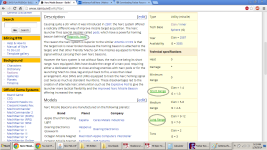
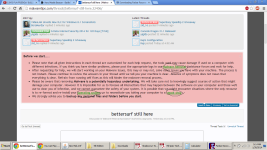
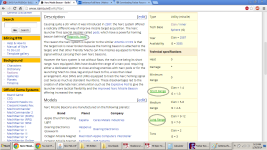
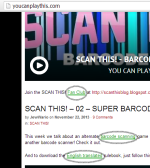
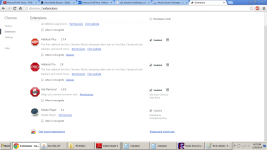
I've highlighted the spots for your convenience.
 

Attachments

  • bettersurfscreenshot.png
    bettersurfscreenshot.png
    119.8 KB · Views: 101
  • second website.png
    second website.png
    134.8 KB · Views: 90
  • bettersurfscreenshot.png
    bettersurfscreenshot.png
    119.8 KB · Views: 98
  • second website.png
    second website.png
    134.8 KB · Views: 89
  • third website.png
    third website.png
    152.9 KB · Views: 92
STEP 1: Run a scan with AdwCleaner

  1. Download AdwCleaner from the below link.
    ADWCLEANER DOWNLAOD LINK (This link will automatically download Security Check on your computer)
  2. Close all open programs and internet browsers.
  3. Double click on adwcleaner.exe to run the tool.
  4. Click on Scan,then confirm each time with Ok.
  5. After the Scan is Over press on Clean ,then confirm each time with Ok.
  6. Your computer will be rebooted automatically. A text file will open after the restart.
  7. Please post the contents of that logfile with your next reply.
  8. You can find the logfile at C:\AdwCleaner[S1].txt as well.
------------------------------------------------------------------------------------------------------------------------------

STEP 2: Run a scan with Junkware Removal Tool

Please download Junkware Removal Tool to your desktop from here
  • Turn off your antivirus software now to avoid potential conflicts
  • Double-click to run the tool. For Windows Vista or 7 users, right-click the file and select Run as Administrator
  • The tool will open and start scanning your system
  • Please be patient as this can take a while to complete depending on your system's specifications
  • On completion, a log (JRT.txt) will be saved to your desktop and will automatically open
  • Post the contents of JRT.txt into your next reply


Download Malwarebytes Anti-Rootkit from here to your Desktop
  • Unzip the contents to a folder on your Desktop.
  • Open the folder where the contents were unzipped and run mbar.exe
  • Follow the instructions in the wizard to update and allow the program to scan your computer for threats.
  • Make sure there is a check next to Create Restore Point and click the Cleanup button to remove any threats. Reboot if prompted to do so.
  • After the reboot, perform another scan with Malwarebytes Anti-Rootkit to verify that no threats remain. If there are threats, click Cleanup once more and reboot.
  • When done, please post the two logs in the MBAR folder(mbar-log.txt and system-log.txt)


Please download Malwarebytes' Anti-Malware to your desktop.
  • Double-click mbam-setup.exe and follow the prompts to install the program.
  • At the end, be sure a checkmark is placed next to
    • Update Malwarebytes' Anti-Malware
    • and Launch Malwarebytes' Anti-Malware
  • then click Finish.
  • If an update is found, it will download and install the latest version.
  • When it prompts you to try their 30-day trail, click decline
  • Once the program has loaded, select Perform quick scan, then click Scan.
  • When the scan is complete, click OK, then Show Results to view the results.
  • Be sure that everything is Checked (ticked) except items in the C:\System Volume Information folder and click on Remove Selected.
  • When completed, a log will open in Notepad. please copy and paste the log into your next reply
    • If you accidently close it, the log file is saved here and will be named like this:
    • C:\Documents and Settings\Username\Application Data\Malwarebytes\Malwarebytes' Anti-Malware\Logs\mbam-log-date (time).txt


# AdwCleaner v3.018 - Report created 30/01/2014 at 10:07:36
# Updated 28/01/2014 by Xplode
# Operating System : Windows 7 Home Premium Service Pack 1 (64 bits)
# Username : OWNER - OWNER-PC
# Running from : C:\Users\OWNER\Downloads\adwcleaner.exe
# Option : Clean

***** [ Services ] *****


***** [ Files / Folders ] *****


***** [ Shortcuts ] *****


***** [ Registry ] *****


***** [ Browsers ] *****

-\\ Internet Explorer v9.0.8112.16476


-\\ Mozilla Firefox v26.0 (en-US)

[ File : C:\Users\OWNER\AppData\Roaming\Mozilla\Firefox\Profiles\ooej3oam.default\prefs.js ]


-\\ Google Chrome v32.0.1700.102

[ File : C:\Users\OWNER\AppData\Local\Google\Chrome\User Data\Default\preferences ]


*************************

AdwCleaner[R0].txt - [8203 octets] - [29/01/2014 11:19:31]
AdwCleaner[R1].txt - [1017 octets] - [30/01/2014 10:05:46]
AdwCleaner[S0].txt - [8208 octets] - [29/01/2014 11:20:51]
AdwCleaner[S1].txt - [940 octets] - [30/01/2014 10:07:36]

########## EOF - C:\AdwCleaner\AdwCleaner[S1].txt - [999 octets] ##########

 
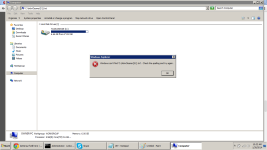
The ads have stop saying they are from bettersurf. They now say they are from mediaplayer.
 

Attachments

  • cant find.png
    cant find.png
    69.2 KB · Views: 94
  • JRT2.txt
    JRT2.txt
    656 bytes · Views: 70