Troubleshooting Bing on Google Chrome

King Alpha

Level 25
Verified
Top Poster
Content Creator
Well-known
Forum Veteran
Everytime I start my PC, Google Chrome opens automatically with Bing as the default search engine. I've checked its settings but Bing is not set as the default search engine. Tried to reset Chrome's settings but no luck. I've also uninstalled Bing Bar and Bing Desktop but it's still there in Chrome. :mad: I don't know what to do now. :(

P.S. My startup is about 1min + which is not normal.

I will highly appreciate any help guys. Thanks in advance!
 
" My startup is about 1min + which is not normal."
  • I'm pretty sure that is the average boot time.

Try reinstalling the browser & deleting the folder.


btw why would you download bing bar?
 
Upvote 0
" My startup is about 1min + which is not normal."
  • I'm pretty sure that is the average boot time.

Try reinstalling the browser & deleting the folder.


btw why would you download bing bar?
It was installed a couple of months ago, I'm having this problem just now. :confused:

My average startup is about 35-45 secs. :( BTW I installed windows updates earlier.
 
Upvote 0
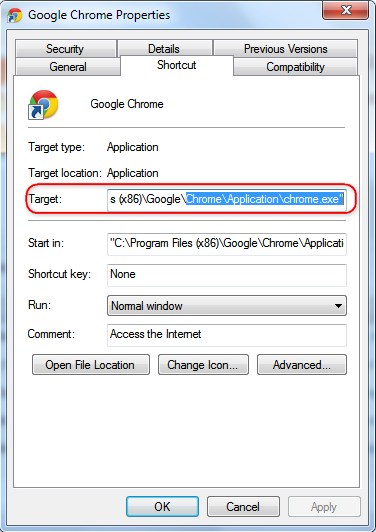
Open the "Properties" window (Right-click on the icon > Properties) of the Chrome shortcut and make sure you don't have anything after "C:\Program Files (x86)\Google\Chrome\Application\chrome.exe" string in the Target field as shown in the image below:

c57ebe226af69958.jpg


Hope this helps!
 
Upvote 0
Open the "Properties" window (Right-click on the icon > Properties) of the Chrome shortcut and make sure you don't have anything after "C:\Program Files (x86)\Google\Chrome\Application\chrome.exe" string in the Target field as shown in the image below:

c57ebe226af69958.jpg


Hope this helps!
I've tried this but there's no other strings after "chrome.exe".


I had some updates earlier too, but have you tried system restore? Does the issue occur on all browsers?

In Google Chrome only. :(
 
Upvote 0

Recently browsing

Members who viewed this thread in the last 5 minutes

Back
Top