BleepingComputer | Technical Support Forums
A free community and discussion forum for answering Computer Help, Security, and Technical Support questions.


Open MalwareTips from your Home Screen or desktop. Follow discussions, find answers and pick up where you left off.
If you cannot find an install option, update your browser or use its bookmark option to keep MalwareTips close.
After installation, open the app and sign in. Enable push notifications in Preferences if you want alerts. On iPhone and iPad, push requires a Home Screen web app and iOS or iPadOS 16.4 or later.
Sign in to manage notificationsInstallation is optional. Your notification settings stay under your control.

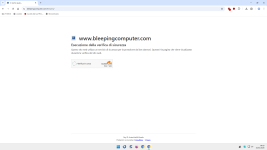
I have visited BleepingComputer minutes ago; did not face the security check message; it is quite annoying in Wilders Security.
I used to get this message when visiting NeoWin, but it stopped to appear days ago.

This oneNot Bleeping Computer.
Bleeping Computer Forum.

I think it is not geographical; I was getting the check then stopped in the same location.Maybe it's active for certain geographical areas... I don't know.
Questo
BleepingComputer
BleepingComputer is a premier destination for cybersecurity news for over 20 years, delivering breaking stories on the latest hacks, malware threats, and how to protect your devices.www.bleepingcomputer.com


I encountered this earlier when my router dropped the IPv6 connection, and I was connecting via IPv4. Once I rebooted the router to fix the IPv6 problem, it didn't come up again. I guess generally IPv6 is more trustworthy because even the prefixes given by the ISPs may not be shared, and the IP itself is device-specific.

The difference between BleepingComputer, Wilders, and NeoWin comes down to each site's individual Cloudflare Zone settings. NeoWin issued your browser a clearance cookie, so you are bypassing the check automatically now. Wilders likely has a stricter security threshold or shorter cookie lifespan.I have visited BleepingComputer minutes ago; did not face the security check message; it is quite annoying in Wilders Security.
I used to get this message when visiting NeoWin, but it stopped to appear days ago.

No, this is the link:This one
BleepingComputer
BleepingComputer is a premier destination for cybersecurity news for over 20 years, delivering breaking stories on the latest hacks, malware threats, and how to protect your devices.
Yep, Brave Shields + Cloudflare WARP produced a security verification page for me.No, this is the link:
BleepingComputer | Technical Support Forums
A free community and discussion forum for answering Computer Help, Security, and Technical Support questions.
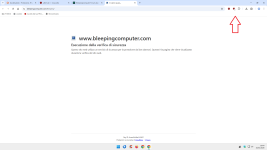
Cloudflare is active on this forum link, not their main site.
But for the last week or so, I'm having issues with sites that have adopted this. Sometimes clicking on such sites (from the bookmark bar) doesn't load for me on the first try; I have to click again to make it load. Otherwise, the browser keeps loading. Don't know whose side the issue is on. MS Edge/adblocker/some other extension/DNS/ISP/Cloudflare itself, or what?

Exact same set up I have, with the same result.Yep, Brave Shields + Cloudflare WARP produced a security verification page for me.
or uBO; internal adblockers (Brave & Vivaldi) do not provoke.Must be Cloudflare as Brave shields doesn't produce it for me.

Members who viewed this thread in the last 5 minutes