Advanced Plus Security Brambedkar59's Security Config 2026

Last updated
Nov 7, 2025
How it's used?
For home and private use
Operating system
Windows 11
Other operating system
2 older laptops running Win 10 (one with F-secure and other Kaspersky Free)
On-device encryption
N/A
Log-in security
    • Biometrics (Windows Hello PIN, TouchID, Face, Iris, Fingerprint)
    • Basic account password (insecure)
Security updates
Check for updates and Notify
Update channels
Allow stable updates only
User Access Control
Notify me only when programs try to make changes to my computer
Smart App Control
Off
Network firewall
Enabled
Real-time security
Avast Premium
Firewall security
Other - Internet Security (3rd-party)
About custom security
Persistent cache enabled for all scans
Periodic malware scanners
Norton Power Eraser
EEK
Malware sample testing
I do not participate in malware testing
Environment for malware testing
N/A
Browser(s) and extensions
Common extension/Search in all browsers: Bitwarden, Bing Search
Edge (Default): uBlock Origin (MV2), Shazam (enabled only on usage), Bypass Paywalls Clean ( (enabled only on usage))
Firefox (Secondary): uBlock Origin
Secure DNS
NextDNS
Desktop VPN
Proton VPN
Password manager
Bitwarden
Maintenance tools
Biweekly run: Windows Built-in, CCleaner, WiseCare 365 (Rarely used), Driver Store Explorer [RAPR] (for deleting old drivers not needed)
For finding program updates: UCheck & RuckZuck
HiBit Uninstaller
File and Photo backup
Google Drive, OneDrive
Subscriptions
    • None
System recovery
Hasleo Backup Suite
Risk factors
    • Browsing to popular websites
    • Working from home
    • Making audio/video calls
    • Opening email attachments
    • Buying from online stores, entering banks card details
    • Logging into my bank account
    • Downloading software and files from reputable sites
    • Sharing and receiving files and torrents
    • Gaming
    • Gaming with third-party mods
    • Streaming audio/video content from trusted sites or paid subscriptions
Computer specs
11400H (UV via ThrottleStop), 3050Ti (UV via G-Helper), 16 GB, 0.5TB + 1 TB NVMe, 1 TB & 4 TB HDD (for image backup and downloads)
Notable changes
Kaspersky Free to AVG IS
AVG IS to Kaspersky Free
Kaspersky Free to Avast Premium
What I'm looking for?

Looking for medium feedback.

Idk if Kaspersky changed anything but browsing feels pretty good now even though I have enabled both HTTPS scan and script injection. Earlier even after disabling both these it felt pretty slow.
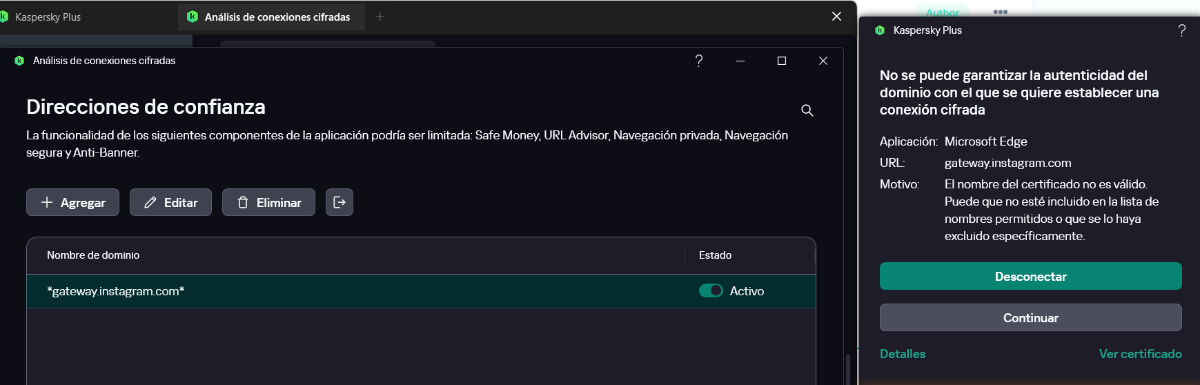
Well, that didn't last long. I am getting certificate error now (only seen on Instagram so far) :(
1730214939618.png

Tried enabling and disabling them in settings, a restart and updating root certificates (by following steps from a Kaspersky support page). Nothing worked so I am back to disabling HTTPS scan and script injection.
 
Probably :)

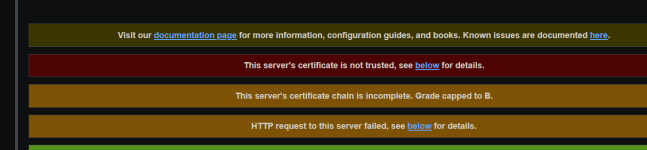
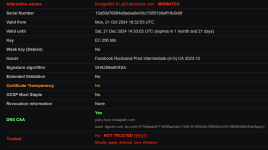
There are other users wit the issue:


I also checked with KES 12.7 and got also the warning:

View attachment 286008
Thanks, I was thinking of reinstalling Kaspersky tomorrow, now I can sleep better tonight :)

PS Do you know of any known issue with 24H2 that Kaspersky has right now? (UAC prompt is delayed for me when I launch apps)
 
Well, that didn't last long. I am getting certificate error now (only seen on Instagram so far) :(
View attachment 286005
Tried enabling and disabling them in settings, a restart and updating root certificates (by following steps from a Kaspersky support page). Nothing worked so I am back to disabling HTTPS scan and script injection.
Instagram fixed the issue. Not getting that same certificate error today.